
User's Personal Folder is missing

robertl30

New member
Local time
4:52 PM
Messages
2
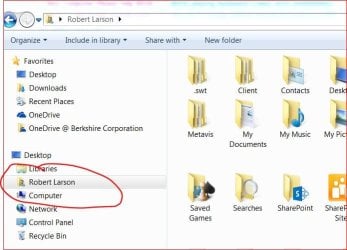
Strange situation. After recently deploying Windows 7 on a new PC user reported that there username folder is missing from Explorer. I didn't even know what they were talking about. But figured out that in Windows Explorer's navigation pane if you rightclick on nothing and choose Show all folders I get a folder listed under Desktop called Robert Larson. On this user's machine that object is missing. I've been all through the GUI trying to find a way to control visibility to that object and can't figure it out. Has anyone seen this and know how to correct?

Here's a screenshot from my PC showing the folder present. I'd show you it missing, but I don't know how to make it go away, let alone make it come back again.

Thanks.
 

Attachments
  • Capture.JPG
    Capture.JPG
    61.7 KB · Views: 16

My Computer

Computer type
PC/Desktop
Computer Manufacturer/Model Number
Dell
OS
Windows 7
To get rid of it, right click the same area and uncheck show all folders.

Have them click on start, computer, then C: then users, and see if their name shows up.
 

My Computer

Computer type
PC/Desktop
Computer Manufacturer/Model Number
Skylake Special #666
OS
Windows 10 Pro x64
CPU
Intel Core i7 6700K
Motherboard
Asus Sabertooth Z170 Mark 1
Memory
GSkill TridentZ RGB 16GB 3600 16-16-16-36
Graphics Card(s)
EVGA GTX 980 Ti SC x2
Sound Card
Realtek High Definition
Monitor(s) Displays
AOC G2460PG
Screen Resolution
1920 x 1080 144Hz
Hard Drives
Samsung 860 Pro 256GB, Seagate Barracuda 4TB x2
PSU
EVGA 1000 P2, EVGA White Custom Braided Cables
Case
Corsair Vengeance C70 Gunmetal Black
Cooling
Corsair H100i v2, Corsair ML120 x2, Thermal Grizzly Kryonaut
Keyboard
Logitech G910 Orion Spectrum
Mouse
Logitech G700s
Internet Speed
Verizon Fios Quantum Gateway 75/75
Antivirus
Windows Defender, Malwarebytes Free 3.8.3
Browser
Chrome
Other Info
Corsair SP120 x4, LG Blu-ray Drive, Durabrand HT-395 100 Watt Dolby Digital Amp, Corsair H2100 Wireless 7.1 Headset
Right. I understand about the uncheck show all folders. That's working great on my machine. But on the problem user's machine. When Show All Folders is checked on they don't have their personal folder. How do I make that come back?

They do have a c:\users\jsmith folder. That looks great and everything in it looks great. Just no shortcut/link thing to it when they click Show All Folders.
 

My Computer

Computer type
PC/Desktop
Computer Manufacturer/Model Number
Dell
OS
Windows 7
Back
Top