Solved Using a 6pin and half of a 4pin for 8pin CPU power on new mobo?

XGamer95

New member
Member
Local time
9:02 PM
Messages
89
Location
Suffolk County, New York
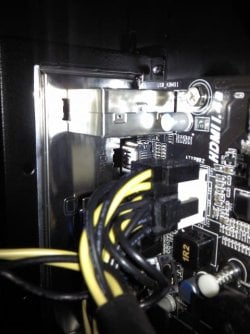
I'm in the middle of assembling a new computer (first one) and I just realized that my current PSU does not have an 8-pin ATX power connector for the CPU on the motherboard. Is it safe to use a 6-pin and half of a 4-pin connector to power the CPU? I've attached a picture and as you can see half of the 4-pin is just hanging off the end.
 

Attachments
  • IMG_20121228_234331.jpg
    IMG_20121228_234331.jpg
    86.4 KB · Views: 19

My Computer My Computer

At a glance

Windows 7 Ultimate 64-bitIntel Core i5-3570k @ 3.4GHz (OC to 4.0 GHz T...ADATA XPG Gaming Series 8GB DDR3 1600MHz (2x4GB)2x EVGA GTX 770 2GB Superclocked w/ ACX Cooling
Computer type
PC/Desktop
Computer Manufacturer/Model Number
Custom Build
OS
Windows 7 Ultimate 64-bit
CPU
Intel Core i5-3570k @ 3.4GHz (OC to 4.0 GHz Turbo Boost)
Motherboard
MSI Z77A-G45 LGA 1155 Intel Z77 ATX
Memory
ADATA XPG Gaming Series 8GB DDR3 1600MHz (2x4GB)
Graphics Card(s)
2x EVGA GTX 770 2GB Superclocked w/ ACX Cooling
Sound Card
On Board
Monitor(s) Displays
1x ASUS VG248QE 24" 144Hz 1ms LED-LCD 3D Ready
Screen Resolution
1920x1080
Hard Drives
1x Corsair Force Series 3 90GB SATA III SSD (OS);
1x Kingston SSDNow V300 Series 120GB SATA III SSD;
1x Hitachi DS7SAC100 1TB 7200 RPM 32MB Cache SATA II HDD;
1x Hitachi DT01ACA300 3TB 7200 RPM 64MB Cache SATA III HDD
PSU
EVGA Supernova 1000 P2 1000W Fully Modular Platinum Rated
Case
Rosewill Thor V2 White Full Tower
Cooling
CM Hyper 212 EVO (Push); 2x Intake 2x Exhaust Fans
Keyboard
Tt eSports Poseidon Cherry MX Brown Mechanical Keyboard
Mouse
A4Tech X7 F5 Wired Laser Mouse
Internet Speed
120 Mbps down, 40 Mbps up
Antivirus
MSE, Malwarebyte's Anti-Malware Premium
Browser
Google Chrome
Other Info
ASUS RT-N66U Dual-band N900 Gigabit Router;
Netgear WNDA4100 Dual-band N900 USB Adapter
Well, first you get the annoying lecture :rolleyes: : If you are building a new system the power supply is the LAST thing you want to skimp on. You should buy a new, modern PS for the system.

Now that's out of the way.

There is nothing technically wrong with how you want to do it. The power supply delivers 12v to each yellow wire regardless of where they actually go. So if the MB needs four 12v wires (and 4 black grounds) to run you can accomplished that your way.

There could be a problem - resulting in odd behaviors and system problems - if the 12v leads came from different 12v rails on a multi-rail power supply. This could result in "dirty power", where the amperage (as opposed to voltage) is not the same across all 4 wires at the same time. This could even happen in a single rail system, depending on the internal circuitry of the PS and where those two separate wire bundles connect.

The only thing that concerns me from your picture is that 3 of the yellow wires are in the back row and that one (plus the extra one hanging off) is in the front row. This seems to be a problem with polarity and I am surprised the system runs like that. I think that all 4 yellow wires should be in all the rear slots.
 

My Computer My Computer

At a glance

Windows 7 64 Bit Home Premium SP1i7-3820GSkill F3-14900CL9Q - 16GBEVGA GeForce GTX660 - Driver 352.86
Computer type
PC/Desktop
Computer Manufacturer/Model Number
Home Built - Jan 2013
OS
Windows 7 64 Bit Home Premium SP1
CPU
i7-3820
Motherboard
Asus P9X79-PRO - Bios 4608
Memory
GSkill F3-14900CL9Q - 16GB
Graphics Card(s)
EVGA GeForce GTX660 - Driver 352.86
Sound Card
On board Realtek ALC898
Monitor(s) Displays
Acer S271HL
Screen Resolution
1920 x 1080
Hard Drives
#1- Samsung 840 Pro Series
#2- Western Digital WD1002FAEX Sata3 Black
#3- Western Digital WD1002FAEX Sata3 Black
PSU
Corsair CMPSU-850TX-V2 - 850 watt (by Seasonic)
Case
Corsair Obsidian 550D
Cooling
Standard 3 120mm case fans, Cooler Master Hyper 212 EVO
Keyboard
MS KC-0405
Mouse
Intellimouse 5-button
Internet Speed
56 Mbits/Sec (on a good day)
Antivirus
Avast & Malwarebytes
Browser
Firefox
Other Info
Asus DVD - DRW-24B1ST 24X

My Computer My Computer

At a glance

Win7 Enterprise, Win7 x86 (Ult 7600), Win7 x6...AMD fx8350 4ghz, AMD-32 2400mhz, AMD-64 3200m...2gb, 4gb on the Ult 7600, 4gb on Technet RTM,...Draw my own Graphics, several nVidia cards
Computer type
PC/Desktop
Computer Manufacturer/Model Number
Built them myself, Science Experiments !
OS
Win7 Enterprise, Win7 x86 (Ult 7600), Win7 x64 Ult 7600, TechNet RTM on AMD x64 (2.8Ghz)
CPU
AMD fx8350 4ghz, AMD-32 2400mhz, AMD-64 3200mhz, AMDx64 2.8G
Motherboard
SIS 755, ECS-K8M890M-M (Ult 7600), GigaByte & others
Memory
2gb, 4gb on the Ult 7600, 4gb on Technet RTM, 32gb on FX8350
Graphics Card(s)
Draw my own Graphics, several nVidia cards
Sound Card
on motherboard
Monitor(s) Displays
19" flat scr, 28" I-Inc widescr,22" Emprex Widescr, 23" Acer
Screen Resolution
1280 x 1024, 1440 x 900, 1920 x 1080
Hard Drives
6 pata Ide HD's & 2 Sata HD's
added 80gb external on Ult 7600 computer,
numerous extra 1tb, 2TB, 3Tb SATA HD's
A collection of ext HD Docks w/ HDs
PSU
430w, 550w, 600w, 700, 800, etc
Case
All Generic Full Towers
Cooling
Open Air & a few fans, some w/ colored LEDs
Keyboard
Compaq & Dell recycled from GoodWill
Mouse
Made in China Optical Wired Mouse
Internet Speed
Fast Cable InterNet
Antivirus
AVG Free on 24 different Desktops, NO Problems!
Browser
IE 8 is preferred, but use FireFox sometimes
Other Info
Linksys Routers, switches, & Hubs
Too Many USB Flash Drives to count, Biggest is 64GB !
Eight computers in my home network.
Sixteen computers at my business network.
Linked via TeamViewer !
Lots of old used spare computer parts everywhere!
The 4+4/8 pin EPU is DIFFERENT from say a PCI-e type connector for example. The EPU should have 4-12v wires and 4 ground wires and the PCI-e only uses 3 and 3. Also to be noted, an 8-pin PCI-e doesn't use 4 and 4 either, it uses 3-12v wires and 5 ground wires. Either use 4+4/8 pin EPU cables/extensions for the sake of your CPU.

I just reread your first post and noticed your PSU doesn't seem to have a 4+4 or 8 pin EPU, is that correct? If it doesn't, buy a PSU that does.
 

My Computer My Computer

At a glance

Windows 7 Professional 64bit SP1Intel Core i5-3570K @ 4.5GHzCorsair Vengeance 16GB (4x4) @1866MHz CL 9-9-...EVGA GTX 750 Ti FTW
Computer type
PC/Desktop
Computer Manufacturer/Model Number
Custom Built
OS
Windows 7 Professional 64bit SP1
CPU
Intel Core i5-3570K @ 4.5GHz
Motherboard
Asus Sabertooth Z77
Memory
Corsair Vengeance 16GB (4x4) @1866MHz CL 9-9-9-24 1T
Graphics Card(s)
EVGA GTX 750 Ti FTW
Sound Card
Onboard Audio
Monitor(s) Displays
Dell S2309W
Screen Resolution
1920x1080
Hard Drives
Samsung 830 128GB SSD - OS
(4) Seagate 5TB HDD
(1) Seagate 2TB HDD
PSU
Seasonic X750 80+ Gold Full Modular
Case
Antec Eleven Hundred Super Mid Tower
Cooling
Intel Liquid Cooler
Keyboard
Max Nighthawk X8 Mechanical keyboard
Mouse
Mionix Naos 7000
Internet Speed
50 Mbps Down / 10 Mbps Up
Antivirus
Microsoft Security Essentials/Malwarebytes Anti-Malware
Browser
Chrome/Firefox
Other Info
Klipsch ProMedia 2.1's
Asus RT-N66R Wireless Router
No point in jumping on the band wagon here...you two got it covered.
 

My Computer My Computer

At a glance

Windows 7 Ultimate 64 bitAMD Phenom II X4 965 Black EditionGSkill 4 X 2 GB PC 8500XFX Radeon HD 6790 D
Computer Manufacturer/Model Number
Custom built
OS
Windows 7 Ultimate 64 bit
CPU
AMD Phenom II X4 965 Black Edition
Motherboard
Gigabyte GA-MA790X-DS4
Memory
GSkill 4 X 2 GB PC 8500
Graphics Card(s)
XFX Radeon HD 6790 D
Sound Card
On board RealTek HD
Monitor(s) Displays
Dual monitors:Samsung SyncMaster S20B300
Screen Resolution
1600 X 900
Hard Drives
Seagate Barracuda 1TB (primary)
Seagate Barracuda 2 X 320 GB
PSU
Ultra X4 750 watt fully modular
Case
Thermaltake Overseer RX 1 full tower
Cooling
Core-Contact 92 mm CPU Cooler
Keyboard
Logitech G510
Mouse
Razor DeathAdder
Internet Speed
50/5 Mbps UL/DL
Other Info
Optical: Super Muliti DVD burner w/lightscribe, Hauppauge WinTV HVR-1800
I'm in the middle of assembling a new computer (first one) and I just realized that my current PSU does not have an 8-pin ATX power connector for the CPU on the motherboard. Is it safe to use a 6-pin and half of a 4-pin connector to power the CPU? I've attached a picture and as you can see half of the 4-pin is just hanging off the end.

What's your PSU? The one listed in your specs is a 650W Coolermaster GX. CM claims that it has a 4+4 pin ATX +12V connector.

I'm not up for checking the pinouts to see whether what you're attempting is sane or not. Connecting +12 to ground might have unfortunate consequences. (Got a fire extinguisher handy?)

The normal approach would be to use a 4 pin +12V connector, if that's all you have. (Some of the motherboards I've used in the past couple of years came with caps on half the 8 pin socket.) It might not provide all the current that you'd need for a high powered (125W) CPU.
 

My Computer My Computer

At a glance

Windows 7 Pro X64 SP1Intel Core I7-3930k16 GB Gskill DDR3-2133eVGA GTX680
Computer Manufacturer/Model Number
homegrown
OS
Windows 7 Pro X64 SP1
CPU
Intel Core I7-3930k
Motherboard
Asus P9X79 Pro
Memory
16 GB Gskill DDR3-2133
Graphics Card(s)
eVGA GTX680
Sound Card
Creative X-Fi Titanium
Monitor(s) Displays
As PA246Q
Screen Resolution
1920 X 1200
Hard Drives
Corsair Force GT, 120 GB
WDC 1.5TB Caviar Black
PSU
PCP&C Silencer 750 Crossfire
Case
Silverstone FT02
Cooling
Noctua NH-D14
Keyboard
cheap Logitech USB
Mouse
Microsoft Intellimouse Explorer (old optical) USB
Internet Speed
6Mb cable
Other Info
Pioneer BDR-205
Samsung SH-203B
Monsoon 5.1 speakers
As bobkn said, your power supply should come with a 4+4 pin connector. They are split because some boards only use a 4 pin and some use an 8 pin. By being split int 2 4 pins, they can be used on either. This is what they look like and you should have one. You will also notice they have a clip on each one. Feel where they plug in. One side will have a ridge on it. That is where the clip goes, just so they are oriented correctly.

z.JPG
 

My Computers My Computers

  • At a glance

    Windows 11 ProRyzen 9 5900X32GB G Skill DDR4-3600EVGA RTX 3080 FTW 3 Ultra
    Computer type
    PC/Desktop
    Computer Manufacturer/Model Number
    ALWAYS UNDER CONSTRUCTION
    OS
    Windows 11 Pro
    CPU
    Ryzen 9 5900X
    Motherboard
    Asus X570 Crosshair Viii Hero
    Memory
    32GB G Skill DDR4-3600
    Graphics Card(s)
    EVGA RTX 3080 FTW 3 Ultra
    Sound Card
    On Board/Sennheiser PC37X Headset
    Monitor(s) Displays
    3 X Asus 27"
    Screen Resolution
    2560x1440
    Hard Drives
    2 X 1 TB NVME drives
    PSU
    EVGA 850
    Case
    Phanteks Eclipse P400A
    Cooling
    EVGA 280 AIO
    Keyboard
    Logitech G510s/ Logitech G13
    Mouse
    Logitech G502
    Internet Speed
    24/1
    Antivirus
    ESET/MBAM Pro/SAS Pro
    Browser
    Chrome/ Firefox/ Edge
  • At a glance

    Windows 11 ProIntel Ultra 9 288V32 GB LPDDR5X 8533
    Computer type
    Laptop
    System Manufacturer/Model Number
    Dell 16 Plus
    OS
    Windows 11 Pro
    CPU
    Intel Ultra 9 288V
    Memory
    32 GB LPDDR5X 8533
    Monitor(s) Displays
    16" Mini-LED HDR600 Touch 90 Hz
    Screen Resolution
    2560X1600
    Hard Drives
    1 TB NVME
I appreciated all of the responses.

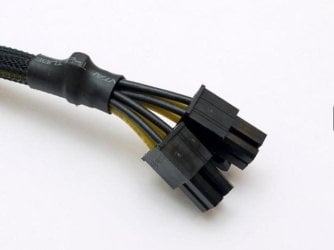
Earlier today I ordered Newegg.com - Rosewill 9.5" EPS 8-Pin Male to ATX 4-Pin Female Cable with Cable Sleeve Model RCA-RU9.5-P8M-P4F to try and resolve this issue. Will that work?
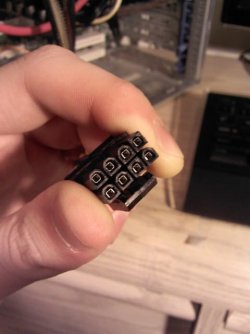
EDIT: Also, you'll see in my response that I keep saying the two 4 pin connector combined don't form the right connector for the 8 pin female for the CPU on the motherboard so I've attached a couple pictures of my two 4 pins held next to each other so you can see what I mean.

My listed specs are for my current computer until I finish this new build. The new build contains:
Newegg.com - Thermaltake Armor A90 Gaming Mid-Tower Chassis With Cable Management Water Cooling SSD Support And Tool-Less Installation VL90001W2Z

Newegg.com - COOLER MASTER GX Series RS650-ACAAD3-US 650W ATX12V v2.31 80 PLUS BRONZE Certified Active PFC Power Supply

Newegg.com - BIOSTAR TZ77B LGA 1155 Intel Z77 HDMI SATA 6Gb/s USB 3.0 ATX Intel Motherboard with UEFI BIOS

Newegg.com - Intel Core i5-3570K Ivy Bridge 3.4GHz (3.8GHz Turbo) LGA 1155 77W Quad-Core Desktop Processor Intel HD Graphics 4000 BX80637I53570K

Newegg.com - ADATA XPG Gaming Series 8GB (2 x 4GB) 240-Pin DDR3 SDRAM DDR3 1600 (PC3 12800) Desktop Memory Model AX3U1600GC4G9-2G

Newegg.com - Corsair Force Series 3 CSSD-F90GB3-BK 2.5" 90GB SATA III Internal Solid State Drive (SSD)

Newegg.com - LG Black 10X BD-ROM 16X DVD-ROM 48X CD-ROM SATA Internal 12X Internal Blu-ray Drive 3D Playback & M-DISC Support Model UH12LS29 LightScribe Support - Blu-Ray Drives

Newegg.com - Palit NE5X460SF1102 GeForce GTX 460 (Fermi) Sonic 1GB 256-bit GDDR5 PCI Express 2.0 x16 HDCP Ready SLI Support Video Card

Newegg.com - Creative Sound Blaster Audigy SE 7.1 Channels 24-bit 96KHz PCI Interface Sound Card

Well, first you get the annoying lecture :rolleyes: : If you are building a new system the power supply is the LAST thing you want to skimp on. You should buy a new, modern PS for the system.

Now that's out of the way.

There is nothing technically wrong with how you want to do it. The power supply delivers 12v to each yellow wire regardless of where they actually go. So if the MB needs four 12v wires (and 4 black grounds) to run you can accomplished that your way.

There could be a problem - resulting in odd behaviors and system problems - if the 12v leads came from different 12v rails on a multi-rail power supply. This could result in "dirty power", where the amperage (as opposed to voltage) is not the same across all 4 wires at the same time. This could even happen in a single rail system, depending on the internal circuitry of the PS and where those two separate wire bundles connect.

The only thing that concerns me from your picture is that 3 of the yellow wires are in the back row and that one (plus the extra one hanging off) is in the front row. This seems to be a problem with polarity and I am surprised the system runs like that. I think that all 4 yellow wires should be in all the rear slots.
Well I hadn't tried running the system as shown in the picture when I posted this. I did try running it with just a 4 pin connector in half of the 8 pin female as I read somewhere this may work but I received a short beep upon boot and no video signal from onboard video or from my GTX 460 so I assumed no POST. All fans and devices were running except for the CPU fan which struck me as odd. For comparisons sake I unplugged the CPU power all together and turned on the system which resulted in immediate shutdown, which, from my understanding, is supposed to happen.

The 4+4/8 pin EPU is DIFFERENT from say a PCI-e type connector for example. The EPU should have 4-12v wires and 4 ground wires and the PCI-e only uses 3 and 3. Also to be noted, an 8-pin PCI-e doesn't use 4 and 4 either, it uses 3-12v wires and 5 ground wires. Either use 4+4/8 pin EPU cables/extensions for the sake of your CPU.

I just reread your first post and noticed your PSU doesn't seem to have a 4+4 or 8 pin EPU, is that correct? If it doesn't, buy a PSU that does.
It has two 4 pin connectors, one of which I used on my old motherboard to power the CPU as it was only 4 pin, but combined they do not create the same plug as needed for the 8 pin CPU power. Though on Newegg (Newegg.com - COOLER MASTER GX Series RS650-ACAAD3-US 650W ATX12V v2.31 80 PLUS BRONZE Certified Active PFC Power Supply) the PSU I have does list a 1 x 4+4-Pin ATX/EPS 12V connector.

I'm in the middle of assembling a new computer (first one) and I just realized that my current PSU does not have an 8-pin ATX power connector for the CPU on the motherboard. Is it safe to use a 6-pin and half of a 4-pin connector to power the CPU? I've attached a picture and as you can see half of the 4-pin is just hanging off the end.

What's your PSU? The one listed in your specs is a 650W Coolermaster GX. CM claims that it has a 4+4 pin ATX +12V connector.

I'm not up for checking the pinouts to see whether what you're attempting is sane or not. Connecting +12 to ground might have unfortunate consequences. (Got a fire extinguisher handy?)

The normal approach would be to use a 4 pin +12V connector, if that's all you have. (Some of the motherboards I've used in the past couple of years came with caps on half the 8 pin socket.) It might not provide all the current that you'd need for a high powered (125W) CPU.
The exact PSU I have is here: Newegg.com - COOLER MASTER GX Series RS650-ACAAD3-US 650W ATX12V v2.31 80 PLUS BRONZE Certified Active PFC Power Supply It does say it has 1 x 4+4-Pin ATX/EPS 12V connector but combined they do not form the correct plug for the 8 pin female on the motherboard. I did try with only a single 4 pin but I received a short beep upon boot and no video signal from onboard video or from my GTX 460 so I assumed no POST. All fans and devices were running except for the CPU fan which struck me as odd.

As bobkn said, your power supply should come with a 4+4 pin connector. They are split because some boards only use a 4 pin and some use an 8 pin. By being split int 2 4 pins, they can be used on either. This is what they look like and you should have one. You will also notice they have a clip on each one. Feel where they plug in. One side will have a ridge on it. That is where the clip goes, just so they are oriented correctly.

View attachment 247783
I do have those but combined they do not form the correct connector for the 8 pin female on the motherboard. They are not mirror images of each other as would be required for them to work.
 

Attachments

  • IMG_20121230_005304.jpg
    IMG_20121230_005304.jpg
    61.3 KB · Views: 7
  • IMG_20121230_005916.jpg
    IMG_20121230_005916.jpg
    62.6 KB · Views: 7
Last edited:

My Computer My Computer

At a glance

Windows 7 Ultimate 64-bitIntel Core i5-3570k @ 3.4GHz (OC to 4.0 GHz T...ADATA XPG Gaming Series 8GB DDR3 1600MHz (2x4GB)2x EVGA GTX 770 2GB Superclocked w/ ACX Cooling
Computer type
PC/Desktop
Computer Manufacturer/Model Number
Custom Build
OS
Windows 7 Ultimate 64-bit
CPU
Intel Core i5-3570k @ 3.4GHz (OC to 4.0 GHz Turbo Boost)
Motherboard
MSI Z77A-G45 LGA 1155 Intel Z77 ATX
Memory
ADATA XPG Gaming Series 8GB DDR3 1600MHz (2x4GB)
Graphics Card(s)
2x EVGA GTX 770 2GB Superclocked w/ ACX Cooling
Sound Card
On Board
Monitor(s) Displays
1x ASUS VG248QE 24" 144Hz 1ms LED-LCD 3D Ready
Screen Resolution
1920x1080
Hard Drives
1x Corsair Force Series 3 90GB SATA III SSD (OS);
1x Kingston SSDNow V300 Series 120GB SATA III SSD;
1x Hitachi DS7SAC100 1TB 7200 RPM 32MB Cache SATA II HDD;
1x Hitachi DT01ACA300 3TB 7200 RPM 64MB Cache SATA III HDD
PSU
EVGA Supernova 1000 P2 1000W Fully Modular Platinum Rated
Case
Rosewill Thor V2 White Full Tower
Cooling
CM Hyper 212 EVO (Push); 2x Intake 2x Exhaust Fans
Keyboard
Tt eSports Poseidon Cherry MX Brown Mechanical Keyboard
Mouse
A4Tech X7 F5 Wired Laser Mouse
Internet Speed
120 Mbps down, 40 Mbps up
Antivirus
MSE, Malwarebyte's Anti-Malware Premium
Browser
Google Chrome
Other Info
ASUS RT-N66U Dual-band N900 Gigabit Router;
Netgear WNDA4100 Dual-band N900 USB Adapter
Your converter cable is a good solution and will work to accomplish your task and you could go that route.

But here's the thing: you are converting a legacy power supply to use in a modern system. Yes, it's a new old power supply. Wouldn't it make more sense to take your time and get the right parts?

You should return the CoolerMaster ATX power supply and get the correct ATX12V v2.31/ EPS12V v2.92 power supply that has the 8-pin connector on it.

Here are a couple of nice units that are the same price and wattage:

Newegg.com - CORSAIR Enthusiast Series TX650 V2 650W ATX12V v2.31/ EPS12V v2.92 80 PLUS BRONZE Certified Active PFC High Performance Power Supply

Newegg.com - SeaSonic M12II 620 Bronze 620W ATX12V V2.3 / EPS 12V V2.91 SLI Ready 80 PLUS BRONZE Certified Modular Active PFC Power Supply
 

My Computer My Computer

At a glance

Windows 7 64 Bit Home Premium SP1i7-3820GSkill F3-14900CL9Q - 16GBEVGA GeForce GTX660 - Driver 352.86
Computer type
PC/Desktop
Computer Manufacturer/Model Number
Home Built - Jan 2013
OS
Windows 7 64 Bit Home Premium SP1
CPU
i7-3820
Motherboard
Asus P9X79-PRO - Bios 4608
Memory
GSkill F3-14900CL9Q - 16GB
Graphics Card(s)
EVGA GeForce GTX660 - Driver 352.86
Sound Card
On board Realtek ALC898
Monitor(s) Displays
Acer S271HL
Screen Resolution
1920 x 1080
Hard Drives
#1- Samsung 840 Pro Series
#2- Western Digital WD1002FAEX Sata3 Black
#3- Western Digital WD1002FAEX Sata3 Black
PSU
Corsair CMPSU-850TX-V2 - 850 watt (by Seasonic)
Case
Corsair Obsidian 550D
Cooling
Standard 3 120mm case fans, Cooler Master Hyper 212 EVO
Keyboard
MS KC-0405
Mouse
Intellimouse 5-button
Internet Speed
56 Mbits/Sec (on a good day)
Antivirus
Avast & Malwarebytes
Browser
Firefox
Other Info
Asus DVD - DRW-24B1ST 24X
I apologize if I haven't been clear, but the power supply I'm using for the new build is the same one from my current computer which I purchased over a year ago so returning it is not an option. The only parts I've just purchased for this new build are the case, mobo, processor, and ram. The rest are from my current computer. I was on a budget so I really can't purchase a new power supply at the moment. As long as the adapter works for now I'm happy. When I have the money I will definitely be purchasing a new one because I dislike my current PSU being non modular. I am still concerned about the stock CPU fan not spinning on boot because it is connected separately to the motherboard and I feel it shouldn't have anything to do with the CPU's power source. Do you think connecting the CPU's power correctly will fix the fan as well?
 

My Computer My Computer

At a glance

Windows 7 Ultimate 64-bitIntel Core i5-3570k @ 3.4GHz (OC to 4.0 GHz T...ADATA XPG Gaming Series 8GB DDR3 1600MHz (2x4GB)2x EVGA GTX 770 2GB Superclocked w/ ACX Cooling
Computer type
PC/Desktop
Computer Manufacturer/Model Number
Custom Build
OS
Windows 7 Ultimate 64-bit
CPU
Intel Core i5-3570k @ 3.4GHz (OC to 4.0 GHz Turbo Boost)
Motherboard
MSI Z77A-G45 LGA 1155 Intel Z77 ATX
Memory
ADATA XPG Gaming Series 8GB DDR3 1600MHz (2x4GB)
Graphics Card(s)
2x EVGA GTX 770 2GB Superclocked w/ ACX Cooling
Sound Card
On Board
Monitor(s) Displays
1x ASUS VG248QE 24" 144Hz 1ms LED-LCD 3D Ready
Screen Resolution
1920x1080
Hard Drives
1x Corsair Force Series 3 90GB SATA III SSD (OS);
1x Kingston SSDNow V300 Series 120GB SATA III SSD;
1x Hitachi DS7SAC100 1TB 7200 RPM 32MB Cache SATA II HDD;
1x Hitachi DT01ACA300 3TB 7200 RPM 64MB Cache SATA III HDD
PSU
EVGA Supernova 1000 P2 1000W Fully Modular Platinum Rated
Case
Rosewill Thor V2 White Full Tower
Cooling
CM Hyper 212 EVO (Push); 2x Intake 2x Exhaust Fans
Keyboard
Tt eSports Poseidon Cherry MX Brown Mechanical Keyboard
Mouse
A4Tech X7 F5 Wired Laser Mouse
Internet Speed
120 Mbps down, 40 Mbps up
Antivirus
MSE, Malwarebyte's Anti-Malware Premium
Browser
Google Chrome
Other Info
ASUS RT-N66U Dual-band N900 Gigabit Router;
Netgear WNDA4100 Dual-band N900 USB Adapter
That's strange.

As you probably already know: here's a link to an image of an 8 pin ATX 12V male connector:

http://www.nordichardware.com/skrivelser_img/432/psu.8-pin.jpg

Each 4 pin side of the connector should have two D shaped pins and two square ones. On your CM unit, one side is all D shaped. Looks like the unit was somehow made wrong.

(The only other 4 pin connector that resembles the ATX 12V one is the 4 pin block from the ATX 20+4 pin one. However, it also has two D's and two squares, and it has no locking clip.)

I suggest that you share your pictures with Cooler Master support (www.coolermaster.com). It would be interesting to see what they have to say about your situation.
 

My Computer My Computer

At a glance

Windows 7 Pro X64 SP1Intel Core I7-3930k16 GB Gskill DDR3-2133eVGA GTX680
Computer Manufacturer/Model Number
homegrown
OS
Windows 7 Pro X64 SP1
CPU
Intel Core I7-3930k
Motherboard
Asus P9X79 Pro
Memory
16 GB Gskill DDR3-2133
Graphics Card(s)
eVGA GTX680
Sound Card
Creative X-Fi Titanium
Monitor(s) Displays
As PA246Q
Screen Resolution
1920 X 1200
Hard Drives
Corsair Force GT, 120 GB
WDC 1.5TB Caviar Black
PSU
PCP&C Silencer 750 Crossfire
Case
Silverstone FT02
Cooling
Noctua NH-D14
Keyboard
cheap Logitech USB
Mouse
Microsoft Intellimouse Explorer (old optical) USB
Internet Speed
6Mb cable
Other Info
Pioneer BDR-205
Samsung SH-203B
Monsoon 5.1 speakers
That's strange.

As you probably already know: here's a link to an image of an 8 pin ATX 12V male connector:

http://www.nordichardware.com/skrivelser_img/432/psu.8-pin.jpg

Each 4 pin side of the connector should have two D shaped pins and two square ones. On your CM unit, one side is all D shaped. Looks like the unit was somehow made wrong.

(The only other 4 pin connector that resembles the ATX 12V one is the 4 pin block from the ATX 20+4 pin one. However, it also has two D's and two squares, and it has no locking clip.)

I suggest that you share your pictures with Cooler Master support (www.coolermaster.com). It would be interesting to see what they have to say about your situation.
Yes, this is why I thought the connector wouldn't work but it turns out it does :D. The D pins will fit in the square holes so I am currently using my new build. About the CPU fan, it's power cable was too tight around it and the fan was hitting it as it tried to spin, stopping it all together. Thanks everyone for all your help.
 

My Computer My Computer

At a glance

Windows 7 Ultimate 64-bitIntel Core i5-3570k @ 3.4GHz (OC to 4.0 GHz T...ADATA XPG Gaming Series 8GB DDR3 1600MHz (2x4GB)2x EVGA GTX 770 2GB Superclocked w/ ACX Cooling
Computer type
PC/Desktop
Computer Manufacturer/Model Number
Custom Build
OS
Windows 7 Ultimate 64-bit
CPU
Intel Core i5-3570k @ 3.4GHz (OC to 4.0 GHz Turbo Boost)
Motherboard
MSI Z77A-G45 LGA 1155 Intel Z77 ATX
Memory
ADATA XPG Gaming Series 8GB DDR3 1600MHz (2x4GB)
Graphics Card(s)
2x EVGA GTX 770 2GB Superclocked w/ ACX Cooling
Sound Card
On Board
Monitor(s) Displays
1x ASUS VG248QE 24" 144Hz 1ms LED-LCD 3D Ready
Screen Resolution
1920x1080
Hard Drives
1x Corsair Force Series 3 90GB SATA III SSD (OS);
1x Kingston SSDNow V300 Series 120GB SATA III SSD;
1x Hitachi DS7SAC100 1TB 7200 RPM 32MB Cache SATA II HDD;
1x Hitachi DT01ACA300 3TB 7200 RPM 64MB Cache SATA III HDD
PSU
EVGA Supernova 1000 P2 1000W Fully Modular Platinum Rated
Case
Rosewill Thor V2 White Full Tower
Cooling
CM Hyper 212 EVO (Push); 2x Intake 2x Exhaust Fans
Keyboard
Tt eSports Poseidon Cherry MX Brown Mechanical Keyboard
Mouse
A4Tech X7 F5 Wired Laser Mouse
Internet Speed
120 Mbps down, 40 Mbps up
Antivirus
MSE, Malwarebyte's Anti-Malware Premium
Browser
Google Chrome
Other Info
ASUS RT-N66U Dual-band N900 Gigabit Router;
Netgear WNDA4100 Dual-band N900 USB Adapter
Back
Top