Using an alternative Keyboard layout - HELP!

luma

New member
Local time
12:33 PM
Messages
3
Hey everyone!

I am using an alternative keyboard layout (NEO 2.0) and I would like to know how to change the default keyboard layout so that I don't have to change it each time I open a new window!

Hope s.o. knows something about that!!
 

My Computer

Computer Manufacturer/Model Number
Custom Build@home
OS
Windows 7, Ubuntu
CPU
Intel(R) Core(TM)2 Quad CPU Q9550 @ 2.83GHz (4 CPUs)
Motherboard
MSI
Memory
4096MB RAM
Graphics Card(s)
NVIDIA GeForce GTS 250
Screen Resolution
1680 x 1050
Case
Thermaltake Soprano
Mouse
Razer Diamondback
Hey everyone!

I am using an alternative keyboard layout (NEO 2.0) and I would like to know how to change the default keyboard layout so that I don't have to change it each time I open a new window!

Hope s.o. knows something about that!!

Don't know what Neo 2.0 is, but keyboard layouts can be added in Configuration -> Country and language

Good luck
 

My Computer

OS
Win7 Build 7600 x86
CPU
Pentium II 300MHz
Motherboard
Asus
Memory
32mb EDO RAM
Graphics Card(s)
Diamond Viper
Sound Card
Soundblaster 16
Monitor(s) Displays
14" AOC CRT 16K color
Screen Resolution
800x600
Hard Drives
300mb Quantum fireball
PSU
110 Watts
Cooling
Passive
Keyboard
Trust Ergonomic
Mouse
Generic
Internet Speed
256K u 128K d

Thanks Antman.

When the video ends, in the clip bar there is a video saying "so you think you can type fast?".

A must see!:D
 

My Computer

OS
Win7 Build 7600 x86
CPU
Pentium II 300MHz
Motherboard
Asus
Memory
32mb EDO RAM
Graphics Card(s)
Diamond Viper
Sound Card
Soundblaster 16
Monitor(s) Displays
14" AOC CRT 16K color
Screen Resolution
800x600
Hard Drives
300mb Quantum fireball
PSU
110 Watts
Cooling
Passive
Keyboard
Trust Ergonomic
Mouse
Generic
Internet Speed
256K u 128K d
Thanks, but…

Don't know what Neo 2.0 is, but keyboard layouts can be added in Configuration -> Country and language

Good luck
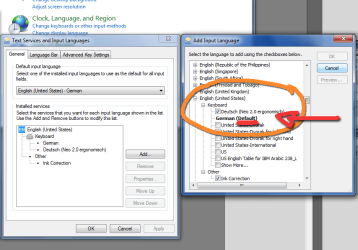
Thanks for the quick responses but the problem is that I cannot choose the DEFAULT keyboard layout!

If anyone had a solution for this I would be really thrilled to hear it!!!
 

Attachments

  • neo-keyboard.png
    neo-keyboard.png
    36.2 KB · Views: 1,709

My Computer

Computer Manufacturer/Model Number
Custom Build@home
OS
Windows 7, Ubuntu
CPU
Intel(R) Core(TM)2 Quad CPU Q9550 @ 2.83GHz (4 CPUs)
Motherboard
MSI
Memory
4096MB RAM
Graphics Card(s)
NVIDIA GeForce GTS 250
Screen Resolution
1680 x 1050
Case
Thermaltake Soprano
Mouse
Razer Diamondback
Don't know what Neo 2.0 is, but keyboard layouts can be added in Configuration -> Country and language

Good luck
Thanks for the quick responses but the problem is that I cannot choose the DEFAULT keyboard layout!

If anyone had a solution for this I would be really thrilled to hear it!!!

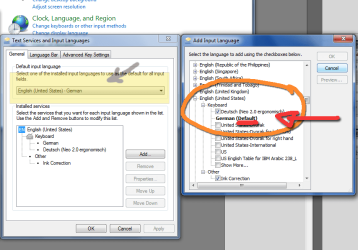
Hi Luma.

I used your screenshot.

I made the part yellow where you can set the default lang/keyboard.

neo-keyboard.png
 

My Computer

OS
Win7 Build 7600 x86
CPU
Pentium II 300MHz
Motherboard
Asus
Memory
32mb EDO RAM
Graphics Card(s)
Diamond Viper
Sound Card
Soundblaster 16
Monitor(s) Displays
14" AOC CRT 16K color
Screen Resolution
800x600
Hard Drives
300mb Quantum fireball
PSU
110 Watts
Cooling
Passive
Keyboard
Trust Ergonomic
Mouse
Generic
Internet Speed
256K u 128K d
omg...

:doh:
I really cannot say why I‘ve never seen that before!!!

Thank you all very much!!!

Problem solved!
:thumbsup:
 

My Computer

Computer Manufacturer/Model Number
Custom Build@home
OS
Windows 7, Ubuntu
CPU
Intel(R) Core(TM)2 Quad CPU Q9550 @ 2.83GHz (4 CPUs)
Motherboard
MSI
Memory
4096MB RAM
Graphics Card(s)
NVIDIA GeForce GTS 250
Screen Resolution
1680 x 1050
Case
Thermaltake Soprano
Mouse
Razer Diamondback
Hello, someone can help me ?

I'm having some problems here.

I Uninstall the US Layout, I only USE and Have the United States (International) installed, but sometimes when I'm typing change to US....and I cant use the special characts like É (combination ' + e )
willdelet.jpg
 

My Computer

Computer type
PC/Desktop
Computer Manufacturer/Model Number
Custom Build
OS
Windows 7 Ultimate x64
CPU
i7-2600k (with Thermaltake Frio)
Motherboard
Asus P8P67
Memory
16gb Patriot (4x4gb) 1600hz
Graphics Card(s)
MSI N580 GTX Lightning
Hard Drives
SSD OCZ Vertex 3 for OS (120gb)
Seagate 1.5TB for Files
Seagate 1.0TB for Edit
Antivirus
Kaspersky Pure 2.0
Browser
Firefox 20
Don't know what Neo 2.0 is, but keyboard layouts can be added in Configuration -> Country and language

Good luck
Thanks for the quick responses but the problem is that I cannot choose the DEFAULT keyboard layout!

If anyone had a solution for this I would be really thrilled to hear it!!!

Hi Luma.

I used your screenshot.

I made the part yellow where you can set the default lang/keyboard.

View attachment 29062

Thank you very much, I had exactly the same problem and I had not seen that before.

:doh:
I really cannot say why I‘ve never seen that before!!!

Thank you all very much!!!

Problem solved!
:thumbsup:
Do not think that you are the only one in the world that has the same problem. I had it and thank you to this forum I have solved it.

P.D. Sorry for getting back this old thread, if an admin like to delete this post, please feel free to do that.
 

My Computer

Computer type
PC/Desktop
Computer Manufacturer/Model Number
Custom Build
OS
Windows 7 Pro x64
CPU
Intel Core i7-4770K
Motherboard
EVGA Z87 FTW LGA1150
Memory
Corsair Vengeance Pro 16GB 2x8GB DDR3 2400MHz PC3 19200
Graphics Card(s)
EVGA GeForce GTX770 SuperClocked
Hard Drives
Many Western Digital Black
Antivirus
None
Browser
Chrome
Back
Top