
Using an External Sound card

DarkDavil

Avatar thanks to BFK :D
Power User
Local time
5:19 AM
Messages
432
Location
Illinois...India?
Hello all, as my internal laptop sound card doesn't support SPDIF out - i've decided to go with an external sound card and through the external sound card - hook it to my receiver for 5.1/7.1 sound.
My question is how is it that i would connect my external sound card to my receiver.
Say i was to get this
One
Which cable would i use to hook that to my receiver?
And would that ensure that i'm getting 5.1 surround sound on my surround sound system?
Is that a good external card?

And to top it all off - could anyone recommend a good external sound card that supports 7.1 out?(I won't mind with a 5.1, but my system has 10 speakers - so i support 7.1 and beyond!)
 
Last edited:

My Computer

Computer Manufacturer/Model Number
HP dv6000t CTO Entertainment Lappy |My Desktop @ Bottom
OS
7 x64/ Back-Track 4
CPU
Intel Core 2 Duo CPU 8300@ 2.4 Ghz
Motherboard
HP's Own
Memory
4096 MB DDR2
Graphics Card(s)
Nvidia 8400M GS
Sound Card
Altec Lansing (The usual on Laptops )
Monitor(s) Displays
Laptop Screen. 17' Wide.
Screen Resolution
1280 x 800
Hard Drives
150 GB HDD.
Cooling
2 External Fans, Undervolted, Coolant
Keyboard
Norm. Cheap Random Keyboard
Mouse
Norm. Cheap Random Mouse
Other Info
This is my Homemade Desktop :)
HDD: Western Digital Caviar Blue 320GB 16MB 7200RPM SATA2
And more to come in a bit! :D
I'd recommend the Sound Blaster X-FI 5.1 USB.
Granted, it's not 7.1, but it's a really good external sound card. Furthermore, you're not going to find many external sound cards that are 7.1 unless you look into actual professional sound gear. Not to mention, most of the external sound cards that are labeled "7.1" are actually virtual 7.1...

Sound Blaster X-Fi Surround 5.1 | Creative Labs Online Store

How it works:

You connect the sound card to the laptop via USB.
Connect All Sound Cables to Subwoofer in my case (Left, Right, Rear, Center/Sub)
Connect Subwoofer to all Speakers
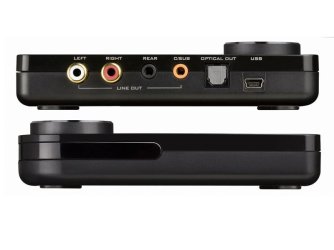
Package comes w/ a 2 prong male RGB to female 3.5mm converter so you can connect a 3.5mm speaker cable to the Left/Right connections.

In the case of the SB X-Fi USB 5.1, you should be able to connect via the optical cable and/or the regular cables for 5.1 sound

I've been using this card for a year now and I love it. It sounds much better than my built in sound. Currently I've got it supplying sound to a set of Logitech X-540 speakers. I also have my Sennheiser PC 151 headphones hooked up. One thing I like about this sound card is the fact that when I plug in my headphone's jack it automatically turns off the output to the speakers. It also automatically turns them back on when I unplug. You can leave the mic jack plugged in all the time, these jacks aren't in the picture below, they're on the side [Headphones, Mic In, Line In]
 

Attachments

  • crea_2.jpg
    crea_2.jpg
    34.9 KB · Views: 959
Last edited:

My Computer

Computer Manufacturer/Model Number
Apple Macbook Pro (April 2009)
OS
W7 Ult. x64 | OS X
CPU
Intel Mobile Core 2 Duo 2.93Ghz [T9800 Penryn]
Motherboard
NVIDIA nForce 730i Rev. B1 [Mac-F2268EC8 (U2E1)]
Memory
4096MB Samsung DDR3 Dual Channel [PC3-8500F 1066Mhz]
Graphics Card(s)
NVIDIA GeForce 9600M GT 512MB [G96M Rev. C1]
Sound Card
SB X-Fi Surround 5.1 USB | Onboard Realtek (Disabled)
Monitor(s) Displays
Acer x223wbd 22" | Apple Anti-Glare 17" (Disabled)
Screen Resolution
{Current} 1440x900 {Acer} 1680x1050 {Apple} 1920x1200
Hard Drives
{Internal}
Seagate Momentus 320GB 2.5" 7200RPM [ST9320421AS]

{Externals}
LaCie 320GB USB 2.0 HDD [301284UR]
LaCie 750GB USB 2.0 FW400 eSATA HDD [301314U]
LaCie 1TB USB 2.0 HDD [301304UR]
PSU
Magsafe
Case
Aluminum/Unibody (MBP52)
Cooling
2 x 6000 RPM Fans
Keyboard
Logitech G-15v2 [PN 920-000379]
Mouse
Logitech G-9 [PN 910-000338]
Internet Speed
12Mbps/2.5Mbps w/ 24Mbps Speed Boost [Comcast]
Other Info
Logitech X-540 Speakers [PN 970223-0122]
Sennheiser PC-151 Headset
I'd recommend the Sound Blaster X-FI 5.1 USB.
Granted, it's not 7.1, but it's a really good external sound card. Furthermore, you're not going to find many external sound cards that are 7.1 unless you look into actual professional sound gear. Not to mention, most of the external sound cards that are labeled "7.1" are actually virtual 7.1...

Sound Blaster X-Fi Surround 5.1 | Creative Labs Online Store

How it works:

You connect the sound card to the laptop via USB.
Connect All Sound Cables to Subwoofer in my case (Left, Right, Rear, Center/Sub)
Connect Subwoofer to all Speakers
Package comes w/ a 2 prong male RGB to female 3.5mm converter so you can connect a 3.5mm speaker cable to the Left/Right connections.

In the case of the SB X-Fi USB 5.1, you should be able to connect via the optical cable and/or the regular cables for 5.1 sound

I've been using this card for a year now and I love it. It sounds much better than my built in sound. Currently I've got it supplying sound to a set of Logitech X-540 speakers. I also have my Sennheiser PC 151 headphones hooked up. One thing I like about this sound card is the fact that when I plug in my headphone's jack it automatically turns off the output to the speakers. It also automatically turns them back on when I unplug. You can leave the mic jack plugged in all the time, these jacks aren't in the picture below, they're on the side [Headphones, Mic In, Line In]

Awsome man! +Rep for sure - I'll use the optical cable most-likley. :) Great info :D
 

My Computer

Computer Manufacturer/Model Number
HP dv6000t CTO Entertainment Lappy |My Desktop @ Bottom
OS
7 x64/ Back-Track 4
CPU
Intel Core 2 Duo CPU 8300@ 2.4 Ghz
Motherboard
HP's Own
Memory
4096 MB DDR2
Graphics Card(s)
Nvidia 8400M GS
Sound Card
Altec Lansing (The usual on Laptops )
Monitor(s) Displays
Laptop Screen. 17' Wide.
Screen Resolution
1280 x 800
Hard Drives
150 GB HDD.
Cooling
2 External Fans, Undervolted, Coolant
Keyboard
Norm. Cheap Random Keyboard
Mouse
Norm. Cheap Random Mouse
Other Info
This is my Homemade Desktop :)
HDD: Western Digital Caviar Blue 320GB 16MB 7200RPM SATA2
And more to come in a bit! :D
I just installed mine and the volume knob doesn't do anything. Have you tried using the volume knob? Does it increase or decrease the sound, the way you have it set up?
 

My Computer

OS
Windows 7 Home Premium
Back
Top