
Hi guys,
I'm a visual artist and I use a program called ArKaos for AV installations and nightclub visuals. I'm thinking of building a HTPC to take around with me as my laptop is not quite powerful enough for the work I do.
I was thinking of using the laptop as a reference monitor for the HTPC using Remote desktop over LAN but I've run into some issues trying to set it up at home on my main PC.
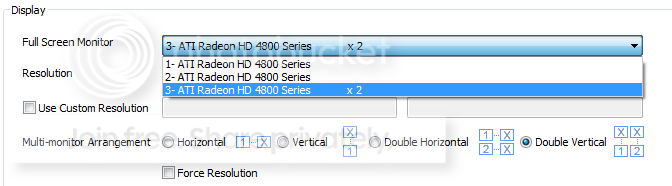
When I run Remote desktop I loose the ability to select which display is being used for full screen in ArKaos.
This is what the display preferences look like without Remote Desktop:
And this is what I see when I'm running Remote Desktop:
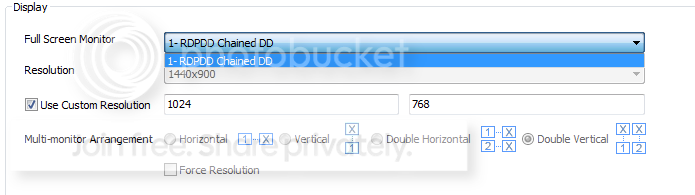
I have extremely little knowledge of Remote Desktop so I don't know how it handles display drivers but it would seem it uses it's own driver (RDPDD) when it's active.
Is there anyway around this, all I want to do is have my laptop displaying ArKaos' clip view and have my second GPU output running to a projector.
Hope I haven't confused anyone, I know this is probably not what Remote Desktop was designed for but I hope there's some way around this.
Thanks in advance,
Louis.
I'm a visual artist and I use a program called ArKaos for AV installations and nightclub visuals. I'm thinking of building a HTPC to take around with me as my laptop is not quite powerful enough for the work I do.
I was thinking of using the laptop as a reference monitor for the HTPC using Remote desktop over LAN but I've run into some issues trying to set it up at home on my main PC.
When I run Remote desktop I loose the ability to select which display is being used for full screen in ArKaos.
This is what the display preferences look like without Remote Desktop:
And this is what I see when I'm running Remote Desktop:
I have extremely little knowledge of Remote Desktop so I don't know how it handles display drivers but it would seem it uses it's own driver (RDPDD) when it's active.
Is there anyway around this, all I want to do is have my laptop displaying ArKaos' clip view and have my second GPU output running to a projector.
Hope I haven't confused anyone, I know this is probably not what Remote Desktop was designed for but I hope there's some way around this.
Thanks in advance,
Louis.
My Computer
At a glance
Windows 7 Ultimate 64bit
- OS
- Windows 7 Ultimate 64bit


