
Solved Using My Laptop Hard Drive as a Virtual Memory for Gaming

fahadhum

New member
Member
VIP
Local time
7:32 PM
Messages
201
Location
Doha Qatar
Is it safe to use my Hard Disk space as Virtual Memory to improve Games performance ..I have seen many users doing that and claiming a performance boost...This is how my Virtual Memory Settings looks like (Picture Shown Below)

Now,If it is safe to do so,how much Numeric values should i put in the box , avoiding any possible damage to my processor or system ..?
 

Attachments
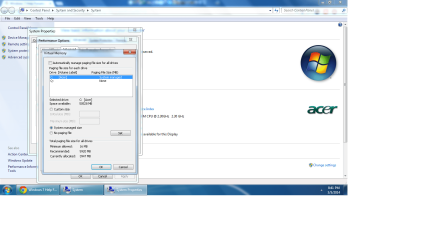
  • Virtual Mermory Settings.png
    Virtual Mermory Settings.png
    88.6 KB · Views: 16

My Computer My Computer

At a glance

Windows 7 Home Premium 64 biti716 GBNvidia GFORCE GTX 960 2 GB
Computer type
PC/Desktop
Computer Manufacturer/Model Number
Asus
OS
Windows 7 Home Premium 64 bit
CPU
i7
Motherboard
Gigabyte H97-D3H
Memory
16 GB
Graphics Card(s)
Nvidia GFORCE GTX 960 2 GB
Screen Resolution
1280*720
Cooling
CORSAIR Liquid Fan + One Built in FAN
Antivirus
Avast Free Anti Virus 2015
Browser
Google Chrome
I think what you are thinking of is a RAM disk, rather than virtual memory. The image that you've shown is for your paging file. I might be wrong, but I wouldn't try to use the paging file to improve your games speed.

A definite performance boost will come from using extra system RAM as a RAM disk. This involves using special software to create a virtual disk in RAM. You then copy the game files to this RAM disk, and execute the game from there. Since there is no disk access, only to memory, the game speed can be dramatically increased. I think this is what you are thinking of doing.
 

My Computer My Computer

At a glance

Win 7 Pro x64/Win 10 Pro x64 dual bootAMD FX 8350 Vishera @ 420016 GB Mushkin Blackline DDR3-2400 @ 1866 (9-1...XFX Radeon R9 280 Double D Black Edition
Computer type
PC/Desktop
Computer Manufacturer/Model Number
Mellon Labs (custom build)
OS
Win 7 Pro x64/Win 10 Pro x64 dual boot
CPU
AMD FX 8350 Vishera @ 4200
Motherboard
ASUS M5A97 R2.0
Memory
16 GB Mushkin Blackline DDR3-2400 @ 1866 (9-10-10-10-31)
Graphics Card(s)
XFX Radeon R9 280 Double D Black Edition
Sound Card
Realtek HD Audio on MB. Sounds great.
Monitor(s) Displays
Acer 24", Acer 22"
Screen Resolution
3840 x 1080
Hard Drives
1 x Mushkin Chronos 120 GB SSD (Win 10)
1 x Samsung 850 EVO 250 GB SSD (Win 7)
1 x WD 1TB SATA Blue
1 x WD 1TB SATA Green
PSU
Corsair TX-750
Case
CoolerMaster HAF 912+
Cooling
Coolermaster Seidon 240M Liquid AIO. 6 case fans
Keyboard
Logitech G710+
Mouse
Logitech G500s
Internet Speed
Much better since I got fiber, but still way overpriced.
Antivirus
MSE, Malware Bytes for scanning
Browser
Firefox
Other Info
Corsair VOID USB headphones.

A Mellon Labs X-1 - LCD Smartie driven system status display.

Brought to you by the letter E
Leave the pagefile on system managed. You will gain nothing by changing it.

I am not a fan of using a RAMDisk with a modern OS. In most cases it is an inefficient use of memory. There are legitimate uses of a RAMDisk but not many.
 

My Computer My Computer

At a glance

Windows 7 Pro 64 bitXeon W35208 GBNvidia Geforce 210
Computer type
PC/Desktop
Computer Manufacturer/Model Number
HP
OS
Windows 7 Pro 64 bit
CPU
Xeon W3520
Memory
8 GB
Graphics Card(s)
Nvidia Geforce 210
Leave the pagefile on system managed. You will gain nothing by changing it.

I am not a fan of using a RAMDisk with a modern OS. In most cases it is an inefficient use of memory. There are legitimate uses of a RAMDisk but not many.
I agree, a RAM disk is really only any good if you have more than 4 GB of RAM and you can devote 2 - 4 GB of RAM to it. The benefits of their use can be highly situational.

There can be a benefit to using one, though. I play Civilization IV and the turn times can be slow in the late game. Having the game files on RAM disk definitely speeds things up considerably. I don't know how some modern games would do with using one because of DRM and high levels of optimization, but a RAM disk for older games can be useful in certain situations.
 

My Computer My Computer

At a glance

Win 7 Pro x64/Win 10 Pro x64 dual bootAMD FX 8350 Vishera @ 420016 GB Mushkin Blackline DDR3-2400 @ 1866 (9-1...XFX Radeon R9 280 Double D Black Edition
Computer type
PC/Desktop
Computer Manufacturer/Model Number
Mellon Labs (custom build)
OS
Win 7 Pro x64/Win 10 Pro x64 dual boot
CPU
AMD FX 8350 Vishera @ 4200
Motherboard
ASUS M5A97 R2.0
Memory
16 GB Mushkin Blackline DDR3-2400 @ 1866 (9-10-10-10-31)
Graphics Card(s)
XFX Radeon R9 280 Double D Black Edition
Sound Card
Realtek HD Audio on MB. Sounds great.
Monitor(s) Displays
Acer 24", Acer 22"
Screen Resolution
3840 x 1080
Hard Drives
1 x Mushkin Chronos 120 GB SSD (Win 10)
1 x Samsung 850 EVO 250 GB SSD (Win 7)
1 x WD 1TB SATA Blue
1 x WD 1TB SATA Green
PSU
Corsair TX-750
Case
CoolerMaster HAF 912+
Cooling
Coolermaster Seidon 240M Liquid AIO. 6 case fans
Keyboard
Logitech G710+
Mouse
Logitech G500s
Internet Speed
Much better since I got fiber, but still way overpriced.
Antivirus
MSE, Malware Bytes for scanning
Browser
Firefox
Other Info
Corsair VOID USB headphones.

A Mellon Labs X-1 - LCD Smartie driven system status display.

Brought to you by the letter E
This is no viable plan. The pagefile should be left alone and if your games really need it, they will at best slowed down.

The RAMdisk idea is valid but only if you have acres of RAM - 16 or 32GBs.
 
Last edited:

My Computer My Computer

At a glance

Vista, Windows7, Mint Mate, Zorin, Windows 8from 1.6GHz Duo to i7
Computer Manufacturer/Model Number
HP, Dell, Gateway, Toshiba - 4 laptops and 2 desktops
OS
Vista, Windows7, Mint Mate, Zorin, Windows 8
CPU
from 1.6GHz Duo to i7
Monitor(s) Displays
2x HP w2207
Hard Drives
5x HDD, 7x SSD, 12x Externals
Keyboard
with trackball - no mices
Mouse
Trackball mice
Internet Speed
DSL 6000
I wouldn't suggest a ram disk unless you have 16 or more gbs of ram. My pc would have issues with freezing with a ram disk using 8gbs of ram which I thought would be fine but wasn't enough.

As for page file, leave it as it is or set to 1gb fixed page file if itching for hdd space which is how I have it by setting both to 1024. Though I would recommend leaving it alone if you're unsure of how it works or the possible issue of running out of ram and not having enough page file.
 

My Computer My Computer

At a glance

Windows 10 64bitAMD Phenom II X4 925 (Deneb)(2.8GHz) OC 3.4GHzCorsair Vengeance DDR3 4GBX2 (8192MB)XFX HD 6870 1GB (OC)- 940MHz core, mem 1150MHz
Computer type
PC/Desktop
Computer Manufacturer/Model Number
custom build
OS
Windows 10 64bit
CPU
AMD Phenom II X4 925 (Deneb)(2.8GHz) OC 3.4GHz
Motherboard
M5A78L-MLX Plus
Memory
Corsair Vengeance DDR3 4GBX2 (8192MB)
Graphics Card(s)
XFX HD 6870 1GB (OC)- 940MHz core, mem 1150MHz
Monitor(s) Displays
Vizio 26' 1920x1080 / Acer 1336x768
Screen Resolution
1920x1080 60Hz /1336x768
Hard Drives
Kingston Digital 60GB SSDNow V300/500gb HDD Western Digital 7200rpm (/WD 160GB HDD 7200rpm
PSU
CORSAIR CX600 600w
Case
AZZA Orion 202 EVO
Cooling
cooler master hyper TX3 cpu cooler
Keyboard
Razer DeathStalker
Mouse
Logitech Optical Gaming Mouse G400
Antivirus
Defualt on win 10
Browser
Firefox
Other Info
cpu is overclocked in bios
hmm @Mellon Head , @LMiller7 , @whs , @M1GU31 .I am getting a similar uncomfortable feeling before touching the Page File Option that it might be a bad idea to mess with it..I got this idea of increasing ram and somehow increasing gaming performance from some users on you tube. But i don't think it is a wise thing to do,considering i don't have knowledge of this specific subject..

I still have one more query in regards to the same graphics improvement matter.That is,setting any particular game TO HIGH PRIORITY via pressing (Ctrl+Alt+Delete>Start Task Manager>Processes>Any Game.exe>Set Priority>High) ,while game is still playing.Will it really boost the games performance or is it just a bad idea...?
 

My Computer My Computer

At a glance

Windows 7 Home Premium 64 biti716 GBNvidia GFORCE GTX 960 2 GB
Computer type
PC/Desktop
Computer Manufacturer/Model Number
Asus
OS
Windows 7 Home Premium 64 bit
CPU
i7
Motherboard
Gigabyte H97-D3H
Memory
16 GB
Graphics Card(s)
Nvidia GFORCE GTX 960 2 GB
Screen Resolution
1280*720
Cooling
CORSAIR Liquid Fan + One Built in FAN
Antivirus
Avast Free Anti Virus 2015
Browser
Google Chrome
hmm @Mellon Head , @LMiller7 , @whs , @M1GU31 .I am getting a similar uncomfortable feeling before touching the Page File Option that it might be a bad idea to mess with it..I got this idea of increasing ram and somehow increasing gaming performance from some users on you tube. But i don't think it is a wise thing to do,considering i don't have knowledge of this specific subject..

I still have one more query in regards to the same graphics improvement matter.That is,setting any particular game TO HIGH PRIORITY via pressing (Ctrl+Alt+Delete>Start Task Manager>Processes>Any Game.exe>Set Priority>High) ,while game is still playing.Will it really boost the games performance or is it just a bad idea...?

There's a chance it will, sometimes doing that does and sometimes it doesn't. You could try it but don't expect miracles. What you could do is say keep your laptop plugged to the charger and set the battery plan to high performance. That might help slightly as well.
 

My Computer My Computer

At a glance

Windows 10 64bitAMD Phenom II X4 925 (Deneb)(2.8GHz) OC 3.4GHzCorsair Vengeance DDR3 4GBX2 (8192MB)XFX HD 6870 1GB (OC)- 940MHz core, mem 1150MHz
Computer type
PC/Desktop
Computer Manufacturer/Model Number
custom build
OS
Windows 10 64bit
CPU
AMD Phenom II X4 925 (Deneb)(2.8GHz) OC 3.4GHz
Motherboard
M5A78L-MLX Plus
Memory
Corsair Vengeance DDR3 4GBX2 (8192MB)
Graphics Card(s)
XFX HD 6870 1GB (OC)- 940MHz core, mem 1150MHz
Monitor(s) Displays
Vizio 26' 1920x1080 / Acer 1336x768
Screen Resolution
1920x1080 60Hz /1336x768
Hard Drives
Kingston Digital 60GB SSDNow V300/500gb HDD Western Digital 7200rpm (/WD 160GB HDD 7200rpm
PSU
CORSAIR CX600 600w
Case
AZZA Orion 202 EVO
Cooling
cooler master hyper TX3 cpu cooler
Keyboard
Razer DeathStalker
Mouse
Logitech Optical Gaming Mouse G400
Antivirus
Defualt on win 10
Browser
Firefox
Other Info
cpu is overclocked in bios
@ M1GU31 Oh yes.I am doing that already.I keep my laptop plugged in and on high performance while playing games.I am using a fan , a simple home use fan that i keep on the right side of my laptop which doesn't let it get warm while gaming.The only thing i didn't tried since i bought this laptop is UPDATING Nvidia GRAPHICS Driver,which i ought to do.Problem is,i read online in many forums that updating Nvidia Graphics driver is causing system crash and similar major issues like , graphics card failing to respond and not detecting etc...So,i am scared to do an update..
 

My Computer My Computer

At a glance

Windows 7 Home Premium 64 biti716 GBNvidia GFORCE GTX 960 2 GB
Computer type
PC/Desktop
Computer Manufacturer/Model Number
Asus
OS
Windows 7 Home Premium 64 bit
CPU
i7
Motherboard
Gigabyte H97-D3H
Memory
16 GB
Graphics Card(s)
Nvidia GFORCE GTX 960 2 GB
Screen Resolution
1280*720
Cooling
CORSAIR Liquid Fan + One Built in FAN
Antivirus
Avast Free Anti Virus 2015
Browser
Google Chrome
With a laptop, you should only use the drivers from the laptop manufacturer's website. If they don't have an updated graphics driver, then don't go anywhere else and get one. Laptop manufacturer's often fiddle with the hardware in certain ways, and the drivers can be different from stock Nvidia drivers. Installing the regular Nvidia drivers could cause problems for you. Maybe that's where you heard about the crashing problems...
 

My Computer My Computer

At a glance

Win 7 Pro x64/Win 10 Pro x64 dual bootAMD FX 8350 Vishera @ 420016 GB Mushkin Blackline DDR3-2400 @ 1866 (9-1...XFX Radeon R9 280 Double D Black Edition
Computer type
PC/Desktop
Computer Manufacturer/Model Number
Mellon Labs (custom build)
OS
Win 7 Pro x64/Win 10 Pro x64 dual boot
CPU
AMD FX 8350 Vishera @ 4200
Motherboard
ASUS M5A97 R2.0
Memory
16 GB Mushkin Blackline DDR3-2400 @ 1866 (9-10-10-10-31)
Graphics Card(s)
XFX Radeon R9 280 Double D Black Edition
Sound Card
Realtek HD Audio on MB. Sounds great.
Monitor(s) Displays
Acer 24", Acer 22"
Screen Resolution
3840 x 1080
Hard Drives
1 x Mushkin Chronos 120 GB SSD (Win 10)
1 x Samsung 850 EVO 250 GB SSD (Win 7)
1 x WD 1TB SATA Blue
1 x WD 1TB SATA Green
PSU
Corsair TX-750
Case
CoolerMaster HAF 912+
Cooling
Coolermaster Seidon 240M Liquid AIO. 6 case fans
Keyboard
Logitech G710+
Mouse
Logitech G500s
Internet Speed
Much better since I got fiber, but still way overpriced.
Antivirus
MSE, Malware Bytes for scanning
Browser
Firefox
Other Info
Corsair VOID USB headphones.

A Mellon Labs X-1 - LCD Smartie driven system status display.

Brought to you by the letter E
@ Mellon Head Indeed,i read that in a similar forum where someone did suggested updating from the manufacturing website.But laptop Manufacturing website will only update my Intel HD card and not the dedicated graphics Nvidia card rite?
 
Last edited:

My Computer My Computer

At a glance

Windows 7 Home Premium 64 biti716 GBNvidia GFORCE GTX 960 2 GB
Computer type
PC/Desktop
Computer Manufacturer/Model Number
Asus
OS
Windows 7 Home Premium 64 bit
CPU
i7
Motherboard
Gigabyte H97-D3H
Memory
16 GB
Graphics Card(s)
Nvidia GFORCE GTX 960 2 GB
Screen Resolution
1280*720
Cooling
CORSAIR Liquid Fan + One Built in FAN
Antivirus
Avast Free Anti Virus 2015
Browser
Google Chrome
With all OEM computers it is usually best to stick with the drivers provided by the OEM, even if they are older than those by Nvidia. The problem is that OEMs often use customized hardware that may not be fully compatible with the generic drivers from Nvidia. Intel is in the same situation and they have published warnings about using their drivers on OEM products. Nvidia may also do this.
 

My Computer My Computer

At a glance

Windows 7 Pro 64 bitXeon W35208 GBNvidia Geforce 210
Computer type
PC/Desktop
Computer Manufacturer/Model Number
HP
OS
Windows 7 Pro 64 bit
CPU
Xeon W3520
Memory
8 GB
Graphics Card(s)
Nvidia Geforce 210
Thank you all for your comments and suggestions.I won't be trying this since i have got enough information now about it's hazards...
 

My Computer My Computer

At a glance

Windows 7 Home Premium 64 biti716 GBNvidia GFORCE GTX 960 2 GB
Computer type
PC/Desktop
Computer Manufacturer/Model Number
Asus
OS
Windows 7 Home Premium 64 bit
CPU
i7
Motherboard
Gigabyte H97-D3H
Memory
16 GB
Graphics Card(s)
Nvidia GFORCE GTX 960 2 GB
Screen Resolution
1280*720
Cooling
CORSAIR Liquid Fan + One Built in FAN
Antivirus
Avast Free Anti Virus 2015
Browser
Google Chrome
Back
Top