
Using Network/"computername" I see dozens of duplicate folders. Why?
Folks,
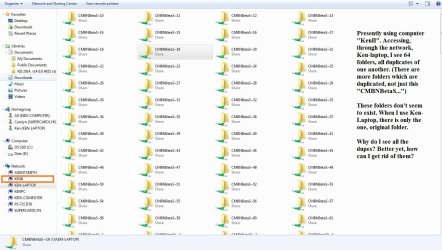
I've finally gotten my windows 7 network up and running. When I access one computer from another, I see dozens of duplicate folders, each with a "name"~14, "name"~15, etc, label. See the jpg I've attached. That shows one example, with 64 copies.
How do I get rid of them???
Delete does not work (nor is it shown if I right click on the shared folder). They are all identical.
I've obviously got some sort of setting that I need to correct. All my networked computers show all these duplicates of many different folders.
Thanks for the help!
Ken
Folks,
I've finally gotten my windows 7 network up and running. When I access one computer from another, I see dozens of duplicate folders, each with a "name"~14, "name"~15, etc, label. See the jpg I've attached. That shows one example, with 64 copies.
How do I get rid of them???
Delete does not work (nor is it shown if I right click on the shared folder). They are all identical.
I've obviously got some sort of setting that I need to correct. All my networked computers show all these duplicates of many different folders.
Thanks for the help!
Ken
Attachments
My Computer
At a glance
Microsoft Windows 7 Home Premium 64-bit 7601 ...AMD FX(tm)-8350 Eight-Core Processor16.00 GBNVIDIA GeForce GTX 670
- Computer type
- PC/Desktop
- Computer Manufacturer/Model Number
- Custom build
- OS
- Microsoft Windows 7 Home Premium 64-bit 7601 Multiprocessor Free Service Pack 1
- CPU
- AMD FX(tm)-8350 Eight-Core Processor
- Motherboard
- ASUSTeK Computer INC. M5A88-M
- Memory
- 16.00 GB
- Graphics Card(s)
- NVIDIA GeForce GTX 670
- Sound Card
- (1) Realtek High Definition Audio (2) NVIDIA Virtual Audio
- Monitor(s) Displays
- Through AVR to one of two TV/Projector
- Screen Resolution
- 1920 x 1080 x 32 bits (4294967296 colors) @ 60 Hz
- Hard Drives
- Samsung SSD 850 PRO 256G SATA Disk Device
- Case
- Silverstone GD09
- Cooling
- Air
- Antivirus
- Kaspersky Internet Security, 2015
