Using shape tool in Paint

marilyn189

New member
Local time
4:39 PM
Messages
5
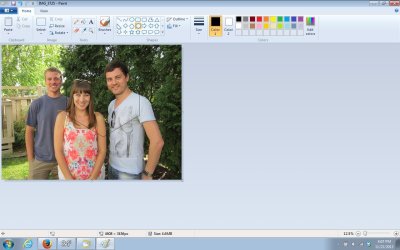
I'm trying to crop out a portion of a picture using the hexagon shape in Paint. I get it positioned, but then I can't figure out how to crop it and save it. The crop button is not available to use when the shape buttons are in use. If I just "save", it saves the entire picture, not the cropped area. Thanks for any help.
 

My Computer

Computer type
PC/Desktop
OS
Windows 7 Home Premium
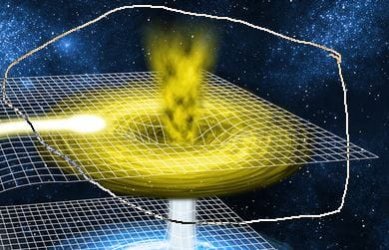
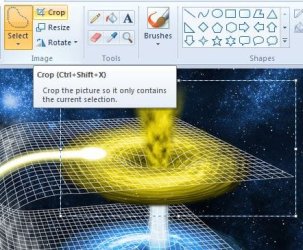
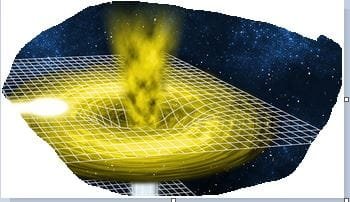
It seems to work fine for me, see the examples below:

Example.jpg

Example2.jpg

Example3.jpg

Example4.jpg
 

My Computer

Computer type
Laptop
Open the picture you want to crop.

Tap or click the Home tab, and in the Image group, tap or click Select.

Tap or click and slide or drag to choose the part of the picture you want to keep, and then tap or click Crop.
 

My Computer

Computer Manufacturer/Model Number
W530-3630QM1
OS
windows 7 home 64bit
CPU
INTEL-CORE I7
Memory
16GB
Hard Drives
750GB
Browser
Chrome
When I am using the Shapes, the select tool is unavailable as is the crop.
 

My Computer

Computer type
PC/Desktop
OS
Windows 7 Home Premium
I'm trying to crop out a portion of a picture using the hexagon shape in Paint. I get it positioned, but then I can't figure out how to crop it and save it. The crop button is not available to use when the shape buttons are in use. If I just "save", it saves the entire picture, not the cropped area. Thanks for any help.
When I am using the Shapes, the select tool is unavailable as is the crop.
I believe you have misunderstood something.

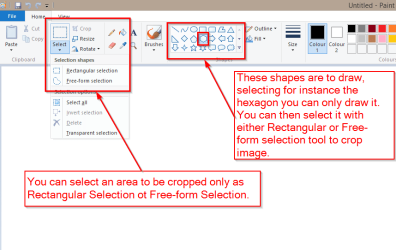
Paint allows only rectangular or free-form selection to be cropped, not a hexagon selection. See screenshot for more information:

2013-11-22 23_02_24-Untitled - Paint.png

Kari
 

My Computer

Computer type
Laptop
Computer Manufacturer/Model Number
HP ENVY 17-1150eg
OS
Windows 10 Pro x64 EN-GB
CPU
1.6 GHz Intel Core i7-720QM Processor
Memory
6 GB
Graphics Card(s)
ATI Mobility Radeon HD 5850 Graphics
Sound Card
Beats sound system with integrated subwoofer
Monitor(s) Displays
17" laptop display, 22" LED and 32" Full HD TV through HDMI
Screen Resolution
1600*900 (1), 1920*1080 (2&3)
Hard Drives
Internal: 2 x 500 GB SATA Hard Disk Drive 7200 rpm
External: 2TB for backups, 3TB USB3 network drive for media
Cooling
As Envy runs a bit warm, I have it on a Cooler Master pad
Keyboard
Logitech diNovo Media Desktop Laser (bluetooth)
Mouse
Logitech Performance Mouse MX
Internet Speed
50/10 Mbps VDSL
Antivirus
Windows Defender 4.3.9431.0
Browser
Maxthon 3.5.2., IE11
I've used the shape tool to put the hexagon around the two people. But no way to save it that I can see. If there's not a way to save it, what's the point of the Shape tool?
 

Attachments

  • Untitled.jpg
    Untitled.jpg
    103.2 KB · Views: 2

My Computer

Computer type
PC/Desktop
OS
Windows 7 Home Premium
Please read my previous post one more time. The shapes (and lines) are to draw patterns, not to select and crop.

Kari
 

My Computer

Computer type
Laptop
Computer Manufacturer/Model Number
HP ENVY 17-1150eg
OS
Windows 10 Pro x64 EN-GB
CPU
1.6 GHz Intel Core i7-720QM Processor
Memory
6 GB
Graphics Card(s)
ATI Mobility Radeon HD 5850 Graphics
Sound Card
Beats sound system with integrated subwoofer
Monitor(s) Displays
17" laptop display, 22" LED and 32" Full HD TV through HDMI
Screen Resolution
1600*900 (1), 1920*1080 (2&3)
Hard Drives
Internal: 2 x 500 GB SATA Hard Disk Drive 7200 rpm
External: 2TB for backups, 3TB USB3 network drive for media
Cooling
As Envy runs a bit warm, I have it on a Cooler Master pad
Keyboard
Logitech diNovo Media Desktop Laser (bluetooth)
Mouse
Logitech Performance Mouse MX
Internet Speed
50/10 Mbps VDSL
Antivirus
Windows Defender 4.3.9431.0
Browser
Maxthon 3.5.2., IE11
Thanks for the input. So, useless, for my purposes :huh:
 

My Computer

Computer type
PC/Desktop
OS
Windows 7 Home Premium
Image editor Paint, simple word processor WordPad and some other built-in free Windows programs are not ment to be used for advanced designing, editing or manipulating. They are offered as simple, easy to use and learn tools.

If you want to and need to, you can search Internet for free tools to achieve what you want to. For instance Gimp is quite popular and completely free. Although I do not know the program myself, I think you can use multiple forms with selection tools in Gimp. Homepage and download: GIMP - The GNU Image Manipulation Program

Our resident graphics gurus mostly use Adobe Photoshop but it is not free. Read more: Download Photoshop CC by joining Creative Cloud today | Adobe Photoshop CC

For a limited time you can now have Photoshop for $9.99(*) plus VAT per month: https://creative.adobe.com/plans/offer/photoshop+lightroom. Offer ends December 2nd.

Kari

(*) Price in UK £8.78, in Euro zone €12.29 per month, VAT excluded.
 

My Computer

Computer type
Laptop
Computer Manufacturer/Model Number
HP ENVY 17-1150eg
OS
Windows 10 Pro x64 EN-GB
CPU
1.6 GHz Intel Core i7-720QM Processor
Memory
6 GB
Graphics Card(s)
ATI Mobility Radeon HD 5850 Graphics
Sound Card
Beats sound system with integrated subwoofer
Monitor(s) Displays
17" laptop display, 22" LED and 32" Full HD TV through HDMI
Screen Resolution
1600*900 (1), 1920*1080 (2&3)
Hard Drives
Internal: 2 x 500 GB SATA Hard Disk Drive 7200 rpm
External: 2TB for backups, 3TB USB3 network drive for media
Cooling
As Envy runs a bit warm, I have it on a Cooler Master pad
Keyboard
Logitech diNovo Media Desktop Laser (bluetooth)
Mouse
Logitech Performance Mouse MX
Internet Speed
50/10 Mbps VDSL
Antivirus
Windows Defender 4.3.9431.0
Browser
Maxthon 3.5.2., IE11
Thanks again. I've used Gimp in the past and have Photoshop Elements; I was just hoping to keep it simple, no masking, etc.
 

My Computer

Computer type
PC/Desktop
OS
Windows 7 Home Premium
Back
Top