Using SSD as an expresscache

seven14

New member
Local time
1:25 AM
Messages
13
Hi,

I'm trying to install win7 again for hours but everytime I install the win7 on HDD, there's 100MB system partition is creating on SSD(disk 0) and when I open the disk management I cannot delete the partitions on SSD because there's that 100 MB on SSD!

I've been told that there shouldn't be any partitions on SSD if I want to use my SSD as an expresscache, but everytime I install win7 there's this 100 MB system reserved on SSD(which is 24GB) I assume it's because SSD is Disk 0?

What I should do? Even if there's 100 MB system reserved partition on SSD I can still make my SSD expresscache? Or should I change my disk order? And how?

I'm really lost here..
 

My Computer

Computer type
PC/Desktop
OS
Windows 7 Ultimate x64
In all scenarios and tutorials, 100MB system reserved part on HDD with Partition C:(the section that we install Win7) I still can't get how to avoid that 100MB part installing on my SSD..
 

My Computer

Computer type
PC/Desktop
OS
Windows 7 Ultimate x64

Thanks theog but I have Lenovo Ideapad y410p and cannot see SATA operation section on BIOS. However I've reinstalled windows like 3rd times trying to avoid that 100MB part installing on my SSD. I've tried several ways but I assume because of my SSD is `disk 0` everytime 100MB part installing on SSD. Where I'm doing wrong?
 

My Computer

Computer type
PC/Desktop
OS
Windows 7 Ultimate x64

My Computer

Computer Manufacturer/Model Number
HP, Dell, Gateway, Toshiba - 4 laptops and 2 desktops
OS
Vista, Windows7, Mint Mate, Zorin, Windows 8
CPU
from 1.6GHz Duo to i7
Monitor(s) Displays
2x HP w2207
Hard Drives
5x HDD, 7x SSD, 12x Externals
Keyboard
with trackball - no mices
Mouse
Trackball mice
Internet Speed
DSL 6000

My Computer

Computer type
PC/Desktop
OS
Windows 7 Ultimate x64
Duribng the install all disks other than the one you install on should be physically disconnected. But in your case that is probably not possible.

The other solution (that works most times) is to make the disk on which you install Disk0. If none of that works, moving the bootmgr after the installation is the next best solution.
 

My Computer

Computer Manufacturer/Model Number
HP, Dell, Gateway, Toshiba - 4 laptops and 2 desktops
OS
Vista, Windows7, Mint Mate, Zorin, Windows 8
CPU
from 1.6GHz Duo to i7
Monitor(s) Displays
2x HP w2207
Hard Drives
5x HDD, 7x SSD, 12x Externals
Keyboard
with trackball - no mices
Mouse
Trackball mice
Internet Speed
DSL 6000
Yeah, theog is right. I forgot about that option.

If you define a primary active partition on the HDD and install into that partition, then you get no 100MB partition.
 

My Computer

Computer Manufacturer/Model Number
HP, Dell, Gateway, Toshiba - 4 laptops and 2 desktops
OS
Vista, Windows7, Mint Mate, Zorin, Windows 8
CPU
from 1.6GHz Duo to i7
Monitor(s) Displays
2x HP w2207
Hard Drives
5x HDD, 7x SSD, 12x Externals
Keyboard
with trackball - no mices
Mouse
Trackball mice
Internet Speed
DSL 6000
Duribng the install all disks other than the one you install on should be physically disconnected. But in your case that is probably not possible.

The other solution (that works most times) is to make the disk on which you install Disk0. If none of that works, moving the bootmgr after the installation is the next best solution.

How I can make the HDD disk 0? I assume it connected that socket onboard and I need to open and switch connections? Which I do not want to done with that. I messed up with my last laptop while I was cleaning inside and I ended up buying this new laptop.

Okay, let's say my last option is moving the bootmgr, I will definitely try that but while I'm about to clean install 6th time for godsake, I wanna make it right :)
 

My Computer

Computer type
PC/Desktop
OS
Windows 7 Ultimate x64
Delete all partition on the SSD in drive options.

Than all partitions on the HDD in drive options, make partitions on the HDD only.

http://www.sevenforums.com/tutorials/52291-partition-hard-drive-windows-7-install.html

In other words, first make em all unallocated, then let's say make 2 partitions on HDD(which I always do for media files like music and videos)

But I think I did that too and still SSD even when it's unallocated making it's own 100 MB part on it. Just because it is disk 0
 

My Computer

Computer type
PC/Desktop
OS
Windows 7 Ultimate x64
Do you not what acceleration cache now?
As the mSATA would need to be Disk 0.

How I can make the HDD disk 0? I assume it connected that socket onboard and I need to open and switch connections? Which I do not want to done with that. I messed up with my last laptop while I was cleaning inside and I ended up buying this new laptop.

Why are reinstalling a new Notebook?
 

My Computer

OS
ME/XP/Vista/Win7
Do you not what acceleration cache now?
As the mSATA would need to be Disk 0.

How I can make the HDD disk 0? I assume it connected that socket onboard and I need to open and switch connections? Which I do not want to done with that. I messed up with my last laptop while I was cleaning inside and I ended up buying this new laptop.

Why are reinstalling a new Notebook?

After all tries the laptop is empty now, there's no OS and I'm just waiting for the right install move..
It came with win8 and I really don't like it, I used to using win7 for years and it's the best for me so far.
 

My Computer

Computer type
PC/Desktop
OS
Windows 7 Ultimate x64
I hope you checked for Windows 7 drivers first.
 

My Computer

OS
ME/XP/Vista/Win7
I did clean install first day with win7 drivers it was working great. Then I found out I can use my SSD as an express cache, but somehow it wasn't be able to use as an express cache. So I decided to reinstall win7 and I ended up here.
 

My Computer

Computer type
PC/Desktop
OS
Windows 7 Ultimate x64
Now I'm installing windows again and looks like 100mb part created on HDD, can't wait to check!
 

My Computer

Computer type
PC/Desktop
OS
Windows 7 Ultimate x64
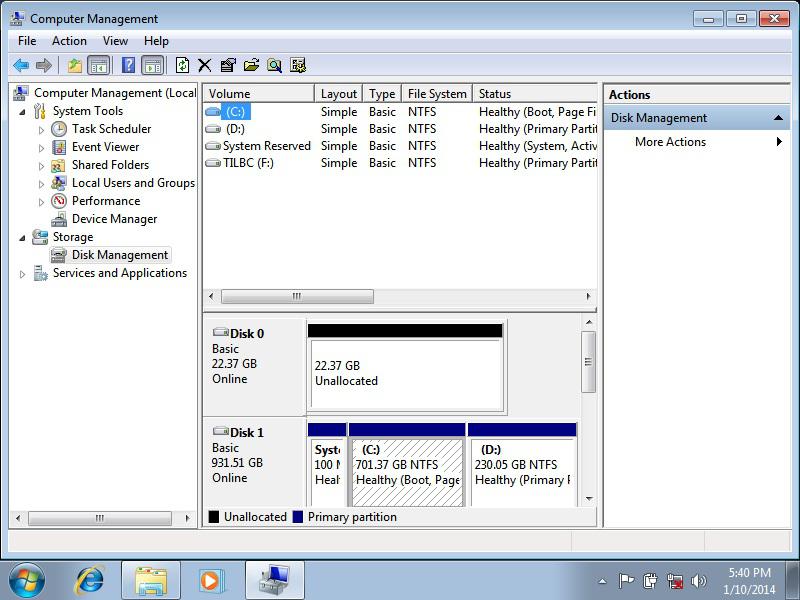
Finally I made it!

ckv8l8xivgv4681ch.jpg


what it looks like now. SSD is unallocated, waiting for the action! Before installing drivers is there anything that I need to know for further expresscache actions?
 

My Computer

Computer type
PC/Desktop
OS
Windows 7 Ultimate x64
Back
Top