Using wallpapers from different countries to make....

MJG3

New member
Local time
1:29 AM
Messages
2
Ok so you know how when you choose which pictures to put in your desktop slideshow they have different countries, I believe they have US, Canada, Australia, UK and that's it. Well what if I want one picture from the US collection and one from the UK one in my desktop slideshow, how do I do that, it's not letting me, it seems as if I gotta stick with one country only.
 

My Computer

OS
Windows 7
Have you tried to make a new folder like "My Wallpapers"

Then copy each pic you want into that folder & set that folder as the default for your slideshow.
 

My Computer

Computer type
PC/Desktop
Computer Manufacturer/Model Number
Built them myself, Science Experiments !
OS
Win7 Enterprise, Win7 x86 (Ult 7600), Win7 x64 Ult 7600, TechNet RTM on AMD x64 (2.8Ghz)
CPU
AMD fx8350 4ghz, AMD-32 2400mhz, AMD-64 3200mhz, AMDx64 2.8G
Motherboard
SIS 755, ECS-K8M890M-M (Ult 7600), GigaByte & others
Memory
2gb, 4gb on the Ult 7600, 4gb on Technet RTM, 32gb on FX8350
Graphics Card(s)
Draw my own Graphics, several nVidia cards
Sound Card
on motherboard
Monitor(s) Displays
19" flat scr, 28" I-Inc widescr,22" Emprex Widescr, 23" Acer
Screen Resolution
1280 x 1024, 1440 x 900, 1920 x 1080
Hard Drives
6 pata Ide HD's & 2 Sata HD's
added 80gb external on Ult 7600 computer,
numerous extra 1tb, 2TB, 3Tb SATA HD's
A collection of ext HD Docks w/ HDs
PSU
430w, 550w, 600w, 700, 800, etc
Case
All Generic Full Towers
Cooling
Open Air & a few fans, some w/ colored LEDs
Keyboard
Compaq & Dell recycled from GoodWill
Mouse
Made in China Optical Wired Mouse
Internet Speed
Fast Cable InterNet
Antivirus
AVG Free on 24 different Desktops, NO Problems!
Browser
IE 8 is preferred, but use FireFox sometimes
Other Info
Linksys Routers, switches, & Hubs
Too Many USB Flash Drives to count, Biggest is 64GB !
Eight computers in my home network.
Sixteen computers at my business network.
Linked via TeamViewer !
Lots of old used spare computer parts everywhere!
I can't find where the Austrlia and UK photos are located, I looked in the Globalization folder and they are not there
 

My Computer

OS
Windows 7
windows 7 includes various geographically related regional themes... These themes target different geographical areas. Included in the themes, are country specific regional wallpapers that feature beautiful tourist attractions, sceneries and landscapes of the countries...
The wallpapers are in form of High definition (HD) photos which have the resolution of 1920×1200.... all 120 wallpapers are different and there are 6 wallpapers from a country...
download here and have fun mixing them:D
cheers
 

My Computer

Computer Manufacturer/Model Number
Micro-Star International/MS-7529
OS
Windows 7 Ultimate x32
CPU
DualCore Intel Pentium E2200, 2218 MHz (11 x 202)
Motherboard
MSI G31M3 V2 (MS-7529) (2 PCI, 1 PCI-E x16,2 DDR2 DIMM)
Memory
2 GB DDR2-800 DDR2 SDRAM
Graphics Card(s)
nVIDIA GeForce 9500GT 1GB
Sound Card
Realtek ALC888/1200 @ Intel 82801GB ICH7
Monitor(s) Displays
Samsung SyncMaster 2253BW (Digital) 22'' LCD
Screen Resolution
1680x1050
Hard Drives
SAMSUNG HD322IJ ATA Device (298 GB , IDE)
I can't find where the Austrlia and UK photos are located, I looked in the Globalization folder and they are not there
Just find the theme you want the pic from, apply it (in the personalization menu) and open the 'Desktop background' then drag the image you want in your slideshow to your desktop (from the window) :)

NOTE: This will move that picture from the regional theme.
 
Right click on desktop > personalize > bottom right in "My Themes" go to "Get more themes online". There you get more than you can possibly use.
 

My Computer

Computer Manufacturer/Model Number
HP, Dell, Gateway, Toshiba - 4 laptops and 2 desktops
OS
Vista, Windows7, Mint Mate, Zorin, Windows 8
CPU
from 1.6GHz Duo to i7
Monitor(s) Displays
2x HP w2207
Hard Drives
5x HDD, 7x SSD, 12x Externals
Keyboard
with trackball - no mices
Mouse
Trackball mice
Internet Speed
DSL 6000
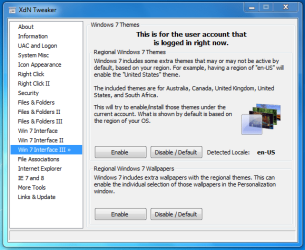
Xdn Tweaker

Select Win7 interace III , Select enable. Very cool tweaking application and its FREE.
 

Attachments

  • xdn.PNG
    xdn.PNG
    25.5 KB · Views: 21
I can't find where the Austrlia and UK photos are located, I looked in the Globalization folder and they are not there

Make sure you set folder options to view hidden files/folders and untick hide protected operating system files. Then navigate to Windows\Globalization\MCT
Double click each theme to activate and add to themes library
 

My Computer

Computer Manufacturer/Model Number
tw33k
OS
Windows 7 Ultimate (x64) SP1
CPU
Intel 3770k 4.6GHz
Motherboard
ASUS Maximus V Formula
Memory
8GB (2x 4GB) Crucial Ballistix
Graphics Card(s)
Sapphire 7950 (1060/1600)
Sound Card
On Board Realtek HD Audio
Monitor(s) Displays
27" Acer B273HU (via HDMI)
Screen Resolution
2048 x 1152
Hard Drives
Crucial M4 128GB
2TB WD Black
1TB Samsung F3 SATA
1TB WD Elite External
2TB WD USB 3.0
PSU
Corsair AX750 Gold
Case
Corsair Obsidian 800DW
Cooling
Corsair H100 (2x AP-121/2x UK-3000 push/pull)
Keyboard
Microsoft Wireless 5000
Mouse
Microsoft Wireless 5000
Internet Speed
5mb/s
Other Info
Logitech z-2300 2.1 speakers
Lamptron FC-5 v2
Back
Top