
Using why to much processing power

namland

New member
Local time
2:57 PM
Messages
2
My computer has recently been using up any where between 2-4 gbs of ram while idling, and up to 6 gbs while watching a video or playing a game. My computer has never had an issues running games or programs before, its an i7 4770 3.50 ghz, 8 gb ddr3 ram (2 4 gb sticks), an evga nivida 770. not sure what else I need to include.

list of processes
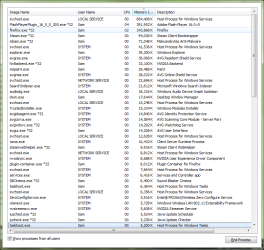
processes.png

I did have a video playing from youtube (dual screens) thats why flash is there.
 

My Computer

Computer type
PC/Desktop
Computer Manufacturer/Model Number
custom
OS
windows 7 home premium 64 bit
CPU
INTEL I7-4770K 3.5 GHZ
Motherboard
MSI Z87-G41 PC MATE INTEL Z87
Memory
ADATA XPG V2 4GB DDR3
Graphics Card(s)
SUPERCLOCKED EVGA NVIDIA GTX 770 ACX 2GB GDDR5
Hard Drives
2 tb main
128 gb ssd with os on it
Antivirus
malaware
Browser
mozilla
And? What is the problem? Are you having performance issues?
 

My Computer

Computer type
PC/Desktop
Computer Manufacturer/Model Number
Alienware Aurora ALX R4
OS
Windows 10 Pro (x64)
CPU
Intel Core i7-3930K (3.2GHz - 4.5GHz)
Motherboard
Alienware Aurora-R4 x79
Memory
4x Samsung 4GB PC3-12800 DDR3 (16GB 1600MHz)
Graphics Card(s)
Nvidia Geforce GTX 690
Sound Card
SteelSeries Siberia Elite
Monitor(s) Displays
Dell UltraSharp U3011
Screen Resolution
2560x1600
Hard Drives
Samsung 850 Pro 256 GB, Seagate 1TB Desktop Hybrid HDD, 2x Western Digital 4TB Green HDD
PSU
875W Some Dell PSU <.<
Case
Alienware Aurora ALX
Cooling
Custom Liquid Cooling (EK CPU & GPU blocks) dual EK 480RAD
Keyboard
Logitech G710+ Mechanical
Mouse
Logitech G700s
Internet Speed
Verizon Fios (50 mbps average)
Other Info
Server: Intel NUC D54250WYK: i5-4250U, 16GB, 256 GB mSATA, Windows Server 2012 R2
I'm sorry I thought I put that in the original post, yes I'm having performance issues, games being choppy or slow, windows or programs taking a long time to open, thinks like that. I first noticed it when playing a game I maxed out all 8 gbs and it almost locked up on me.
 

My Computer

Computer type
PC/Desktop
Computer Manufacturer/Model Number
custom
OS
windows 7 home premium 64 bit
CPU
INTEL I7-4770K 3.5 GHZ
Motherboard
MSI Z87-G41 PC MATE INTEL Z87
Memory
ADATA XPG V2 4GB DDR3
Graphics Card(s)
SUPERCLOCKED EVGA NVIDIA GTX 770 ACX 2GB GDDR5
Hard Drives
2 tb main
128 gb ssd with os on it
Antivirus
malaware
Browser
mozilla
That is a lot of processes, surely you don't need all of those running ?

Anyway since you said "recently" they obviously have not been a problem in the past, so looking down the list there is Trusted Installer and also looking at svchost being very busy it looks to me as if Windows is installing and configuring updates there are a few recent updates in relation to Windows 10 that are known to cause high HDD activity and memory usage so this could well be your problem, it should correct itself in a few more days and if not I would consider removing the known problematic updates. One thing else to note is Firefox appears to use slightly more resources now than it used to but I doubt very much that it has anything to do with your problem since you have 8gb ram.

Best to wait on a reply from the experts here rather than take my word as being gospel though.
 

My Computer

Computer type
Laptop
Computer Manufacturer/Model Number
Sony
OS
Windows 7 x64 SP1
CPU
Intel
Motherboard
Sony
Memory
4gb
Graphics Card(s)
Nvidia
Hard Drives
WD
Internet Speed
Dial up wasn't as bad as this !
Antivirus
Avast
Browser
Firefox
Back
Top