
So this will be a little autopsy because in think my hdd is dead.
It began mid-March when the computer that I always keep turned on, turned off one day and it wouldn’t power back on. I didn’t know what the cause was because I wasn’t using it when it shut down, so I just assumed that it was a PSU failure since there was no power when I press the on button and because it happened to me several times already. So when the lock down/community quarantine happened here in the Philippines there was no way for me to claim for the warranty at the store. Until after a couple of weeks later, I was so bored that I desperately tried to find a way to turn it on. Luckily, I happened to unplug and replug the power cord of the PSU and voila! It powered on.
This part I’m not sure if it is relevant. I tried playing NBA 2K but it was so slow I restarted it several times until it became a little faster. Then it became slow again. At first I assumed that there were background applications that were running so I waited for a few minutes then I started playing and it became smooth. I was able to play smoothly for 40 minutes. After, I tried exploring my files but it was so slow going through folders and files. Opening Firefox and even mouse-overs on the task bar just to see the embossed button appear was so slow. Then I realised I never updated my anti-malware that kept reminding me to do so. My anti-virus was also not turned on. So I updated, scanned, then quarantined that one virus. I didn’t do anything after. I just left it there. By the way through all these I was also able to stream movies via Plex (this computer being the server).
And then while watching tv, I noticed the power in the house fluctuated. My cable box restarted. When I returned to my computer it was off again. I powered it on and there was a message saying that the surge protection kicked in and protected my computer (can’t really remember the words). Just to add to note, my computer is also plugged to an Automatic Voltage Regulator (which is already old). And when it came to the windows logo part it looked like it hanged and the logo wasn’t showing so I restarted it then these appeared:
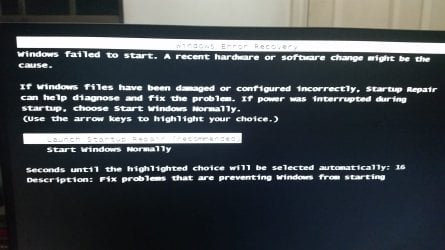
I chose this startup repair then this appeared.
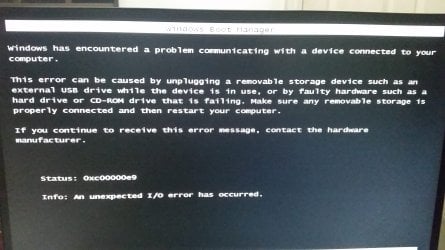
I entered safe mode to try running checkdsk but even then it was so slow.
I googled and one video said to unplug and replug sata and power cables so I did. It seemed to work for a lot of people. When it didn’t work I tried switching sata ports. When I powered there was no signal to the monitor then I heard sounds on my hdd and then when I rebooted again there was no disk appearing in the bios.
So, my questions are:
1.)Is my hdd really dead?
2.)Was the slowing down caused by a virus, corrupted registry, drivers, etc (from the troubleshooting I’ve read), dying hdd (aged 3.5 years), power surge (could it have killed my hdd), faulty PSU (first time it shut down/which also led to lack of power surge protection)? And what can I do?
3.)If it was indeed a power surge, could my Motherboard and PSU be damaged in a way that it is still operational yet they don’t have that surge protection anymore?
4.)If my hdd is dead and I just have to reinstall my OS onto a new drive, will my other components (6 TB worth of hard drives that I value so much) be safe if the surge protection is damaged? Do I have to replace my Motherboard or PSU?
It began mid-March when the computer that I always keep turned on, turned off one day and it wouldn’t power back on. I didn’t know what the cause was because I wasn’t using it when it shut down, so I just assumed that it was a PSU failure since there was no power when I press the on button and because it happened to me several times already. So when the lock down/community quarantine happened here in the Philippines there was no way for me to claim for the warranty at the store. Until after a couple of weeks later, I was so bored that I desperately tried to find a way to turn it on. Luckily, I happened to unplug and replug the power cord of the PSU and voila! It powered on.
This part I’m not sure if it is relevant. I tried playing NBA 2K but it was so slow I restarted it several times until it became a little faster. Then it became slow again. At first I assumed that there were background applications that were running so I waited for a few minutes then I started playing and it became smooth. I was able to play smoothly for 40 minutes. After, I tried exploring my files but it was so slow going through folders and files. Opening Firefox and even mouse-overs on the task bar just to see the embossed button appear was so slow. Then I realised I never updated my anti-malware that kept reminding me to do so. My anti-virus was also not turned on. So I updated, scanned, then quarantined that one virus. I didn’t do anything after. I just left it there. By the way through all these I was also able to stream movies via Plex (this computer being the server).
And then while watching tv, I noticed the power in the house fluctuated. My cable box restarted. When I returned to my computer it was off again. I powered it on and there was a message saying that the surge protection kicked in and protected my computer (can’t really remember the words). Just to add to note, my computer is also plugged to an Automatic Voltage Regulator (which is already old). And when it came to the windows logo part it looked like it hanged and the logo wasn’t showing so I restarted it then these appeared:
I chose this startup repair then this appeared.
I entered safe mode to try running checkdsk but even then it was so slow.
I googled and one video said to unplug and replug sata and power cables so I did. It seemed to work for a lot of people. When it didn’t work I tried switching sata ports. When I powered there was no signal to the monitor then I heard sounds on my hdd and then when I rebooted again there was no disk appearing in the bios.
So, my questions are:
1.)Is my hdd really dead?
2.)Was the slowing down caused by a virus, corrupted registry, drivers, etc (from the troubleshooting I’ve read), dying hdd (aged 3.5 years), power surge (could it have killed my hdd), faulty PSU (first time it shut down/which also led to lack of power surge protection)? And what can I do?
3.)If it was indeed a power surge, could my Motherboard and PSU be damaged in a way that it is still operational yet they don’t have that surge protection anymore?
4.)If my hdd is dead and I just have to reinstall my OS onto a new drive, will my other components (6 TB worth of hard drives that I value so much) be safe if the surge protection is damaged? Do I have to replace my Motherboard or PSU?
My Computer
At a glance
Windows 7 Professional 64bitIntel Core i5-6600 3.3 GHz (up to 3.9 GHz, 6 MB)2 x Kingston 4 GB DDR4 2133 MHz Fury BlackPalit GTX 750 TI 2 GB DDR5 128 BIT OC STORMX
- Computer type
- PC/Desktop
- Computer Manufacturer/Model Number
- Custom build
- OS
- Windows 7 Professional 64bit
- CPU
- Intel Core i5-6600 3.3 GHz (up to 3.9 GHz, 6 MB)
- Motherboard
- Asus H110M-D Micro-ATX
- Memory
- 2 x Kingston 4 GB DDR4 2133 MHz Fury Black
- Graphics Card(s)
- Palit GTX 750 TI 2 GB DDR5 128 BIT OC STORMX
- Sound Card
- Built-in
- Monitor(s) Displays
- ASUS VC239H Slim Bezel Black 23"
- Screen Resolution
- 1920 x 1080
- Hard Drives
- Seagate 2 TB 7200 RPM
- PSU
- FSP Raider 550W 80+ Silver
- Case
- Cooler Master N200 Micro-ATX
- Cooling
- Stock


