Using win7 Disk manager to shrink disk... leaving partition too big

HarryPutnam

New member
Local time
8:27 PM
Messages
33
Running a freshly done re-install of win 7 64 bit.

I'm working on bringing the newly installed machine up to speed, and want to do it like the old OS that lasted 5 yrs was done.

That is, I broke the main OS disk into 2 pieces... so three total since the OS takes a tiny 200mb partition.

I guessed a good size would be 150 GB for the OS... 5 yrs ago. It turned out to be a bit close by the end of its career and was only 34GB shy of 150 GB.

So this time I thought I'd give it another 40GB making it around 190 GB.

So, cutting to the chase:
Using the OS tools, it appears the disk manager wants to keep around 250+ for the OS. I cannot see why this would be the case.
I have some screen grabs at the end showing the shrink dialog, and snap of the properties of the disk.

And know too that I have:
Tested and De-fragmented this disc, and it has been freshly reformatted too. All not long before starting work to shrink it.
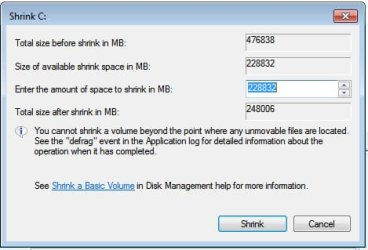
The dialog (see image below) shows (Sz taken direct from the tool. Conversions from : Convert gigabyte to 248006 megabyte - Conversion of Measurement Units )

. . . . . size before shrink: 476838 - 465.66 GB
. . . . Shrinkable amount: 228832 - 223.47 GB
Total size after shrinking: 248006 - 242.12 GB

242 GB seems a bit hefty for the OS partition given the fact that it topped out at less than 150 GB after 5 yrs of use.

I'd really like to pare that down... but a little hesitant to get after it with Partition Wizard or the like.

So, I'm asking if I should heed this greedy estimate or go ahead and shrink it down to 180 GB, booting off Partition Wizard?

As you see from the image of disk properties, there is about 35 GB on there now, my estimate of 180 GB gives it room to grow by a of factor 500 %.
 

Attachments
  • ShrinkDiskDialog.jpg
    ShrinkDiskDialog.jpg
    23.1 KB · Views: 15
  • DiskPropertiesDialog.jpg
    DiskPropertiesDialog.jpg
    29.8 KB · Views: 15

My Computer My Computer

At a glance

win 7 home premiumi7 820 quad 1.73 Ghz8 GBATI Radeon HD 5800 (1 GB)
Computer Manufacturer/Model Number
Sager Laptop running win 7 Home Premium
OS
win 7 home premium
CPU
i7 820 quad 1.73 Ghz
Memory
8 GB
Graphics Card(s)
ATI Radeon HD 5800 (1 GB)
Sound Card
Built in (Realtek HD Audio)
Monitor(s) Displays
(Laptop integral) ??
Hard Drives
2 WD SATA 500 GB
I'd think only you can decide how much additional space you need, both for application programs you plan to install eventually as well as for any data those programs may manage, not to mention other documents and files you currently have or plan to have in the future.

I myself have three internal hard drives in my "small" machine, divided into partitions C-M. This structure has evolved for many years, and I know exactly the type of data I put on each partition. C is obviously primarily for Windows and programs, along with miscellaneous "data" that's kind of generic. Any other data that is significant in size or numbers (e.g. multi-media audio/video/pictures) go elsewhere, as does important "work related" data. I've never bothered to try and move "\My Documents" off of C, I simply SAVE data to other partitions when given the opportunity.

Anyway, I agree with you that a "minimalist C" in the real world doesn't need to be much larger than probably 75-100GB tops, assuming you have someplace else (like a second partition) to store your REAL (or really large/numerous) DATA files, and assuming you're conscientious about SAVE'ing your data to those other partitions rather than just letting the target location default to say "downloads" or "\My Documents", etc.

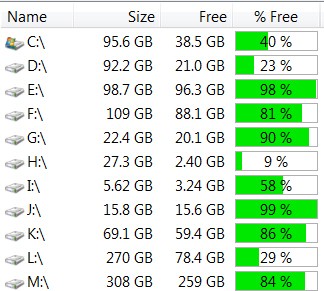
Here's my "small machine" setup. Note that I'm only using about 64GB of my C-partition, of which the Windows 7 Pro x64 folder itself is 29GB, and Program Files (x86 and x64) take up another 13GB. Another 7GB for PAGEFIL and HIBERFIL and 4GB for "restore points", and that means I only have about 11GB actually being used on C for data and other assorted folders/files.

And that's because all of my "real data" is NOT SAVED ON C.

zrob.jpg


Of course I have a well-planned daily/weekly/monthly backup regimen in place (for both "system image" and "data"), to an external 2TB USB 3.0 drive. Cannot afford to lose ANYTHING, and don't want to spend more than 5-30 minutes recovering from a lost/deleted file or a system integrity disaster.
 

My Computer My Computer

At a glance

Windows 7 Pro x64 (1), Win7 Pro X64 (2)i5-3350p 3.1Ghz/6MB-cache (1); E8400 3.0Ghz/6...8GB PC3-12800 DDR3 (1); 4GB PC3-10600 DDR3 (2)ATI HD7750 (1), (see TV cards); ATI R7 250 (2)
Computer type
PC/Desktop
Computer Manufacturer/Model Number
Home-built, two systems (1) and (2)
OS
Windows 7 Pro x64 (1), Win7 Pro X64 (2)
CPU
i5-3350p 3.1Ghz/6MB-cache (1); E8400 3.0Ghz/6MB-cache (2)
Motherboard
ASUS P8Z77-V Pro (1); ASUS P5Q3 (2)
Memory
8GB PC3-12800 DDR3 (1); 4GB PC3-10600 DDR3 (2)
Graphics Card(s)
ATI HD7750 (1), (see TV cards); ATI R7 250 (2)
Sound Card
Realtek ALC892 HD Audio (1); Realtek ALC1200 HD Audio (2)
Monitor(s) Displays
Eizo HD2441W LCD, Eizo S2433W (1); Eizo 24" S2433W (2)
Screen Resolution
1920x1200, 1920x1200 (1); 1920x1200 (2)
Hard Drives
(1) 1TB SATA-II (7200RPM), 2x2TB SATA-III (7200RPM), 250GB SATA-III (10000RPM) for OS; 2x2TB external USB 3.0

(2) 320GB SATA-II (7200RPM), 750GB SATA-II (7200RPM), 150GB SATA-II (10000RPM) for OS; 2TB external USB 3.0
PSU
Nesteq ECS-6001 600W (1); Nesteq ECS-5001 500W (2)
Case
Acousti-Case 360 (1) and (2)
Cooling
Noctua NH-U12P SE2 for CPU, 2x120mm case fans (1) and (2)
Keyboard
IBM PS/2 (1) and (2)
Mouse
Logitech MX Revolution wireless (1); Microsoft wired (2)
Internet Speed
100mbps down / 10mbps up
Antivirus
Microsoft Security Essentials; Malwarebyte Anti-Malware Pro
Browser
Firefox
Other Info
Ceton InfiniTV 4-tuner cablecard-enabled TV card as well as Hauppauge HVR-2250 OTA/ATSC 2-tuner TV card in (1), running under Win7 WMC

My Computer My Computer

At a glance

Windows 10 Pro X64Intel Quad Core i7-4770 @ 3.4Ghz16.0GB PC3-12800 DDR3 SDRAM 1600 MHzIntel Integrated HD Graphics
Computer type
PC/Desktop
Computer Manufacturer/Model Number
Lenovo IdeaCenter 450
OS
Windows 10 Pro X64
CPU
Intel Quad Core i7-4770 @ 3.4Ghz
Memory
16.0GB PC3-12800 DDR3 SDRAM 1600 MHz
Graphics Card(s)
Intel Integrated HD Graphics
Sound Card
Realtek HD Audio
Monitor(s) Displays
HP 22" LCD
Screen Resolution
1680 x 1050
Hard Drives
250GB Samsung EVO SATA-3 SSD
2TB Seagate ST2000DM001 SATA-2
1.5TB Seagate ST3150041AS SATA
Keyboard
Dell USB
Mouse
Lenovo USB
Internet Speed
Cable via Road Runner 3MB Upload, 30MB Download
Antivirus
Windows Defender, MBAM Pro, MBAE
Browser
Seamonkey
Other Info
UEFI/GPT
PLDS DVD-RW DH16AERSH
I would use the Partition Wizard Boot cd ;)
 

My Computer My Computer

At a glance

Windows 10 Pro x64Intel Core i7 6700KGSkill TridentZ RGB 16GB 3600 16-16-16-36EVGA GTX 980 Ti SC x2
Computer type
PC/Desktop
Computer Manufacturer/Model Number
Skylake Special #666
OS
Windows 10 Pro x64
CPU
Intel Core i7 6700K
Motherboard
Asus Sabertooth Z170 Mark 1
Memory
GSkill TridentZ RGB 16GB 3600 16-16-16-36
Graphics Card(s)
EVGA GTX 980 Ti SC x2
Sound Card
Realtek High Definition
Monitor(s) Displays
AOC G2460PG
Screen Resolution
1920 x 1080 144Hz
Hard Drives
Samsung 860 Pro 256GB, Seagate Barracuda 4TB x2
PSU
EVGA 1000 P2, EVGA White Custom Braided Cables
Case
Corsair Vengeance C70 Gunmetal Black
Cooling
Corsair H100i v2, Corsair ML120 x2, Thermal Grizzly Kryonaut
Keyboard
Logitech G910 Orion Spectrum
Mouse
Logitech G700s
Internet Speed
Verizon Fios Quantum Gateway 75/75
Antivirus
Windows Defender, Malwarebytes Free 3.8.3
Browser
Chrome
Other Info
Corsair SP120 x4, LG Blu-ray Drive, Durabrand HT-395 100 Watt Dolby Digital Amp, Corsair H2100 Wireless 7.1 Headset

My Computer My Computer

At a glance

W7 Ultimate SP1, LM19.2 MATE, W10 Home 1703, ...AMD Phenom II x6 1100T, 3.3 GHz12GB DDR3 1333 G-Skill (4GB x 2), G-Skill (2G...NVIDIA GeForce GTX 660
Computer type
PC/Desktop
Computer Manufacturer/Model Number
n/a
OS
W7 Ultimate SP1, LM19.2 MATE, W10 Home 1703, W10 Pro 1703 VM, #All 64 bit
CPU
AMD Phenom II x6 1100T, 3.3 GHz
Motherboard
ASUS M4A88T-M/USB3 (AM3)
Memory
12GB DDR3 1333 G-Skill (4GB x 2), G-Skill (2GB x 2)
Graphics Card(s)
NVIDIA GeForce GTX 660
Sound Card
Realtek?
Monitor(s) Displays
Samsung S23B350
Screen Resolution
1920x1080
Hard Drives
WD Green 2TB (SATA), WD Green 3TB (SATA), WD Blue 4TB (SATA), WD Blue 6TB (SATA)
PSU
Cooler Master
Case
Antec GX300 Tower
Cooling
3x Antec TRICOOL 120mm Fans
Mouse
Wired Optical
Internet Speed
DSL
Antivirus
Avast
Browser
Pale Moon (64 bit)
Other Info
2018-12-27 Upgraded HDDs
2015-12-10 Upgraded case, graphics card, storage
2015-08-15 Upgraded motherboard & RAM
2015-07-15 Upgraded LM17.1 to LM17.2
Back
Top