Usually slow and very inconsistent Wireless Internet.

DeanLai

New member
Local time
8:24 AM
Messages
9
Location
Portland, OR
Hi, I know this problem has been around but I can't seem to find a solution that works for me. Basically I have very slow internet 90% of the time over my wireless network, and probably at least once every couple hours the connection seems to halt altogether and require a reset of the connection via the Networking and Sharing page. Reseting the router can and/or modem can provide temporary fixes, but nothing has lasted more than a day. My roommate isn't having trouble with his 3 year old macbook pro and even my Nexus one (android phone) runs speed tests at around 6x that of my desktop most of the time.

Basic system specs are as follows, though probably the only relevant ones are maybe the motherboard and built in networking.

Intel® DP67BG Extreme Series
Integrated 802.11b/g/n Wireless (I can't seem to get the exact model number for the device but according the the device properties it's manufactured by Ralink and the driver version is 3.1.4.0 from 7/27/2010)
core i5-2500k
8GB RAM
64GB SSD
1TB SATA disk
GeFore GTX 460

Router is a Cisco 33968 (or maybe linksys E1000? or both?) and the modem is some generic comcast deal.

First time poster, as this is my first major problem with Windows 7. Thanks for the help!

Sean

EDIT:
Okay so I looked around for more solutions which lead me to uninstalling the driver for the built-in networking device but now Windows can't find a driver for it and I'm stuck using my phone as a tether until I can get the device installed. Any clue where I can find a driver now that Windows can't seem to recognize what the device is beyond a generic wireless adapter?
 
Last edited:

My Computer My Computer

At a glance

Windows 7 Home PremiumIntel Core i5-2500k8GB Patriot® Division2 G2 DDR3-1600nVidia GeForce GTX 460 1GB GDDR5
Computer Manufacturer/Model Number
Maingear Vybe
OS
Windows 7 Home Premium
CPU
Intel Core i5-2500k
Motherboard
Intel® DP67BG Extreme
Memory
8GB Patriot® Division2 G2 DDR3-1600
Graphics Card(s)
nVidia GeForce GTX 460 1GB GDDR5
Sound Card
w/ motherboard
Monitor(s) Displays
NEC EA231WMi
Hard Drives
64GB Crucial® RealSSD™ C300 SATA 6G
1.0TB Samsung F3 7200rpm 32MB Cache SATA
PSU
620 Watt Seasonic® S12II 80+ Bronze
Case
VYBE Super Stock ATX Compact Chassis
Cooling
MAINGEAR LiquidX 1500 Supercooler, fans elsewhere
Slow Wireless Internet

My last post got no replies, so I'll try and be more thorough with this one.

I'm running Windows 7 Home premium and been experiencing really slow internet via my wireless adapter ever since I got the computer about a month ago. There will be certain days or hours (maybe 5-10% of the time) when the internet will work fine, but the majority of the time my download speeds are really quite slow. My wireless adapter is the Ralink 802.11 bgn 1T1R Wireless adapter that comes on the Intel DP67BG motherboard. Here are the speed test results.

Connected via wireless adapter http://www.speedtest.net/result/1276945158.png
Connected via USB tether to my phone on the same wireless network http://speedtest.net/result/1276948476.png
Connected via USB tether to my phone on its 3G network http://www.speedtest.net/result/1276950377.png

I've tried all sorts of solutions (disabling IPv6, resetting router/modem etc., reinstalling the driver for the adapter, disabling homegroup) that I've found in this forum and elsewhere, and none have worked yet.

Does anyone have a clue what the problem could be? It's a sad day when the internet on my phone is faster than on my desktop PC.
 

My Computer My Computer

At a glance

Windows 7 Home PremiumIntel Core i5-2500k8GB Patriot® Division2 G2 DDR3-1600nVidia GeForce GTX 460 1GB GDDR5
Computer Manufacturer/Model Number
Maingear Vybe
OS
Windows 7 Home Premium
CPU
Intel Core i5-2500k
Motherboard
Intel® DP67BG Extreme
Memory
8GB Patriot® Division2 G2 DDR3-1600
Graphics Card(s)
nVidia GeForce GTX 460 1GB GDDR5
Sound Card
w/ motherboard
Monitor(s) Displays
NEC EA231WMi
Hard Drives
64GB Crucial® RealSSD™ C300 SATA 6G
1.0TB Samsung F3 7200rpm 32MB Cache SATA
PSU
620 Watt Seasonic® S12II 80+ Bronze
Case
VYBE Super Stock ATX Compact Chassis
Cooling
MAINGEAR LiquidX 1500 Supercooler, fans elsewhere
My last post got no replies, so I'll try and be more thorough with this one.

I'm running Windows 7 Home premium and been experiencing really slow internet via my wireless adapter ever since I got the computer about a month ago. There will be certain days or hours (maybe 5-10% of the time) when the internet will work fine, but the majority of the time my download speeds are really quite slow. My wireless adapter is the Ralink 802.11 bgn 1T1R Wireless adapter that comes on the Intel DP67BG motherboard. Here are the speed test results.

Connected via wireless adapter http://www.speedtest.net/result/1276945158.png tested on T-1 Mobile
Connected via USB tether to my phone on the same wireless network http://speedtest.net/result/1276948476.png Test on comcast
Connected via USB tether to my phone on its 3G network http://www.speedtest.net/result/1276950377.png tested on comcast.

I've tried all sorts of solutions (disabling IPv6, resetting router/modem etc., reinstalling the driver for the adapter, disabling homegroup) that I've found in this forum and elsewhere, and none have worked yet.

Does anyone have a clue what the problem could be? It's a sad day when the internet on my phone is faster than on my desktop PC.


Test all three to the same server, and run an ipconfig /all and upload the output to us.
 

My Computer My Computer

At a glance

Win 8 Release candidate 8400[email protected]4 gigsNvidia 9600M
Computer Manufacturer/Model Number
HP Pavillion dv-7 1005 Tx
OS
Win 8 Release candidate 8400
CPU
[email protected]
Memory
4 gigs
Graphics Card(s)
Nvidia 9600M
Sound Card
HD built-in
Monitor(s) Displays
17" Wxga
Screen Resolution
1440x900
Cooling
none
Internet Speed
45Mb down 5Mb up
I figured I should use T-mobile's server for that last once since I was using their 3G, but all three of these new tests use the Comcast server near Portland.

EDIT: I'm confused, it doesn't seem possible to test the 3G on a comcast server and I suppose that makes sense, so not sure what you want me to do there. Maybe I'm misunderstanding what you mean by "Test all three to the same server".

In any case, here are my ipconfig /all readouts.

1. With my wireless adapter, and new speed test as of now (abnormally slow, but that might be a different issue) http://www.speedtest.net/result/1277102461.png

Windows IP Configuration

Host Name . . . . . . . . . . . . : Dean-PC
Primary Dns Suffix . . . . . . . :
Node Type . . . . . . . . . . . . : Hybrid
IP Routing Enabled. . . . . . . . : No
WINS Proxy Enabled. . . . . . . . : No
DNS Suffix Search List. . . . . . : hsd1.or.comcast.net.

Wireless LAN adapter Wireless Network Connection 3:

Media State . . . . . . . . . . . : Media disconnected
Connection-specific DNS Suffix . :
Description . . . . . . . . . . . : Microsoft Virtual WiFi Miniport Adapter #
2
Physical Address. . . . . . . . . : 6C-62-6D-25-13-CE
DHCP Enabled. . . . . . . . . . . : Yes
Autoconfiguration Enabled . . . . : Yes

Wireless LAN adapter Wireless Network Connection:

Connection-specific DNS Suffix . : hsd1.or.comcast.net.
Description . . . . . . . . . . . : 802.11bgn 1T1R Wireless Adapter
Physical Address. . . . . . . . . : 6C-62-6D-25-13-CF
DHCP Enabled. . . . . . . . . . . : Yes
Autoconfiguration Enabled . . . . : Yes
IPv4 Address. . . . . . . . . . . : 192.168.1.143(Preferred)
Subnet Mask . . . . . . . . . . . : 255.255.255.0
Lease Obtained. . . . . . . . . . : Sunday, May 01, 2011 14:03:53
Lease Expires . . . . . . . . . . : Monday, May 02, 2011 14:03:53
Default Gateway . . . . . . . . . : 192.168.1.1
DHCP Server . . . . . . . . . . . : 192.168.1.1
DNS Servers . . . . . . . . . . . : 68.87.69.150
68.87.85.102
NetBIOS over Tcpip. . . . . . . . : Enabled

Ethernet adapter Bluetooth Network Connection:

Media State . . . . . . . . . . . : Media disconnected
Connection-specific DNS Suffix . :
Description . . . . . . . . . . . : Bluetooth Device (Personal Area Network)
Physical Address. . . . . . . . . : 6C-62-6D-23-FF-19
DHCP Enabled. . . . . . . . . . . : Yes
Autoconfiguration Enabled . . . . : Yes

Ethernet adapter Local Area Connection:

Media State . . . . . . . . . . . : Media disconnected
Connection-specific DNS Suffix . : mg.local
Description . . . . . . . . . . . : Intel(R) 82579V Gigabit Network Connectio
n
Physical Address. . . . . . . . . : 00-22-4D-4F-92-CE
DHCP Enabled. . . . . . . . . . . : Yes
Autoconfiguration Enabled . . . . : Yes

Tunnel adapter isatap.{1EE0C650-5AFA-4884-96DA-C81107EDB59B}:

Media State . . . . . . . . . . . : Media disconnected
Connection-specific DNS Suffix . :
Description . . . . . . . . . . . : Microsoft ISATAP Adapter
Physical Address. . . . . . . . . : 00-00-00-00-00-00-00-E0
DHCP Enabled. . . . . . . . . . . : No
Autoconfiguration Enabled . . . . : Yes

Tunnel adapter isatap.hsd1.or.comcast.net.:

Media State . . . . . . . . . . . : Media disconnected
Connection-specific DNS Suffix . : hsd1.or.comcast.net.
Description . . . . . . . . . . . : Microsoft ISATAP Adapter #2
Physical Address. . . . . . . . . : 00-00-00-00-00-00-00-E0
DHCP Enabled. . . . . . . . . . . : No
Autoconfiguration Enabled . . . . : Yes

Tunnel adapter isatap.{199D2CB1-C867-46C5-A4A0-532DF32C338D}:

Media State . . . . . . . . . . . : Media disconnected
Connection-specific DNS Suffix . :
Description . . . . . . . . . . . : Microsoft ISATAP Adapter #3
Physical Address. . . . . . . . . : 00-00-00-00-00-00-00-E0
DHCP Enabled. . . . . . . . . . . : No
Autoconfiguration Enabled . . . . : Yes

Tunnel adapter Teredo Tunneling Pseudo-Interface:

Connection-specific DNS Suffix . :
Description . . . . . . . . . . . : Teredo Tunneling Pseudo-Interface
Physical Address. . . . . . . . . : 00-00-00-00-00-00-00-E0
DHCP Enabled. . . . . . . . . . . : No
Autoconfiguration Enabled . . . . : Yes
IPv6 Address. . . . . . . . . . . : 2001:0:4137:9e76:2412:24e5:b8c4:76a(Prefe
rred)
Link-local IPv6 Address . . . . . : fe80::2412:24e5:b8c4:76a%14(Preferred)
Default Gateway . . . . . . . . . : ::
NetBIOS over Tcpip. . . . . . . . : Disabled

Tunnel adapter isatap.mg.local:

Media State . . . . . . . . . . . : Media disconnected
Connection-specific DNS Suffix . :
Description . . . . . . . . . . . : Microsoft ISATAP Adapter #4
Physical Address. . . . . . . . . : 00-00-00-00-00-00-00-E0
DHCP Enabled. . . . . . . . . . . : No
Autoconfiguration Enabled . . . . : Yes


2. With USB tether via my phone on the same wireless network, new speedtest as of now http://www.speedtest.net/result/1277106928.png, same server as previous.

Windows IP Configuration

Host Name . . . . . . . . . . . . : Dean-PC
Primary Dns Suffix . . . . . . . :
Node Type . . . . . . . . . . . . : Hybrid
IP Routing Enabled. . . . . . . . : No
WINS Proxy Enabled. . . . . . . . : No

Wireless LAN adapter Wireless Network Connection 3:

Media State . . . . . . . . . . . : Media disconnected
Connection-specific DNS Suffix . :
Description . . . . . . . . . . . : Microsoft Virtual WiFi Miniport Adapter #
2
Physical Address. . . . . . . . . : 6C-62-6D-25-13-CE
DHCP Enabled. . . . . . . . . . . : Yes
Autoconfiguration Enabled . . . . : Yes

Wireless LAN adapter Wireless Network Connection:

Media State . . . . . . . . . . . : Media disconnected
Connection-specific DNS Suffix . : hsd1.or.comcast.net.
Description . . . . . . . . . . . : 802.11bgn 1T1R Wireless Adapter
Physical Address. . . . . . . . . : 6C-62-6D-25-13-CF
DHCP Enabled. . . . . . . . . . . : Yes
Autoconfiguration Enabled . . . . : Yes

Ethernet adapter Local Area Connection 2:

Connection-specific DNS Suffix . :
Description . . . . . . . . . . . : Remote NDIS based Internet Sharing Device

Physical Address. . . . . . . . . : 72-F3-01-E8-C7-54
DHCP Enabled. . . . . . . . . . . : Yes
Autoconfiguration Enabled . . . . : Yes
Link-local IPv6 Address . . . . . : fe80::8514:98a1:9d49:341c%16(Preferred)
IPv4 Address. . . . . . . . . . . : 192.168.42.219(Preferred)
Subnet Mask . . . . . . . . . . . : 255.255.255.0
Lease Obtained. . . . . . . . . . : Sunday, May 01, 2011 14:14:44
Lease Expires . . . . . . . . . . : Sunday, May 01, 2011 15:14:43
Default Gateway . . . . . . . . . : 192.168.42.129
DHCP Server . . . . . . . . . . . : 192.168.42.129
DHCPv6 IAID . . . . . . . . . . . : 544404225
DHCPv6 Client DUID. . . . . . . . : 00-01-00-01-15-30-FA-46-00-22-4D-4F-92-CE

DNS Servers . . . . . . . . . . . : 192.168.42.129
NetBIOS over Tcpip. . . . . . . . : Enabled

Ethernet adapter Bluetooth Network Connection:

Media State . . . . . . . . . . . : Media disconnected
Connection-specific DNS Suffix . :
Description . . . . . . . . . . . : Bluetooth Device (Personal Area Network)
Physical Address. . . . . . . . . : 6C-62-6D-23-FF-19
DHCP Enabled. . . . . . . . . . . : Yes
Autoconfiguration Enabled . . . . : Yes

Ethernet adapter Local Area Connection:

Media State . . . . . . . . . . . : Media disconnected
Connection-specific DNS Suffix . : mg.local
Description . . . . . . . . . . . : Intel(R) 82579V Gigabit Network Connectio
n
Physical Address. . . . . . . . . : 00-22-4D-4F-92-CE
DHCP Enabled. . . . . . . . . . . : Yes
Autoconfiguration Enabled . . . . : Yes

Tunnel adapter isatap.{1EE0C650-5AFA-4884-96DA-C81107EDB59B}:

Media State . . . . . . . . . . . : Media disconnected
Connection-specific DNS Suffix . :
Description . . . . . . . . . . . : Microsoft ISATAP Adapter
Physical Address. . . . . . . . . : 00-00-00-00-00-00-00-E0
DHCP Enabled. . . . . . . . . . . : No
Autoconfiguration Enabled . . . . : Yes

Tunnel adapter isatap.hsd1.or.comcast.net.:

Media State . . . . . . . . . . . : Media disconnected
Connection-specific DNS Suffix . :
Description . . . . . . . . . . . : Microsoft ISATAP Adapter #2
Physical Address. . . . . . . . . : 00-00-00-00-00-00-00-E0
DHCP Enabled. . . . . . . . . . . : No
Autoconfiguration Enabled . . . . : Yes

Tunnel adapter isatap.{199D2CB1-C867-46C5-A4A0-532DF32C338D}:

Media State . . . . . . . . . . . : Media disconnected
Connection-specific DNS Suffix . :
Description . . . . . . . . . . . : Microsoft ISATAP Adapter #3
Physical Address. . . . . . . . . : 00-00-00-00-00-00-00-E0
DHCP Enabled. . . . . . . . . . . : No
Autoconfiguration Enabled . . . . : Yes

Tunnel adapter Teredo Tunneling Pseudo-Interface:

Connection-specific DNS Suffix . :
Description . . . . . . . . . . . : Teredo Tunneling Pseudo-Interface
Physical Address. . . . . . . . . : 00-00-00-00-00-00-00-E0
DHCP Enabled. . . . . . . . . . . : No
Autoconfiguration Enabled . . . . : Yes
IPv6 Address. . . . . . . . . . . : 2001:0:4137:9e76:2885:da30:2fc9:df2b(Pref
erred)
Link-local IPv6 Address . . . . . : fe80::2885:da30:2fc9:df2b%14(Preferred)
Default Gateway . . . . . . . . . : ::
NetBIOS over Tcpip. . . . . . . . : Disabled

Tunnel adapter isatap.mg.local:

Media State . . . . . . . . . . . : Media disconnected
Connection-specific DNS Suffix . :
Description . . . . . . . . . . . : Microsoft ISATAP Adapter #4
Physical Address. . . . . . . . . : 00-00-00-00-00-00-00-E0
DHCP Enabled. . . . . . . . . . . : No
Autoconfiguration Enabled . . . . : Yes

Tunnel adapter isatap.{B829D997-5442-46A2-BEA7-3C7DD749CFAF}:

Media State . . . . . . . . . . . : Media disconnected
Connection-specific DNS Suffix . :
Description . . . . . . . . . . . : Microsoft ISATAP Adapter #5
Physical Address. . . . . . . . . : 00-00-00-00-00-00-00-E0
DHCP Enabled. . . . . . . . . . . : No
Autoconfiguration Enabled . . . . : Yes


3. via USB tether on my phones 3g network http://www.speedtest.net/result/1277110581.png

Windows IP Configuration

Host Name . . . . . . . . . . . . : Dean-PC
Primary Dns Suffix . . . . . . . :
Node Type . . . . . . . . . . . . : Hybrid
IP Routing Enabled. . . . . . . . : No
WINS Proxy Enabled. . . . . . . . : No

Wireless LAN adapter Wireless Network Connection 3:

Media State . . . . . . . . . . . : Media disconnected
Connection-specific DNS Suffix . :
Description . . . . . . . . . . . : Microsoft Virtual WiFi Miniport Adapter #
2
Physical Address. . . . . . . . . : 6C-62-6D-25-13-CE
DHCP Enabled. . . . . . . . . . . : Yes
Autoconfiguration Enabled . . . . : Yes

Wireless LAN adapter Wireless Network Connection:

Media State . . . . . . . . . . . : Media disconnected
Connection-specific DNS Suffix . : hsd1.or.comcast.net.
Description . . . . . . . . . . . : 802.11bgn 1T1R Wireless Adapter
Physical Address. . . . . . . . . : 6C-62-6D-25-13-CF
DHCP Enabled. . . . . . . . . . . : Yes
Autoconfiguration Enabled . . . . : Yes

Ethernet adapter Local Area Connection 2:

Connection-specific DNS Suffix . :
Description . . . . . . . . . . . : Remote NDIS based Internet Sharing Device

Physical Address. . . . . . . . . : 72-F3-01-E8-C7-54
DHCP Enabled. . . . . . . . . . . : Yes
Autoconfiguration Enabled . . . . : Yes
Link-local IPv6 Address . . . . . : fe80::8514:98a1:9d49:341c%16(Preferred)
IPv4 Address. . . . . . . . . . . : 192.168.42.219(Preferred)
Subnet Mask . . . . . . . . . . . : 255.255.255.0
Lease Obtained. . . . . . . . . . : Sunday, May 01, 2011 14:14:44
Lease Expires . . . . . . . . . . : Sunday, May 01, 2011 15:14:44
Default Gateway . . . . . . . . . : 192.168.42.129
DHCP Server . . . . . . . . . . . : 192.168.42.129
DHCPv6 IAID . . . . . . . . . . . : 544404225
DHCPv6 Client DUID. . . . . . . . : 00-01-00-01-15-30-FA-46-00-22-4D-4F-92-CE

DNS Servers . . . . . . . . . . . : 192.168.42.129
NetBIOS over Tcpip. . . . . . . . : Enabled

Ethernet adapter Bluetooth Network Connection:

Media State . . . . . . . . . . . : Media disconnected
Connection-specific DNS Suffix . :
Description . . . . . . . . . . . : Bluetooth Device (Personal Area Network)
Physical Address. . . . . . . . . : 6C-62-6D-23-FF-19
DHCP Enabled. . . . . . . . . . . : Yes
Autoconfiguration Enabled . . . . : Yes

Ethernet adapter Local Area Connection:

Media State . . . . . . . . . . . : Media disconnected
Connection-specific DNS Suffix . : mg.local
Description . . . . . . . . . . . : Intel(R) 82579V Gigabit Network Connectio
n
Physical Address. . . . . . . . . : 00-22-4D-4F-92-CE
DHCP Enabled. . . . . . . . . . . : Yes
Autoconfiguration Enabled . . . . : Yes

Tunnel adapter isatap.{1EE0C650-5AFA-4884-96DA-C81107EDB59B}:

Media State . . . . . . . . . . . : Media disconnected
Connection-specific DNS Suffix . :
Description . . . . . . . . . . . : Microsoft ISATAP Adapter
Physical Address. . . . . . . . . : 00-00-00-00-00-00-00-E0
DHCP Enabled. . . . . . . . . . . : No
Autoconfiguration Enabled . . . . : Yes

Tunnel adapter isatap.hsd1.or.comcast.net.:

Media State . . . . . . . . . . . : Media disconnected
Connection-specific DNS Suffix . :
Description . . . . . . . . . . . : Microsoft ISATAP Adapter #2
Physical Address. . . . . . . . . : 00-00-00-00-00-00-00-E0
DHCP Enabled. . . . . . . . . . . : No
Autoconfiguration Enabled . . . . : Yes

Tunnel adapter isatap.{199D2CB1-C867-46C5-A4A0-532DF32C338D}:

Media State . . . . . . . . . . . : Media disconnected
Connection-specific DNS Suffix . :
Description . . . . . . . . . . . : Microsoft ISATAP Adapter #3
Physical Address. . . . . . . . . : 00-00-00-00-00-00-00-E0
DHCP Enabled. . . . . . . . . . . : No
Autoconfiguration Enabled . . . . : Yes

Tunnel adapter Teredo Tunneling Pseudo-Interface:

Connection-specific DNS Suffix . :
Description . . . . . . . . . . . : Teredo Tunneling Pseudo-Interface
Physical Address. . . . . . . . . : 00-00-00-00-00-00-00-E0
DHCP Enabled. . . . . . . . . . . : No
Autoconfiguration Enabled . . . . : Yes
IPv6 Address. . . . . . . . . . . : 2001:0:4137:9e76:2885:da30:2fc9:df2b(Pref
erred)
Link-local IPv6 Address . . . . . : fe80::2885:da30:2fc9:df2b%14(Preferred)
Default Gateway . . . . . . . . . : ::
NetBIOS over Tcpip. . . . . . . . : Disabled

Tunnel adapter isatap.mg.local:

Media State . . . . . . . . . . . : Media disconnected
Connection-specific DNS Suffix . :
Description . . . . . . . . . . . : Microsoft ISATAP Adapter #4
Physical Address. . . . . . . . . : 00-00-00-00-00-00-00-E0
DHCP Enabled. . . . . . . . . . . : No
Autoconfiguration Enabled . . . . : Yes

Tunnel adapter isatap.{B829D997-5442-46A2-BEA7-3C7DD749CFAF}:

Media State . . . . . . . . . . . : Media disconnected
Connection-specific DNS Suffix . :
Description . . . . . . . . . . . : Microsoft ISATAP Adapter #5
Physical Address. . . . . . . . . : 00-00-00-00-00-00-00-E0
DHCP Enabled. . . . . . . . . . . : No
Autoconfiguration Enabled . . . . : Yes


Hope that helps!

 

My Computer My Computer

At a glance

Windows 7 Home PremiumIntel Core i5-2500k8GB Patriot® Division2 G2 DDR3-1600nVidia GeForce GTX 460 1GB GDDR5
Computer Manufacturer/Model Number
Maingear Vybe
OS
Windows 7 Home Premium
CPU
Intel Core i5-2500k
Motherboard
Intel® DP67BG Extreme
Memory
8GB Patriot® Division2 G2 DDR3-1600
Graphics Card(s)
nVidia GeForce GTX 460 1GB GDDR5
Sound Card
w/ motherboard
Monitor(s) Displays
NEC EA231WMi
Hard Drives
64GB Crucial® RealSSD™ C300 SATA 6G
1.0TB Samsung F3 7200rpm 32MB Cache SATA
PSU
620 Watt Seasonic® S12II 80+ Bronze
Case
VYBE Super Stock ATX Compact Chassis
Cooling
MAINGEAR LiquidX 1500 Supercooler, fans elsewhere
Hello,

Here's Ralink's site, see if you can find your driver here.

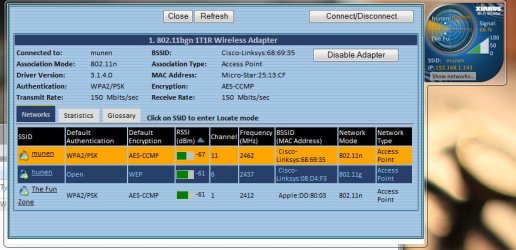
If after the driver has been installed and you're still having an issue.... from your wireless computer pls. install and run Xirrus Wi-Fi Inspector.
Click on the 'Show Networks' to display all wireless networks on the xirrus icon on your desktop of if you have one running in a corner. Tap the Printscreen key on your keyboard, open up Paint then choose Edit from the Menu and select Paste, then SAVE it. Upload and attached it here, click on Go Advanced and locate Manage Attachments Tab and attached the file.

Please let us know.
 

My Computer My Computer

At a glance

Win7 & Win8 64bitIntel i5
Computer Manufacturer/Model Number
Lenovo Desktop/Samsung Laptop
OS
Win7 & Win8 64bit
CPU
Intel i5
Internet Speed
Charter-20 Mbps
Antivirus
Avast
Browser
FF, IE9 and Chrome
I got the driver issue solved by downloading the driver through intel since it's part of their motherboard.

I actually reposted my issue here http://www.sevenforums.com/network-sharing/160549-slow-wireless-internet.html, but couldn't figure out how to delete this one. Thanks for the reply though.

I'll post the Xirrus results in the other thread, though given the performance of the other devices on the network I don't think the network itself is the issue.
 

My Computer My Computer

At a glance

Windows 7 Home PremiumIntel Core i5-2500k8GB Patriot® Division2 G2 DDR3-1600nVidia GeForce GTX 460 1GB GDDR5
Computer Manufacturer/Model Number
Maingear Vybe
OS
Windows 7 Home Premium
CPU
Intel Core i5-2500k
Motherboard
Intel® DP67BG Extreme
Memory
8GB Patriot® Division2 G2 DDR3-1600
Graphics Card(s)
nVidia GeForce GTX 460 1GB GDDR5
Sound Card
w/ motherboard
Monitor(s) Displays
NEC EA231WMi
Hard Drives
64GB Crucial® RealSSD™ C300 SATA 6G
1.0TB Samsung F3 7200rpm 32MB Cache SATA
PSU
620 Watt Seasonic® S12II 80+ Bronze
Case
VYBE Super Stock ATX Compact Chassis
Cooling
MAINGEAR LiquidX 1500 Supercooler, fans elsewhere

Attachments

  • Untitled-1.jpg
    Untitled-1.jpg
    89.3 KB · Views: 304

My Computer My Computer

At a glance

Windows 7 Home PremiumIntel Core i5-2500k8GB Patriot® Division2 G2 DDR3-1600nVidia GeForce GTX 460 1GB GDDR5
Computer Manufacturer/Model Number
Maingear Vybe
OS
Windows 7 Home Premium
CPU
Intel Core i5-2500k
Motherboard
Intel® DP67BG Extreme
Memory
8GB Patriot® Division2 G2 DDR3-1600
Graphics Card(s)
nVidia GeForce GTX 460 1GB GDDR5
Sound Card
w/ motherboard
Monitor(s) Displays
NEC EA231WMi
Hard Drives
64GB Crucial® RealSSD™ C300 SATA 6G
1.0TB Samsung F3 7200rpm 32MB Cache SATA
PSU
620 Watt Seasonic® S12II 80+ Bronze
Case
VYBE Super Stock ATX Compact Chassis
Cooling
MAINGEAR LiquidX 1500 Supercooler, fans elsewhere
You may do a 'Report Post' and inform the Mod to merge your Threads, best that way.
I actually reposted my issue here Slow Wireless Internet, but couldn't figure out how to delete this one. Thanks for the reply though.
Signal doesn't look very good. You may change the Wireless Channel to 1 or 6 and see if it helps.
Sometimes lowering the Network Security helps too. You have a very secured network which is excellent. Let's try a WPA, test your connection, if it didn't improve then try WEP (not a good choice).

Another good option if you want to keep WPA2 setting, you might want to look into some High-Gain Antenna or Device, 9dBi or higher shd work. If your router has detachable Antenna you may replace them with High Gain Antenna and they're very reasonable.

It's also good to keep your router's firmware up to date, for better peformance.
 

My Computer My Computer

At a glance

Win7 & Win8 64bitIntel i5
Computer Manufacturer/Model Number
Lenovo Desktop/Samsung Laptop
OS
Win7 & Win8 64bit
CPU
Intel i5
Internet Speed
Charter-20 Mbps
Antivirus
Avast
Browser
FF, IE9 and Chrome
Well first off, it's not my network, it's my roommates and I don't have administrative access to the router. But I think the crux of the issue is elsewhere because my download speed goes up at least 5x just by tethering my PC to my phone (Speedtest results can be seen in the other thread) while my phone is connected to the same wireless network at basically the same physical location (+/- 1-2 feet).
 

My Computer My Computer

At a glance

Windows 7 Home PremiumIntel Core i5-2500k8GB Patriot® Division2 G2 DDR3-1600nVidia GeForce GTX 460 1GB GDDR5
Computer Manufacturer/Model Number
Maingear Vybe
OS
Windows 7 Home Premium
CPU
Intel Core i5-2500k
Motherboard
Intel® DP67BG Extreme
Memory
8GB Patriot® Division2 G2 DDR3-1600
Graphics Card(s)
nVidia GeForce GTX 460 1GB GDDR5
Sound Card
w/ motherboard
Monitor(s) Displays
NEC EA231WMi
Hard Drives
64GB Crucial® RealSSD™ C300 SATA 6G
1.0TB Samsung F3 7200rpm 32MB Cache SATA
PSU
620 Watt Seasonic® S12II 80+ Bronze
Case
VYBE Super Stock ATX Compact Chassis
Cooling
MAINGEAR LiquidX 1500 Supercooler, fans elsewhere
Thanks for letting me know that it's not your wireless network, I obtained the info from this post.
Basically I have very slow internet 90% of the time over my wireless network, and probably at least once every couple hours the connection seems to halt altogether and require a reset of the connection via the Networking and Sharing page.
If the wireless is being shared off from the network, most likely each one of you or some are hogging the bandwidth.
Any P2P downloads, heavy gaming, video streaming will cause this issue.

If you can't access the router's settings and priviledge and don't own the broadband subscription it will be hard for you to take control of such activities if bandwidth is heavily being utilized.

Updating the bandwidth to a higher speed, >10mbps will be a better solution or having your own subscription.
 
Last edited:

My Computer My Computer

At a glance

Win7 & Win8 64bitIntel i5
Computer Manufacturer/Model Number
Lenovo Desktop/Samsung Laptop
OS
Win7 & Win8 64bit
CPU
Intel i5
Internet Speed
Charter-20 Mbps
Antivirus
Avast
Browser
FF, IE9 and Chrome

My Computer My Computer

At a glance

Windows 7 Home PremiumIntel Core i5-2500k8GB Patriot® Division2 G2 DDR3-1600nVidia GeForce GTX 460 1GB GDDR5
Computer Manufacturer/Model Number
Maingear Vybe
OS
Windows 7 Home Premium
CPU
Intel Core i5-2500k
Motherboard
Intel® DP67BG Extreme
Memory
8GB Patriot® Division2 G2 DDR3-1600
Graphics Card(s)
nVidia GeForce GTX 460 1GB GDDR5
Sound Card
w/ motherboard
Monitor(s) Displays
NEC EA231WMi
Hard Drives
64GB Crucial® RealSSD™ C300 SATA 6G
1.0TB Samsung F3 7200rpm 32MB Cache SATA
PSU
620 Watt Seasonic® S12II 80+ Bronze
Case
VYBE Super Stock ATX Compact Chassis
Cooling
MAINGEAR LiquidX 1500 Supercooler, fans elsewhere
Just thought of QoS (Quality of Service), please have a read here.
Well first off, it's not my network, it's my roommates and I don't have administrative access to the router. But I think the crux of the issue is elsewhere because my download speed goes up at least 5x just by tethering my PC to my phone (Speedtest results can be seen in the other thread) while my phone is connected to the same wireless network at basically the same physical location (+/- 1-2 feet).
I really don't know what else to tell you.
 

My Computer My Computer

At a glance

Win7 & Win8 64bitIntel i5
Computer Manufacturer/Model Number
Lenovo Desktop/Samsung Laptop
OS
Win7 & Win8 64bit
CPU
Intel i5
Internet Speed
Charter-20 Mbps
Antivirus
Avast
Browser
FF, IE9 and Chrome
Tried disabling QoS without any noticeable difference. Does anyone have any other ideas as to what might be going on with this issue?
 

My Computer My Computer

At a glance

Windows 7 Home PremiumIntel Core i5-2500k8GB Patriot® Division2 G2 DDR3-1600nVidia GeForce GTX 460 1GB GDDR5
Computer Manufacturer/Model Number
Maingear Vybe
OS
Windows 7 Home Premium
CPU
Intel Core i5-2500k
Motherboard
Intel® DP67BG Extreme
Memory
8GB Patriot® Division2 G2 DDR3-1600
Graphics Card(s)
nVidia GeForce GTX 460 1GB GDDR5
Sound Card
w/ motherboard
Monitor(s) Displays
NEC EA231WMi
Hard Drives
64GB Crucial® RealSSD™ C300 SATA 6G
1.0TB Samsung F3 7200rpm 32MB Cache SATA
PSU
620 Watt Seasonic® S12II 80+ Bronze
Case
VYBE Super Stock ATX Compact Chassis
Cooling
MAINGEAR LiquidX 1500 Supercooler, fans elsewhere
Try disabling unnecessary Startup Apps and Services running from msconfig.
Click on Start, type msconfig press enter, locate Start up Tab first and uncheck/disable Startup Apps that are needed.
Some Anti-Virus/Security Software do hog resources.
 

My Computer My Computer

At a glance

Win7 & Win8 64bitIntel i5
Computer Manufacturer/Model Number
Lenovo Desktop/Samsung Laptop
OS
Win7 & Win8 64bit
CPU
Intel i5
Internet Speed
Charter-20 Mbps
Antivirus
Avast
Browser
FF, IE9 and Chrome
I only have KeePass and Avast! running on startup, and while I agree that Avast can potential hog my network resources that doesn't help me fix the crux of the issue which is that using different independent methods for connecting to the same network (well, and a 3g tether just for a speed reference) yields drastically different connection speeds in the same background environment, and indeed tested within as close of a time frame as possible ~1 minute. Is it possible that Windows isn't properly using my wireless adapter, or worse that there was something wrong with it out of the box?
 

My Computer My Computer

At a glance

Windows 7 Home PremiumIntel Core i5-2500k8GB Patriot® Division2 G2 DDR3-1600nVidia GeForce GTX 460 1GB GDDR5
Computer Manufacturer/Model Number
Maingear Vybe
OS
Windows 7 Home Premium
CPU
Intel Core i5-2500k
Motherboard
Intel® DP67BG Extreme
Memory
8GB Patriot® Division2 G2 DDR3-1600
Graphics Card(s)
nVidia GeForce GTX 460 1GB GDDR5
Sound Card
w/ motherboard
Monitor(s) Displays
NEC EA231WMi
Hard Drives
64GB Crucial® RealSSD™ C300 SATA 6G
1.0TB Samsung F3 7200rpm 32MB Cache SATA
PSU
620 Watt Seasonic® S12II 80+ Bronze
Case
VYBE Super Stock ATX Compact Chassis
Cooling
MAINGEAR LiquidX 1500 Supercooler, fans elsewhere
i've read this thread, i dont understand why you arent or it only has been suggested once, that you change your wireless channel

.....change your wireless channel. go get the admin or ask your room mate to do so.

also do install a sniffer, to possibly shed some light on this also

http://www.metageek.net/products/inssider/
 

My Computer My Computer

At a glance

Windows 7 Ultimate N 64-bitAMD Black Edition - AMD Phenom X4 2.5 GHz Pro...8GB DDR2 800MHZ BRANDEDPalti NVIDIA GeForce GTX 460
Computer Manufacturer/Model Number
Windows 7 Ultimate 64-bit
OS
Windows 7 Ultimate N 64-bit
CPU
AMD Black Edition - AMD Phenom X4 2.5 GHz Processor
Motherboard
Bio Star
Memory
8GB DDR2 800MHZ BRANDED
Graphics Card(s)
Palti NVIDIA GeForce GTX 460
Monitor(s) Displays
3D 23.6" & 22"
Screen Resolution
1920x1080@120Hz
Hard Drives
313GB SAMSUNG SAMSUNG HD321KJ
PSU
OCZ 600W StealthXStream PSU, PowerWhisper, Active PFC
Internet Speed
22793
Windows 7 wireless internet issues

all,

I am also having issues with the Wireless internet in windows 7 as mentioned by other members. HOw to fix it up.

pls help me
 

My Computer My Computer

At a glance

windows 7
OS
windows 7
Back
Top