Solved Various problems, possible drivers/services broken or missing

LeoLeonardoIII

New member
Local time
2:56 PM
Messages
12
Location
Northern AL, atm
I've started having various problems cropping up for a couple month now.. Among them being:
Periodic, random de-selection of the current active window, rendering it seemingly unresponsive to input until clicked on again.
"The Windows Security Center service can't be started."
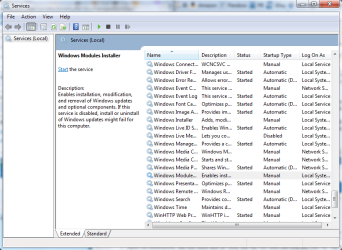
"windows Update cannot currently check for updates, because the service is not running. You may need to restart your computer." Upon looking for fixes, I noticed that I don't even HAVE the windows update service anymore.
Every time on start-up, an error appears, so soon that the desktop hasn't even appeared after logging in, claiming that string.dll is missing.
Cannot turn Windows Firewall on, as once I attempt to do so I get the message "Windows Firewall can't change some of your settings. Error code 0x80070424"
Also: "There was an error opening the Windows Firewall with Advanced Security snap-in" ... "The Windows Firewall with Advanced Security snap-in failed to load. Restart the Windows Firewall service on the computer that you are managing. Error code 0x6D9."
Task manager used to fail to start. "The program can't start because pcwum.dll is missing from your computer. Try reinstalling the program to fix this problem."
Right before my last system restore, various drivers went missing or were broken, including, from what I remember, the one that my adaptor uses to connect to the internet. I could not connect either wirelessly or via direct connection with the ethernet.
I'm afraid to restart my computer, lest the drivers break again...
Also I tried running a virus scan with AVG while the internet drivers were broken, and apparently it said I'm missing a driver to scan too? I have no idea >.< AVG isn't on my computer atm anyway..
I also never received the disc with the operating system on it when I got the computer, so it's not like I can do a complete reinstall or get the missing things from there if that even is an option.
I've tried running the 'sfc /scannow' thing, and it supposedly fixed everything it could, however nothing changed noticeably.
 

Attachments
  • DxDiag.txt
    DxDiag.txt
    37.6 KB · Views: 2
  • System.png
    System.png
    65 KB · Views: 11
  • Whereismywindowsupdate.png
    Whereismywindowsupdate.png
    35 KB · Views: 6

My Computer

Computer Manufacturer/Model Number
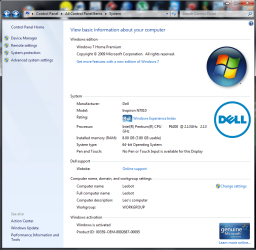
Inspiron 17r
OS
Windows 7 Home Premium
You are infected with something. Use another computer to download and then burn and run virus and malware scanners.
 

My Computer

OS
7 x64
How might I do that? Is there a scanner you would recommend? I have used Malware Bytes, which turned up nothing last i scanned, so..
 

My Computer

Computer Manufacturer/Model Number
Inspiron 17r
OS
Windows 7 Home Premium
You need to do Offline scans. Make a Boot CD/DVD or USB Thumb of the tools and run them from booting from the CD/DVD or thumb drive you make of the Offline scanners.

Malware bytes has a offline tool and check the Tutorials on this site for virus scanners. Try the Win Defender tool.

Microsoft
 

My Computer

OS
7 x64
Win Defender Offline did not work, I tried 4 different times, on two different computers, but every time it turned up an error, saying there was a problem preparing the flash drive or something.
Malware bytes' scan turned up clean, and I disinfected my computer using "ad-aware" that my friend uses, removed 11 items..
However there does not appear to be any change.
 

My Computer

Computer Manufacturer/Model Number
Inspiron 17r
OS
Windows 7 Home Premium
I also never received the disc with the operating system on it when I got the computer, so it's not like I can do a complete reinstall or get the missing things from there if that even is an option.

You CAN do a complete reinstall IF you have the 25 character Product Key, which should be on a sticker on the PC.
 

My Computer

Computer type
PC/Desktop
Computer Manufacturer/Model Number
Ignatz Special; 4 speed manual gearbox; factory air conditioning; one of one
OS
Windows 7 Home Premium SP1, 64-bit
CPU
Intel Skylake i5-6600K, not overclocked
Motherboard
AsRock Z170M Extreme 4, micro ATX
Memory
8 GB HyperX DDR4-2666 (2 x 4 GB)
Graphics Card(s)
none; graphics are integrated on CPU
Sound Card
onboard: Realtek ALC1150; external: USB Behringer UF0-202
Monitor(s) Displays
Dell S2340M 23 inch IPS
Screen Resolution
1600 x 900
Hard Drives
System: Crucial MX100 series SSD, 128 GB;
Data: Samsung Spinpoint 103SJ, 1 TB;
Backup: WD Caviar Green WD30EZRX-00D8PB0, 3 TB
PSU
Rosewill SilentNight 500 watt fanless, semi-modular
Case
Antec Solo II
Cooling
Noctua NH-U12S; Noctua F12 intake, Noctua S12A exhaust
Keyboard
Microsoft 200 6JH-00001 USB
Mouse
Dell or Microsoft optical wired; USB
Antivirus
Microsoft Security Essentials and Malwarebytes Premium
Browser
Pale Moon
Other Info
All fans PWM; speeds at idle: CPU circa 500 rpm; intake circa 600 rpm; exhaust circa 600 rpm; CPU temps 27 idle and 47 C load in a warm room (27 C/81 F) when running Intel Extreme Tuning Utility stress test.
You CAN do a complete reinstall IF you have the 25 character Product Key, which should be on a sticker on the PC.
Is that so? What would that entail? How would I do this? Is there any significant risk to doing a reinstall like this? I just checked, and I DO have the product key sticker in place still.
 

My Computer

Computer Manufacturer/Model Number
Inspiron 17r
OS
Windows 7 Home Premium
How far back can you do a system restore?? Just throwing it out there.
 

My Computer

Computer type
PC/Desktop
Computer Manufacturer/Model Number
custom build
OS
windows 7 home premium 64bit sp1
CPU
fx 8350 oc to 4.3 1.368v
Motherboard
gigabyte 970a-ud3p
Memory
16 gb crucial ballistic sport 1600mhz
Graphics Card(s)
nvidia gt 740
Sound Card
nvidia
Monitor(s) Displays
cheap
Screen Resolution
1680x1050
Hard Drives
240gb samsung 850 evo
1tb toshiba 7200rpm hhd
PSU
600 watts- corsair
Case
thermaltake snow edition
Cooling
ocz vendetta ii
Keyboard
dell
Mouse
dell
Internet Speed
34 mbps
Antivirus
avast
Browser
chrome
How far back can you do a system restore?? Just throwing it out there.
The earliest there was one for 9/18/2011, 4:23:22 PM
I would have used that, but..
The selected backup could not be found. System restore is looking for a restore point that is on your backup. Choose a different restore point.
When the internet died entirely for me, the only way I got it back up was by using a system restore for 11/01/2012 (the very beginning of this month) and as of right now that one does not appear to exist anymore.
So no, I've looked into system restore but it does no good, unfortunately.
 

My Computer

Computer Manufacturer/Model Number
Inspiron 17r
OS
Windows 7 Home Premium
sorry to hear that. If you have a backup, or a copy of your operating system you could do a fresh install. thats the best i got.
Oh, yea, like someone else mentioned, get some antivirus from somewhere else, and use a flash drive to put it on your computer. i use avast free, and it works well.
but as for you missing dll's? i got nothing, i would be doing the same as you
good luck
 

My Computer

Computer type
PC/Desktop
Computer Manufacturer/Model Number
custom build
OS
windows 7 home premium 64bit sp1
CPU
fx 8350 oc to 4.3 1.368v
Motherboard
gigabyte 970a-ud3p
Memory
16 gb crucial ballistic sport 1600mhz
Graphics Card(s)
nvidia gt 740
Sound Card
nvidia
Monitor(s) Displays
cheap
Screen Resolution
1680x1050
Hard Drives
240gb samsung 850 evo
1tb toshiba 7200rpm hhd
PSU
600 watts- corsair
Case
thermaltake snow edition
Cooling
ocz vendetta ii
Keyboard
dell
Mouse
dell
Internet Speed
34 mbps
Antivirus
avast
Browser
chrome
You CAN do a complete reinstall IF you have the 25 character Product Key, which should be on a sticker on the PC.
Is that so? What would that entail? How would I do this? Is there any significant risk to doing a reinstall like this? I just checked, and I DO have the product key sticker in place still.

You would go here:

Official Windows 7 SP1 ISO from Digital River « My Digital Life

and download the ISO that matches the version your PC shipped with---Home Premium 32-bit, Home Premium 64-bit, or whatever it is.

Burn that ISO to a disk. Install from that disk. Activate it with your Product Key.

There is no risk. It's the one way you can do a clean install at no cost. You should probably go to your PC manufacturer's web site and download the LAN driver (Ethernet driver) so you will be able to re-establish an Internet connection following the clean install. The other necessary drivers should be included within the downloaded ISO.

Then go to Windows update and let Windows update itself.

You would have to back up all of your personal data beforehand because it would be deleted during the clean install. The clean install will delete all partitions you now have and create new partitions as needed.

You will have to reinstall all programs. You will lose any programs your PC manufacturer may have included in addition to Windows. You will end up with a legal and activated Windows installation. No more and no less.

When you buy Windows, what you are paying for is that Product Key. Safeguard it.
 

My Computer

Computer type
PC/Desktop
Computer Manufacturer/Model Number
Ignatz Special; 4 speed manual gearbox; factory air conditioning; one of one
OS
Windows 7 Home Premium SP1, 64-bit
CPU
Intel Skylake i5-6600K, not overclocked
Motherboard
AsRock Z170M Extreme 4, micro ATX
Memory
8 GB HyperX DDR4-2666 (2 x 4 GB)
Graphics Card(s)
none; graphics are integrated on CPU
Sound Card
onboard: Realtek ALC1150; external: USB Behringer UF0-202
Monitor(s) Displays
Dell S2340M 23 inch IPS
Screen Resolution
1600 x 900
Hard Drives
System: Crucial MX100 series SSD, 128 GB;
Data: Samsung Spinpoint 103SJ, 1 TB;
Backup: WD Caviar Green WD30EZRX-00D8PB0, 3 TB
PSU
Rosewill SilentNight 500 watt fanless, semi-modular
Case
Antec Solo II
Cooling
Noctua NH-U12S; Noctua F12 intake, Noctua S12A exhaust
Keyboard
Microsoft 200 6JH-00001 USB
Mouse
Dell or Microsoft optical wired; USB
Antivirus
Microsoft Security Essentials and Malwarebytes Premium
Browser
Pale Moon
Other Info
All fans PWM; speeds at idle: CPU circa 500 rpm; intake circa 600 rpm; exhaust circa 600 rpm; CPU temps 27 idle and 47 C load in a warm room (27 C/81 F) when running Intel Extreme Tuning Utility stress test.
It needs to be an ordinary DVD.
 

My Computer

Computer type
PC/Desktop
Computer Manufacturer/Model Number
Ignatz Special; 4 speed manual gearbox; factory air conditioning; one of one
OS
Windows 7 Home Premium SP1, 64-bit
CPU
Intel Skylake i5-6600K, not overclocked
Motherboard
AsRock Z170M Extreme 4, micro ATX
Memory
8 GB HyperX DDR4-2666 (2 x 4 GB)
Graphics Card(s)
none; graphics are integrated on CPU
Sound Card
onboard: Realtek ALC1150; external: USB Behringer UF0-202
Monitor(s) Displays
Dell S2340M 23 inch IPS
Screen Resolution
1600 x 900
Hard Drives
System: Crucial MX100 series SSD, 128 GB;
Data: Samsung Spinpoint 103SJ, 1 TB;
Backup: WD Caviar Green WD30EZRX-00D8PB0, 3 TB
PSU
Rosewill SilentNight 500 watt fanless, semi-modular
Case
Antec Solo II
Cooling
Noctua NH-U12S; Noctua F12 intake, Noctua S12A exhaust
Keyboard
Microsoft 200 6JH-00001 USB
Mouse
Dell or Microsoft optical wired; USB
Antivirus
Microsoft Security Essentials and Malwarebytes Premium
Browser
Pale Moon
Other Info
All fans PWM; speeds at idle: CPU circa 500 rpm; intake circa 600 rpm; exhaust circa 600 rpm; CPU temps 27 idle and 47 C load in a warm room (27 C/81 F) when running Intel Extreme Tuning Utility stress test.
right.

58997.iso
 

My Computer

Computer type
PC/Desktop
Computer Manufacturer/Model Number
Ignatz Special; 4 speed manual gearbox; factory air conditioning; one of one
OS
Windows 7 Home Premium SP1, 64-bit
CPU
Intel Skylake i5-6600K, not overclocked
Motherboard
AsRock Z170M Extreme 4, micro ATX
Memory
8 GB HyperX DDR4-2666 (2 x 4 GB)
Graphics Card(s)
none; graphics are integrated on CPU
Sound Card
onboard: Realtek ALC1150; external: USB Behringer UF0-202
Monitor(s) Displays
Dell S2340M 23 inch IPS
Screen Resolution
1600 x 900
Hard Drives
System: Crucial MX100 series SSD, 128 GB;
Data: Samsung Spinpoint 103SJ, 1 TB;
Backup: WD Caviar Green WD30EZRX-00D8PB0, 3 TB
PSU
Rosewill SilentNight 500 watt fanless, semi-modular
Case
Antec Solo II
Cooling
Noctua NH-U12S; Noctua F12 intake, Noctua S12A exhaust
Keyboard
Microsoft 200 6JH-00001 USB
Mouse
Dell or Microsoft optical wired; USB
Antivirus
Microsoft Security Essentials and Malwarebytes Premium
Browser
Pale Moon
Other Info
All fans PWM; speeds at idle: CPU circa 500 rpm; intake circa 600 rpm; exhaust circa 600 rpm; CPU temps 27 idle and 47 C load in a warm room (27 C/81 F) when running Intel Extreme Tuning Utility stress test.
One last thing before I try to do the reinstall over the weekend..
I'm not sure which LAN driver thing to get, I found this site: Certified LAN Drivers
via google, but I'm not sure which is the one I need.
I know it's an inspiron, from dell
i see 'intel' on a sticker..
but under the 'intel' section there are a lot of different ones, and when searching Intel's site for help I got lost ^^;
 

My Computer

Computer Manufacturer/Model Number
Inspiron 17r
OS
Windows 7 Home Premium
Problem

See attachment..
I tried using some microsoft fixit thing a couple times, but it never could do anything at all..
 

Attachments

  • Untitled.png
    Untitled.png
    292.1 KB · Views: 2

My Computer

Computer Manufacturer/Model Number
Inspiron 17r
OS
Windows 7 Home Premium
Alright. Progress report.

I tried it a different way, booting from the disc and formatting my HD from there before installing from the disc..
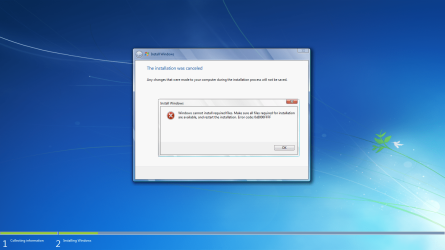
That was the only way it worked, else it gave me errors and said a file that was in the recovery drive (D:) was corrupted and unreadable, and thus refused to let me proceed.
After I backed up all my files and before I did the OS reinstall, I had put in more work searching for the appropriate driver for my ethernet/wireless/lan whatever, and downloaded all of the ones that might work, and save them on one of my externals for later retrieval. One of them in fact did, which I discovered after the install.
After liberal use of Windows Update, which is finally present, and a dozen or so computer restarts, everything vital seems to be in order.
The only problems so far are on my own part; namely I didn't know where my browsers bookmarks lie within my computer when I was backing certain things up, so those were all lost, but ah well...
Thus far my computer seems to be in decent working order, though a bit slower than usual, but the fact of the matter is it is healthy.

I thank you all for your assistance, it is immensely appreciated.
 

My Computer

Computer Manufacturer/Model Number
Inspiron 17r
OS
Windows 7 Home Premium
Back
Top