Various programs keep "not responding" as well as the OS itself

CycloneDash

New member
Local time
2:27 AM
Messages
10
Various programs keep "not responding" as well as the OS itself

I don't know what to do with this computer, anymore. I have had nothing but problems with it. Anyway, I have Windows 7 Home Premium 64 bit. This problem began in 2012, and persisted for a few months. I ultimately found no solution, and gave up. For some reason, the issue just resolved itself eventually. Now, after a year, it's happening again. Firefox, Steam, VLC ect..Just randomly hang for 30 seconds. It's not exclusive to any program, and I noticed that it gradually spread to Windows Explorer in general. It also happens frequently when I'm gaming. But whether I'm gaming or not, this problem persists. Windows Security Essentials has found no virus, and I've installed Avast and Spybot just to be sure, uninstalling them when they found nothing. I've noticed other posts with similar problems, but have had a hard time following instructions. A lot of it is jargon that I suppose is common sense to the right tech savvy person. Well, I suppose that's the wrong way to put it. Some of the solutions just aren't detailed enough.

I need step by step instructions. I've repeatedly been forced to restart my computer. Even now as I type this, Firefox will stop responding. But the program that has the worst of it is Skype, I've noticed. Eventually, I plan on building my own gaming computer in the future, but I'm afraid right now I'm stuck with this computer. So I have to try my hardest to not smash this Dell Inspiron 580 to pieces.
 

My Computer My Computer

Computer type
PC/Desktop
Computer Manufacturer/Model Number
Dell
OS
Windows 7 64 bit Home Premium
First thing you should do is completely fill out your system specs so we can tell how powerful or puny that thing is.

Particularly what CPU and how much RAM?

Can't do much troubleshooting without that info.
 

My Computer My Computer

Computer type
PC/Desktop
Computer Manufacturer/Model Number
Ignatz Special; 4 speed manual gearbox; factory air conditioning; one of one
OS
Windows 7 Home Premium SP1, 64-bit
CPU
Intel Skylake i5-6600K, not overclocked
Motherboard
AsRock Z170M Extreme 4, micro ATX
Memory
8 GB HyperX DDR4-2666 (2 x 4 GB)
Graphics Card(s)
none; graphics are integrated on CPU
Sound Card
onboard: Realtek ALC1150; external: USB Behringer UF0-202
Monitor(s) Displays
Dell S2340M 23 inch IPS
Screen Resolution
1600 x 900
Hard Drives
System: Crucial MX100 series SSD, 128 GB;
Data: Samsung Spinpoint 103SJ, 1 TB;
Backup: WD Caviar Green WD30EZRX-00D8PB0, 3 TB
PSU
Rosewill SilentNight 500 watt fanless, semi-modular
Case
Antec Solo II
Cooling
Noctua NH-U12S; Noctua F12 intake, Noctua S12A exhaust
Keyboard
Microsoft 200 6JH-00001 USB
Mouse
Dell or Microsoft optical wired; USB
Antivirus
Microsoft Security Essentials and Malwarebytes Premium
Browser
Pale Moon
Other Info
All fans PWM; speeds at idle: CPU circa 500 rpm; intake circa 600 rpm; exhaust circa 600 rpm; CPU temps 27 idle and 47 C load in a warm room (27 C/81 F) when running Intel Extreme Tuning Utility stress test.
I apologize for being so vague. This is the best I can give you, through running dxdiag. Whether that's enough or not enough, let me know.

Intel(R) Core(TM) i3 CPU 540 @.307GHz, ~3.1GHz
6144MB RAM
Nvidia Geforce 310
DirectX 11
 

My Computer My Computer

Computer type
PC/Desktop
Computer Manufacturer/Model Number
Dell
OS
Windows 7 64 bit Home Premium
I apologize for being so vague. This is the best I can give you, through running dxdiag. Whether that's enough or not enough, let me know.

Intel(R) Core(TM) i3 CPU 540 @.307GHz, ~3.1GHz
6144MB RAM
Nvidia Geforce 310
DirectX 11

Not a powerhouse, but tolerable.

Check these things to start:

Open Task Manager; under "physical memory", how much is shown as "available"? Under "system", how many processes are shown?

Reboot and check the same two things again, immediately, without opening any applications or web browsers. How many of those 2 things now?

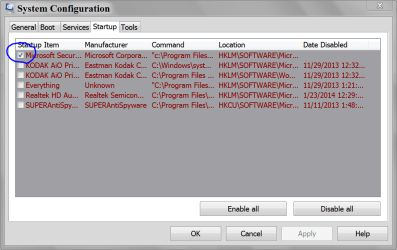
After the reboot, type "msconfig" in the start button search box. Poke msconfig.exe. Go to "startup" tab. How many items have a checkmark next to them?

When did you last do a complete virus and anti-malware scan?

What, if any, applications do you use to "clean up" or "tune" your PC?
 

My Computer My Computer

Computer type
PC/Desktop
Computer Manufacturer/Model Number
Ignatz Special; 4 speed manual gearbox; factory air conditioning; one of one
OS
Windows 7 Home Premium SP1, 64-bit
CPU
Intel Skylake i5-6600K, not overclocked
Motherboard
AsRock Z170M Extreme 4, micro ATX
Memory
8 GB HyperX DDR4-2666 (2 x 4 GB)
Graphics Card(s)
none; graphics are integrated on CPU
Sound Card
onboard: Realtek ALC1150; external: USB Behringer UF0-202
Monitor(s) Displays
Dell S2340M 23 inch IPS
Screen Resolution
1600 x 900
Hard Drives
System: Crucial MX100 series SSD, 128 GB;
Data: Samsung Spinpoint 103SJ, 1 TB;
Backup: WD Caviar Green WD30EZRX-00D8PB0, 3 TB
PSU
Rosewill SilentNight 500 watt fanless, semi-modular
Case
Antec Solo II
Cooling
Noctua NH-U12S; Noctua F12 intake, Noctua S12A exhaust
Keyboard
Microsoft 200 6JH-00001 USB
Mouse
Dell or Microsoft optical wired; USB
Antivirus
Microsoft Security Essentials and Malwarebytes Premium
Browser
Pale Moon
Other Info
All fans PWM; speeds at idle: CPU circa 500 rpm; intake circa 600 rpm; exhaust circa 600 rpm; CPU temps 27 idle and 47 C load in a warm room (27 C/81 F) when running Intel Extreme Tuning Utility stress test.
It's my first desktop, so I suppose it's to be expected. Previously, I had used laptops or shared desktops with family.

Anyway, under physical memory, there's a total of 6007. Under system, there are 72 processes. Now, after restarting, there's 6007 physical memory, and 81 processes. It keeps switching between 78, 77, and 80, however..The only two startup programs are TP-LINK which I use to connect to wi-fi, and a program called Uniblue(Which I installed in a frantic attempt to remedy the issue a month ago), which doesn't start up properly, and instead displays an error message. Clicking OK simply closes it for good, unless I restart again.

The last time I did a full complete virus scan was last month, and I used Microsoft Security Essentials. Nothing came up. Is an anti-malware scan different from a virus scan? If so, then I haven't done the latter. Also, I'm having a hard time opening the start menu, as the instant I do, it stops responding. For some reason, today is the worst it's ever been. Once I click on Msconfig, everything within the start menu is unclickable, and I also can't type. Thankfully, it opened five minutes later.

Anyhow, there are 14 startup items with checks. I'll type them out as listed:

Microsoft Security Client
Microsoft Xbox 360 Accessories
Google Update
Browser Extensions
Search Protection
CCleaner
Adobe Reader and Acrobat Manager
PCFixSpeed
Realplayer Cloud(32-bit)
RealDownloader
Codecpackupdatechecker
Mcafee Security Scanner +
RealPlayer Cloud
TP-LINK Wireless Configuration Utility

Also, the only application I use is Microsoft Security Essentials. I have CCleaner, but I don't even know how to use it. And I've never used Mcafee.
 

My Computer My Computer

Computer type
PC/Desktop
Computer Manufacturer/Model Number
Dell
OS
Windows 7 64 bit Home Premium
You did not mention "available" RAM. You gave only the total figure. Look next to the word "available".

The startup items are revealing.

You apparently have McAfee installed. Why? It's bad form to have 2 anti-virus programs. You say you are using MSE. McAfee is hard to get rid of. You should go to the McAfee web site and locate their uninstall utility and run it to get rid of McAfee.

I don't recognize many of those 14 things. Why "PC Fix Speed"? Sounds like a terrible idea.

Windows will run fine with all of that crap unchecked. I'd uncheck 13 of the 14. Leave MS Security client checked. Reboot and see if there is any change.

Malware is different than virus. You should probably get an anti-malware app, but not just yet.

I have about 55 processes running, so you have a fairly high number.

Go back to msconfig and look at services tab.

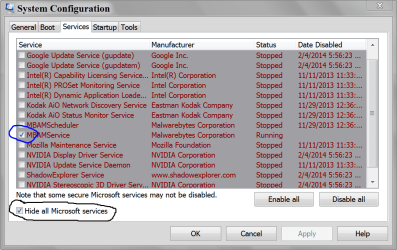
Put a checkmark next to "hide all Microsoft services". How many services are left and shown as "running"? I've got 8 non Microsoft running right now.


Report back with those numbers and then immediately try to get rid of McAfee.

Uninstall the "PC Fix Speed" and any other crap you installed in an attempt to fix this issue.

Keep CCleaner, but it certainly doesn't have to be checked in msconfig.
 

My Computer My Computer

Computer type
PC/Desktop
Computer Manufacturer/Model Number
Ignatz Special; 4 speed manual gearbox; factory air conditioning; one of one
OS
Windows 7 Home Premium SP1, 64-bit
CPU
Intel Skylake i5-6600K, not overclocked
Motherboard
AsRock Z170M Extreme 4, micro ATX
Memory
8 GB HyperX DDR4-2666 (2 x 4 GB)
Graphics Card(s)
none; graphics are integrated on CPU
Sound Card
onboard: Realtek ALC1150; external: USB Behringer UF0-202
Monitor(s) Displays
Dell S2340M 23 inch IPS
Screen Resolution
1600 x 900
Hard Drives
System: Crucial MX100 series SSD, 128 GB;
Data: Samsung Spinpoint 103SJ, 1 TB;
Backup: WD Caviar Green WD30EZRX-00D8PB0, 3 TB
PSU
Rosewill SilentNight 500 watt fanless, semi-modular
Case
Antec Solo II
Cooling
Noctua NH-U12S; Noctua F12 intake, Noctua S12A exhaust
Keyboard
Microsoft 200 6JH-00001 USB
Mouse
Dell or Microsoft optical wired; USB
Antivirus
Microsoft Security Essentials and Malwarebytes Premium
Browser
Pale Moon
Other Info
All fans PWM; speeds at idle: CPU circa 500 rpm; intake circa 600 rpm; exhaust circa 600 rpm; CPU temps 27 idle and 47 C load in a warm room (27 C/81 F) when running Intel Extreme Tuning Utility stress test.
McAfee could of come with the computer as a trial version and was never completely removed.

Uniblue is a NO NO. It could be very difficult to repair the damage such a program has already done.

Please follow ignatzatsonic guidance and I will go back to watching.
 

My Computer My Computer

Computer type
PC/Desktop
Computer Manufacturer/Model Number
Home made Desktop
OS
Windows 10 Pro. 64/ version 1709 Windows 7 Pro/64
CPU
Intel i7-6800K @ 4.3
Motherboard
ASUS X-99 Deluxe II
Memory
Corsair Platinum 16 gig @2400
Graphics Card(s)
EVGA GTX 1070 OC
Monitor(s) Displays
Asus 27" LED LCD/VE278Q
Screen Resolution
1920-1080 or 1280-720 HDMI
Hard Drives
INTEL SSD 730-240 Gb Sata 3.0/
PSU
EVGA Platium 1200W
Case
Phanteks Luxe Tempered Glass 8 fans/ one radiator
Cooling
XSPC/ Water Cooled CPU
Keyboard
Das 4 Professional
Mouse
Logitech M705/MX Anywhere 2-S
Internet Speed
100 mbits
Antivirus
Microsoft Security Essentials/ Malwarebytes Premium 3.0/ SAS
Browser
I.E. 11 default/Firefox/ ISP Time Warner Cable/Spectrum
Other Info
LG BluRay Burner/
Sound system-KLipsch-THX/
Icy Dock ssd Hot Swap bays.
I may be illiterate when it comes to the real technicalities of my computer, but I honestly don't recall a time that I ever installed the PCFix program. Now, one of you mentioned Uniblue..How do I go about removing that? Can I simply uninstall it from the computer, or would you advise I scan it?

I have now unchecked all but Microsoft Security Client, and restarted my system. The processes now fluctuate between 66 and 64. I have noticed a significant improvement in regards to hanging. I tested the system by accessing the start menu, and typing in the search bar. Before, Explorer would hang constantly. Now I notice little hanging, but it still happens occasionally. I also notice that in general, the performance of my computer is much faster. Windows such as control panel pop up instantaneously instead of hanging.

After clicking "Hide all Microsoft Services", I counted up to 24 services, 12 of which are running, while 12 are stopped. Would you like me to list them for you? Now uninstalling a few programs. However, the PCfixSpeed is not in the list of programs and features. I have successfully uninstalled Mcafee through the control panel.

I've found guides on how to remove PCFixSpeed, but I'd prefer to wait for your response before taking action. I've already done enough to screw up my system.

By opening the start menu, and right clicking on computer, I went to properties, which then gave me the system information, such as installed memory(RAM). It is 6.00 GB (5.87 GB Usable). I hope this is what you're looking for.

Edit: So far, what you've been telling me to do has really improved performance. I haven't seen Skype hang even once while talking to my friends. And I am very grateful. It seems like we're really getting to the bottom of the issue. I haven't tried opening games from Steam yet, though.
 
Last edited:

My Computer My Computer

Computer type
PC/Desktop
Computer Manufacturer/Model Number
Dell
OS
Windows 7 64 bit Home Premium

My Computer My Computer

Computer type
PC/Desktop
Computer Manufacturer/Model Number
Home made Desktop
OS
Windows 10 Pro. 64/ version 1709 Windows 7 Pro/64
CPU
Intel i7-6800K @ 4.3
Motherboard
ASUS X-99 Deluxe II
Memory
Corsair Platinum 16 gig @2400
Graphics Card(s)
EVGA GTX 1070 OC
Monitor(s) Displays
Asus 27" LED LCD/VE278Q
Screen Resolution
1920-1080 or 1280-720 HDMI
Hard Drives
INTEL SSD 730-240 Gb Sata 3.0/
PSU
EVGA Platium 1200W
Case
Phanteks Luxe Tempered Glass 8 fans/ one radiator
Cooling
XSPC/ Water Cooled CPU
Keyboard
Das 4 Professional
Mouse
Logitech M705/MX Anywhere 2-S
Internet Speed
100 mbits
Antivirus
Microsoft Security Essentials/ Malwarebytes Premium 3.0/ SAS
Browser
I.E. 11 default/Firefox/ ISP Time Warner Cable/Spectrum
Other Info
LG BluRay Burner/
Sound system-KLipsch-THX/
Icy Dock ssd Hot Swap bays.
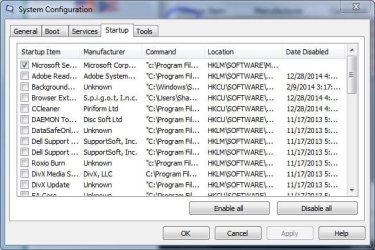
Here's a snip of the window. Unfortunately, I can't resize the window to show you all of the items. If you'd like me to snip it in parts, let me know.
 

Attachments

  • Windows System config.JPG
    Windows System config.JPG
    61.4 KB · Views: 12

My Computer My Computer

Computer type
PC/Desktop
Computer Manufacturer/Model Number
Dell
OS
Windows 7 64 bit Home Premium

My Computer My Computer

Computer type
PC/Desktop
Computer Manufacturer/Model Number
Home made Desktop
OS
Windows 10 Pro. 64/ version 1709 Windows 7 Pro/64
CPU
Intel i7-6800K @ 4.3
Motherboard
ASUS X-99 Deluxe II
Memory
Corsair Platinum 16 gig @2400
Graphics Card(s)
EVGA GTX 1070 OC
Monitor(s) Displays
Asus 27" LED LCD/VE278Q
Screen Resolution
1920-1080 or 1280-720 HDMI
Hard Drives
INTEL SSD 730-240 Gb Sata 3.0/
PSU
EVGA Platium 1200W
Case
Phanteks Luxe Tempered Glass 8 fans/ one radiator
Cooling
XSPC/ Water Cooled CPU
Keyboard
Das 4 Professional
Mouse
Logitech M705/MX Anywhere 2-S
Internet Speed
100 mbits
Antivirus
Microsoft Security Essentials/ Malwarebytes Premium 3.0/ SAS
Browser
I.E. 11 default/Firefox/ ISP Time Warner Cable/Spectrum
Other Info
LG BluRay Burner/
Sound system-KLipsch-THX/
Icy Dock ssd Hot Swap bays.
Oh boy, that's going to take awhile. Well, I'll get right on that. Anyway, I can confirm that Microsoft security client is the only item checked on that list.

Edit: Are the number of items on there abnormal to you? I can only name five programs that I ever use..Windows Media Player, VLC(If WMP refuses to play songs), Steam, Firefox, and Skype. Do you think I should do some cleaning up?
 

My Computer My Computer

Computer type
PC/Desktop
Computer Manufacturer/Model Number
Dell
OS
Windows 7 64 bit Home Premium
Very good.
You are following ignatzatsonic instructions quite nicely.
We thank you for that. It make helping you go a lot smother.


Just to give you a idea of NON Microsoft Services that I have checked. It varies from user to user and computer to computer. I do not use Auto Update for anything. Which means I must do it manually.
Some like manual and some like Auto.

MSCONFIG SERVICES.PNG
 

My Computer My Computer

Computer type
PC/Desktop
Computer Manufacturer/Model Number
Home made Desktop
OS
Windows 10 Pro. 64/ version 1709 Windows 7 Pro/64
CPU
Intel i7-6800K @ 4.3
Motherboard
ASUS X-99 Deluxe II
Memory
Corsair Platinum 16 gig @2400
Graphics Card(s)
EVGA GTX 1070 OC
Monitor(s) Displays
Asus 27" LED LCD/VE278Q
Screen Resolution
1920-1080 or 1280-720 HDMI
Hard Drives
INTEL SSD 730-240 Gb Sata 3.0/
PSU
EVGA Platium 1200W
Case
Phanteks Luxe Tempered Glass 8 fans/ one radiator
Cooling
XSPC/ Water Cooled CPU
Keyboard
Das 4 Professional
Mouse
Logitech M705/MX Anywhere 2-S
Internet Speed
100 mbits
Antivirus
Microsoft Security Essentials/ Malwarebytes Premium 3.0/ SAS
Browser
I.E. 11 default/Firefox/ ISP Time Warner Cable/Spectrum
Other Info
LG BluRay Burner/
Sound system-KLipsch-THX/
Icy Dock ssd Hot Swap bays.
There's no telling what you have done that you don't recall doing.

Dell's should have a way of restoring to factory specs. I've never heard of one that didn't.

That's probably what I'd do if I wasn't satisfied with performance after trying to remove stuff bit by bit.

You could even do a clean install, which would eliminate all the questionable stuff Dell may have put on the PC at the Dell factory that you don't care about or will never use.

You'd have to back up your stuff first or else lose it entirely and start over just as you did the day you bought the machine.

And then develop some good habits so you don't find yourself in the same situation.

Just use Windows own utilities, plus possibly CCleaner and Malwarebytes.
 

My Computer My Computer

Computer type
PC/Desktop
Computer Manufacturer/Model Number
Ignatz Special; 4 speed manual gearbox; factory air conditioning; one of one
OS
Windows 7 Home Premium SP1, 64-bit
CPU
Intel Skylake i5-6600K, not overclocked
Motherboard
AsRock Z170M Extreme 4, micro ATX
Memory
8 GB HyperX DDR4-2666 (2 x 4 GB)
Graphics Card(s)
none; graphics are integrated on CPU
Sound Card
onboard: Realtek ALC1150; external: USB Behringer UF0-202
Monitor(s) Displays
Dell S2340M 23 inch IPS
Screen Resolution
1600 x 900
Hard Drives
System: Crucial MX100 series SSD, 128 GB;
Data: Samsung Spinpoint 103SJ, 1 TB;
Backup: WD Caviar Green WD30EZRX-00D8PB0, 3 TB
PSU
Rosewill SilentNight 500 watt fanless, semi-modular
Case
Antec Solo II
Cooling
Noctua NH-U12S; Noctua F12 intake, Noctua S12A exhaust
Keyboard
Microsoft 200 6JH-00001 USB
Mouse
Dell or Microsoft optical wired; USB
Antivirus
Microsoft Security Essentials and Malwarebytes Premium
Browser
Pale Moon
Other Info
All fans PWM; speeds at idle: CPU circa 500 rpm; intake circa 600 rpm; exhaust circa 600 rpm; CPU temps 27 idle and 47 C load in a warm room (27 C/81 F) when running Intel Extreme Tuning Utility stress test.
Ah, crap. Wait a minute. You showed me the startup tab, which I only have Microsoft Security Client checked. However, on services, I have 23 checked items, with "Hide All Microsoft Services" checked.

Acrobat Active File Monitor V8
Adobe Acrobat Update Service
Adobe Flash Player Update service
Dock Login Service
FLEXnet licensing Service
GoToAssist
Google Update Service(gupdate)
Google Update Service(gupdatem)
HTCMonitorService
InstallDriver Table Manager
Mozilla Maintenance Service
NVIDIA Display Driver Service.
Internet Pass-Through Service
RealNetworks Downloader Resolver Service
RealPlayer Cloud Service
RealPlayer Update Service
SetupARservice
SoftThinks Agent Service
Skype Updater
SupportSoft Sprocket Service (Dellcoms)
SupportSoft Sprocket service(DellSupportCenter)
Steam Client Service(Which I frequently use)
UMVPFSrv

I apologize profusely for the confusion.

Edit: I knew it would come to this. It's going to be frustrating to backup everything, considering pictures and music are all over the place. Then I have to manage all my bookmarks on Firefox, as well as my saved games on Steam. I'm open to the idea, however..I just need to figure out how I'll go about it. It'd be a lot easier if I had a restore point from before this problem began, but of course I don't.
 

My Computer My Computer

Computer type
PC/Desktop
Computer Manufacturer/Model Number
Dell
OS
Windows 7 64 bit Home Premium
I see ignatzatsonic has come and gone.

Your choice on what you want to do. Think on it a while.

I get the feeling I'm in the way so I will just watch. Wish you and your computer well.
 

My Computer My Computer

Computer type
PC/Desktop
Computer Manufacturer/Model Number
Home made Desktop
OS
Windows 10 Pro. 64/ version 1709 Windows 7 Pro/64
CPU
Intel i7-6800K @ 4.3
Motherboard
ASUS X-99 Deluxe II
Memory
Corsair Platinum 16 gig @2400
Graphics Card(s)
EVGA GTX 1070 OC
Monitor(s) Displays
Asus 27" LED LCD/VE278Q
Screen Resolution
1920-1080 or 1280-720 HDMI
Hard Drives
INTEL SSD 730-240 Gb Sata 3.0/
PSU
EVGA Platium 1200W
Case
Phanteks Luxe Tempered Glass 8 fans/ one radiator
Cooling
XSPC/ Water Cooled CPU
Keyboard
Das 4 Professional
Mouse
Logitech M705/MX Anywhere 2-S
Internet Speed
100 mbits
Antivirus
Microsoft Security Essentials/ Malwarebytes Premium 3.0/ SAS
Browser
I.E. 11 default/Firefox/ ISP Time Warner Cable/Spectrum
Other Info
LG BluRay Burner/
Sound system-KLipsch-THX/
Icy Dock ssd Hot Swap bays.
Edit: I knew it would come to this. It's going to be frustrating to backup everything, considering pictures and music are all over the place. Then I have to manage all my bookmarks on Firefox, as well as my saved games on Steam. I'm open to the idea, however..I just need to figure out how I'll go about it. .

Well you don't have to do it if you are satisfied with performance after trying to fix things.

But you've apparently got some bad habits and may soon enough find yourself back in the same situation.

If you did a clean install or a restore to factory specs, you might foul that up over time also. The way out of that would be to develop good habits and some knowledge, or be willing to periodically do fresh installs, or to use an imaging application that could restore you to some particular point in time when things were fine.

If you are going to start over, you'd need to get some type of backup drive if you want to keep your steam stuff, pictures, etc. I have no idea how large that stuff is combined or how disorganized and difficult it would be to locate.
 

My Computer My Computer

Computer type
PC/Desktop
Computer Manufacturer/Model Number
Ignatz Special; 4 speed manual gearbox; factory air conditioning; one of one
OS
Windows 7 Home Premium SP1, 64-bit
CPU
Intel Skylake i5-6600K, not overclocked
Motherboard
AsRock Z170M Extreme 4, micro ATX
Memory
8 GB HyperX DDR4-2666 (2 x 4 GB)
Graphics Card(s)
none; graphics are integrated on CPU
Sound Card
onboard: Realtek ALC1150; external: USB Behringer UF0-202
Monitor(s) Displays
Dell S2340M 23 inch IPS
Screen Resolution
1600 x 900
Hard Drives
System: Crucial MX100 series SSD, 128 GB;
Data: Samsung Spinpoint 103SJ, 1 TB;
Backup: WD Caviar Green WD30EZRX-00D8PB0, 3 TB
PSU
Rosewill SilentNight 500 watt fanless, semi-modular
Case
Antec Solo II
Cooling
Noctua NH-U12S; Noctua F12 intake, Noctua S12A exhaust
Keyboard
Microsoft 200 6JH-00001 USB
Mouse
Dell or Microsoft optical wired; USB
Antivirus
Microsoft Security Essentials and Malwarebytes Premium
Browser
Pale Moon
Other Info
All fans PWM; speeds at idle: CPU circa 500 rpm; intake circa 600 rpm; exhaust circa 600 rpm; CPU temps 27 idle and 47 C load in a warm room (27 C/81 F) when running Intel Extreme Tuning Utility stress test.
This isn't exactly an easy choice. Also, I don't think I'll be willing to risk fouling it up. I have everything I need, right now. Steam, Skype, Firefox, and WMP to listen to music. I'm done tampering with my system after this mess. I started up Terraria, a game on Steam which usually stops responding about every three minutes. However, I have noticed no such hanging except for when the game was loading.

But I've still thought about restoring it to factory settings. But I'd like a step by step guide on how exactly I can do that, before I attempt anything.
 

My Computer My Computer

Computer type
PC/Desktop
Computer Manufacturer/Model Number
Dell
OS
Windows 7 64 bit Home Premium

My Computer My Computer

Computer type
PC/Desktop
Computer Manufacturer/Model Number
Ignatz Special; 4 speed manual gearbox; factory air conditioning; one of one
OS
Windows 7 Home Premium SP1, 64-bit
CPU
Intel Skylake i5-6600K, not overclocked
Motherboard
AsRock Z170M Extreme 4, micro ATX
Memory
8 GB HyperX DDR4-2666 (2 x 4 GB)
Graphics Card(s)
none; graphics are integrated on CPU
Sound Card
onboard: Realtek ALC1150; external: USB Behringer UF0-202
Monitor(s) Displays
Dell S2340M 23 inch IPS
Screen Resolution
1600 x 900
Hard Drives
System: Crucial MX100 series SSD, 128 GB;
Data: Samsung Spinpoint 103SJ, 1 TB;
Backup: WD Caviar Green WD30EZRX-00D8PB0, 3 TB
PSU
Rosewill SilentNight 500 watt fanless, semi-modular
Case
Antec Solo II
Cooling
Noctua NH-U12S; Noctua F12 intake, Noctua S12A exhaust
Keyboard
Microsoft 200 6JH-00001 USB
Mouse
Dell or Microsoft optical wired; USB
Antivirus
Microsoft Security Essentials and Malwarebytes Premium
Browser
Pale Moon
Other Info
All fans PWM; speeds at idle: CPU circa 500 rpm; intake circa 600 rpm; exhaust circa 600 rpm; CPU temps 27 idle and 47 C load in a warm room (27 C/81 F) when running Intel Extreme Tuning Utility stress test.
Don't you think maybe this is a little extreme? I may be irresponsible, but not to the extent that you're assuming I am. I honestly don't download much. Of anything, really. Uniblue was a result of trying to remedy the hanging myself, as it was suggested that one of my drivers could be out of date, and that could be the result of hanging. My computer is running greater now than it has in the past few months, since I've followed your instructions. It's not as if I download 40 things a month. Hell, the last thing I ever even downloaded was Java so that I could run Minecraft, and that was last week. Most of everything else is either music, or JPEGs.

I'm certainly looking for any reason not to do a full system restore. But if that's the only option that I have at this point, then I guess I'll prepare.
 

My Computer My Computer

Computer type
PC/Desktop
Computer Manufacturer/Model Number
Dell
OS
Windows 7 64 bit Home Premium
Back
Top