Verrrrrry Slow Internet Connection - wireless

Vital Anaconda

New member
Local time
9:08 PM
Messages
7
This is a new computer with Built-in wireless LAN (802.11b/g/n).
Windows 7 Home Premium Edition 64-bit
AMD Athlon™ II quad-core processor 645*
6GB PC3-10600 DDR3 SDRAM
ATI Radeon HD 4200 integrated graphics

Router is netgear wnr834bv2 with up-to-date firmware

All windows updates installed.
All latest drivers installed.

Removed Norton, running Avast.
No viruses or malware.

When it is connected with ethernet cable the download speed (per speedtest) is 23.91Mbps but on the wireless connection the speed drops to 0.41 Mbps.

I ran it in safe mode plus network and got the same results.
Also moved computer to within 3 feet of router and got same results.

We had a desktop running Vista with a wireless connection in the exact same spot - no speed issues there. Also my laptop gets 21Mbps on speedtest in that location.

HP tech support says it is to be expected and to run an ethernet cable. If that was possible I wouldn't have bought the model with the wireless card installed.

I hope this is enough information for someone to help me.
 

My Computer

Computer Manufacturer/Model Number
HP Pavillion p7-1054 Desktop
OS
Windows 7 Home Premium 64 bit
CPU
Athlon II X4 645
Memory
6 Gb
Graphics Card(s)
ATI Radeon HD 4200
Have you tried a different driver for your wireless LAN?
 

My Computer

Computer type
PC/Desktop
Computer Manufacturer/Model Number
Self Build
OS
MS Windows 7 Professional 64-bit SP1
CPU
AMD FX(tm)-6100 Six-Core Processor Socket AM3+ (942)
Motherboard
ASUSTeK COMPUTER INC. SABERTOOTH 990FX (AM3r2)
Memory
8.00 GB Dual-Channel DDR3 @ 802MHz (11-11-11-36) 1.5Volts
Graphics Card(s)
NVIDIA GeForce GTX 560 Ti
Sound Card
Onboard Realtek HD
Monitor(s) Displays
shimian (1920x1080@60Hz)
Screen Resolution
1920*1080
Hard Drives
OCZ-AGIL ITY3 SATA Disk Device 120GB
PSU
Corsair TX 750
Case
Corsair
Cooling
WaterCooled
Keyboard
Microsoft Wired
Mouse
Logitech USB Optical TiltWheel Mouse
Internet Speed
Realtek PCIe GBE Family Controller 20MB*1MB
Antivirus
Avast
Browser
Firefox
Other Info
150GB Internal Hard Drive for Backing Up Important Files -
Hauppauge Nova-DT Dual DVB-T Tuner Device (+IR) -
USB PC Camera with Mic (SN9C105)
Have you tried a different driver for your wireless LAN?

No, I sort of assumed the latest would be the best. Perhaps that wasn't a good assumption - how do I find an older version? It is difficult to search for anything on that computer, I am using my laptop to surf.
 

My Computer

Computer Manufacturer/Model Number
HP Pavillion p7-1054 Desktop
OS
Windows 7 Home Premium 64 bit
CPU
Athlon II X4 645
Memory
6 Gb
Graphics Card(s)
ATI Radeon HD 4200
I have borrowed a wireless USB adapter and I am getting 20 Mbsp downloads with that. It isn't an elegant fix and it bugs me that I now have to buy an adapter that I shouldn't have had to, but it will have to do for now.
 

My Computer

Computer Manufacturer/Model Number
HP Pavillion p7-1054 Desktop
OS
Windows 7 Home Premium 64 bit
CPU
Athlon II X4 645
Memory
6 Gb
Graphics Card(s)
ATI Radeon HD 4200
Hate talking to myself but the latest update is the USB adapter is now down to less than 10 Mbps. Nothing else changed.

Has nobody else experienced this or better yet, found a real fix for it?
 

My Computer

Computer Manufacturer/Model Number
HP Pavillion p7-1054 Desktop
OS
Windows 7 Home Premium 64 bit
CPU
Athlon II X4 645
Memory
6 Gb
Graphics Card(s)
ATI Radeon HD 4200
Run System Information For Windows.

Scroll down to the bottom of the page and get SIW Without Installer (English-Only).
Under Hardware, click on Network adapters. Post the make and model number of your wireless device.
Also post the info for the motherboard.

Have you installed all updates, preferably while connected via Ethernet cable as it will go much faster. There may be an update for your wireless card already available.
 

My Computer

Computer type
PC/Desktop
Computer Manufacturer/Model Number
Lenovo IdeaCenter 450
OS
Windows 10 Pro X64
CPU
Intel Quad Core i7-4770 @ 3.4Ghz
Memory
16.0GB PC3-12800 DDR3 SDRAM 1600 MHz
Graphics Card(s)
Intel Integrated HD Graphics
Sound Card
Realtek HD Audio
Monitor(s) Displays
HP 22" LCD
Screen Resolution
1680 x 1050
Hard Drives
250GB Samsung EVO SATA-3 SSD
2TB Seagate ST2000DM001 SATA-2
1.5TB Seagate ST3150041AS SATA
Keyboard
Dell USB
Mouse
Lenovo USB
Internet Speed
Cable via Road Runner 3MB Upload, 30MB Download
Antivirus
Windows Defender, MBAM Pro, MBAE
Browser
Seamonkey
Other Info
UEFI/GPT
PLDS DVD-RW DH16AERSH
I have installed all updates and all driver updates (actually there were no newer drivers).

The installed card only shows up as "802.11n Wireless LAN Card" but it is manufactured by Ralink.

From SIW:

Network Adapter 1
Model SMCWUSB-G 802.11g Wireless USB 2.0 Adapter
Status Connected
MAC Address 00-13-F7-E9-3A-E6

Type WIRELESS LAN
Speed 54 Mbps
Network Adapter 2
Model 802.11n Wireless LAN Card
Description [14] 802.11n Wireless LAN Card
Status Connected (it can't be - the card is disabled)

Network Adapter 3
Model SMCWUSB-G 802.11g Wireless USB 2.0 Adapter
Description [17] SMCWUSB-G 802.11g Wireless USB 2.0 Adapter
Status Connected

Network Adapter 4
Model Realtek PCIe FE Family Controller
Description [8] Realtek PCIe FE Family Controller
Status Connected


Manufacturer FOXCONN
Model 2AB1
Version 1.00
Serial Number
Bridge
North Bridge AMD 785G Revision 00
South Bridge AMD SB700 Revision 00
CPU
Name AMD Athlon(tm) II X4 645 Processor
Cpu Socket Socket AM3 (938)
Max CPU Speed 3100 MHz
Memory
Maximum Capacity 16384 MBytes
Maximum Memory Module Size [unknown]
Memory Slots 4
Memory Type DDR3
System Slots
ISA 0
PCI 5
AGP 0
VL-BUS 0
EISA 0
PCMCIA 0
ExpressCard 0
MCA 0
 

My Computer

Computer Manufacturer/Model Number
HP Pavillion p7-1054 Desktop
OS
Windows 7 Home Premium 64 bit
CPU
Athlon II X4 645
Memory
6 Gb
Graphics Card(s)
ATI Radeon HD 4200
The SIW output has this for Wireless:

Status Connected (it can't be - the card is disabled)


Open Device Manager, expand Network Adapters.
Right click on the Wireless adapter and select Enable.

See if that helps.
 

My Computer

Computer type
PC/Desktop
Computer Manufacturer/Model Number
Lenovo IdeaCenter 450
OS
Windows 10 Pro X64
CPU
Intel Quad Core i7-4770 @ 3.4Ghz
Memory
16.0GB PC3-12800 DDR3 SDRAM 1600 MHz
Graphics Card(s)
Intel Integrated HD Graphics
Sound Card
Realtek HD Audio
Monitor(s) Displays
HP 22" LCD
Screen Resolution
1680 x 1050
Hard Drives
250GB Samsung EVO SATA-3 SSD
2TB Seagate ST2000DM001 SATA-2
1.5TB Seagate ST3150041AS SATA
Keyboard
Dell USB
Mouse
Lenovo USB
Internet Speed
Cable via Road Runner 3MB Upload, 30MB Download
Antivirus
Windows Defender, MBAM Pro, MBAE
Browser
Seamonkey
Other Info
UEFI/GPT
PLDS DVD-RW DH16AERSH
I disabled it because it was even slower than the USB adapter.
 

My Computer

Computer Manufacturer/Model Number
HP Pavillion p7-1054 Desktop
OS
Windows 7 Home Premium 64 bit
CPU
Athlon II X4 645
Memory
6 Gb
Graphics Card(s)
ATI Radeon HD 4200
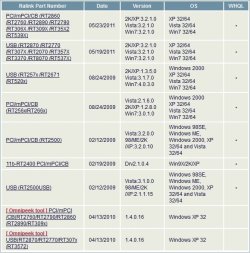
If you enable it and run SIW again, does it provide any more info? The Ralink page goes by part number:

Ralink.jpg

Where are you getting your driver from? How do you know it's the l;atest available?

Edit: You could also try this, see if something starting at boot time is the problem: http://support.microsoft.com/kb/929135
 

My Computer

Computer type
PC/Desktop
Computer Manufacturer/Model Number
Lenovo IdeaCenter 450
OS
Windows 10 Pro X64
CPU
Intel Quad Core i7-4770 @ 3.4Ghz
Memory
16.0GB PC3-12800 DDR3 SDRAM 1600 MHz
Graphics Card(s)
Intel Integrated HD Graphics
Sound Card
Realtek HD Audio
Monitor(s) Displays
HP 22" LCD
Screen Resolution
1680 x 1050
Hard Drives
250GB Samsung EVO SATA-3 SSD
2TB Seagate ST2000DM001 SATA-2
1.5TB Seagate ST3150041AS SATA
Keyboard
Dell USB
Mouse
Lenovo USB
Internet Speed
Cable via Road Runner 3MB Upload, 30MB Download
Antivirus
Windows Defender, MBAM Pro, MBAE
Browser
Seamonkey
Other Info
UEFI/GPT
PLDS DVD-RW DH16AERSH
Ah, right. Sorry I misunderstood your meaning first time. Still no model number.

Type WIRELESS LAN
Speed 54 Mbps
Network Adapter 2
Model 802.11n Wireless LAN Card
Status Connected
MAC Address 68-A3-C4-BE-8A-33

I was trusting the computer when it said there were no newer drivers. A mistake maybe?
Driver version is 3.1.13.0 dated 11/4/2010 (from device manager. Note that neither the version nor date correspond to anything on the Ralink chart?)

I'll try the clean boot next - is that different that booting in safe mode? I did the safe mode + network and that didn't alter the download speed at all.

I do appreciate you trying to help on this.
 

My Computer

Computer Manufacturer/Model Number
HP Pavillion p7-1054 Desktop
OS
Windows 7 Home Premium 64 bit
CPU
Athlon II X4 645
Memory
6 Gb
Graphics Card(s)
ATI Radeon HD 4200
Clean boot is a bit more restrictive than Safe Mode with Networking. Worth trying.

For the wireless card, open device manager, expand network adapters then double click on the wireless adapter.
Click on the Details tab then select Hardware Ids from the Property dropdown. In the value field you will see something like this:
PCI\VEN_14E4&DEV_1677&SUBSYS_01751028&REV_01
PCI\VEN_14E4&DEV_1677&SUBSYS_01751028
PCI\VEN_14E4&DEV_1677&CC_020000
PCI\VEN_14E4&DEV_1677&CC_0200
If you hold the Ctrl key and click on each one so they are all selected you can then press Ctrl+c to copy the data to the clipboard. Patste in into a reply here. Maybe that will tell me exactly what adapter you have.
 

My Computer

Computer type
PC/Desktop
Computer Manufacturer/Model Number
Lenovo IdeaCenter 450
OS
Windows 10 Pro X64
CPU
Intel Quad Core i7-4770 @ 3.4Ghz
Memory
16.0GB PC3-12800 DDR3 SDRAM 1600 MHz
Graphics Card(s)
Intel Integrated HD Graphics
Sound Card
Realtek HD Audio
Monitor(s) Displays
HP 22" LCD
Screen Resolution
1680 x 1050
Hard Drives
250GB Samsung EVO SATA-3 SSD
2TB Seagate ST2000DM001 SATA-2
1.5TB Seagate ST3150041AS SATA
Keyboard
Dell USB
Mouse
Lenovo USB
Internet Speed
Cable via Road Runner 3MB Upload, 30MB Download
Antivirus
Windows Defender, MBAM Pro, MBAE
Browser
Seamonkey
Other Info
UEFI/GPT
PLDS DVD-RW DH16AERSH
Back
Top