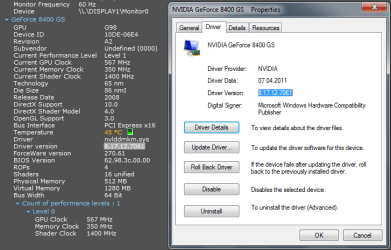
version of network and display drivers!

Maheshputt

New member
Member
Local time
11:37 AM
Messages
88
hi!

I have ATI Radeon 4350 and realtek network card.I have updated the drivers recently.I downloaded the catayst suite 11.5 from AMD and the realtek driver 7.045 from realtek.
When i went and checked the driver version in device manager it shows the graphics card version as 8.850.0.0 date 4/11/2011 and the realtek network card driver as 7.45.516.2011,date as 5/16/2011. I want to know if i have the latest drivers installed because in the manufacturer's website the graphics card posted date is shown as 5/9/2011 and the realtek network card updated date as 5/11/2011 whereas in device manager it shows the network card driver date as 5/16/2011 and the graphics card driver date as 4/19/2011.
How do i know if i have the latest version of the drivers as the version mentioned in the manufacturer's website is not matching with the version displayed in the device manager.
 

My Computer

Computer Manufacturer/Model Number
DELL INSPIRION Desktop 545S
OS
windows7 64 bit
CPU
Intel core 2 DUO 8400@3GHZ
Motherboard
DELL INC OT287N SOCKET 775
Memory
4GB
Graphics Card(s)
ATI RADEON 4350 512 MB Ram
Sound Card
Realtek HIGH definition Audio
Monitor(s) Displays
DELL TFT monitor dell 1910N
Screen Resolution
1366*768 pixels
Hard Drives
SATA Hard drive came with the system
Internet Speed
512 MBPS broad band connection
Maybe you need to install Speccy,check system infro from there. For me is working fine with Speccy and Device Manager
ver.png
 

My Computer

Computer type
PC/Desktop
Computer Manufacturer/Model Number
Custom Build
OS
Windows 10 Pro x64
CPU
Intel Core i5 4440 @Stock
Motherboard
Gigabyte Z97 D3H
Memory
4 x 4GB HyperX Fury DDR3
Graphics Card(s)
Gigabyte GTX 1050Ti O4G
Sound Card
Integrated
Monitor(s) Displays
Dell P2417H
Screen Resolution
1920 x 1080
Hard Drives
Samsung EVO 850 120GB / Toshiba DT01ACA050 1TB 7200prm 32MB
PSU
Riotoro Onyx 750W
Case
NZXT H500 Black-Red
Cooling
Stock CPU + NZXT 120mm + 2x120mm red fans
Keyboard
Modecom Volcano Lanparty
Mouse
Asus ROG Gladius / DeepCool E-Pad Plus
Internet Speed
DOCSIS 50/3 Mbit
Browser
Google Chrome
Other Info
Asus K55VJ(i5 3210M, GT635M / 2GB, 8GB DDR3, 500GB HDD)
speccy does not show the drivers at all.
 

My Computer

Computer Manufacturer/Model Number
DELL INSPIRION Desktop 545S
OS
windows7 64 bit
CPU
Intel core 2 DUO 8400@3GHZ
Motherboard
DELL INC OT287N SOCKET 775
Memory
4GB
Graphics Card(s)
ATI RADEON 4350 512 MB Ram
Sound Card
Realtek HIGH definition Audio
Monitor(s) Displays
DELL TFT monitor dell 1910N
Screen Resolution
1366*768 pixels
Hard Drives
SATA Hard drive came with the system
Internet Speed
512 MBPS broad band connection
does speccy also show the network drivers?
 

My Computer

Computer Manufacturer/Model Number
DELL INSPIRION Desktop 545S
OS
windows7 64 bit
CPU
Intel core 2 DUO 8400@3GHZ
Motherboard
DELL INC OT287N SOCKET 775
Memory
4GB
Graphics Card(s)
ATI RADEON 4350 512 MB Ram
Sound Card
Realtek HIGH definition Audio
Monitor(s) Displays
DELL TFT monitor dell 1910N
Screen Resolution
1366*768 pixels
Hard Drives
SATA Hard drive came with the system
Internet Speed
512 MBPS broad band connection
No,it don't show the version. Download SIW and you will see all the informations from your pc,including those from Network.
Go to Hardware->Devices and there expand Network Adapters. Found there your network card and expand it. Scroll a bit and you'll see Driver Version.
 

My Computer

Computer type
PC/Desktop
Computer Manufacturer/Model Number
Custom Build
OS
Windows 10 Pro x64
CPU
Intel Core i5 4440 @Stock
Motherboard
Gigabyte Z97 D3H
Memory
4 x 4GB HyperX Fury DDR3
Graphics Card(s)
Gigabyte GTX 1050Ti O4G
Sound Card
Integrated
Monitor(s) Displays
Dell P2417H
Screen Resolution
1920 x 1080
Hard Drives
Samsung EVO 850 120GB / Toshiba DT01ACA050 1TB 7200prm 32MB
PSU
Riotoro Onyx 750W
Case
NZXT H500 Black-Red
Cooling
Stock CPU + NZXT 120mm + 2x120mm red fans
Keyboard
Modecom Volcano Lanparty
Mouse
Asus ROG Gladius / DeepCool E-Pad Plus
Internet Speed
DOCSIS 50/3 Mbit
Browser
Google Chrome
Other Info
Asus K55VJ(i5 3210M, GT635M / 2GB, 8GB DDR3, 500GB HDD)
hi,

It is showing the same version that is there in the device manager.The version of network adapter that is there in the devicemanager is 7.45.516.2011.I went to the realtek website and i downloaded the drivers manually but it shows as 7.045
in the website and the date as 5/23/2011.So i am not able to know if the correct driver is getting updated.I downloaded SIW and went hardware->Devices->and expanded the network adapters but it still shows the driver version as 7.45.516.2011.That is why i am confused as to why it is not showing the correct version in device manager.
 

My Computer

Computer Manufacturer/Model Number
DELL INSPIRION Desktop 545S
OS
windows7 64 bit
CPU
Intel core 2 DUO 8400@3GHZ
Motherboard
DELL INC OT287N SOCKET 775
Memory
4GB
Graphics Card(s)
ATI RADEON 4350 512 MB Ram
Sound Card
Realtek HIGH definition Audio
Monitor(s) Displays
DELL TFT monitor dell 1910N
Screen Resolution
1366*768 pixels
Hard Drives
SATA Hard drive came with the system
Internet Speed
512 MBPS broad band connection
Hm.. So if SIW says that the version is 7.45.516.2011 that means that you have that version installed.
Try first to remove the old drivers and install newest version. :sarc:
 

My Computer

Computer type
PC/Desktop
Computer Manufacturer/Model Number
Custom Build
OS
Windows 10 Pro x64
CPU
Intel Core i5 4440 @Stock
Motherboard
Gigabyte Z97 D3H
Memory
4 x 4GB HyperX Fury DDR3
Graphics Card(s)
Gigabyte GTX 1050Ti O4G
Sound Card
Integrated
Monitor(s) Displays
Dell P2417H
Screen Resolution
1920 x 1080
Hard Drives
Samsung EVO 850 120GB / Toshiba DT01ACA050 1TB 7200prm 32MB
PSU
Riotoro Onyx 750W
Case
NZXT H500 Black-Red
Cooling
Stock CPU + NZXT 120mm + 2x120mm red fans
Keyboard
Modecom Volcano Lanparty
Mouse
Asus ROG Gladius / DeepCool E-Pad Plus
Internet Speed
DOCSIS 50/3 Mbit
Browser
Google Chrome
Other Info
Asus K55VJ(i5 3210M, GT635M / 2GB, 8GB DDR3, 500GB HDD)
will it not be a problem if i unistall the drivers?
 

My Computer

Computer Manufacturer/Model Number
DELL INSPIRION Desktop 545S
OS
windows7 64 bit
CPU
Intel core 2 DUO 8400@3GHZ
Motherboard
DELL INC OT287N SOCKET 775
Memory
4GB
Graphics Card(s)
ATI RADEON 4350 512 MB Ram
Sound Card
Realtek HIGH definition Audio
Monitor(s) Displays
DELL TFT monitor dell 1910N
Screen Resolution
1366*768 pixels
Hard Drives
SATA Hard drive came with the system
Internet Speed
512 MBPS broad band connection
I'm not sure about that. I haven't do that before,I just update the latest version of some driver,without uninstalling older one.
 

My Computer

Computer type
PC/Desktop
Computer Manufacturer/Model Number
Custom Build
OS
Windows 10 Pro x64
CPU
Intel Core i5 4440 @Stock
Motherboard
Gigabyte Z97 D3H
Memory
4 x 4GB HyperX Fury DDR3
Graphics Card(s)
Gigabyte GTX 1050Ti O4G
Sound Card
Integrated
Monitor(s) Displays
Dell P2417H
Screen Resolution
1920 x 1080
Hard Drives
Samsung EVO 850 120GB / Toshiba DT01ACA050 1TB 7200prm 32MB
PSU
Riotoro Onyx 750W
Case
NZXT H500 Black-Red
Cooling
Stock CPU + NZXT 120mm + 2x120mm red fans
Keyboard
Modecom Volcano Lanparty
Mouse
Asus ROG Gladius / DeepCool E-Pad Plus
Internet Speed
DOCSIS 50/3 Mbit
Browser
Google Chrome
Other Info
Asus K55VJ(i5 3210M, GT635M / 2GB, 8GB DDR3, 500GB HDD)
okay thanks for the help.I will try that.
 

My Computer

Computer Manufacturer/Model Number
DELL INSPIRION Desktop 545S
OS
windows7 64 bit
CPU
Intel core 2 DUO 8400@3GHZ
Motherboard
DELL INC OT287N SOCKET 775
Memory
4GB
Graphics Card(s)
ATI RADEON 4350 512 MB Ram
Sound Card
Realtek HIGH definition Audio
Monitor(s) Displays
DELL TFT monitor dell 1910N
Screen Resolution
1366*768 pixels
Hard Drives
SATA Hard drive came with the system
Internet Speed
512 MBPS broad band connection
will it not be a problem if i unistall the drivers?

I've recently updated the drivers for my NVIDIA GTX 460 card and it gave me the option to uninstall the old driver first, and then carry out a clean install of the new driver.

In my opinion, you have nothing to lose by uninstalling the driver you are updating and everything to gain in terms of better performance from your hardware.

It's probably best to create a restore point before you update, although you can of course roll back to the previous driver via Device Manager if you do experience problems after the update.
 

My Computer

Computer Manufacturer/Model Number
HP Pavilion Elite 495UK
OS
Windows 7 Ultimate SP1 64-Bit
CPU
Intel Core i7 870 @ 2.93GHz
Motherboard
MSI 2A9C (CPU1)
Memory
8Gb Dual-Channel DDR3 @ 664MHz
Graphics Card(s)
nVidia GeForce GTX 460 1024MB dedicated RAM
Sound Card
Realtek HD Audio
Monitor(s) Displays
HP2310i
Screen Resolution
1920 x 1080
Hard Drives
1x1954GB Hitachi HDS22020ALA 330 (RAID), 1x1954GB Hitachi External for backup and storage
PSU
460W
Case
HP Elite
Cooling
Air cooled
Keyboard
Logitech K750 solar-powered keyboard
Mouse
Logitech Wireless M180 mouse
Internet Speed
2Mb
Other Info
Pure Avanti Flow Internet Radio with iPod Dock, 64Gb iPod, HP USB Speakers, Sony MDR-V500 Headphones, Sony Vaio F-Series Laptop
okay thanks for that advice.I will try create a system restore point and then try updating the driver.
Thanks once again.
 

My Computer

Computer Manufacturer/Model Number
DELL INSPIRION Desktop 545S
OS
windows7 64 bit
CPU
Intel core 2 DUO 8400@3GHZ
Motherboard
DELL INC OT287N SOCKET 775
Memory
4GB
Graphics Card(s)
ATI RADEON 4350 512 MB Ram
Sound Card
Realtek HIGH definition Audio
Monitor(s) Displays
DELL TFT monitor dell 1910N
Screen Resolution
1366*768 pixels
Hard Drives
SATA Hard drive came with the system
Internet Speed
512 MBPS broad band connection
okay thanks for that advice.I will try create a system restore point and then try updating the driver.
Thanks once again.

You're more than welcome.

Let us know how it goes.
 

My Computer

Computer Manufacturer/Model Number
HP Pavilion Elite 495UK
OS
Windows 7 Ultimate SP1 64-Bit
CPU
Intel Core i7 870 @ 2.93GHz
Motherboard
MSI 2A9C (CPU1)
Memory
8Gb Dual-Channel DDR3 @ 664MHz
Graphics Card(s)
nVidia GeForce GTX 460 1024MB dedicated RAM
Sound Card
Realtek HD Audio
Monitor(s) Displays
HP2310i
Screen Resolution
1920 x 1080
Hard Drives
1x1954GB Hitachi HDS22020ALA 330 (RAID), 1x1954GB Hitachi External for backup and storage
PSU
460W
Case
HP Elite
Cooling
Air cooled
Keyboard
Logitech K750 solar-powered keyboard
Mouse
Logitech Wireless M180 mouse
Internet Speed
2Mb
Other Info
Pure Avanti Flow Internet Radio with iPod Dock, 64Gb iPod, HP USB Speakers, Sony MDR-V500 Headphones, Sony Vaio F-Series Laptop
sure thanks.
 

My Computer

Computer Manufacturer/Model Number
DELL INSPIRION Desktop 545S
OS
windows7 64 bit
CPU
Intel core 2 DUO 8400@3GHZ
Motherboard
DELL INC OT287N SOCKET 775
Memory
4GB
Graphics Card(s)
ATI RADEON 4350 512 MB Ram
Sound Card
Realtek HIGH definition Audio
Monitor(s) Displays
DELL TFT monitor dell 1910N
Screen Resolution
1366*768 pixels
Hard Drives
SATA Hard drive came with the system
Internet Speed
512 MBPS broad band connection
Back
Top