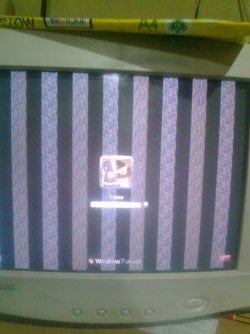
Vertical pixelated line on my screen!

frease

New member
Local time
3:16 PM
Messages
6
Help, I was just playing Warioware and for a sudden, the screen got pixelated, go black and restarted. This had happened quite a few times before, but this time, after restarted, the BIOS screen also pixelated, and vertical pixelated bars appeared on the screen and followed by BSOD before the welcome screen. I restarted in Safe Mode and clean all the display drivers using Driver Sweeper. For sure any of these two files atikmdag.sys and atikmpag.sys caused the BSOD because after I swept all the drivers files, it boots successfully without BSOD.

But how can I fix this vertical bar? Do I need to buy a new graphic card? If so, will this happened again because I think new graphic card will also use atikmpag.sys nd atikmdag.sys? And if it is again, should I switch to Nvidia? Please help me, my brain got confused typing in this pixelated bar, and excuse me for any mistake or posting in wrong section :sick:

I'm using ATI HD 4670 with no installed CCC right now. Before this, I used 11.11 version of CCC.

PS: I attached the image of the vertical bars.. I simply can't do anything with it present!
 

Attachments
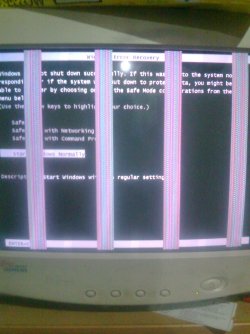
  • Image0575.jpg
    Image0575.jpg
    230.3 KB · Views: 16
  • Image0576.jpg
    Image0576.jpg
    197.9 KB · Views: 12

My Computer My Computer

OS
Windows 7 Ultimate x64
It sounds like the video card overheated and apparently one too many times. Most likely the card is shot.
 

My Computer My Computer

Computer type
PC/Desktop
Computer Manufacturer/Model Number
My Own Build
OS
Windows 10 64 bit
CPU
Intel i7 6700K
Motherboard
ASUS ROG Maximus VIII Hero
Memory
16GB Corsair Dominator
Graphics Card(s)
Intel CPU Graphics
Sound Card
RealTek
Monitor(s) Displays
27" Dell S2719dgf
Screen Resolution
2560X1440
Hard Drives
1 TB Samsung 850 EVO SSD for Win 10 Pro
500GB Samsung 850 EVO SSD for Win 10 Insider
2 TB drive for backup
PSU
EVGA Supernova 750G2
Case
BeQuiet Silent Base 600
Cooling
Deepcool Captain 120EX
Keyboard
Microsoft Wireless 2000
Mouse
Microsoft wireless
Internet Speed
100 MB/sec (Cable)
Antivirus
Microsoft Defender and Malwarebytes
Browser
Edge/Firefox
Other Info
Cakewalk (Sonar) by BandLab and Studio One 4.1 Pro recording studio software. MOTU 896Mk3 Hybrid recording interface, Frontier Tranzport wireless control unit, Behringer X-Touch Control Surface.
Five USB connected optical drives for CD Audio production using Nero BurningROM
Silly me, I just attached the file. Overheated? Hmm.. I never overclock my card, I just use it as it is, no tweaking.. :(

So what I need to do? Buy a new ATI or Nvidia card?
 

My Computer My Computer

OS
Windows 7 Ultimate x64
Overheating is typically what leads to them failing, but it could just be faulty. It could also be the monitor causing the lines, but not the screen going pixilated, black, and then the computer shutting off. My money is on a dying graphics card.
 

My Computer My Computer

Computer type
Laptop
Computer Manufacturer/Model Number
Toshiba P775-S7100
OS
Windows 7 Professional SP1 64-bit
CPU
Intel Core i5-2450M @2.5 GHz
Memory
6 GB DDR3 1333MHz
Graphics Card(s)
Intel HD 3000
Monitor(s) Displays
Built-in 17.3" LED; 22" Insignia NS-L22Q-10A
Screen Resolution
1600x900; 1360x768
Hard Drives
750 GB Hitachi
1TB Seagate FreeAgent External
Internet Speed
Verizon DSL Speed(Down/Up): 3360 Kbps / 800 Kbps
Antivirus
MSE and MBAM Pro
Browser
IE10
So people, do I need to buy a new ATI or Nvidia video card? Correct me if I'm wrong, if I buy ATI card, will atimkdag problem happened again? Idk, I think any ATI card also uses atikmdag and again correct me if I'm wrong, my eyes almost exploded to write this.
 

My Computer My Computer

OS
Windows 7 Ultimate x64
If you think it would be best, you can certainly switch to Nvidia, which I personally prefer. Although if the GPU is failing, that could have also been the cause of the BSOD but cannot say for certain.
 

My Computer My Computer

Computer type
Laptop
Computer Manufacturer/Model Number
Toshiba P775-S7100
OS
Windows 7 Professional SP1 64-bit
CPU
Intel Core i5-2450M @2.5 GHz
Memory
6 GB DDR3 1333MHz
Graphics Card(s)
Intel HD 3000
Monitor(s) Displays
Built-in 17.3" LED; 22" Insignia NS-L22Q-10A
Screen Resolution
1600x900; 1360x768
Hard Drives
750 GB Hitachi
1TB Seagate FreeAgent External
Internet Speed
Verizon DSL Speed(Down/Up): 3360 Kbps / 800 Kbps
Antivirus
MSE and MBAM Pro
Browser
IE10
The BSOD was caused by ATI drivers, I have made a thread about it here, someone just interpreted the log files and found out that the BSOD caused by atikmdag. So, Nvidia then!

I'm opening this thread for any other replies, anyone?
 

My Computer My Computer

OS
Windows 7 Ultimate x64
Back
Top