Very BIG size, "windows folder"

sandhee

New member
Local time
4:40 AM
Messages
2
I am use my windows 7 enterprise for my notebook. my current folder windows size is almost 15 GB. I always update my win 7, use my windows update. whats the problem?what's I should be check?thanks before.:D
 

My Computer

Computer Manufacturer/Model Number
HP 520
OS
Windows 7 Enterprise
CPU
Intel Core Duo T2400 1.8 Ghz
Memory
3 GB
Graphics Card(s)
Intel
Sound Card
Intel
Welcome

I do not see the problem, my window folder is almost 13gb. If you want to get back some HD space, go to c drive, >right click>properties>disc clean up, including system files.

Windows 7 uses space for back up, system image, and back up and restore, plus shadow copies.
 

My Computer

Computer type
PC/Desktop
Computer Manufacturer/Model Number
Dell XPS 420
OS
Windows 10, Home Clean Install
CPU
Intel Core2 processsor Q8200(2.33Ghz 1333FSB) Quad Core Tech
Motherboard
Dell
Memory
6 gb
Graphics Card(s)
ATI Radeon 256MB HD3650
Sound Card
Intergrated 7.1 Channel Audio
Monitor(s) Displays
Dell SP2009W 20"
Hard Drives
640 GB Serial ATA Hard drive
Cooling
Fan
Keyboard
Dell USB Keyboard
Mouse
Dell Premium Optical USB
Internet Speed
DSL 2.85
I don't think you are outside the norm. But if you think there is a problem, you have to be more specific. Run WinDirStat and post the upper left pane. Then run vssadmin list shadowstorage in elevated Command Prompt and post the results. Only then will we be able to see whether you have a problem.
 

My Computer

Computer Manufacturer/Model Number
HP, Dell, Gateway, Toshiba - 4 laptops and 2 desktops
OS
Vista, Windows7, Mint Mate, Zorin, Windows 8
CPU
from 1.6GHz Duo to i7
Monitor(s) Displays
2x HP w2207
Hard Drives
5x HDD, 7x SSD, 12x Externals
Keyboard
with trackball - no mices
Mouse
Trackball mice
Internet Speed
DSL 6000
thats pretty normal. as mentioned you can run disk clean up if you want but there isn't anything to worry about here.
 

My Computer

Computer Manufacturer/Model Number
Custom
OS
Windows 7 Ultimate Signature Edition
CPU
Intel Core i7 Extreme 3.33GHz
Motherboard
EVGA X-58 SLI Classified
Memory
12GB DDR3
Graphics Card(s)
2x EVGA 285 2GB in SLI
Sound Card
Creative Labs X-Fi ExtremeGamer
Monitor(s) Displays
30" Viewsonic
Hard Drives
2x1TB Western Digital 7200RPM in RAID 0/1TB WD My Book External HDD
PSU
Thermaltake 1000w supporting quad SLI
Case
Thermaltake Armor Full Tower
Cooling
Thermaltake V1 CPU+DIY Liquid cooling
OK people, you made me curious. Windows Explorer shows me with 9.17 GB.

I do delete old restore points, use cleanmgr.exe (otherwise known as Disk Cleanup) and also CCleaner.

karl
 

My Computer

Computer Manufacturer/Model Number
Toshiba Satellite S875D-S7239 laptop
OS
MS Windows 7 Ultimate SP1 64-bit
CPU
AMD A10-4600M
Motherboard
AMD Pumori (Socket FT1)
Memory
6.00 GB Dual-Channel DDR3 @ 798MHz (11-11-12-28)
Graphics Card(s)
AMD Radeon HD 7660G
Sound Card
High Definition Audio Device
Monitor(s) Displays
Generic PnP Monitor (1600x900@60Hz)
Screen Resolution
1600x900@60Hz
Hard Drives
SSD 119GB Corsair CSSD-V128GB2 ATA Device
Keyboard
Standard PS/2 Keyboard
Mouse
HP Wireless Optical Mobile Mouse Model FHA-3410
Internet Speed
What the local pub, local coffee shop offers.
Other Info
Optical Drive:MATSHITA BD-CMB UJ160B ATA Device


Also have an Asus ha1002xp netbook with Win 7 Ultimate installed.
Karl,

It is my hunch that the big difference is due to shadow copies, which you clean with your version of disc clean.

If the OS version of disc clean is used and you include the system files, do regular maintenance you will get results like yours.
 

My Computer

Computer type
PC/Desktop
Computer Manufacturer/Model Number
Dell XPS 420
OS
Windows 10, Home Clean Install
CPU
Intel Core2 processsor Q8200(2.33Ghz 1333FSB) Quad Core Tech
Motherboard
Dell
Memory
6 gb
Graphics Card(s)
ATI Radeon 256MB HD3650
Sound Card
Intergrated 7.1 Channel Audio
Monitor(s) Displays
Dell SP2009W 20"
Hard Drives
640 GB Serial ATA Hard drive
Cooling
Fan
Keyboard
Dell USB Keyboard
Mouse
Dell Premium Optical USB
Internet Speed
DSL 2.85
OK guys.thanks for all ur advice, i'm new in windows 7..thank again for all your post, its very helpfull.
 

My Computer

Computer Manufacturer/Model Number
HP 520
OS
Windows 7 Enterprise
CPU
Intel Core Duo T2400 1.8 Ghz
Memory
3 GB
Graphics Card(s)
Intel
Sound Card
Intel
OK guys.thanks for all ur advice, i'm new in windows 7..thank again for all your post, its very helpfull.

If you use the tools I have posted above, you will get a better insight of how the disk space is being used.
 

My Computer

Computer Manufacturer/Model Number
HP, Dell, Gateway, Toshiba - 4 laptops and 2 desktops
OS
Vista, Windows7, Mint Mate, Zorin, Windows 8
CPU
from 1.6GHz Duo to i7
Monitor(s) Displays
2x HP w2207
Hard Drives
5x HDD, 7x SSD, 12x Externals
Keyboard
with trackball - no mices
Mouse
Trackball mice
Internet Speed
DSL 6000
You guys are talking how its not out of norm, I would like to know what is concidered to be the norm for the Windows folder, as mine is now 21.2GB.

Thanks in advance.
 

My Computer

Computer Manufacturer/Model Number
ORDI
OS
Windows 7 Ultimate 64bit
CPU
Intel Core 2 Duo P8700
Motherboard
Don't know
Memory
4GB DDR2
Graphics Card(s)
nVIDIA GeForce 9650M GT 1 GB Dedicated
Sound Card
Standard
Monitor(s) Displays
1680x1050 laptop display
Hard Drives
400 GB
PSU
9-cell battery/power cable
Case
Laptop case
Cooling
laptop fan
You guys are talking how its not out of norm, I would like to know what is concidered to be the norm for the Windows folder, as mine is now 21.2GB.

Thanks in advance.
If you install and uninstall programs very often, you may get a bloated winsxs folder. Check with WinDirStat where the biggies are.
 

My Computer

Computer Manufacturer/Model Number
HP, Dell, Gateway, Toshiba - 4 laptops and 2 desktops
OS
Vista, Windows7, Mint Mate, Zorin, Windows 8
CPU
from 1.6GHz Duo to i7
Monitor(s) Displays
2x HP w2207
Hard Drives
5x HDD, 7x SSD, 12x Externals
Keyboard
with trackball - no mices
Mouse
Trackball mice
Internet Speed
DSL 6000
You still didn't answer my question:

What is considered the norm for the Windows folder?


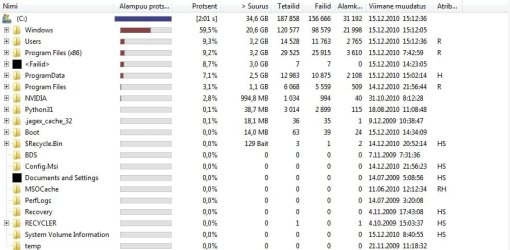
But anyway, I ran the program you suggested, and the upper left pane(I hope) is in attachments.

And here is the results of the cmd line you told the other guy to do:
Code:
Microsoft Windows [Version 6.1.7600]
Copyright (c) 2009 Microsoft Corporation.  All rights reserved.

C:\Windows\system32>vssadmin list shadowstorage
vssadmin 1.1 - Volume Shadow Copy Service administrative command-line tool
(C) Copyright 2001-2005 Microsoft Corp.

Shadow Copy Storage association
   For volume: (C:)\\?\Volume{afdc53ff-c967-11de-a3ce-806e6f6e6963}\
   Shadow Copy Storage volume: (C:)\\?\Volume{afdc53ff-c967-11de-a3ce-806e6f6e69
63}\
   Used Shadow Copy Storage space: 229.887 MB (0%)
   Allocated Shadow Copy Storage space: 320 MB (0%)
   Maximum Shadow Copy Storage space: 320 MB (0%)


C:\Windows\system32>
 

Attachments

  • titled.jpg
    titled.jpg
    17.1 KB · Views: 225

My Computer

Computer Manufacturer/Model Number
ORDI
OS
Windows 7 Ultimate 64bit
CPU
Intel Core 2 Duo P8700
Motherboard
Don't know
Memory
4GB DDR2
Graphics Card(s)
nVIDIA GeForce 9650M GT 1 GB Dedicated
Sound Card
Standard
Monitor(s) Displays
1680x1050 laptop display
Hard Drives
400 GB
PSU
9-cell battery/power cable
Case
Laptop case
Cooling
laptop fan
I see you ran WinDirStat but did not highlight C before you clicked OK. Thus you did not get the details of C. I suggest you run it again, highlight C and then you will get a list down to the last byts. And you can explore all folders in great detail.

As to your question of what is "normal" - that is impossible to answer because there is no normal. It highly depends how and what you do with your system. But with WinDirStat you will find the folders that take all the space and why. Once you have this information, we can discuss the possible reasons.
 

My Computer

Computer Manufacturer/Model Number
HP, Dell, Gateway, Toshiba - 4 laptops and 2 desktops
OS
Vista, Windows7, Mint Mate, Zorin, Windows 8
CPU
from 1.6GHz Duo to i7
Monitor(s) Displays
2x HP w2207
Hard Drives
5x HDD, 7x SSD, 12x Externals
Keyboard
with trackball - no mices
Mouse
Trackball mice
Internet Speed
DSL 6000
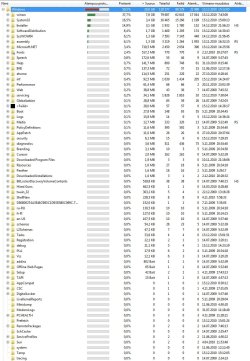
Ok, I ran it again and clicked on C: this time, the result is, one again, in the attachment.

I also added whats inside the Windows folder after editing.
 

Attachments

  • windirstat.jpg
    windirstat.jpg
    59.7 KB · Views: 361
  • under Windows.jpg
    under Windows.jpg
    180.2 KB · Views: 456

My Computer

Computer Manufacturer/Model Number
ORDI
OS
Windows 7 Ultimate 64bit
CPU
Intel Core 2 Duo P8700
Motherboard
Don't know
Memory
4GB DDR2
Graphics Card(s)
nVIDIA GeForce 9650M GT 1 GB Dedicated
Sound Card
Standard
Monitor(s) Displays
1680x1050 laptop display
Hard Drives
400 GB
PSU
9-cell battery/power cable
Case
Laptop case
Cooling
laptop fan
As I suspected, it is the winsxs folder that takes a chunk of the space. Winsxs is a very strange folder (it is actually more like a container). Rather than me going thru a lengthy explanation, I suggest you read this excellent article: Ghacks Technology News

You never answered my earlier question whether you installed and uninstalled programs frequently. That could be one of the causes of the large winsxs (because it keeps all the "old" stuff around).

Btw: My winsxs is 4.7GB, but it could be anything. I have seen as large as 15GB in Vista.
 

My Computer

Computer Manufacturer/Model Number
HP, Dell, Gateway, Toshiba - 4 laptops and 2 desktops
OS
Vista, Windows7, Mint Mate, Zorin, Windows 8
CPU
from 1.6GHz Duo to i7
Monitor(s) Displays
2x HP w2207
Hard Drives
5x HDD, 7x SSD, 12x Externals
Keyboard
with trackball - no mices
Mouse
Trackball mice
Internet Speed
DSL 6000
I don't know whether I do install/uninstall things frequently, I don't think I do it more than I should, but I have installed and then uninstalled things here and there, but I don't think its too frequent, then again, who knows...

Is there a connection between the size of the program installed/uninstalled and the size the winsxs folder growth? If so then it might be caused by the big games I've played but then uninstalled once I'm done with them.
 

My Computer

Computer Manufacturer/Model Number
ORDI
OS
Windows 7 Ultimate 64bit
CPU
Intel Core 2 Duo P8700
Motherboard
Don't know
Memory
4GB DDR2
Graphics Card(s)
nVIDIA GeForce 9650M GT 1 GB Dedicated
Sound Card
Standard
Monitor(s) Displays
1680x1050 laptop display
Hard Drives
400 GB
PSU
9-cell battery/power cable
Case
Laptop case
Cooling
laptop fan
I don't know whether I do install/uninstall things frequently, I don't think I do it more than I should, but I have installed and then uninstalled things here and there, but I don't think its too frequent, then again, who knows...

Is there a connection between the size of the program installed/uninstalled and the size the winsxs folder growth? If so then it might be caused by the big games I've played but then uninstalled once I'm done with them.
Yeah, big games may do that. E.g. a great number of .dlls can cause the growth. If you open winsxs in WinDirStat (click on the + of the box in front), you will see all the little files framed in the color picture below. As you open it further (or click on the little color dots below), you can find out what is in there.
 

My Computer

Computer Manufacturer/Model Number
HP, Dell, Gateway, Toshiba - 4 laptops and 2 desktops
OS
Vista, Windows7, Mint Mate, Zorin, Windows 8
CPU
from 1.6GHz Duo to i7
Monitor(s) Displays
2x HP w2207
Hard Drives
5x HDD, 7x SSD, 12x Externals
Keyboard
with trackball - no mices
Mouse
Trackball mice
Internet Speed
DSL 6000
So all in all there really is no safe way to make the folder smaller is there?
 

My Computer

Computer Manufacturer/Model Number
ORDI
OS
Windows 7 Ultimate 64bit
CPU
Intel Core 2 Duo P8700
Motherboard
Don't know
Memory
4GB DDR2
Graphics Card(s)
nVIDIA GeForce 9650M GT 1 GB Dedicated
Sound Card
Standard
Monitor(s) Displays
1680x1050 laptop display
Hard Drives
400 GB
PSU
9-cell battery/power cable
Case
Laptop case
Cooling
laptop fan
So all in all there really is no safe way to make the folder smaller is there?
I would not touch it - not with a ten foot pole. Do you really need that space on the disk? You could make an easy gain of a few GBs if you delete the hiberfile (provided you do not use hibernation). The Command Prompt (run as admin) command is powercfg -h off Then press Enter.
 

My Computer

Computer Manufacturer/Model Number
HP, Dell, Gateway, Toshiba - 4 laptops and 2 desktops
OS
Vista, Windows7, Mint Mate, Zorin, Windows 8
CPU
from 1.6GHz Duo to i7
Monitor(s) Displays
2x HP w2207
Hard Drives
5x HDD, 7x SSD, 12x Externals
Keyboard
with trackball - no mices
Mouse
Trackball mice
Internet Speed
DSL 6000

My Computer

Computer Manufacturer/Model Number
Self-Built in July 2009
OS
Windows 7 Ultimate x64
CPU
Intel Q9550 2.83Ghz OC'd to 3.40Ghz
Motherboard
Gigabyte GA-EP45-UD3R rev. 1.1, F12 BIOS
Memory
8GB G.Skill PI DDR2-800, 4-4-4-12 timings
Graphics Card(s)
EVGA 1280MB Nvidia GeForce GTX570
Sound Card
Realtek ALC899A 8 channel onboard audio
Monitor(s) Displays
23" Acer x233H
Screen Resolution
1920x1080
Hard Drives
Intel X25-M 80GB Gen 2 SSD
Western Digital 1TB Caviar Black, 32MB cache. WD1001FALS
PSU
Corsair 620HX modular
Case
Antec P182
Cooling
stock
Keyboard
ABS M1 Mechanical
Mouse
Logitech G9 Laser Mouse
Internet Speed
15/2 cable modem
Other Info
Windows and Linux enthusiast. Logitech G35 Headset.

My Computer

Computer Manufacturer/Model Number
HP, Dell, Gateway, Toshiba - 4 laptops and 2 desktops
OS
Vista, Windows7, Mint Mate, Zorin, Windows 8
CPU
from 1.6GHz Duo to i7
Monitor(s) Displays
2x HP w2207
Hard Drives
5x HDD, 7x SSD, 12x Externals
Keyboard
with trackball - no mices
Mouse
Trackball mice
Internet Speed
DSL 6000
Back
Top