Very important file overwritten, need help.

EFG

New member
Local time
3:37 PM
Messages
7
Hi there,

Sorry if I'm being a leecher, but I'm honestly in hysteria and have no idea what to do. I've recently accidentally overwrote my GCSE art final piece (a graphics project, PSD file), with an older save, and have just lost the whole of my final piece. It has to be in by tomorrow. If anyone could nudge me into the direction of getting it back or just help a little, I'll be very, very thankful.

It was overwritten with another PSD file on a USB, from another USB, if it helps :/
Once again, thanks in advance to anyone who bothers to help... ;_;
 

My Computer

OS
Windows 7
Hello EFG, and welcome to Seven Forums.

You might see if you may be able to use Previous Versions to restore a older copy of the file back. If not, then you might try the free program ShadowExplorer to do so.

Hope this helps,
Shawn
 

My Computer

Computer type
PC/Desktop
Computer Manufacturer/Model Number
Self built custom
OS
64-bit Windows 11 Pro for Workstations
CPU
Intel i7-8700K OC'd to 5 GHz
Motherboard
ASUS ROG Maximus XI Formula Z390
Memory
64 GB (4x16GB) G.SKILL TridentZ RGB DDR4 3600 MHz
Graphics Card(s)
ASUS ROG-STRIX-GTX1080TI-O11G-GAMING
Sound Card
Integrated
Monitor(s) Displays
2 x Samsung Odyssey G7 27"
Screen Resolution
2560x1440
Hard Drives
1TB Samsung 990 PRO M.2,
4TB Samsung 990 PRO PRO M.2,
TerraMaster F8 SSD Plus NAS
PSU
Seasonic Prime Titanium 850W
Case
Thermaltake Core P3
Cooling
Corsair Hydro H115i
Keyboard
Logitech wireless K800
Mouse
Logitech MX Master 4
Internet Speed
2 Gb/s Download and 100 Mb/s Upload
Antivirus
Malwarebyte Anti-Malware Premium
Browser
Google Chrome
Other Info
Logitech Z625 speaker system,
Logitech BRIO 4K Pro webcam,
HP Color LaserJet Pro MFP M477fdn,
APC SMART-UPS RT 1000 XL - SURT1000XLI,
Galaxy S23 Plus phone
Welcome to SF!

Don't worry about being a leech; that's what we're here for. :)

Did you happen to have a Windows backup? If so, you can restore a previous version of the file, in the Properties tab of the new one.

Other than that, you should be looking at data recovery software. You can try the free DiskDigger and Recuva.
 

My Computer

Computer Manufacturer/Model Number
Custom
OS
Windows 7 Professional x64
CPU
Intel i7 2600K OC'd @ 4620 MHz
Motherboard
Asus P8Z68-V Pro
Memory
16GB GSkill Sniper 2133 Mhz (4x4GB)
Graphics Card(s)
EVGA GeForce GTX 480 SuperClocked+
Sound Card
Realtek High Definition Audio
Monitor(s) Displays
2x Acer S273HLbmii 27"
Screen Resolution
2 x 1920x1080
Hard Drives
64GB Crucial M4 SSD

Storage: Hitachi 1TB 5400RPM, Samsung 1.5TB 5400RPM
PSU
Corsair HW Series 750w (modular)
Case
Cooler Master HAF 932 Advanced Blue Edition
Cooling
CM Hyper 212+ CPU cooler, 3x 230mm + 1x 140mm case fans
Keyboard
Logitech MK320 (wireless)
Mouse
Logitech MK320 (wireless)
Internet Speed
30 Mb/s : 2 Mb/s
Alright Shawn, thanks for the speedy reply and welcome. Will Shadow Copy and explorer work for USB devices though? I copied one file over from another USB, and overwrote it on another... I gave the programs you listed a quick glance, and they don't seem to support that? ;_;
 

My Computer

OS
Windows 7
Also Jonathan King, thanks to you too, I'll go check them out.
 

My Computer

OS
Windows 7
I have never seen any shadows on a USB stick. And most of the afore mentioned programs work off the shadows. Recuva might be your best bet - although slim.
 

My Computer

Computer Manufacturer/Model Number
HP, Dell, Gateway, Toshiba - 4 laptops and 2 desktops
OS
Vista, Windows7, Mint Mate, Zorin, Windows 8
CPU
from 1.6GHz Duo to i7
Monitor(s) Displays
2x HP w2207
Hard Drives
5x HDD, 7x SSD, 12x Externals
Keyboard
with trackball - no mices
Mouse
Trackball mice
Internet Speed
DSL 6000
Alright, I've checked all the methods you guys suggested, Shadow Copy seems to be Vista exclusive and I'm running Windows 7... DiskDigger and Recuva only recover the deleted files on the USB, not overwritten, so that doesn't work. However, thanks for taking the time to help. I really appreciate it.
 

My Computer

OS
Windows 7
You would do a scan of your hard drive using those programs.
 

My Computer

Computer Manufacturer/Model Number
Custom
OS
Windows 7 Professional x64
CPU
Intel i7 2600K OC'd @ 4620 MHz
Motherboard
Asus P8Z68-V Pro
Memory
16GB GSkill Sniper 2133 Mhz (4x4GB)
Graphics Card(s)
EVGA GeForce GTX 480 SuperClocked+
Sound Card
Realtek High Definition Audio
Monitor(s) Displays
2x Acer S273HLbmii 27"
Screen Resolution
2 x 1920x1080
Hard Drives
64GB Crucial M4 SSD

Storage: Hitachi 1TB 5400RPM, Samsung 1.5TB 5400RPM
PSU
Corsair HW Series 750w (modular)
Case
Cooler Master HAF 932 Advanced Blue Edition
Cooling
CM Hyper 212+ CPU cooler, 3x 230mm + 1x 140mm case fans
Keyboard
Logitech MK320 (wireless)
Mouse
Logitech MK320 (wireless)
Internet Speed
30 Mb/s : 2 Mb/s
You would do a scan of your hard drive using those programs.

Yep, but the file overwritten was USB specific, I didn't actually do the project on the current computer, the laptop it was done on isn't in my posession, and the project was deleted there too. However, I'm guessing I could try the recovery on the laptop too, I'll go get it in a sec. Does it affect my chances of getting the file back alot if it was deleted Tusday afternoon? :s
 

My Computer

OS
Windows 7
project was deleted there too
That would not matter as long as there is a shadow with the data -then Shadow Explorer can retrieve it.
BTW: Win7 uses shadows too - only less frequent than Vista.
 

My Computer

Computer Manufacturer/Model Number
HP, Dell, Gateway, Toshiba - 4 laptops and 2 desktops
OS
Vista, Windows7, Mint Mate, Zorin, Windows 8
CPU
from 1.6GHz Duo to i7
Monitor(s) Displays
2x HP w2207
Hard Drives
5x HDD, 7x SSD, 12x Externals
Keyboard
with trackball - no mices
Mouse
Trackball mice
Internet Speed
DSL 6000
I tried ShadowExplorer, it didn't even see the removable drive :( oh well.
 

My Computer

OS
Windows 7

My Computer

Computer Manufacturer/Model Number
Mesh
OS
win7 ultimate 32 , 64 ,XP
CPU
3.40
Memory
4 GB
Graphics Card(s)
GeForce GTX 480
Sound Card
Realtek
Monitor(s) Displays
LG 28" LCD
Screen Resolution
1600X1024
Hard Drives
2X500GB HDD sata
Western Digital Usb 2TB
PSU
650w
Keyboard
Wireless Logitech
Mouse
Wireless Logitech
Internet Speed
50 MB
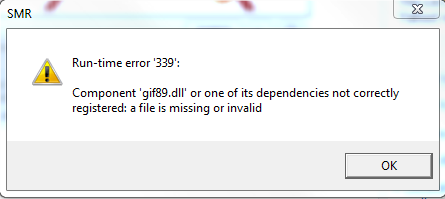
Right. Smartrecovery doesn't like me.

bfVEj.png
 

My Computer

OS
Windows 7
I tried ShadowExplorer, it didn't even see the removable drive :( oh well.
Don't go to the USB stick. You have to go to the files in the system on which you worked before you wrote them to the stick.
 

My Computer

Computer Manufacturer/Model Number
HP, Dell, Gateway, Toshiba - 4 laptops and 2 desktops
OS
Vista, Windows7, Mint Mate, Zorin, Windows 8
CPU
from 1.6GHz Duo to i7
Monitor(s) Displays
2x HP w2207
Hard Drives
5x HDD, 7x SSD, 12x Externals
Keyboard
with trackball - no mices
Mouse
Trackball mice
Internet Speed
DSL 6000
While trying to recover an accidentally overwritten file, I found this excellent free program that worked, even on a USB. It found the overwritten versions, plus some deleted ones.
/https://www.cleverfiles.com/

PS to moderator: Perhaps this should be redirected to Tutorials.
 

My Computer

Computer type
PC/Desktop
Computer Manufacturer/Model Number
Lenovo
OS
win7 64bit Pro
CPU
2.4
Memory
8G
Hard Drives
1T SSD
Back
Top