Very poor Internet connection/speed

oXRUSSXo

New member
Local time
5:47 PM
Messages
12
I recently got a new Wireless card LB-Link BL-LW04-A2.
I'm able to connect to my wifi and I get 4 bar connection yet my download speed is 1mb. If I put my laptop in exactly the same place that gets about 20-30 mb download speed.

I have spoke to my ISP and they have said it's not a fault at their end. I'm thinking it could be braise my driers are out of date for my wireless card. I've been on the manufacturers website and there are new drivers but it won't let me download them.

Can someone please help me

Thanks in advance
 

My Computer

Computer type
PC/Desktop
OS
Windows 7 ultimate x64
definitely try to update the drivers for the wireless card. Thats the first thing i would do. Then in addition to that; i would power cycle both the modem and router(if you have a router). Unplug both(if applicable) and wait about 1 minute or so; then plug the modem in first; and let that boot; then plug the router in and let that boot and see if it helps resolve the issue.
 

My Computer

Computer type
PC/Desktop
Computer Manufacturer/Model Number
custom built
OS
Windows 7 ultimate 64-bit
CPU
Intel I7 2600K 3.4ghz
Motherboard
Asus Evo P8P67
Memory
Corsair 16gb ddr3 1600mhz
Graphics Card(s)
Nvidia Geforce gt 430
Sound Card
Sound Blaster Titanium x-fi pci express
Monitor(s) Displays
Dell E198WFP
Hard Drives
1 western digital 2TB drive.
PSU
Antec 1200 watt
Case
Inwin Dragon Rider
Cooling
6 case supplied cooling fans
Keyboard
logitech mk700
Mouse
logitech m705
Internet Speed
25-50mbps download; 10mbps upload(i think)
Antivirus
avg free 2014
Browser
mozilla firefox
Other Info
Also have a pretty bad speaker setup which is a klipsch promedia 5.1 surround speaker setup with huge subwoofer and lg blu ray player/writer. Also a hp officejet pro 8600 plus wireless all in one and a logitech s7500 webcam.
......drivers are out of date for my wireless card. I've been on the manufacturers website and there are new drivers but it won't let me download them....
Please post a link to the website where you are having trouble getting the drivers from.

Which browser are you using to try and get these drivers? IE11? Firefox? Chrome?

Can you post a screenshot of the error/problem that you see when you try to get these drivers?
http://www.sevenforums.com/tutorials/9733-screenshots-files-upload-post-seven-forums.html

Can you download the drivers using another computer?

Please post the info in this link:
http://www.sevenforums.com/network-...ts-before-posting-your-networking-thread.html

Is your Wireless Access Point* (WAP) set to use "N" only?
Or is it set to use multiple protocols?

*or router WAP combo.
 

My Computer

Computer type
Laptop
Computer Manufacturer/Model Number
Employer provided Dell Latitude
OS
W7 Pro SP1 64bit
CPU
i7
Memory
8GB
Graphics Card(s)
Intel HD Graphics
Hard Drives
crappy SSD
Antivirus
Employer mandated Symantec Endpoint Protection
Browser
Pale Moon 64bit, IE11 64bit & Chrome 64bit
The first place to try for drivers should be the manufacturers site. Also, like username mentioned; its a good idea to try and select wireless "n" only instead of multiple protocols; due to the fact that wireless "n" is the latest and most recent "version" of wireless networking out and is also the quickest compared to the older ones.
 
Last edited:

My Computer

Computer type
PC/Desktop
Computer Manufacturer/Model Number
custom built
OS
Windows 7 ultimate 64-bit
CPU
Intel I7 2600K 3.4ghz
Motherboard
Asus Evo P8P67
Memory
Corsair 16gb ddr3 1600mhz
Graphics Card(s)
Nvidia Geforce gt 430
Sound Card
Sound Blaster Titanium x-fi pci express
Monitor(s) Displays
Dell E198WFP
Hard Drives
1 western digital 2TB drive.
PSU
Antec 1200 watt
Case
Inwin Dragon Rider
Cooling
6 case supplied cooling fans
Keyboard
logitech mk700
Mouse
logitech m705
Internet Speed
25-50mbps download; 10mbps upload(i think)
Antivirus
avg free 2014
Browser
mozilla firefox
Other Info
Also have a pretty bad speaker setup which is a klipsch promedia 5.1 surround speaker setup with huge subwoofer and lg blu ray player/writer. Also a hp officejet pro 8600 plus wireless all in one and a logitech s7500 webcam.
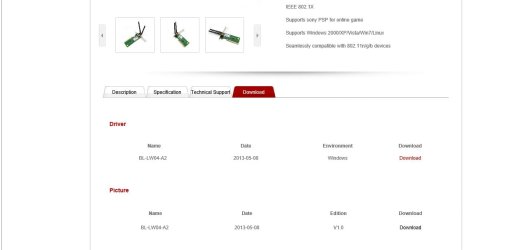
Hi the webpage which im trying to access is this page B-LINK Electronics Co., Ltd.-People's network of experts

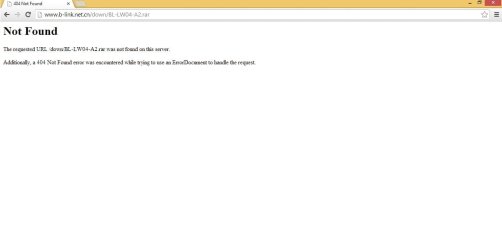
im able to load this page fine but as soon as I click the download button for the drivers
p1.jpg

I receive this message in internet explorer
p2.jpg

And this message in Chrome
p3.jpg

Please can you help as I think it may be the drivers that resolve this issue
 

My Computer

Computer type
PC/Desktop
OS
Windows 7 ultimate x64
Yeah, I got the same error in IE.

Try this page, LB-Link Chinese / google translated

Google Translate

Select BL-LW04-A2 driver (Windows) - it's dated 01/09/2014
 

My Computer

Computer type
Laptop
Computer Manufacturer/Model Number
HP Pavilion dv6-6c10us
OS
x64 (6.3.9600) Win8.1 Pro & soon dual boot x64 (6.1.7601) Win7_SP1 HomePrem
CPU
AMD A6-3420M APU with Radeon(tm) HD Graphics
Motherboard
Hewlett-Packard 1805
Memory
6.00 GB
Graphics Card(s)
AMD Radeon(TM) HD 6520G
Sound Card
(1) AMD High Definition Audio Device (2) IDT High Definiti
Monitor(s) Displays
HP W2072a 20" LCD (1600 x 900) @ 60 Hz
Screen Resolution
1366 x 768 x 32 bits (4294967296 colors) @ 60 Hz
Hard Drives
ST640LM0 00 HM641JI SATA Disk Device
Keyboard
Logitech k520 wireless KB
Mouse
Logitech m320 wireless mouse (bundled with KB)
Internet Speed
15/5 | 54 MB Wireless 'n'
Antivirus
Realtime: Defender or Avast | On-demand: Malwarebytes, ESET
Browser
IE 11 on Win8, IE 10 on win 7
Other Info
Media: [Gimp, Audacity, VLC] || Comm: [WEmail 2012, Skype] || Productivity: [OpenOffice,| Textpad] || Utils: [Sysinternals, cCleaner, Speccy, Defraggler]
Hi thanks for the link. I've downloaded then and installed. I'm only getting about 1-2 mb connection. I have spoke to my ISP and they said I should be getting around 56-58 mb.

I have a constant 5 bar connection just very slow.
Any more ideas on what could solve this?
 

My Computer

Computer type
PC/Desktop
OS
Windows 7 ultimate x64
Yeah, I got the same error in IE.

Try this page, LB-Link Chinese / google translated

Google Translate

Select BL-LW04-A2 driver (Windows) - it's dated 01/09/2014
Good find, but they date stuff in a weird way. The files inside the zip were from April 2010 and the drivers were even older.


..........
Any more ideas on what could solve this?
Reread each post - answer each question :-)
 

My Computer

Computer type
Laptop
Computer Manufacturer/Model Number
Employer provided Dell Latitude
OS
W7 Pro SP1 64bit
CPU
i7
Memory
8GB
Graphics Card(s)
Intel HD Graphics
Hard Drives
crappy SSD
Antivirus
Employer mandated Symantec Endpoint Protection
Browser
Pale Moon 64bit, IE11 64bit & Chrome 64bit
oXRUSSXo: This is a tough issue to help with, it's a tough issue even on my own machine.

Your signal strength is good, but throughput is terrible.

It's more trial and error on your part, there's no easy fix.
I'd stay away from so-called optimizers - they might help, or they might make it worse.

Your laptop can help you walk through the setings on your desktop. The devices are different, but there are many common settings. Compare the two and see if anything sticks out.

Something as simple as 20hz on one and 20/40 on the other... or b/g/n/ac - I don't know, but you might see something, try it and get better throughput. Keep good notes on the exisiting config, change one thing at a time, and change it back if there isn't an improvement.

I've found that the documentation for network adapters, especially laptop minicards, is severely lacking. Still, if you have the documentation, see if it offers a solution in the troubleshooting section.

Side note: It took me about 6 months to figure out a similar problem on my machine. Turned out to be router firmware. I don't think this is the issue you're facing since the laptop seems to play well with the router.

Good luck,

Bill
-
 

My Computer

Computer type
Laptop
Computer Manufacturer/Model Number
HP Pavilion dv6-6c10us
OS
x64 (6.3.9600) Win8.1 Pro & soon dual boot x64 (6.1.7601) Win7_SP1 HomePrem
CPU
AMD A6-3420M APU with Radeon(tm) HD Graphics
Motherboard
Hewlett-Packard 1805
Memory
6.00 GB
Graphics Card(s)
AMD Radeon(TM) HD 6520G
Sound Card
(1) AMD High Definition Audio Device (2) IDT High Definiti
Monitor(s) Displays
HP W2072a 20" LCD (1600 x 900) @ 60 Hz
Screen Resolution
1366 x 768 x 32 bits (4294967296 colors) @ 60 Hz
Hard Drives
ST640LM0 00 HM641JI SATA Disk Device
Keyboard
Logitech k520 wireless KB
Mouse
Logitech m320 wireless mouse (bundled with KB)
Internet Speed
15/5 | 54 MB Wireless 'n'
Antivirus
Realtime: Defender or Avast | On-demand: Malwarebytes, ESET
Browser
IE 11 on Win8, IE 10 on win 7
Other Info
Media: [Gimp, Audacity, VLC] || Comm: [WEmail 2012, Skype] || Productivity: [OpenOffice,| Textpad] || Utils: [Sysinternals, cCleaner, Speccy, Defraggler]
Back
Top