Internet connection speed problem on a new computer.

Themis711

New member
Local time
8:02 PM
Messages
5
Hello everyone.
I registered to the forum cause i am encountering a problem with my old internet's connection speed on a new computer.

I have a 2mbs internet connection which has been enough for me for the past few years. Problem is that since i bought a new desktop my connection is extremely slow, youtube videos lag almost instantaneously even on 360p (which didn't happen with the same connection on my old desktop). Moreover, downloading from firefox or programs like origin speed seems not to go above 15 or 20 kbps while on my old desktop it reached its limit around 210kbps. As you understand this is extremely annoying, i am suspecting that the problem is hardware related. I am using a modem (the one my isp provided) and an ethernet cable to my desktop. Additionally i am using windows firewall and Microsoft security essentials.

I would appreciate your advices and knowledge in order to understand whats causing my internet being so slow...
 

My Computer

OS
Windows 7 Home Premium x64
CPU
Intel Core i7-3770 3.40GHz-390GHz
Motherboard
Gigabyte Z77-D3H (s 1155, Z77, DDR3)
Memory
8GB
Graphics Card(s)
Nvidia Geforce GTX 560
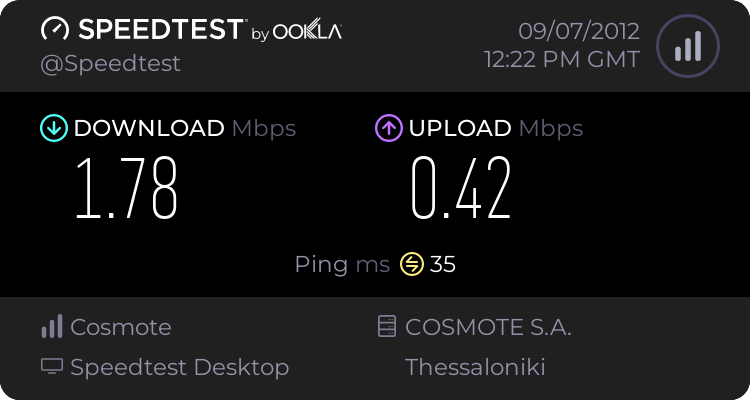
Moreover even if i open a youtube video and freeze it in order to stream, it does not. And i should also mention that its almost impossible to run a speedtest.net test, it keeps saying 'configuration load failed' an error occured while loading speedtest.net. Please try again and let us know if it continues to happen.
After a few tries it does work but the results are very very wrong


These results should be around 2mb's not 0.50 somethings definitely very wrong....
 

My Computer

OS
Windows 7 Home Premium x64
CPU
Intel Core i7-3770 3.40GHz-390GHz
Motherboard
Gigabyte Z77-D3H (s 1155, Z77, DDR3)
Memory
8GB
Graphics Card(s)
Nvidia Geforce GTX 560
I just connected my ethernet cable in my laptop and tried a speedtest.net. Guess the results...


This only supports that something is wrong with my new computer, i would appreciate any help please....
 

My Computer

OS
Windows 7 Home Premium x64
CPU
Intel Core i7-3770 3.40GHz-390GHz
Motherboard
Gigabyte Z77-D3H (s 1155, Z77, DDR3)
Memory
8GB
Graphics Card(s)
Nvidia Geforce GTX 560
If you can download and run the Xirrus software it will show potential problems with your wireless set up. Please post a screen shot of the results here. :)

Wi-Fi Inspector | Xirrus
 

My Computer

Computer type
PC/Desktop
Computer Manufacturer/Model Number
Home built
OS
Windows 7 Ult, Windows 8.1 Pro,
CPU
Q9650-4.275GHz, E8600 4.5GHz, E6750-3.8GHz
Motherboard
Evga 780i FTW
Memory
G.Skill PC2 9600 1200Mhz 5 5 5 15 2T
Graphics Card(s)
GTX480
Sound Card
Asus Xonar D2
Monitor(s) Displays
HannsG
Screen Resolution
1680X1050
Hard Drives
GSkill Phoenix Pro 120GB SSD
PSU
ThermalTake Toughpower 1000Watt modular
Case
ThermalTake XaserV
Cooling
Xigmatek S1283
Keyboard
Logitech G15
Mouse
Logitech G9
Internet Speed
T1
If you can download and run the Xirrus software it will show potential problems with your wireless set up. Please post a screen shot of the results here. :)

Wi-Fi Inspector | Xirrus

As i mentioned the internet is connected to my desktop through a modem and an ethernet cable. Its not wireless....


Furthermore i should mention that i noticed some similarities with this case: http://www.sevenforums.com/network-sharing/172105-browsers-slow-torrent-speed-fine.html
as i can get good speeds when using utorrent...
 

My Computer

OS
Windows 7 Home Premium x64
CPU
Intel Core i7-3770 3.40GHz-390GHz
Motherboard
Gigabyte Z77-D3H (s 1155, Z77, DDR3)
Memory
8GB
Graphics Card(s)
Nvidia Geforce GTX 560
If you can download and run the Xirrus software it will show potential problems with your wireless set up. Please post a screen shot of the results here. :)

Wi-Fi Inspector | Xirrus

As i mentioned the internet is connected to my desktop through a modem and an ethernet cable. Its not wireless....


Furthermore i should mention that i noticed some similarities with this case: http://www.sevenforums.com/network-sharing/172105-browsers-slow-torrent-speed-fine.html
as i can get good speeds when using utorrent...

Sorry the speeds were so low I assumed it was a wireless connection. :o

I would definitely try the Gigabyte site for the latest Atheros LAN and Intel Chipset drivers first.
GIGABYTE - Motherboard - Socket 1155 - GA-Z77-D3H (rev. 1.0)
 

My Computer

Computer type
PC/Desktop
Computer Manufacturer/Model Number
Home built
OS
Windows 7 Ult, Windows 8.1 Pro,
CPU
Q9650-4.275GHz, E8600 4.5GHz, E6750-3.8GHz
Motherboard
Evga 780i FTW
Memory
G.Skill PC2 9600 1200Mhz 5 5 5 15 2T
Graphics Card(s)
GTX480
Sound Card
Asus Xonar D2
Monitor(s) Displays
HannsG
Screen Resolution
1680X1050
Hard Drives
GSkill Phoenix Pro 120GB SSD
PSU
ThermalTake Toughpower 1000Watt modular
Case
ThermalTake XaserV
Cooling
Xigmatek S1283
Keyboard
Logitech G15
Mouse
Logitech G9
Internet Speed
T1
If you can download and run the Xirrus software it will show potential problems with your wireless set up. Please post a screen shot of the results here. :)

Wi-Fi Inspector | Xirrus

As i mentioned the internet is connected to my desktop through a modem and an ethernet cable. Its not wireless....


Furthermore i should mention that i noticed some similarities with this case: http://www.sevenforums.com/network-sharing/172105-browsers-slow-torrent-speed-fine.html
as i can get good speeds when using utorrent...

Sorry the speeds were so low I assumed it was a wireless connection. :o

I would definitely try the Gigabyte site for the latest Atheros LAN and Intel Chipset drivers first.
GIGABYTE - Motherboard - Socket 1155 - GA-Z77-D3H (rev. 1.0)

No need to apologize mate, you're trying to help!
I uninstalled and reinstalled the drivers plenty of times, tried past versions did pretty much everything you can imagine...
Finally i installed a wireless network card (via usb) to my desktop and a wireless router and guess what? the internet works perfectly. I am suspecting that the motherboards network card is faulty, now my question is: should i leave is at is (since its a minor problem and probably not worth the hassle) or take it back to the shop where i bought the computer from and request that they change my motherboard?

I have a two years warranty, and i was thinking that its not worth the hassle to change the motherboard at the moment (since its otherwise working perfect) over the network card. If any other problem comes up that requires me to carry the pc to the shop, then i could mention the faulty network card but i am thinking that its not worth the hassle now...
Any opinions?
 

My Computer

OS
Windows 7 Home Premium x64
CPU
Intel Core i7-3770 3.40GHz-390GHz
Motherboard
Gigabyte Z77-D3H (s 1155, Z77, DDR3)
Memory
8GB
Graphics Card(s)
Nvidia Geforce GTX 560
As i mentioned the internet is connected to my desktop through a modem and an ethernet cable. Its not wireless....


Furthermore i should mention that i noticed some similarities with this case: http://www.sevenforums.com/network-sharing/172105-browsers-slow-torrent-speed-fine.html
as i can get good speeds when using utorrent...

Sorry the speeds were so low I assumed it was a wireless connection. :o

I would definitely try the Gigabyte site for the latest Atheros LAN and Intel Chipset drivers first.
GIGABYTE - Motherboard - Socket 1155 - GA-Z77-D3H (rev. 1.0)

No need to apologize mate, you're trying to help!
I uninstalled and reinstalled the drivers plenty of times, tried past versions did pretty much everything you can imagine...
Finally i installed a wireless network card (via usb) to my desktop and a wireless router and guess what? the internet works perfectly. I am suspecting that the motherboards network card is faulty, now my question is: should i leave is at is (since its a minor problem and probably not worth the hassle) or take it back to the shop where i bought the computer from and request that they change my motherboard?

I have a two years warranty, and i was thinking that its not worth the hassle to change the motherboard at the moment (since its otherwise working perfect) over the network card. If any other problem comes up that requires me to carry the pc to the shop, then i could mention the faulty network card but i am thinking that its not worth the hassle now...
Any opinions?

You might try clearing the cmos on the board before you throw in the towel. I've seen onboard networking interfaces brought back to life by just clearing the cmos, just be sure and put the bios settings back to how they were before the cmos clear.
 

My Computer

Computer type
PC/Desktop
Computer Manufacturer/Model Number
Home built
OS
Windows 7 Ult, Windows 8.1 Pro,
CPU
Q9650-4.275GHz, E8600 4.5GHz, E6750-3.8GHz
Motherboard
Evga 780i FTW
Memory
G.Skill PC2 9600 1200Mhz 5 5 5 15 2T
Graphics Card(s)
GTX480
Sound Card
Asus Xonar D2
Monitor(s) Displays
HannsG
Screen Resolution
1680X1050
Hard Drives
GSkill Phoenix Pro 120GB SSD
PSU
ThermalTake Toughpower 1000Watt modular
Case
ThermalTake XaserV
Cooling
Xigmatek S1283
Keyboard
Logitech G15
Mouse
Logitech G9
Internet Speed
T1
Back
Top