(vga) monitor displays no signal

pcdummy

New member
Local time
5:17 PM
Messages
14
Location
USA
I was updating my NVIDIA GeForce 6150SE nForce 430 from dell.com, my video card is integrated on MoBo. After I installed new driver I restarted PC and now my monitor displays no signal. I have no idea on how to fix this problem. I would greatly appreciate any suggestions anyone has. Thank You:confused:
 

My Computer My Computer

At a glance

Windows 7 Ultimate 32 bitAMD Athlon (tm) 64 X2 Dual Core Processor 4000+4 1GB DDR2 Sticks RAMNVIDIA GeForce 6150SE nForce 430 64MB
Computer Manufacturer/Model Number
Dell Inspiron 531/ DCMA
OS
Windows 7 Ultimate 32 bit
CPU
AMD Athlon (tm) 64 X2 Dual Core Processor 4000+
Motherboard
ECS Model IC780-MA
Memory
4 1GB DDR2 Sticks RAM
Graphics Card(s)
NVIDIA GeForce 6150SE nForce 430 64MB
Sound Card
Radeon HD 4350
Monitor(s) Displays
Ativia AT220H
Screen Resolution
1024 x 768
Hard Drives
IDE WDC WD 1600-22Guc0 (149GB) Boot Drive "Windows XP Home"

(SeaGate) 250GB ST325082 OAS SCSI Connected to MB Has "Windows 7 Ultimate in stalled on it

IDE Samsung Sv2033D (10GB) Stroage
PSU
Bestec Model: ATX0300D5WB 300W MAX
Case
Home PC Desktop Tower
Cooling
CPU Fan / CHASSIS Fan
Keyboard
Gear Head
Mouse
Generic
Internet Speed
DSL Cable
Have you tried repeatedly tapping F8 as soon as you turn the computer on and getting into Safe Mode? :)
 

My Computer My Computer

At a glance

Main - Windows 7 Pro SP1 64-Bit; 2nd - Window...Main - Core i7 2600K; 2nd - Core i7 920Main - 16GB Corsair Vengeance; 2nd - 12GB Cor...Main - XFX Radeon 6870 1GB; 2nd - XFX Radeon ...
Computer Manufacturer/Model Number
Self
OS
Main - Windows 7 Pro SP1 64-Bit; 2nd - Windows Server 2008 R2
CPU
Main - Core i7 2600K; 2nd - Core i7 920
Motherboard
Main - Asus P8Z68-V Pro/Gen3; 2nd - Gigabyte GA-EX58-UDR3
Memory
Main - 16GB Corsair Vengeance; 2nd - 12GB Corsair Vengeance
Graphics Card(s)
Main - XFX Radeon 6870 1GB; 2nd - XFX Radeon 4870 1GB
Sound Card
Both: Onboard Realtek Azalia
Monitor(s) Displays
Main - Hann 25" + I-INC 25" + Acer 23"; 2nd - Upgrading Soon
Screen Resolution
Main - 1920x1080 (All Three Monitors); 2nd - Upgrading Soon
Hard Drives
Main - (1) Crucial M4 128GB (Boot)
Main - (1) Seagate 2TB 64MB Cache (Data)
Main - (1) Seagate 2TB 64MB Cache (Data Backup)
2nd - (1) Intel X25-M SSD 80GB (Boot)
2nd - (3) Seagate 1TB 32MB Cache (Data Backup)
2nd - (1) Seagate 320GB (Because)
PSU
Main - OCZ 600W Modular; 2nd - OCZ 600W
Case
Main - Thermaltake Element G; 2nd - NZXT something or other
Cooling
Main - Corsair H80; 2nd - Prolimatech Megahalems
Keyboard
Main - Razer Reclusa; 2nd - Old MS Keyboard
Mouse
Main - Logitech MX Revolution; 2nd - Old MS Mouse
Internet Speed
20Mbps Time-Warner Cable
Hmmm, could be the cord. Try plugging in/tightening the cords; both in your monitor and in your PC. If that doesn't work, repeatedly tap F8 as you start up your computer and go into Safe Mode.
 

My Computer My Computer

At a glance

Windows 7 Ultimate x64/Windows 8 Consumer Pre...Intel Pentium Dual Core E6700 3.2GHzStrontium 8192MB DDR3 1333Mhzmsi GeForce N560GTX-M2D1GD5 1GB
Computer Manufacturer/Model Number
Custom Build
OS
Windows 7 Ultimate x64/Windows 8 Consumer Preview x64/Ubuntu 11.04
CPU
Intel Pentium Dual Core E6700 3.2GHz
Motherboard
ASUS P5G41T-M LX
Memory
Strontium 8192MB DDR3 1333Mhz
Graphics Card(s)
msi GeForce N560GTX-M2D1GD5 1GB
Sound Card
Realtek HD Audio
Monitor(s) Displays
CHIMEI CMV 221D 22"
Screen Resolution
1680x1050
Hard Drives
Seagate Barracuda LP Green 3.5'' 2TB Internal HDD 5900RPM + WD Elements Desktop 1TB External HDD 7200RPM
PSU
SHAW Viper-1500w Gaming PSU
Case
Black eMaxx ATX Mini Tower Case
Keyboard
Microsoft Wireless Keyboard 1000
Mouse
Microsoft Wireless Optical Mouse 2000
Internet Speed
100GB @ 4.76Mbps
will not boot into safemode:cry:
 

My Computer My Computer

At a glance

Windows 7 Ultimate 32 bitAMD Athlon (tm) 64 X2 Dual Core Processor 4000+4 1GB DDR2 Sticks RAMNVIDIA GeForce 6150SE nForce 430 64MB
Computer Manufacturer/Model Number
Dell Inspiron 531/ DCMA
OS
Windows 7 Ultimate 32 bit
CPU
AMD Athlon (tm) 64 X2 Dual Core Processor 4000+
Motherboard
ECS Model IC780-MA
Memory
4 1GB DDR2 Sticks RAM
Graphics Card(s)
NVIDIA GeForce 6150SE nForce 430 64MB
Sound Card
Radeon HD 4350
Monitor(s) Displays
Ativia AT220H
Screen Resolution
1024 x 768
Hard Drives
IDE WDC WD 1600-22Guc0 (149GB) Boot Drive "Windows XP Home"

(SeaGate) 250GB ST325082 OAS SCSI Connected to MB Has "Windows 7 Ultimate in stalled on it

IDE Samsung Sv2033D (10GB) Stroage
PSU
Bestec Model: ATX0300D5WB 300W MAX
Case
Home PC Desktop Tower
Cooling
CPU Fan / CHASSIS Fan
Keyboard
Gear Head
Mouse
Generic
Internet Speed
DSL Cable
Have you ever reset a BIOS before? You might try that. If you're not sure what to do, ask.

What slots are available on the motherboard? Do you have an old PCI video card you could throw in there?
 

My Computer My Computer

At a glance

Main - Windows 7 Pro SP1 64-Bit; 2nd - Window...Main - Core i7 2600K; 2nd - Core i7 920Main - 16GB Corsair Vengeance; 2nd - 12GB Cor...Main - XFX Radeon 6870 1GB; 2nd - XFX Radeon ...
Computer Manufacturer/Model Number
Self
OS
Main - Windows 7 Pro SP1 64-Bit; 2nd - Windows Server 2008 R2
CPU
Main - Core i7 2600K; 2nd - Core i7 920
Motherboard
Main - Asus P8Z68-V Pro/Gen3; 2nd - Gigabyte GA-EX58-UDR3
Memory
Main - 16GB Corsair Vengeance; 2nd - 12GB Corsair Vengeance
Graphics Card(s)
Main - XFX Radeon 6870 1GB; 2nd - XFX Radeon 4870 1GB
Sound Card
Both: Onboard Realtek Azalia
Monitor(s) Displays
Main - Hann 25" + I-INC 25" + Acer 23"; 2nd - Upgrading Soon
Screen Resolution
Main - 1920x1080 (All Three Monitors); 2nd - Upgrading Soon
Hard Drives
Main - (1) Crucial M4 128GB (Boot)
Main - (1) Seagate 2TB 64MB Cache (Data)
Main - (1) Seagate 2TB 64MB Cache (Data Backup)
2nd - (1) Intel X25-M SSD 80GB (Boot)
2nd - (3) Seagate 1TB 32MB Cache (Data Backup)
2nd - (1) Seagate 320GB (Because)
PSU
Main - OCZ 600W Modular; 2nd - OCZ 600W
Case
Main - Thermaltake Element G; 2nd - NZXT something or other
Cooling
Main - Corsair H80; 2nd - Prolimatech Megahalems
Keyboard
Main - Razer Reclusa; 2nd - Old MS Keyboard
Mouse
Main - Logitech MX Revolution; 2nd - Old MS Mouse
Internet Speed
20Mbps Time-Warner Cable
No I've never reset BIOS I will accept any help you can give me. sorry for slow replies I am using my sons ps3. I have a PCI Express slot for a graphics card
 

My Computer My Computer

At a glance

Windows 7 Ultimate 32 bitAMD Athlon (tm) 64 X2 Dual Core Processor 4000+4 1GB DDR2 Sticks RAMNVIDIA GeForce 6150SE nForce 430 64MB
Computer Manufacturer/Model Number
Dell Inspiron 531/ DCMA
OS
Windows 7 Ultimate 32 bit
CPU
AMD Athlon (tm) 64 X2 Dual Core Processor 4000+
Motherboard
ECS Model IC780-MA
Memory
4 1GB DDR2 Sticks RAM
Graphics Card(s)
NVIDIA GeForce 6150SE nForce 430 64MB
Sound Card
Radeon HD 4350
Monitor(s) Displays
Ativia AT220H
Screen Resolution
1024 x 768
Hard Drives
IDE WDC WD 1600-22Guc0 (149GB) Boot Drive "Windows XP Home"

(SeaGate) 250GB ST325082 OAS SCSI Connected to MB Has "Windows 7 Ultimate in stalled on it

IDE Samsung Sv2033D (10GB) Stroage
PSU
Bestec Model: ATX0300D5WB 300W MAX
Case
Home PC Desktop Tower
Cooling
CPU Fan / CHASSIS Fan
Keyboard
Gear Head
Mouse
Generic
Internet Speed
DSL Cable

My Computer My Computer

At a glance

Main - Windows 7 Pro SP1 64-Bit; 2nd - Window...Main - Core i7 2600K; 2nd - Core i7 920Main - 16GB Corsair Vengeance; 2nd - 12GB Cor...Main - XFX Radeon 6870 1GB; 2nd - XFX Radeon ...
Computer Manufacturer/Model Number
Self
OS
Main - Windows 7 Pro SP1 64-Bit; 2nd - Windows Server 2008 R2
CPU
Main - Core i7 2600K; 2nd - Core i7 920
Motherboard
Main - Asus P8Z68-V Pro/Gen3; 2nd - Gigabyte GA-EX58-UDR3
Memory
Main - 16GB Corsair Vengeance; 2nd - 12GB Corsair Vengeance
Graphics Card(s)
Main - XFX Radeon 6870 1GB; 2nd - XFX Radeon 4870 1GB
Sound Card
Both: Onboard Realtek Azalia
Monitor(s) Displays
Main - Hann 25" + I-INC 25" + Acer 23"; 2nd - Upgrading Soon
Screen Resolution
Main - 1920x1080 (All Three Monitors); 2nd - Upgrading Soon
Hard Drives
Main - (1) Crucial M4 128GB (Boot)
Main - (1) Seagate 2TB 64MB Cache (Data)
Main - (1) Seagate 2TB 64MB Cache (Data Backup)
2nd - (1) Intel X25-M SSD 80GB (Boot)
2nd - (3) Seagate 1TB 32MB Cache (Data Backup)
2nd - (1) Seagate 320GB (Because)
PSU
Main - OCZ 600W Modular; 2nd - OCZ 600W
Case
Main - Thermaltake Element G; 2nd - NZXT something or other
Cooling
Main - Corsair H80; 2nd - Prolimatech Megahalems
Keyboard
Main - Razer Reclusa; 2nd - Old MS Keyboard
Mouse
Main - Logitech MX Revolution; 2nd - Old MS Mouse
Internet Speed
20Mbps Time-Warner Cable
Have you ever reset a BIOS before? You might try that. If you're not sure what to do, ask.

What slots are available on the motherboard? Do you have an old PCI video card you could throw in there?

No I've never reset BIOS I will accept any help you can give me. sorry for slow replies I am using my sons ps3. I have a PCI Express slot for a graphics card
 

My Computer My Computer

At a glance

Windows 7 Ultimate 32 bitAMD Athlon (tm) 64 X2 Dual Core Processor 4000+4 1GB DDR2 Sticks RAMNVIDIA GeForce 6150SE nForce 430 64MB
Computer Manufacturer/Model Number
Dell Inspiron 531/ DCMA
OS
Windows 7 Ultimate 32 bit
CPU
AMD Athlon (tm) 64 X2 Dual Core Processor 4000+
Motherboard
ECS Model IC780-MA
Memory
4 1GB DDR2 Sticks RAM
Graphics Card(s)
NVIDIA GeForce 6150SE nForce 430 64MB
Sound Card
Radeon HD 4350
Monitor(s) Displays
Ativia AT220H
Screen Resolution
1024 x 768
Hard Drives
IDE WDC WD 1600-22Guc0 (149GB) Boot Drive "Windows XP Home"

(SeaGate) 250GB ST325082 OAS SCSI Connected to MB Has "Windows 7 Ultimate in stalled on it

IDE Samsung Sv2033D (10GB) Stroage
PSU
Bestec Model: ATX0300D5WB 300W MAX
Case
Home PC Desktop Tower
Cooling
CPU Fan / CHASSIS Fan
Keyboard
Gear Head
Mouse
Generic
Internet Speed
DSL Cable
You're using the onboard Graphics though, right? If you have both in the computer, try switching the monitor cable to the other connector.
 

My Computer My Computer

At a glance

Main - Windows 7 Pro SP1 64-Bit; 2nd - Window...Main - Core i7 2600K; 2nd - Core i7 920Main - 16GB Corsair Vengeance; 2nd - 12GB Cor...Main - XFX Radeon 6870 1GB; 2nd - XFX Radeon ...
Computer Manufacturer/Model Number
Self
OS
Main - Windows 7 Pro SP1 64-Bit; 2nd - Windows Server 2008 R2
CPU
Main - Core i7 2600K; 2nd - Core i7 920
Motherboard
Main - Asus P8Z68-V Pro/Gen3; 2nd - Gigabyte GA-EX58-UDR3
Memory
Main - 16GB Corsair Vengeance; 2nd - 12GB Corsair Vengeance
Graphics Card(s)
Main - XFX Radeon 6870 1GB; 2nd - XFX Radeon 4870 1GB
Sound Card
Both: Onboard Realtek Azalia
Monitor(s) Displays
Main - Hann 25" + I-INC 25" + Acer 23"; 2nd - Upgrading Soon
Screen Resolution
Main - 1920x1080 (All Three Monitors); 2nd - Upgrading Soon
Hard Drives
Main - (1) Crucial M4 128GB (Boot)
Main - (1) Seagate 2TB 64MB Cache (Data)
Main - (1) Seagate 2TB 64MB Cache (Data Backup)
2nd - (1) Intel X25-M SSD 80GB (Boot)
2nd - (3) Seagate 1TB 32MB Cache (Data Backup)
2nd - (1) Seagate 320GB (Because)
PSU
Main - OCZ 600W Modular; 2nd - OCZ 600W
Case
Main - Thermaltake Element G; 2nd - NZXT something or other
Cooling
Main - Corsair H80; 2nd - Prolimatech Megahalems
Keyboard
Main - Razer Reclusa; 2nd - Old MS Keyboard
Mouse
Main - Logitech MX Revolution; 2nd - Old MS Mouse
Internet Speed
20Mbps Time-Warner Cable
No signal to display!!!! This what i have tried so far.

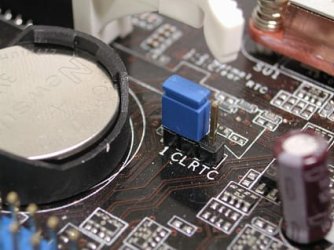
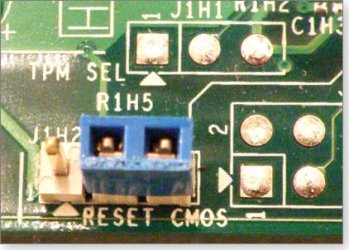
After I updated my onboard graphics card and rebooted PC my monitor displayed no signal. I've tried to reboot to safemode but haven't had any luck. I have removed my RAM sticks and turned power on to check MOBO it beeps, from what I have read online that means it is Okay. I got a new PCIE Graphics Card and installed it but still no signal. I am getting ready to go buy new CMOS battey and try that. ClueLess on the JUMPER PINS not sure which ones are 1 2 3 if you place jumper on the pins top pin and bottom pin or place it on top row the first to pins? Also, not even sure how they was placed in the beginning? I removed them a few days ago before joining here tring to reset everything? I am confused and probably confusing too!
 

My Computer My Computer

At a glance

Windows 7 Ultimate 32 bitAMD Athlon (tm) 64 X2 Dual Core Processor 4000+4 1GB DDR2 Sticks RAMNVIDIA GeForce 6150SE nForce 430 64MB
Computer Manufacturer/Model Number
Dell Inspiron 531/ DCMA
OS
Windows 7 Ultimate 32 bit
CPU
AMD Athlon (tm) 64 X2 Dual Core Processor 4000+
Motherboard
ECS Model IC780-MA
Memory
4 1GB DDR2 Sticks RAM
Graphics Card(s)
NVIDIA GeForce 6150SE nForce 430 64MB
Sound Card
Radeon HD 4350
Monitor(s) Displays
Ativia AT220H
Screen Resolution
1024 x 768
Hard Drives
IDE WDC WD 1600-22Guc0 (149GB) Boot Drive "Windows XP Home"

(SeaGate) 250GB ST325082 OAS SCSI Connected to MB Has "Windows 7 Ultimate in stalled on it

IDE Samsung Sv2033D (10GB) Stroage
PSU
Bestec Model: ATX0300D5WB 300W MAX
Case
Home PC Desktop Tower
Cooling
CPU Fan / CHASSIS Fan
Keyboard
Gear Head
Mouse
Generic
Internet Speed
DSL Cable
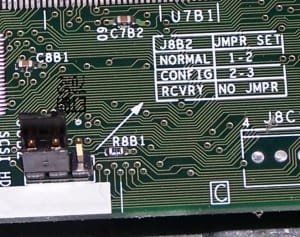
I've added a few pics of typical jumper pin layouts.

If the Dell motherboard had onboard video and you are now using a PCI-e card you may need to disable the onboard video. (Obviously easier said than done if you can't get in to the BIOS...) Dells are also notoriously undersupplied when it comes to power, so there may be an issue there with the new card.

Just so we are sure of what is going on, as I understand it you have onboard video, are trying to use a PCI-e card, updated the video driver, then the problems started. If any of this is incorrect, let us know. :)
 

Attachments

  • cmos_jumper.jpg
    cmos_jumper.jpg
    39.8 KB · Views: 7
  • jumper.jpg
    jumper.jpg
    22.1 KB · Views: 614
  • W20090910-BIOS.jpg
    W20090910-BIOS.jpg
    32.2 KB · Views: 7

My Computer My Computer

At a glance

Main - Windows 7 Pro SP1 64-Bit; 2nd - Window...Main - Core i7 2600K; 2nd - Core i7 920Main - 16GB Corsair Vengeance; 2nd - 12GB Cor...Main - XFX Radeon 6870 1GB; 2nd - XFX Radeon ...
Computer Manufacturer/Model Number
Self
OS
Main - Windows 7 Pro SP1 64-Bit; 2nd - Windows Server 2008 R2
CPU
Main - Core i7 2600K; 2nd - Core i7 920
Motherboard
Main - Asus P8Z68-V Pro/Gen3; 2nd - Gigabyte GA-EX58-UDR3
Memory
Main - 16GB Corsair Vengeance; 2nd - 12GB Corsair Vengeance
Graphics Card(s)
Main - XFX Radeon 6870 1GB; 2nd - XFX Radeon 4870 1GB
Sound Card
Both: Onboard Realtek Azalia
Monitor(s) Displays
Main - Hann 25" + I-INC 25" + Acer 23"; 2nd - Upgrading Soon
Screen Resolution
Main - 1920x1080 (All Three Monitors); 2nd - Upgrading Soon
Hard Drives
Main - (1) Crucial M4 128GB (Boot)
Main - (1) Seagate 2TB 64MB Cache (Data)
Main - (1) Seagate 2TB 64MB Cache (Data Backup)
2nd - (1) Intel X25-M SSD 80GB (Boot)
2nd - (3) Seagate 1TB 32MB Cache (Data Backup)
2nd - (1) Seagate 320GB (Because)
PSU
Main - OCZ 600W Modular; 2nd - OCZ 600W
Case
Main - Thermaltake Element G; 2nd - NZXT something or other
Cooling
Main - Corsair H80; 2nd - Prolimatech Megahalems
Keyboard
Main - Razer Reclusa; 2nd - Old MS Keyboard
Mouse
Main - Logitech MX Revolution; 2nd - Old MS Mouse
Internet Speed
20Mbps Time-Warner Cable
After I updated my onboard graphics card and rebooted PC my monitor displayed no signal. I've tried to reboot to safemode but haven't had any luck. I have removed my RAM sticks and turned power on to check MOBO it beeps, from what I have read online that means it is Okay. I got a new PCIE Graphics Card and installed it but still no signal. I am getting ready to go buy new CMOS battey and try that. ClueLess on the JUMPER PINS not sure which ones are 1 2 3 if you place jumper on the pins top pin and bottom pin or place it on top row the first to pins? Also, not even sure how they was placed in the beginning? I removed them a few days ago before joining here tring to reset everything? I am confused and probably confusing too!
First, it's very important that you STOP! Despite not knowing what you're doing, you seem to be doing all sorts of things that are probably just digging the hole deeper... so please, stop. What you need to do, if this is even possible at this point, is to get the board back to exactly how it was yesterday.

Second, can you link to the exact file you downloaded?

Third, clean up the confusion. Did you install a dedicated graphics card? What card, specifically, did you install and is it still installed?
 

My Computer My Computer

At a glance

7 Ultimate x64i5-2500k8GB G.Skill Ripjaws X F3-12800CL7D-8GBXH 1866...EVGA GTX 570 SC
OS
7 Ultimate x64
CPU
i5-2500k
Motherboard
Asus P8P67 Pro
Memory
8GB G.Skill Ripjaws X F3-12800CL7D-8GBXH 1866MHz 8-9-8-24
Graphics Card(s)
EVGA GTX 570 SC
Sound Card
X-Fi Titanium Fatality
Monitor(s) Displays
Samsung S27A550H 27" LED
Screen Resolution
1920x1080
Hard Drives
OCZ Vertex 3 120GB.
1TB Samsung F3.
2TB Samsung F4.
PSU
PC Power & Cooling Silencer 760
Case
Lian Li Lancool K62
Cooling
Thermalright Venomous X Black/Scythe S-Flex/Shin-Etsu X23
Keyboard
MS Natural Elite 4000 Ergonomic
Mouse
Logitech G500
Internet Speed
6MB/768
Other Info
Logitech Z-5500 505 watts.
D-Link DGL-4500.
Tripp-Lite Smart Pro 1500.
I thought I had asked that... ;)
 

My Computer My Computer

At a glance

Main - Windows 7 Pro SP1 64-Bit; 2nd - Window...Main - Core i7 2600K; 2nd - Core i7 920Main - 16GB Corsair Vengeance; 2nd - 12GB Cor...Main - XFX Radeon 6870 1GB; 2nd - XFX Radeon ...
Computer Manufacturer/Model Number
Self
OS
Main - Windows 7 Pro SP1 64-Bit; 2nd - Windows Server 2008 R2
CPU
Main - Core i7 2600K; 2nd - Core i7 920
Motherboard
Main - Asus P8Z68-V Pro/Gen3; 2nd - Gigabyte GA-EX58-UDR3
Memory
Main - 16GB Corsair Vengeance; 2nd - 12GB Corsair Vengeance
Graphics Card(s)
Main - XFX Radeon 6870 1GB; 2nd - XFX Radeon 4870 1GB
Sound Card
Both: Onboard Realtek Azalia
Monitor(s) Displays
Main - Hann 25" + I-INC 25" + Acer 23"; 2nd - Upgrading Soon
Screen Resolution
Main - 1920x1080 (All Three Monitors); 2nd - Upgrading Soon
Hard Drives
Main - (1) Crucial M4 128GB (Boot)
Main - (1) Seagate 2TB 64MB Cache (Data)
Main - (1) Seagate 2TB 64MB Cache (Data Backup)
2nd - (1) Intel X25-M SSD 80GB (Boot)
2nd - (3) Seagate 1TB 32MB Cache (Data Backup)
2nd - (1) Seagate 320GB (Because)
PSU
Main - OCZ 600W Modular; 2nd - OCZ 600W
Case
Main - Thermaltake Element G; 2nd - NZXT something or other
Cooling
Main - Corsair H80; 2nd - Prolimatech Megahalems
Keyboard
Main - Razer Reclusa; 2nd - Old MS Keyboard
Mouse
Main - Logitech MX Revolution; 2nd - Old MS Mouse
Internet Speed
20Mbps Time-Warner Cable
OK, from the beginning. I went to Dell Support to update my onboard graphics card. This the support page with all the latest updates. (My PC TAG #4H8S1F1) http://support.dell.com/support/downloads/index.aspx?c=us&cs=19&l=en&s=dhs&ServiceTag=4H8S1F1. This page gave alist of all updates for my pc. After I downloaded the graphics card I created restore point and then proceeded with install. When it finished the install wizard recommended restarting. After restart I had lost signal to monitor. Since then you have read what I have tried doing. I have put everything back to original condition before I opened case except for the jumper pins I am not their default place. My mobo has 6 pins 3 on top 3 directly below looks like this...----> ::: <--- I have a new PCI Express Card but the manual says that the onboard graphics card needs to be disabled which is sort of a problem since I can't get to Device Manager. I also have a new Power supply (550W PCI-EXPRESS Comenetor 12CM Fan) not yet installed
 

My Computer My Computer

At a glance

Windows 7 Ultimate 32 bitAMD Athlon (tm) 64 X2 Dual Core Processor 4000+4 1GB DDR2 Sticks RAMNVIDIA GeForce 6150SE nForce 430 64MB
Computer Manufacturer/Model Number
Dell Inspiron 531/ DCMA
OS
Windows 7 Ultimate 32 bit
CPU
AMD Athlon (tm) 64 X2 Dual Core Processor 4000+
Motherboard
ECS Model IC780-MA
Memory
4 1GB DDR2 Sticks RAM
Graphics Card(s)
NVIDIA GeForce 6150SE nForce 430 64MB
Sound Card
Radeon HD 4350
Monitor(s) Displays
Ativia AT220H
Screen Resolution
1024 x 768
Hard Drives
IDE WDC WD 1600-22Guc0 (149GB) Boot Drive "Windows XP Home"

(SeaGate) 250GB ST325082 OAS SCSI Connected to MB Has "Windows 7 Ultimate in stalled on it

IDE Samsung Sv2033D (10GB) Stroage
PSU
Bestec Model: ATX0300D5WB 300W MAX
Case
Home PC Desktop Tower
Cooling
CPU Fan / CHASSIS Fan
Keyboard
Gear Head
Mouse
Generic
Internet Speed
DSL Cable
Let's make sure we get the CMOS jumper in the right place as a start.

The six pins you are seeing are to clear the CMOS (What we're trying to do to reset the BIOS) and the pins to clear the BIOS password. If you turn the attached picture on its side to read the text it looks like the CMOS (BIOS) is the top row and the password is the bottom row. The normal settings for each is on the two left-most pins (or toward the bottom of the case if it were sitting upright). The black shaded part in the image is the jumper itself and the picture shows both in the reset mode covering pins 2 & 3.

For a start, make sure the computer is unplugged, then let's put both jumpers in the "normal" position covering pins 1 & 2. Plug it back in, cross your fingers, then try to start it up. :)
 

Attachments

  • Dell CMOS.JPG
    Dell CMOS.JPG
    17.9 KB · Views: 8

My Computer My Computer

At a glance

Main - Windows 7 Pro SP1 64-Bit; 2nd - Window...Main - Core i7 2600K; 2nd - Core i7 920Main - 16GB Corsair Vengeance; 2nd - 12GB Cor...Main - XFX Radeon 6870 1GB; 2nd - XFX Radeon ...
Computer Manufacturer/Model Number
Self
OS
Main - Windows 7 Pro SP1 64-Bit; 2nd - Windows Server 2008 R2
CPU
Main - Core i7 2600K; 2nd - Core i7 920
Motherboard
Main - Asus P8Z68-V Pro/Gen3; 2nd - Gigabyte GA-EX58-UDR3
Memory
Main - 16GB Corsair Vengeance; 2nd - 12GB Corsair Vengeance
Graphics Card(s)
Main - XFX Radeon 6870 1GB; 2nd - XFX Radeon 4870 1GB
Sound Card
Both: Onboard Realtek Azalia
Monitor(s) Displays
Main - Hann 25" + I-INC 25" + Acer 23"; 2nd - Upgrading Soon
Screen Resolution
Main - 1920x1080 (All Three Monitors); 2nd - Upgrading Soon
Hard Drives
Main - (1) Crucial M4 128GB (Boot)
Main - (1) Seagate 2TB 64MB Cache (Data)
Main - (1) Seagate 2TB 64MB Cache (Data Backup)
2nd - (1) Intel X25-M SSD 80GB (Boot)
2nd - (3) Seagate 1TB 32MB Cache (Data Backup)
2nd - (1) Seagate 320GB (Because)
PSU
Main - OCZ 600W Modular; 2nd - OCZ 600W
Case
Main - Thermaltake Element G; 2nd - NZXT something or other
Cooling
Main - Corsair H80; 2nd - Prolimatech Megahalems
Keyboard
Main - Razer Reclusa; 2nd - Old MS Keyboard
Mouse
Main - Logitech MX Revolution; 2nd - Old MS Mouse
Internet Speed
20Mbps Time-Warner Cable
Well both jumpers are on 1 & 2 but still a no go!
 

My Computer My Computer

At a glance

Windows 7 Ultimate 32 bitAMD Athlon (tm) 64 X2 Dual Core Processor 4000+4 1GB DDR2 Sticks RAMNVIDIA GeForce 6150SE nForce 430 64MB
Computer Manufacturer/Model Number
Dell Inspiron 531/ DCMA
OS
Windows 7 Ultimate 32 bit
CPU
AMD Athlon (tm) 64 X2 Dual Core Processor 4000+
Motherboard
ECS Model IC780-MA
Memory
4 1GB DDR2 Sticks RAM
Graphics Card(s)
NVIDIA GeForce 6150SE nForce 430 64MB
Sound Card
Radeon HD 4350
Monitor(s) Displays
Ativia AT220H
Screen Resolution
1024 x 768
Hard Drives
IDE WDC WD 1600-22Guc0 (149GB) Boot Drive "Windows XP Home"

(SeaGate) 250GB ST325082 OAS SCSI Connected to MB Has "Windows 7 Ultimate in stalled on it

IDE Samsung Sv2033D (10GB) Stroage
PSU
Bestec Model: ATX0300D5WB 300W MAX
Case
Home PC Desktop Tower
Cooling
CPU Fan / CHASSIS Fan
Keyboard
Gear Head
Mouse
Generic
Internet Speed
DSL Cable
Have you replaced the CMOS battery yet. It's about the size of a quarter (CR-2032)

Have you tested the monitor on another computer to make sure it in fact works properly.
 

My Computer My Computer

At a glance

Win7 Enterprise, Win7 x86 (Ult 7600), Win7 x6...AMD fx8350 4ghz, AMD-32 2400mhz, AMD-64 3200m...2gb, 4gb on the Ult 7600, 4gb on Technet RTM,...Draw my own Graphics, several nVidia cards
Computer type
PC/Desktop
Computer Manufacturer/Model Number
Built them myself, Science Experiments !
OS
Win7 Enterprise, Win7 x86 (Ult 7600), Win7 x64 Ult 7600, TechNet RTM on AMD x64 (2.8Ghz)
CPU
AMD fx8350 4ghz, AMD-32 2400mhz, AMD-64 3200mhz, AMDx64 2.8G
Motherboard
SIS 755, ECS-K8M890M-M (Ult 7600), GigaByte & others
Memory
2gb, 4gb on the Ult 7600, 4gb on Technet RTM, 32gb on FX8350
Graphics Card(s)
Draw my own Graphics, several nVidia cards
Sound Card
on motherboard
Monitor(s) Displays
19" flat scr, 28" I-Inc widescr,22" Emprex Widescr, 23" Acer
Screen Resolution
1280 x 1024, 1440 x 900, 1920 x 1080
Hard Drives
6 pata Ide HD's & 2 Sata HD's
added 80gb external on Ult 7600 computer,
numerous extra 1tb, 2TB, 3Tb SATA HD's
A collection of ext HD Docks w/ HDs
PSU
430w, 550w, 600w, 700, 800, etc
Case
All Generic Full Towers
Cooling
Open Air & a few fans, some w/ colored LEDs
Keyboard
Compaq & Dell recycled from GoodWill
Mouse
Made in China Optical Wired Mouse
Internet Speed
Fast Cable InterNet
Antivirus
AVG Free on 24 different Desktops, NO Problems!
Browser
IE 8 is preferred, but use FireFox sometimes
Other Info
Linksys Routers, switches, & Hubs
Too Many USB Flash Drives to count, Biggest is 64GB !
Eight computers in my home network.
Sixteen computers at my business network.
Linked via TeamViewer !
Lots of old used spare computer parts everywhere!
Well both jumpers are on 1 & 2 but still a no go!
Did you find them that way, or was one or both in the 2 & 3 position?
 

My Computer My Computer

At a glance

Main - Windows 7 Pro SP1 64-Bit; 2nd - Window...Main - Core i7 2600K; 2nd - Core i7 920Main - 16GB Corsair Vengeance; 2nd - 12GB Cor...Main - XFX Radeon 6870 1GB; 2nd - XFX Radeon ...
Computer Manufacturer/Model Number
Self
OS
Main - Windows 7 Pro SP1 64-Bit; 2nd - Windows Server 2008 R2
CPU
Main - Core i7 2600K; 2nd - Core i7 920
Motherboard
Main - Asus P8Z68-V Pro/Gen3; 2nd - Gigabyte GA-EX58-UDR3
Memory
Main - 16GB Corsair Vengeance; 2nd - 12GB Corsair Vengeance
Graphics Card(s)
Main - XFX Radeon 6870 1GB; 2nd - XFX Radeon 4870 1GB
Sound Card
Both: Onboard Realtek Azalia
Monitor(s) Displays
Main - Hann 25" + I-INC 25" + Acer 23"; 2nd - Upgrading Soon
Screen Resolution
Main - 1920x1080 (All Three Monitors); 2nd - Upgrading Soon
Hard Drives
Main - (1) Crucial M4 128GB (Boot)
Main - (1) Seagate 2TB 64MB Cache (Data)
Main - (1) Seagate 2TB 64MB Cache (Data Backup)
2nd - (1) Intel X25-M SSD 80GB (Boot)
2nd - (3) Seagate 1TB 32MB Cache (Data Backup)
2nd - (1) Seagate 320GB (Because)
PSU
Main - OCZ 600W Modular; 2nd - OCZ 600W
Case
Main - Thermaltake Element G; 2nd - NZXT something or other
Cooling
Main - Corsair H80; 2nd - Prolimatech Megahalems
Keyboard
Main - Razer Reclusa; 2nd - Old MS Keyboard
Mouse
Main - Logitech MX Revolution; 2nd - Old MS Mouse
Internet Speed
20Mbps Time-Warner Cable
I had to move them. It is hard to believe 1 driver update can be this big of a head ache! I really appropriate your help. Thank You!
 

My Computer My Computer

At a glance

Windows 7 Ultimate 32 bitAMD Athlon (tm) 64 X2 Dual Core Processor 4000+4 1GB DDR2 Sticks RAMNVIDIA GeForce 6150SE nForce 430 64MB
Computer Manufacturer/Model Number
Dell Inspiron 531/ DCMA
OS
Windows 7 Ultimate 32 bit
CPU
AMD Athlon (tm) 64 X2 Dual Core Processor 4000+
Motherboard
ECS Model IC780-MA
Memory
4 1GB DDR2 Sticks RAM
Graphics Card(s)
NVIDIA GeForce 6150SE nForce 430 64MB
Sound Card
Radeon HD 4350
Monitor(s) Displays
Ativia AT220H
Screen Resolution
1024 x 768
Hard Drives
IDE WDC WD 1600-22Guc0 (149GB) Boot Drive "Windows XP Home"

(SeaGate) 250GB ST325082 OAS SCSI Connected to MB Has "Windows 7 Ultimate in stalled on it

IDE Samsung Sv2033D (10GB) Stroage
PSU
Bestec Model: ATX0300D5WB 300W MAX
Case
Home PC Desktop Tower
Cooling
CPU Fan / CHASSIS Fan
Keyboard
Gear Head
Mouse
Generic
Internet Speed
DSL Cable
When you (try to) start the computer does it appear to be doing anything? Does the HDD activity light flash and/or can you hear the drive running? What about the fans - are they spinning?

If those things are all true and you know the monitor is good, I would be tempted to put the new PSU and video card in and see what happens.
 

My Computer My Computer

At a glance

Main - Windows 7 Pro SP1 64-Bit; 2nd - Window...Main - Core i7 2600K; 2nd - Core i7 920Main - 16GB Corsair Vengeance; 2nd - 12GB Cor...Main - XFX Radeon 6870 1GB; 2nd - XFX Radeon ...
Computer Manufacturer/Model Number
Self
OS
Main - Windows 7 Pro SP1 64-Bit; 2nd - Windows Server 2008 R2
CPU
Main - Core i7 2600K; 2nd - Core i7 920
Motherboard
Main - Asus P8Z68-V Pro/Gen3; 2nd - Gigabyte GA-EX58-UDR3
Memory
Main - 16GB Corsair Vengeance; 2nd - 12GB Corsair Vengeance
Graphics Card(s)
Main - XFX Radeon 6870 1GB; 2nd - XFX Radeon 4870 1GB
Sound Card
Both: Onboard Realtek Azalia
Monitor(s) Displays
Main - Hann 25" + I-INC 25" + Acer 23"; 2nd - Upgrading Soon
Screen Resolution
Main - 1920x1080 (All Three Monitors); 2nd - Upgrading Soon
Hard Drives
Main - (1) Crucial M4 128GB (Boot)
Main - (1) Seagate 2TB 64MB Cache (Data)
Main - (1) Seagate 2TB 64MB Cache (Data Backup)
2nd - (1) Intel X25-M SSD 80GB (Boot)
2nd - (3) Seagate 1TB 32MB Cache (Data Backup)
2nd - (1) Seagate 320GB (Because)
PSU
Main - OCZ 600W Modular; 2nd - OCZ 600W
Case
Main - Thermaltake Element G; 2nd - NZXT something or other
Cooling
Main - Corsair H80; 2nd - Prolimatech Megahalems
Keyboard
Main - Razer Reclusa; 2nd - Old MS Keyboard
Mouse
Main - Logitech MX Revolution; 2nd - Old MS Mouse
Internet Speed
20Mbps Time-Warner Cable
Back
Top