
S smuddell New member Thread Starter Local time 6:22 AM Messages 26 Dec 17, 2015 #41 It's all one button for Speaker Options which I have set up as follows : Thanks for all your help, I know you didn't solve it but you came up with all sorts of ideas! My Computer My Computer At a glance Windows 7 Home Premium 64bitOSWindows 7 Home Premium 64bit
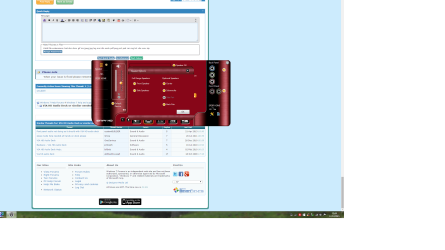
It's all one button for Speaker Options which I have set up as follows : Thanks for all your help, I know you didn't solve it but you came up with all sorts of ideas!
BorisTheAnimal Furry Pride Pro User VIP Local time 8:22 AM Messages 1,411 Location Milkyway Dec 17, 2015 #42 smuddell said: It's all one button for Speaker Options which I have set up as follows : View attachment 378102 Thanks for all your help, I know you didn't solve it but you came up with all sorts of ideas! Click to expand... But what would happen if you unchecked the back pair and checked the side pair, would that perhaps make it work or have you already tried that? My Computer My Computer At a glance Windows 7 Home Premiumi5-3570k16 GB DDR3 G Skill SniperGIGABYTE GeForce GTX 970 GV-N970WF3OC-4GDComputer typePC/DesktopComputer Manufacturer/Model NumberCustom buildOSWindows 7 Home PremiumCPUi5-3570kMotherboardASUS Sabertooth z77Memory16 GB DDR3 G Skill SniperGraphics Card(s)GIGABYTE GeForce GTX 970 GV-N970WF3OC-4GDMonitor(s) DisplaysASUS ROG PG278QScreen Resolution2560x1440@60Hz/120Hz/144HzHard Drives56GB KINGSTON SVP200S37A60G 512GB Crucial MX100 1863GB Seagate ST2000DM001-1CH164 2795GB Seagate ST3000DM001-9YN166PSUCorsair GS800CaseStorm Trooper Stryker WhiteKeyboardLogitech G910 Orion SparkMouseLogitech G502AntivirusMSEBrowserFirefox/ChromeOther InfoLogitech G633 Logitech Mouse Matt
smuddell said: It's all one button for Speaker Options which I have set up as follows : View attachment 378102 Thanks for all your help, I know you didn't solve it but you came up with all sorts of ideas! Click to expand... But what would happen if you unchecked the back pair and checked the side pair, would that perhaps make it work or have you already tried that?
S smuddell New member Thread Starter Local time 6:22 AM Messages 26 Dec 17, 2015 #43 Yes tried that but under 6 speaker set up side pair is greyed out and cannot be selected, only under 8 speaker setup. My Computer My Computer At a glance Windows 7 Home Premium 64bitOSWindows 7 Home Premium 64bit
Yes tried that but under 6 speaker set up side pair is greyed out and cannot be selected, only under 8 speaker setup.
BorisTheAnimal Furry Pride Pro User VIP Local time 8:22 AM Messages 1,411 Location Milkyway Dec 17, 2015 #44 smuddell said: Yes tried that but under 6 speaker set up side pair is greyed out and cannot be selected, only under 8 speaker setup. Click to expand... Okay can you double click a jack and see what happens? PS I won't be able to respond until tomorrow morning. My Computer My Computer At a glance Windows 7 Home Premiumi5-3570k16 GB DDR3 G Skill SniperGIGABYTE GeForce GTX 970 GV-N970WF3OC-4GDComputer typePC/DesktopComputer Manufacturer/Model NumberCustom buildOSWindows 7 Home PremiumCPUi5-3570kMotherboardASUS Sabertooth z77Memory16 GB DDR3 G Skill SniperGraphics Card(s)GIGABYTE GeForce GTX 970 GV-N970WF3OC-4GDMonitor(s) DisplaysASUS ROG PG278QScreen Resolution2560x1440@60Hz/120Hz/144HzHard Drives56GB KINGSTON SVP200S37A60G 512GB Crucial MX100 1863GB Seagate ST2000DM001-1CH164 2795GB Seagate ST3000DM001-9YN166PSUCorsair GS800CaseStorm Trooper Stryker WhiteKeyboardLogitech G910 Orion SparkMouseLogitech G502AntivirusMSEBrowserFirefox/ChromeOther InfoLogitech G633 Logitech Mouse Matt
smuddell said: Yes tried that but under 6 speaker set up side pair is greyed out and cannot be selected, only under 8 speaker setup. Click to expand... Okay can you double click a jack and see what happens? PS I won't be able to respond until tomorrow morning.
S smuddell New member Thread Starter Local time 6:22 AM Messages 26 Dec 18, 2015 #45 BorisTheAnimal said: smuddell said: Yes tried that but under 6 speaker set up side pair is greyed out and cannot be selected, only under 8 speaker setup. Click to expand... Okay can you double click a jack and see what happens? PS I won't be able to respond until tomorrow morning. Click to expand... Comes up with what speaker it's allocated to, ie front/back/centre etc. This is what I used to swap front and back! My Computer My Computer At a glance Windows 7 Home Premium 64bitOSWindows 7 Home Premium 64bit
BorisTheAnimal said: smuddell said: Yes tried that but under 6 speaker set up side pair is greyed out and cannot be selected, only under 8 speaker setup. Click to expand... Okay can you double click a jack and see what happens? PS I won't be able to respond until tomorrow morning. Click to expand... Comes up with what speaker it's allocated to, ie front/back/centre etc. This is what I used to swap front and back!
BorisTheAnimal Furry Pride Pro User VIP Local time 8:22 AM Messages 1,411 Location Milkyway Dec 18, 2015 #46 smuddell said: BorisTheAnimal said: smuddell said: Yes tried that but under 6 speaker set up side pair is greyed out and cannot be selected, only under 8 speaker setup. Click to expand... Okay can you double click a jack and see what happens? PS I won't be able to respond until tomorrow morning. Click to expand... Comes up with what speaker it's allocated to, ie front/back/centre etc. This is what I used to swap front and back! Click to expand... Oh I see well hm another bummer. If only your motherboard had this: My Computer My Computer At a glance Windows 7 Home Premiumi5-3570k16 GB DDR3 G Skill SniperGIGABYTE GeForce GTX 970 GV-N970WF3OC-4GDComputer typePC/DesktopComputer Manufacturer/Model NumberCustom buildOSWindows 7 Home PremiumCPUi5-3570kMotherboardASUS Sabertooth z77Memory16 GB DDR3 G Skill SniperGraphics Card(s)GIGABYTE GeForce GTX 970 GV-N970WF3OC-4GDMonitor(s) DisplaysASUS ROG PG278QScreen Resolution2560x1440@60Hz/120Hz/144HzHard Drives56GB KINGSTON SVP200S37A60G 512GB Crucial MX100 1863GB Seagate ST2000DM001-1CH164 2795GB Seagate ST3000DM001-9YN166PSUCorsair GS800CaseStorm Trooper Stryker WhiteKeyboardLogitech G910 Orion SparkMouseLogitech G502AntivirusMSEBrowserFirefox/ChromeOther InfoLogitech G633 Logitech Mouse Matt
smuddell said: BorisTheAnimal said: smuddell said: Yes tried that but under 6 speaker set up side pair is greyed out and cannot be selected, only under 8 speaker setup. Click to expand... Okay can you double click a jack and see what happens? PS I won't be able to respond until tomorrow morning. Click to expand... Comes up with what speaker it's allocated to, ie front/back/centre etc. This is what I used to swap front and back! Click to expand... Oh I see well hm another bummer. If only your motherboard had this: