Solved VIA USB3 roothub driver problem "device cannot start"

dorian hawkmoon

New member
Member
VIP
Local time
9:25 AM
Messages
398
I installed my HyperTx3 evo today after upgrading from FX4100 to FX6300. Double-checked every other cable to be sure. Nice day, going fine so far...

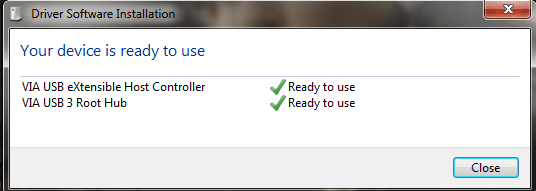
Then, I just now see that none of my USB3 drives are being recognized. USB 2 ports working just fine. I check and sure enough in device manager, USB3 root hub shows yellow exclamation, "Device cannot start"! I just restart my pc and then it shows this dialogue itself-I touched nothing to do that... (uploaded screen of that scenario). But same problem stays anyways.

I uninstall both driver from device manager, tick the delete drivers option - reinstall from Disc, then from downloaded file; still no use. Same thing persists. I can't use any of my USB 3.0 USB sockets. What can I do?
 

Attachments
  • After error.png
    After error.png
    9.2 KB · Views: 45
Last edited:

My Computer

Computer type
PC/Desktop
Computer Manufacturer/Model Number
Self built
OS
Windows 10 Pro (x64)
CPU
AMD RYZEN 7 1700+Stock Wraith Spire
Motherboard
ASUS PRIME B350M-A
Memory
Corsair 8GB (1 x 8 GB) DDR4 Vengeance LPX 2400Mhz
Graphics Card(s)
SAPPHIRE RX 470 4GB (Platinum Edition)
Monitor(s) Displays
BenQ VZ2250H
Screen Resolution
1920x1080
Hard Drives
120GB Samsung 750 Evo (OS/Programs)+1TB ST Firecuda (Games/Creative Applications)+1TB WD Green (Storage)
PSU
Antec VP650PM
Case
Coolermaster K380 Mid-Tower
Cooling
Side:Antec F19 120mm+Rear:Tt ISGC Fan12
Keyboard
Logitech K200
Mouse
Dragonwar Ele-G9 Thor
Internet Speed
Slow by 21st Century Standards :(
Antivirus
Bitdefender Internet Security and MBAM
Browser
Firefox
Other Info
Creative Inspire T3130
Please post a screenshot from Device Manager output, expanded in the USB item at the bottom to show all of your USB items.

Also, is there a Device Manager item for "other devices"? Are there any items anywhere that show a yellow exclamation mark next to them? If so, please post a screenshot of that area of Device Manager as well.
 

My Computer

Computer type
PC/Desktop
Computer Manufacturer/Model Number
Home-built, two systems (1) and (2)
OS
Windows 7 Pro x64 (1), Win7 Pro X64 (2)
CPU
i5-3350p 3.1Ghz/6MB-cache (1); E8400 3.0Ghz/6MB-cache (2)
Motherboard
ASUS P8Z77-V Pro (1); ASUS P5Q3 (2)
Memory
8GB PC3-12800 DDR3 (1); 4GB PC3-10600 DDR3 (2)
Graphics Card(s)
ATI HD7750 (1), (see TV cards); ATI R7 250 (2)
Sound Card
Realtek ALC892 HD Audio (1); Realtek ALC1200 HD Audio (2)
Monitor(s) Displays
Eizo HD2441W LCD, Eizo S2433W (1); Eizo 24" S2433W (2)
Screen Resolution
1920x1200, 1920x1200 (1); 1920x1200 (2)
Hard Drives
(1) 1TB SATA-II (7200RPM), 2x2TB SATA-III (7200RPM), 250GB SATA-III (10000RPM) for OS; 2x2TB external USB 3.0

(2) 320GB SATA-II (7200RPM), 750GB SATA-II (7200RPM), 150GB SATA-II (10000RPM) for OS; 2TB external USB 3.0
PSU
Nesteq ECS-6001 600W (1); Nesteq ECS-5001 500W (2)
Case
Acousti-Case 360 (1) and (2)
Cooling
Noctua NH-U12P SE2 for CPU, 2x120mm case fans (1) and (2)
Keyboard
IBM PS/2 (1) and (2)
Mouse
Logitech MX Revolution wireless (1); Microsoft wired (2)
Internet Speed
100mbps down / 10mbps up
Antivirus
Microsoft Security Essentials; Malwarebyte Anti-Malware Pro
Browser
Firefox
Other Info
Ceton InfiniTV 4-tuner cablecard-enabled TV card as well as Hauppauge HVR-2250 OTA/ATSC 2-tuner TV card in (1), running under Win7 WMC
No it didn't. No other hardware problems at least. Only one Bitdefender AVC HV was not okay, and thinking it might be the source of this problem, I uninstalled BDIS 2015. Installed BDIS 2014 and AVC HV problem was corrected. The USB3 root hub problem remained.
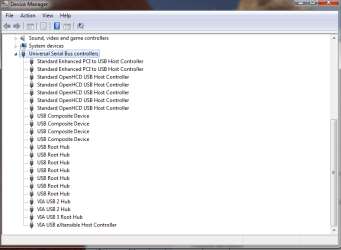
I spent up all night trying to fix. Uninstalling & reinstalling the driver the second time, the driver installer couldn't detect the hardware at all. No matter how many restarts.I performed a format, reinstalled Win7 again. No hardware detected. Checked BIOS, on board USB3 chip is 'on' in the option. Gave up, Shut Down the PC & went to sleep.And in morning-the device manager detects USB3 suddenly again, Installed, it went smooth..here is the current situation (What on sweet earth is happening?!):
 

Attachments

  • Untitled.png
    Untitled.png
    15 KB · Views: 2
Last edited:

My Computer

Computer type
PC/Desktop
Computer Manufacturer/Model Number
Self built
OS
Windows 10 Pro (x64)
CPU
AMD RYZEN 7 1700+Stock Wraith Spire
Motherboard
ASUS PRIME B350M-A
Memory
Corsair 8GB (1 x 8 GB) DDR4 Vengeance LPX 2400Mhz
Graphics Card(s)
SAPPHIRE RX 470 4GB (Platinum Edition)
Monitor(s) Displays
BenQ VZ2250H
Screen Resolution
1920x1080
Hard Drives
120GB Samsung 750 Evo (OS/Programs)+1TB ST Firecuda (Games/Creative Applications)+1TB WD Green (Storage)
PSU
Antec VP650PM
Case
Coolermaster K380 Mid-Tower
Cooling
Side:Antec F19 120mm+Rear:Tt ISGC Fan12
Keyboard
Logitech K200
Mouse
Dragonwar Ele-G9 Thor
Internet Speed
Slow by 21st Century Standards :(
Antivirus
Bitdefender Internet Security and MBAM
Browser
Firefox
Other Info
Creative Inspire T3130
Did you install the chipset drivers for the new CPU?
 

My Computer

Computer type
PC/Desktop
Computer Manufacturer/Model Number
Custom Build
OS
W7 Pro x64 SP1 | W10 Pro IP x64 | W8.1 Pro x64 VM | Linux Mint VM
CPU
i7-4790k @ 4GHz (4.4GHz Boost)
Motherboard
ASUS Sabertooth Z87 (BIOS Rev 2004)
Memory
16GB DDR3 Kingston HyperX Fury @ 1600MHz CL 9-9-9-27
Graphics Card(s)
EVGA GTX 980 Classified
Sound Card
Realtek Onboard
Monitor(s) Displays
Samsung S27D390
Screen Resolution
1920 x 1080
Hard Drives
240GB Intel 520 Series SSD |
Samsung 850 EVO 120GB SSD |
2TB WD Caviar Black |
2TB WD Caviar Green
PSU
Corsair HX850-80 Gold Modular
Case
Cooler Master Silencio 650
Cooling
Corsair H80i w/2 x Corsair SP120 | 2 x 120mm Noctua NF-S12B
Keyboard
Microsoft Sidewinder X4
Mouse
Gigabyte M6900 optical
Internet Speed
152mb
Antivirus
F-Secure
Browser
Firefox 38.0
Other Info
Backup Rig: Win 7 Pro 64-bit | AMD A10-5800k | ASUS F2A85-V Pro | 8GB Samsung DDR3 @1600MHz | 120GB Toshiba SDD | 2TB Seagate HDD | Cooler Master Silencio 550
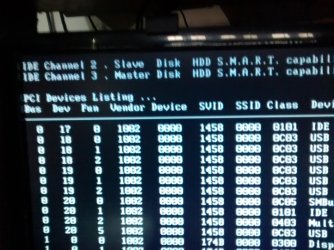
I installed amd-catalyst-14-9-win7-win8.1-64bit-dd-ccc-whql, like I always do even when I had the FX4100. I noticed one thing though, in windows pre-loading window, out of three HDD, two are being show (SMART status), when the problem occured, all three HDD's were listed. Now the USB3 is working only two are shown, again! Is this connected to the problem?
 

Attachments

  • 12333.jpg
    12333.jpg
    355.9 KB · Views: 1

My Computer

Computer type
PC/Desktop
Computer Manufacturer/Model Number
Self built
OS
Windows 10 Pro (x64)
CPU
AMD RYZEN 7 1700+Stock Wraith Spire
Motherboard
ASUS PRIME B350M-A
Memory
Corsair 8GB (1 x 8 GB) DDR4 Vengeance LPX 2400Mhz
Graphics Card(s)
SAPPHIRE RX 470 4GB (Platinum Edition)
Monitor(s) Displays
BenQ VZ2250H
Screen Resolution
1920x1080
Hard Drives
120GB Samsung 750 Evo (OS/Programs)+1TB ST Firecuda (Games/Creative Applications)+1TB WD Green (Storage)
PSU
Antec VP650PM
Case
Coolermaster K380 Mid-Tower
Cooling
Side:Antec F19 120mm+Rear:Tt ISGC Fan12
Keyboard
Logitech K200
Mouse
Dragonwar Ele-G9 Thor
Internet Speed
Slow by 21st Century Standards :(
Antivirus
Bitdefender Internet Security and MBAM
Browser
Firefox
Other Info
Creative Inspire T3130
I installed amd-catalyst-14-9-win7-win8.1-64bit-dd-ccc-whql, like I always do even when I had the FX4100.
I thought your post #1 talked about installing a new CPU cooler. Did you also upgrade the CPU itself? Did you upgrade the motherboard as well?

The AMD Catalyst 14.9 driver you installed is for a graphics card. This isn't the AMD Chipset driver, for the northbridge/southbridge AMD chipsets on your Gigabyte motherboard:


  1. North Bridge: AMD 760G
  2. South Bridge: AMD SB710
This site provides links to download the AMD chipset driver, which is typically required to enable the USB 3.0 hardware and all the other hardware built into your motherboard. Normally the motherboard chipset drivers are the first thing you install after getting your hardware build all squared away, and are starting to install the OS.

I'd pursue this.
 

My Computer

Computer type
PC/Desktop
Computer Manufacturer/Model Number
Home-built, two systems (1) and (2)
OS
Windows 7 Pro x64 (1), Win7 Pro X64 (2)
CPU
i5-3350p 3.1Ghz/6MB-cache (1); E8400 3.0Ghz/6MB-cache (2)
Motherboard
ASUS P8Z77-V Pro (1); ASUS P5Q3 (2)
Memory
8GB PC3-12800 DDR3 (1); 4GB PC3-10600 DDR3 (2)
Graphics Card(s)
ATI HD7750 (1), (see TV cards); ATI R7 250 (2)
Sound Card
Realtek ALC892 HD Audio (1); Realtek ALC1200 HD Audio (2)
Monitor(s) Displays
Eizo HD2441W LCD, Eizo S2433W (1); Eizo 24" S2433W (2)
Screen Resolution
1920x1200, 1920x1200 (1); 1920x1200 (2)
Hard Drives
(1) 1TB SATA-II (7200RPM), 2x2TB SATA-III (7200RPM), 250GB SATA-III (10000RPM) for OS; 2x2TB external USB 3.0

(2) 320GB SATA-II (7200RPM), 750GB SATA-II (7200RPM), 150GB SATA-II (10000RPM) for OS; 2TB external USB 3.0
PSU
Nesteq ECS-6001 600W (1); Nesteq ECS-5001 500W (2)
Case
Acousti-Case 360 (1) and (2)
Cooling
Noctua NH-U12P SE2 for CPU, 2x120mm case fans (1) and (2)
Keyboard
IBM PS/2 (1) and (2)
Mouse
Logitech MX Revolution wireless (1); Microsoft wired (2)
Internet Speed
100mbps down / 10mbps up
Antivirus
Microsoft Security Essentials; Malwarebyte Anti-Malware Pro
Browser
Firefox
Other Info
Ceton InfiniTV 4-tuner cablecard-enabled TV card as well as Hauppauge HVR-2250 OTA/ATSC 2-tuner TV card in (1), running under Win7 WMC
Just to be clear, after upgrading to FX6300, the USB3 was fine initially...but after some time (coincided with cooler install) the errors occured. (See my 2nd post)
I had installed USb 3, LAN drivers from the motherboard DVD-section named 'Chipset drivers' immediately after Cpu upgrade. The others are 'On/off utility' and 'Google chrome' and Via audio (which I don't use, I have Steel series Siberia usb soundcard driver installed) in that section.
What can cause only IDE channel 2 and 3 to be displayed, when all 3 should be displayed in SMART status? When the USB3 disappeared from device manager, the channel 1 was shown again.
 
Last edited:

My Computer

Computer type
PC/Desktop
Computer Manufacturer/Model Number
Self built
OS
Windows 10 Pro (x64)
CPU
AMD RYZEN 7 1700+Stock Wraith Spire
Motherboard
ASUS PRIME B350M-A
Memory
Corsair 8GB (1 x 8 GB) DDR4 Vengeance LPX 2400Mhz
Graphics Card(s)
SAPPHIRE RX 470 4GB (Platinum Edition)
Monitor(s) Displays
BenQ VZ2250H
Screen Resolution
1920x1080
Hard Drives
120GB Samsung 750 Evo (OS/Programs)+1TB ST Firecuda (Games/Creative Applications)+1TB WD Green (Storage)
PSU
Antec VP650PM
Case
Coolermaster K380 Mid-Tower
Cooling
Side:Antec F19 120mm+Rear:Tt ISGC Fan12
Keyboard
Logitech K200
Mouse
Dragonwar Ele-G9 Thor
Internet Speed
Slow by 21st Century Standards :(
Antivirus
Bitdefender Internet Security and MBAM
Browser
Firefox
Other Info
Creative Inspire T3130
No thoughts, eh? *sigh* :picnic:
 

My Computer

Computer type
PC/Desktop
Computer Manufacturer/Model Number
Self built
OS
Windows 10 Pro (x64)
CPU
AMD RYZEN 7 1700+Stock Wraith Spire
Motherboard
ASUS PRIME B350M-A
Memory
Corsair 8GB (1 x 8 GB) DDR4 Vengeance LPX 2400Mhz
Graphics Card(s)
SAPPHIRE RX 470 4GB (Platinum Edition)
Monitor(s) Displays
BenQ VZ2250H
Screen Resolution
1920x1080
Hard Drives
120GB Samsung 750 Evo (OS/Programs)+1TB ST Firecuda (Games/Creative Applications)+1TB WD Green (Storage)
PSU
Antec VP650PM
Case
Coolermaster K380 Mid-Tower
Cooling
Side:Antec F19 120mm+Rear:Tt ISGC Fan12
Keyboard
Logitech K200
Mouse
Dragonwar Ele-G9 Thor
Internet Speed
Slow by 21st Century Standards :(
Antivirus
Bitdefender Internet Security and MBAM
Browser
Firefox
Other Info
Creative Inspire T3130
Not sure this could be connected but just in case go to Device Manager, expand the Universal Serial Bus Controllers, right click the 1st USB Root Hub entry go to the Power Management tab and if ticked then untick "Allow this computer to turn off this device to save power". Do this to all the USB Root Hub entries including the VIA USB 3 Root Hub. Restart the computer and see if it helps
 

My Computer

Computer type
PC/Desktop
Computer Manufacturer/Model Number
Home Made
OS
Windows 7 Ultimate x64
CPU
Q6600 3.1ghz
Motherboard
Gigabyte GA-P35-DS3L
Memory
Kingston DDR2 6400 8GB
Graphics Card(s)
Gigabyte Radeon HD 6850 1GB 256-Bit
Sound Card
On board
Monitor(s) Displays
Acer X243H
Screen Resolution
1920x1080
Hard Drives
Intel 330 120GB SSD
WD 2TB 7200
PSU
Thermaltake Toughpower 750W Semi Modular
Case
Modified Alienware
Keyboard
A4Tech
Mouse
Gigabyte ECO600
Antivirus
Comodo
Browser
Cyberfox
I know this is a old.. the thread. I am currently having issues with my VIA USB 3.0 PCI add on card by startech. Many of the "helpfull sugestions" is to tick or untic "Allow this computer to turn off this device to save power", First the VIA USB Hub installer adds three item to the device manager.

VIA USB eXtensible Host Controller
VIA USB 3 Root Hub
VIA USB 2 Hub

None of these items have the tab for power management. The problem is that the device doesn't seem to be able to wake and restart. If you restart the PC the USB 3 ROOT HUB works fine. No Error. The USB 3 ROOT HUB has the code 10 (cannot start) the VIA USB eXtensible Host Controller, and VIA USB 2 Hub. Both show "This device is working properly".

I am not a big fan of VIA my asus motherboard MA4A785-M uses VIA for sound which recently updated. Upon boot up it would work fine then become staticky then it would lose one channel. Solution was to remove the VIA driver off the system and let windows install its own driver. Works fine now. If only this would work for the USB 3 HUB.
 

My Computer

Computer type
PC/Desktop
Computer Manufacturer/Model Number
Custom Build
OS
Microsoft Windows 7 Home Premium 64-bit 7601 Multiprocessor Free Service Pack 1
CPU
AMD Phenom(tm) II X4 965 Processor
Motherboard
ASUSTeK Computer INC. M4A785-M
Memory
8.0 GB
Graphics Card(s)
NVIDIA GeForce GTX 560 Ti
Sound Card
(1) NVIDIA High Definition Audio (2) NVIDIA High Definitio
Monitor(s) Displays
Samsung SyncMaster T220G
Screen Resolution
1680 x 1050 x 32 bits (4294967296 colors) @ 59 Hz
Hard Drives
WDC WD7500AADS-00M2B0
PSU
650 Watt
Case
Cooler Master HAF XM
Cooling
Air
Keyboard
CompUSA SK-6200
Mouse
Logitech M-510
Internet Speed
Comcast
Antivirus
MSE
Browser
Firefox 27.0 IE 11
Other Info
Belkin Hub To Go F5U706
I'm afraid the problem will resurface once I format the pc again someday. Thinking this might be a motherboard USB3 driver/BIOS bug?

PS. It was USB3 driver bug. Apparently VIA doesn't make the best drivers out there.
 
Last edited:

My Computer

Computer type
PC/Desktop
Computer Manufacturer/Model Number
Self built
OS
Windows 10 Pro (x64)
CPU
AMD RYZEN 7 1700+Stock Wraith Spire
Motherboard
ASUS PRIME B350M-A
Memory
Corsair 8GB (1 x 8 GB) DDR4 Vengeance LPX 2400Mhz
Graphics Card(s)
SAPPHIRE RX 470 4GB (Platinum Edition)
Monitor(s) Displays
BenQ VZ2250H
Screen Resolution
1920x1080
Hard Drives
120GB Samsung 750 Evo (OS/Programs)+1TB ST Firecuda (Games/Creative Applications)+1TB WD Green (Storage)
PSU
Antec VP650PM
Case
Coolermaster K380 Mid-Tower
Cooling
Side:Antec F19 120mm+Rear:Tt ISGC Fan12
Keyboard
Logitech K200
Mouse
Dragonwar Ele-G9 Thor
Internet Speed
Slow by 21st Century Standards :(
Antivirus
Bitdefender Internet Security and MBAM
Browser
Firefox
Other Info
Creative Inspire T3130
Back
Top