Video cuts out during "Expanding Files"

xxxxsh4d0wxxxx

New member
Local time
2:26 PM
Messages
29
Okay, I had another thread that was apparently going nowhere, probably because of the way that I, poorly, worded it.

I am attempting to install the latest Win7 ISO from the Microsoft website. I am attempting to install the 64-bit version.

I will get past the first reboot, and get to 30-33% of the expanding files stage, and will lose video. I am 100% sure it is a video loss.

I am trying to install it by having my main 250GB HDD as the OS with XP on it, and using my other 250GB as my formatted and partitioned HDD in which Win7 will be installed upon. I am not trying to install it from inside XP onto my current HDD, it is being installed inside XP to another, formatted, and partitioned, HDD that is connected.

I apologize for the confusion in my last thread, as I really wasn't being clear.
 

My Computer My Computer

At a glance

Windows XP SP3AMD Athlon 64 X2 3800+1GB DDR2NVIDIA GeForce 6100 nForce 405
Computer Manufacturer/Model Number
Acer Aspire T180
OS
Windows XP SP3
CPU
AMD Athlon 64 X2 3800+
Motherboard
Acer EM61PM/EM61SM
Memory
1GB DDR2
Graphics Card(s)
NVIDIA GeForce 6100 nForce 405
Sound Card
Realtek
Monitor(s) Displays
eMachines eView 17f3
Screen Resolution
1152x864
Hard Drives
HITACHI HDT722525DLA380
PSU
aPower 480W
Case
Acer
Cooling
Fan
Keyboard
Logitech
Mouse
Logitech
Internet Speed
Cable
No one? :(
 

My Computer My Computer

At a glance

Windows XP SP3AMD Athlon 64 X2 3800+1GB DDR2NVIDIA GeForce 6100 nForce 405
Computer Manufacturer/Model Number
Acer Aspire T180
OS
Windows XP SP3
CPU
AMD Athlon 64 X2 3800+
Motherboard
Acer EM61PM/EM61SM
Memory
1GB DDR2
Graphics Card(s)
NVIDIA GeForce 6100 nForce 405
Sound Card
Realtek
Monitor(s) Displays
eMachines eView 17f3
Screen Resolution
1152x864
Hard Drives
HITACHI HDT722525DLA380
PSU
aPower 480W
Case
Acer
Cooling
Fan
Keyboard
Logitech
Mouse
Logitech
Internet Speed
Cable
Okay, I had another thread that was apparently going nowhere, probably because of the way that I, poorly, worded it.

I am attempting to install the latest Win7 ISO from the Microsoft website. I am attempting to install the 64-bit version.

I will get past the first reboot, and get to 30-33% of the expanding files stage, and will lose video. I am 100% sure it is a video loss.

I am trying to install it by having my main 250GB HDD as the OS with XP on it, and using my other 250GB as my formatted and partitioned HDD in which Win7 will be installed upon. I am not trying to install it from inside XP onto my current HDD, it is being installed inside XP to another, formatted, and partitioned, HDD that is connected.

I apologize for the confusion in my last thread, as I really wasn't being clear.

Why not burn it to dvd and boot from that? win 7 will find you video driver for itself

Ken
 

My Computer My Computer

At a glance

Win 8 Release candidate 8400[email protected]4 gigsNvidia 9600M
Computer Manufacturer/Model Number
HP Pavillion dv-7 1005 Tx
OS
Win 8 Release candidate 8400
CPU
[email protected]
Memory
4 gigs
Graphics Card(s)
Nvidia 9600M
Sound Card
HD built-in
Monitor(s) Displays
17" Wxga
Screen Resolution
1440x900
Cooling
none
Internet Speed
45Mb down 5Mb up
Don't think you can run the Win 7.exe from XP.

Like zig said, burn an ISO and boot from DVD.
 

My Computer My Computer

At a glance

Windows 8.1 PRO3rd Generation Intel Core i7‐3612QM CPU @ 2.1...8GB DDR3NVIDIA GeForce GT 525M (128 bit), 1GB Grpahics
Computer type
PC/Desktop
Computer Manufacturer/Model Number
DELL VOSTRO 3650
OS
Windows 8.1 PRO
CPU
3rd Generation Intel Core i7‐3612QM CPU @ 2.10GHZ
Memory
8GB DDR3
Graphics Card(s)
NVIDIA GeForce GT 525M (128 bit), 1GB Grpahics
Screen Resolution
1920X1080
Hard Drives
750GB 5400RPM

My Computer My Computer

At a glance

Windows XP SP3AMD Athlon 64 X2 3800+1GB DDR2NVIDIA GeForce 6100 nForce 405
Computer Manufacturer/Model Number
Acer Aspire T180
OS
Windows XP SP3
CPU
AMD Athlon 64 X2 3800+
Motherboard
Acer EM61PM/EM61SM
Memory
1GB DDR2
Graphics Card(s)
NVIDIA GeForce 6100 nForce 405
Sound Card
Realtek
Monitor(s) Displays
eMachines eView 17f3
Screen Resolution
1152x864
Hard Drives
HITACHI HDT722525DLA380
PSU
aPower 480W
Case
Acer
Cooling
Fan
Keyboard
Logitech
Mouse
Logitech
Internet Speed
Cable
Normal 4.7Gb dvd is fine..
 

My Computer My Computer

At a glance

Windows 8.1 PRO3rd Generation Intel Core i7‐3612QM CPU @ 2.1...8GB DDR3NVIDIA GeForce GT 525M (128 bit), 1GB Grpahics
Computer type
PC/Desktop
Computer Manufacturer/Model Number
DELL VOSTRO 3650
OS
Windows 8.1 PRO
CPU
3rd Generation Intel Core i7‐3612QM CPU @ 2.10GHZ
Memory
8GB DDR3
Graphics Card(s)
NVIDIA GeForce GT 525M (128 bit), 1GB Grpahics
Screen Resolution
1920X1080
Hard Drives
750GB 5400RPM
Will do, I'll pick up some DVD's after work. What size need they be?


Standard 4.3 gig will fit either 32bit or 64. Always good to have a win 7 dvd around in case

Ken
 

My Computer My Computer

At a glance

Win 8 Release candidate 8400[email protected]4 gigsNvidia 9600M
Computer Manufacturer/Model Number
HP Pavillion dv-7 1005 Tx
OS
Win 8 Release candidate 8400
CPU
[email protected]
Memory
4 gigs
Graphics Card(s)
Nvidia 9600M
Sound Card
HD built-in
Monitor(s) Displays
17" Wxga
Screen Resolution
1440x900
Cooling
none
Internet Speed
45Mb down 5Mb up

My Computer My Computer

At a glance

Windows 8.1 PRO3rd Generation Intel Core i7‐3612QM CPU @ 2.1...8GB DDR3NVIDIA GeForce GT 525M (128 bit), 1GB Grpahics
Computer type
PC/Desktop
Computer Manufacturer/Model Number
DELL VOSTRO 3650
OS
Windows 8.1 PRO
CPU
3rd Generation Intel Core i7‐3612QM CPU @ 2.10GHZ
Memory
8GB DDR3
Graphics Card(s)
NVIDIA GeForce GT 525M (128 bit), 1GB Grpahics
Screen Resolution
1920X1080
Hard Drives
750GB 5400RPM
Okay, sorry it took me so long to respond. I work at the largest Ford dealership in the midwest and with the whole "Cash For Clunkers" deal still going on, it's been busier than ever.

Any who, how do I make the bootable CD? I've got the ISO and a 4.7GB DVD. I know I need to use a program to rip it on there, but which is the best? Also, do I need to use WinRar to extract the ISO or what?
 

My Computer My Computer

At a glance

Windows XP SP3AMD Athlon 64 X2 3800+1GB DDR2NVIDIA GeForce 6100 nForce 405
Computer Manufacturer/Model Number
Acer Aspire T180
OS
Windows XP SP3
CPU
AMD Athlon 64 X2 3800+
Motherboard
Acer EM61PM/EM61SM
Memory
1GB DDR2
Graphics Card(s)
NVIDIA GeForce 6100 nForce 405
Sound Card
Realtek
Monitor(s) Displays
eMachines eView 17f3
Screen Resolution
1152x864
Hard Drives
HITACHI HDT722525DLA380
PSU
aPower 480W
Case
Acer
Cooling
Fan
Keyboard
Logitech
Mouse
Logitech
Internet Speed
Cable
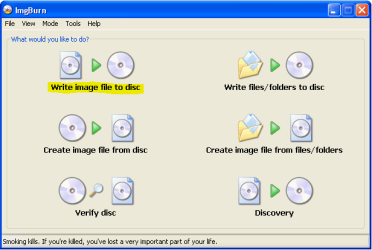
You can use ImgBurn from here: The Official ImgBurn Website Their forums contain many useful hints on using this program, but it is really quite easy and straightforward. On the main page, click on the option Write image file to disc and follow the subsequent instructions.
Capture.PNG
 

My Computer My Computer

At a glance

Windows 8.1 Pro RTM x64Intel Core-i5-3570K 4-core @ 3.4GHz (Ivy Brid...4 x 4GB DDR3-1600 Corsair Vengeance CMZ8GX3M2...MSI GeForce GTX770 Gaming OC 2GB
Computer type
PC/Desktop
Computer Manufacturer/Model Number
Dwarf Dwf/11/2012 r09/2013
OS
Windows 8.1 Pro RTM x64
CPU
Intel Core-i5-3570K 4-core @ 3.4GHz (Ivy Bridge) (OC 4.4GHz)
Motherboard
ASRock Z77 Extreme4-M
Memory
4 x 4GB DDR3-1600 Corsair Vengeance CMZ8GX3M2A1600C9B (16GB)
Graphics Card(s)
MSI GeForce GTX770 Gaming OC 2GB
Sound Card
Realtek High Definition on board solution (ALC 898)
Monitor(s) Displays
ViewSonic VA1912w Widescreen (VGA)
Screen Resolution
1440x900
Hard Drives
OCZ Agility 3 SSD 120GB SATA III x2 (RAID 0)
Samsung HD501LJ 500GB SATA II x2
Hitachi HDS721010CLA332 1TB SATA II
Iomega 1.5TB Ext USB 2.0
WD 2.0TB Ext USB 3.0
PSU
XFX Pro Series 850W Semi-Modular
Case
Gigabyte IF233
Cooling
1 x 120mm Front Inlet 1 x 120mm Rear Exhaust
Keyboard
Microsoft Comfort Curve Keyboard 3000 (USB)
Mouse
Microsoft Comfort Mouse 3000 for Business (USB)
Internet Speed
NetGear DG834Gv3 ADSL Modem/Router (Ethernet) ~4.0 Mb/s (O2)
Antivirus
Avast! 8.0.1497
Browser
IE 11
Other Info
Optical Drive: HL-DT-ST BD-RE BH10LS30 SATA Bluray
Lexmark S305 Printer/Scanner/Copier (USB)
WEI Score: 8.1/8.1/8.5/8.5/8.25
Asus Eee PC 1011PX Netbook (Windows 7 x86 Starter)
You don't need to make the dvd bootable nor do you need to extract the contents of the iso, the iso image of windows 7 dvd is already bootable, all you have to do is burn the iso image to a blank dvd.

Here is how to do it, step by step :

1) You need to install an application for cd/dvd burning like Nero, or Ashampoo Burning Studio (not free), or ImgBurn or CDBurner XP which are free (I will use ImgBurn for this tutorial).

Link for ImgBurn download
http://download.imgburn.com/SetupImgBurn_2.5.0.0.exe

Link for CDBurnerXP download
http://cdburnerxp.se/downloadsetup.exe


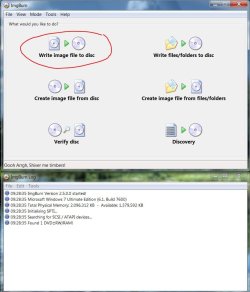
2)Start ImgBurn application and choose the option
Write Image File To Disk

Capture1.JPG


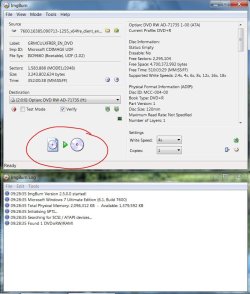
3)Next you need to find and select the iso image that you want to burn. At the top where it says Source and "Please select a file", click on the little icon of a folder with an magnifying glass over it to locate the iso file on your computer.

Capture2.JPG
Also make sure that the "Verify" option is selected
so that after burning, the program will check the burned disk to verify if it was burned properly and that there are no errors while reading the disk.
I would also advise to select a slower burning speed, for instance 4x or even lower ( by default ImgBurn is set to burn at max speed that either dvd burner or the blank dvd medium allows ) to ensure the image gets burned properly and so the dvd drive will have no problems reading data off the dvd during the windows install process.


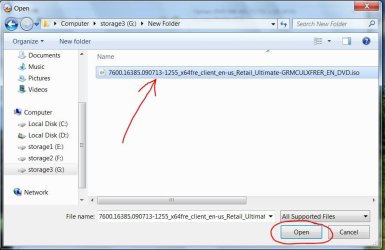
4) Now locate the iso file on your computer, select it and click Open

Capture3.JPG


5) Now all you have to do is click on the "Write" option in the bottom of the window as shown in the final screenshot, and let ImgBurn application do the rest. it will proceed to first write the image to the dvd, and then it will open and close the dvd drive tray and proceed to verify the burned dvd.
Then it will notify you that the dvd was burned successfully.


Hope this helps.
Cheers.

:)
 

Attachments

  • Capture4.JPG
    Capture4.JPG
    102.5 KB · Views: 6

My Computer My Computer

At a glance

Windows 7 Home Basic 64bitIntel Core 2 Duo 6420 (2.13 Ghz)2x1 GB Kingston KVR DDR2 800MhzSaphire ATI HD4870 512MB
Computer Manufacturer/Model Number
custom built
OS
Windows 7 Home Basic 64bit
CPU
Intel Core 2 Duo 6420 (2.13 Ghz)
Motherboard
Asus P5B-E Plus
Memory
2x1 GB Kingston KVR DDR2 800Mhz
Graphics Card(s)
Saphire ATI HD4870 512MB
Sound Card
Creative Audigy 4 PCI
Monitor(s) Displays
Samsung SyncMaster T220
Screen Resolution
1680x1050
Hard Drives
WD 320GB (Sata2)
Maxtor 250GB (ATA133)
Maxtor 80GB (ATA133)
PSU
Coolermaster Silent Pro 700Watt
Case
Chieftec midi tower case
Cooling
stock cpu cooler/fan
Keyboard
Logitech UltraX Premium Keyboard (usb 2.0)
Mouse
Logitech MX518 gaming grade optical mouse 1800dpi(usb2.0)
Thanks! Burning the ISO to the DVD was a success. I wrote i at 4x and it had no errors or anything.

My problem still lies, that my video will cut out randomly. This time it cut out at the part where you have the option to create and delete partitions, in the Win 7 installation process.

-Sigh-

I've no clue what to do.
 

My Computer My Computer

At a glance

Windows XP SP3AMD Athlon 64 X2 3800+1GB DDR2NVIDIA GeForce 6100 nForce 405
Computer Manufacturer/Model Number
Acer Aspire T180
OS
Windows XP SP3
CPU
AMD Athlon 64 X2 3800+
Motherboard
Acer EM61PM/EM61SM
Memory
1GB DDR2
Graphics Card(s)
NVIDIA GeForce 6100 nForce 405
Sound Card
Realtek
Monitor(s) Displays
eMachines eView 17f3
Screen Resolution
1152x864
Hard Drives
HITACHI HDT722525DLA380
PSU
aPower 480W
Case
Acer
Cooling
Fan
Keyboard
Logitech
Mouse
Logitech
Internet Speed
Cable
Okay, so it will install entirely through safe-mode, but when it gets to a certain point it needs to be in normal mode, to complete the installation, and after a certain time, the video cuts out. I've tried different video cards, etc.

I can't think of why it wouldn't work.
 

My Computer My Computer

At a glance

Windows XP SP3AMD Athlon 64 X2 3800+1GB DDR2NVIDIA GeForce 6100 nForce 405
Computer Manufacturer/Model Number
Acer Aspire T180
OS
Windows XP SP3
CPU
AMD Athlon 64 X2 3800+
Motherboard
Acer EM61PM/EM61SM
Memory
1GB DDR2
Graphics Card(s)
NVIDIA GeForce 6100 nForce 405
Sound Card
Realtek
Monitor(s) Displays
eMachines eView 17f3
Screen Resolution
1152x864
Hard Drives
HITACHI HDT722525DLA380
PSU
aPower 480W
Case
Acer
Cooling
Fan
Keyboard
Logitech
Mouse
Logitech
Internet Speed
Cable
Back
Top