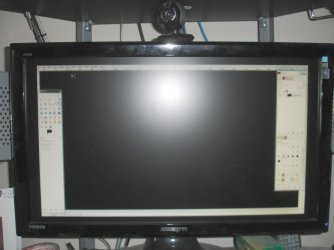
Video does not fill the monitor size fully, problems?

HellTriX

New member
Local time
5:29 AM
Messages
4
I have a 25" Hannspree monitor with a native 1920x1080 resolution and every since I've installed windows 7 my screen does not use the full size of the monitors viewable area. All resolutions do this until I get to a really low resolution where it fills the full screen but then the text is blurry since its not in native resolution.

Steps I have taken to troubleshoot this have been messing with all the settings on the monitor itself to no avail.
I have updated and even tried beta drivers for my Radeon 2900GT sapphire card connected via DVI. I tried the monitor on my other computer and it properly fills the screen so that rules out the monitor as the issue.

I will try to include pictures of the screen, but if that fails here is a visual description: the right and left sides of the screen have almost an inch of black space (2cm) and the top and bottom of the screen have half an inch (1cm) black space where the monitor should actually be displaying but instead has shrunk the image down. It displays everything just in a smaller view than the monitor supports.

Any ideas on how to rectify this would really help, It makes text and other stuff hard to see and read since its shruken down unnaturally.

tnx
 

Attachments
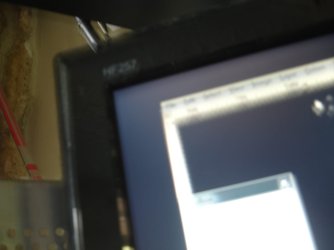
  • DSC03684_scaled.JPG
    DSC03684_scaled.JPG
    63 KB · Views: 37
  • DSC03680_scaled.JPG
    DSC03680_scaled.JPG
    213.3 KB · Views: 191

My Computer My Computer

At a glance

Windows 7 64bitAMD 6400+ X2ATI Sapphire 2900GT
Computer Manufacturer/Model Number
Custom
OS
Windows 7 64bit
CPU
AMD 6400+ X2
Motherboard
Asus
Graphics Card(s)
ATI Sapphire 2900GT
Monitor(s) Displays
Hannspree 25"
Hard Drives
4x raptor 128gig raid-0
2x Maxtor 1TB
PSU
Seasonic 430W 80%+ rated
Does this happen with any other resolutions?

~Lordbob
 

My Computer My Computer

At a glance

Windows 7 Ultimate x64, Mint 9Intel i5-2500k2x 4Gb Corsair VENGEANCE DDR3-1600NVidia GeForce N260GTX Twin Frozr
Computer Manufacturer/Model Number
Hera
OS
Windows 7 Ultimate x64, Mint 9
CPU
Intel i5-2500k
Motherboard
ASUS P8P67 Pro
Memory
2x 4Gb Corsair VENGEANCE DDR3-1600
Graphics Card(s)
NVidia GeForce N260GTX Twin Frozr
Sound Card
Realtek HD OnBoard Audio
Monitor(s) Displays
ASUS 24" Monitor
Screen Resolution
1920x1080
Hard Drives
G.SKILL Phoenix Series 60GB SATA II MLC Internal Solid State Drive (SSD)
SAMSUNG Spinpoint F3R 1TB 7200 RPM 32MB Cache SATA II
PSU
Cooler Master Real Power Pro 750W
Case
Cooler Master Haf 932
Cooling
Fans
Keyboard
Razer Tarantula
Mouse
Razer Lachesis
Internet Speed
not fast enough

My Computer My Computer

At a glance

Windows 7 64bitAMD 6400+ X2ATI Sapphire 2900GT
Computer Manufacturer/Model Number
Custom
OS
Windows 7 64bit
CPU
AMD 6400+ X2
Motherboard
Asus
Graphics Card(s)
ATI Sapphire 2900GT
Monitor(s) Displays
Hannspree 25"
Hard Drives
4x raptor 128gig raid-0
2x Maxtor 1TB
PSU
Seasonic 430W 80%+ rated
So what exactly fixed it?

~Lordbob
 

My Computer My Computer

At a glance

Windows 7 Ultimate x64, Mint 9Intel i5-2500k2x 4Gb Corsair VENGEANCE DDR3-1600NVidia GeForce N260GTX Twin Frozr
Computer Manufacturer/Model Number
Hera
OS
Windows 7 Ultimate x64, Mint 9
CPU
Intel i5-2500k
Motherboard
ASUS P8P67 Pro
Memory
2x 4Gb Corsair VENGEANCE DDR3-1600
Graphics Card(s)
NVidia GeForce N260GTX Twin Frozr
Sound Card
Realtek HD OnBoard Audio
Monitor(s) Displays
ASUS 24" Monitor
Screen Resolution
1920x1080
Hard Drives
G.SKILL Phoenix Series 60GB SATA II MLC Internal Solid State Drive (SSD)
SAMSUNG Spinpoint F3R 1TB 7200 RPM 32MB Cache SATA II
PSU
Cooler Master Real Power Pro 750W
Case
Cooler Master Haf 932
Cooling
Fans
Keyboard
Razer Tarantula
Mouse
Razer Lachesis
Internet Speed
not fast enough
So what exactly fixed it?

~Lordbob

Step by step here is what I did:
1) Open Ati Catalyst.
2) From the graphics drop down select Desktops & Display.
3) At the bottom where you see a small monitor icon, click the little triangle at the top right corner. Click on configure in this menu.
4) You should now be at an Attributes menu, at the top, click Scaling options. You should now see scaling options.
5) Click the scroll bar and try dragging it around to scale your screen.
 

My Computer My Computer

At a glance

Windows 7 64bitAMD 6400+ X2ATI Sapphire 2900GT
Computer Manufacturer/Model Number
Custom
OS
Windows 7 64bit
CPU
AMD 6400+ X2
Motherboard
Asus
Graphics Card(s)
ATI Sapphire 2900GT
Monitor(s) Displays
Hannspree 25"
Hard Drives
4x raptor 128gig raid-0
2x Maxtor 1TB
PSU
Seasonic 430W 80%+ rated
That will distort the image out of aspect ratio. There should be settings right on the monitor to adjust instead.
 

My Computer My Computer

At a glance

7600.20510 x86P4 550 3.4 GHz HT running at 3.5 GHzOCZ 2 GB(2x1GB) DDR400mHz running @ 414 mHzHIS Radeon HD 3850 IceQ 3 Turbo HDMI Dual DL-...
Computer Manufacturer/Model Number
self built
OS
7600.20510 x86
CPU
P4 550 3.4 GHz HT running at 3.5 GHz
Motherboard
MSI PM8M3-V (MS-7211 v1.x) Micro-ATX mainboard
Memory
OCZ 2 GB(2x1GB) DDR400mHz running @ 414 mHz
Graphics Card(s)
HIS Radeon HD 3850 IceQ 3 Turbo HDMI Dual DL-DVI AGP
Sound Card
MOTU Traveler firewire studio interface 192 kHz 24 bit
Monitor(s) Displays
22" widescreen Acer X223W LCD, 17" Compaq P75 CRT
Screen Resolution
1680x1050 and 1280x1024
Hard Drives
SATA I x2 WD, 400 GB and 120 GB, SATA 2 WD Caviar Black 1 TB
PSU
350W generic
Case
Cybertronpc, it glows blue
Cooling
stock cpu fan, Ice-Q 3 gpu and system, many case fans
Keyboard
Logitch Classical Keyboard 200
Mouse
Logitech Mediaplay cordless
Internet Speed
1792/448 kbits/sec
Other Info
SATA II PCI fake RAID adapter, 1 GB Readyboost, original ATI Remote Wonder (even works with WMC perfectly), Logitech Rumblepad 2 game controller x2
That will distort the image out of aspect ratio. There should be settings right on the monitor to adjust instead.

Not true, the image is already at aspect ratio it is just underscanned for the monitor vs HDTV. My monitor will NOT let met change the height/width settings. By adjusting the overscan settings in the driver/video card it simple increases the same aspect ratio to fill the full screen.

My screen looks as clear now as it did win proper settings in windows Vista so it is definitely at correct aspect ratio.
 

My Computer My Computer

At a glance

Windows 7 64bitAMD 6400+ X2ATI Sapphire 2900GT
Computer Manufacturer/Model Number
Custom
OS
Windows 7 64bit
CPU
AMD 6400+ X2
Motherboard
Asus
Graphics Card(s)
ATI Sapphire 2900GT
Monitor(s) Displays
Hannspree 25"
Hard Drives
4x raptor 128gig raid-0
2x Maxtor 1TB
PSU
Seasonic 430W 80%+ rated
First you said scaling and then in last post you said overcan/underscan.

Which did you use?
 

My Computer My Computer

At a glance

7600.20510 x86P4 550 3.4 GHz HT running at 3.5 GHzOCZ 2 GB(2x1GB) DDR400mHz running @ 414 mHzHIS Radeon HD 3850 IceQ 3 Turbo HDMI Dual DL-...
Computer Manufacturer/Model Number
self built
OS
7600.20510 x86
CPU
P4 550 3.4 GHz HT running at 3.5 GHz
Motherboard
MSI PM8M3-V (MS-7211 v1.x) Micro-ATX mainboard
Memory
OCZ 2 GB(2x1GB) DDR400mHz running @ 414 mHz
Graphics Card(s)
HIS Radeon HD 3850 IceQ 3 Turbo HDMI Dual DL-DVI AGP
Sound Card
MOTU Traveler firewire studio interface 192 kHz 24 bit
Monitor(s) Displays
22" widescreen Acer X223W LCD, 17" Compaq P75 CRT
Screen Resolution
1680x1050 and 1280x1024
Hard Drives
SATA I x2 WD, 400 GB and 120 GB, SATA 2 WD Caviar Black 1 TB
PSU
350W generic
Case
Cybertronpc, it glows blue
Cooling
stock cpu fan, Ice-Q 3 gpu and system, many case fans
Keyboard
Logitch Classical Keyboard 200
Mouse
Logitech Mediaplay cordless
Internet Speed
1792/448 kbits/sec
Other Info
SATA II PCI fake RAID adapter, 1 GB Readyboost, original ATI Remote Wonder (even works with WMC perfectly), Logitech Rumblepad 2 game controller x2
Back
Top