Video editing software selection

scripttron75

New member
Member
VIP
Local time
3:30 PM
Messages
168
Hello all, I have windows 7 pro 64bit from my specs u can see. I am looking to upload some videos to Youtube that i recorded from my Iphone 7 plus. yes i recorded the videos the wrong way and when i put them a editing software they are wrong way. is there a software app that is easy to use so i can take these 6 videos that i recorded and combine them, correct orientation and Aspect ratio because when they are flipped the screen is incorrect. :D
 

My Computer

Computer type
PC/Desktop
Computer Manufacturer/Model Number
Custom Built
OS
Windows 7 pro 64 bit
CPU
AMD FX 8370
Motherboard
MSI Gaming board 970 series
Memory
G.SKILL Ripjaws Series 16GB (4 x 4GB) DDR3 SDRAM DDR3
Graphics Card(s)
MSI Geforce GTx 66ti
Sound Card
onboard real tek
Monitor(s) Displays
Acer 22in
Screen Resolution
2048 tops
Hard Drives
SSD 120gig hyper X kingston - 4 other hard drives for storage
PSU
800watt
Case
Lepra
Cooling
standard fan came with amd processor.
Keyboard
Light up Dragon blue keyboard
Mouse
MS optical mouse
Internet Speed
300MB Timewarner Spectrum
Antivirus
AVG and Spyhunter4
Browser
FF, IE and chrome
Other Info
External USB 2.0 hard drive 1tb
Try the free Virtual Dub. There's even a portable version that you can try without having to install it on your computer.

Once you launch the program, drag and drop one of your videos into it. Depending on the file format of your source videos, you may have to first convert them to a format Virtual Dub supports. Notably, Virtual Dub doesn't seem to support the .mp4 format. It seems to work best with .avi format.

Then on the menu bar select Video->Filters->Add. Select the "rotate" filter, and choose to rotate 90 or 180 degrees. Then use File->Save as AVI.

If necessary, you can use another program to convert the result from .avi back to another format, but IIRC I think YouTube supports .avi so this last step might be unnecessary.

Note a 90-deg rotate will convert a tall video to wide, and vice versa. If you want to keep the same outside dimensions but just rotate the video inside it, you'll obviously have to either crop the rotated video or letterbox it. Virtual Dub has a filter for that, too--use both the "rotate" and "resize" filters together.
 

My Computer

Computer type
PC/Desktop
Computer Manufacturer/Model Number
Dell Optiplex 7050
OS
Windows 7/8.1/10 multiboot
CPU
Intel Core i7-7700
Motherboard
Dell, Intel Q270 chipset
Memory
48GB (2x16GB Crucial DDR4-3200 + 2x8GB Hynix DDR4-2400)
Graphics Card(s)
Intel HD630 + AMD Radeon R7 450 PCIe
Monitor(s) Displays
Asus VC279 (27")
Screen Resolution
1920x1080
Hard Drives
Toshiba M.2 NVMe (256GB),
Samsung 960 Evo (500GB),
WD Red Plus 80EFBX (8TB)
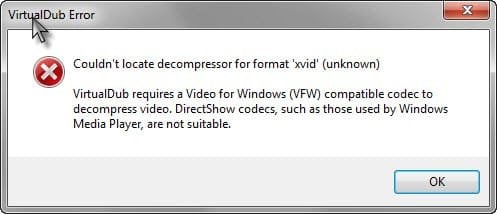
thanks, they are .mov files straight from my iphone. i have anyvideo converter and i converted them to .avi and then try to open all of them with virtual dub and i get an error.
 

Attachments

  • 2017-06-26_18-05-40.jpg
    2017-06-26_18-05-40.jpg
    15.9 KB · Views: 24

My Computer

Computer type
PC/Desktop
Computer Manufacturer/Model Number
Custom Built
OS
Windows 7 pro 64 bit
CPU
AMD FX 8370
Motherboard
MSI Gaming board 970 series
Memory
G.SKILL Ripjaws Series 16GB (4 x 4GB) DDR3 SDRAM DDR3
Graphics Card(s)
MSI Geforce GTx 66ti
Sound Card
onboard real tek
Monitor(s) Displays
Acer 22in
Screen Resolution
2048 tops
Hard Drives
SSD 120gig hyper X kingston - 4 other hard drives for storage
PSU
800watt
Case
Lepra
Cooling
standard fan came with amd processor.
Keyboard
Light up Dragon blue keyboard
Mouse
MS optical mouse
Internet Speed
300MB Timewarner Spectrum
Antivirus
AVG and Spyhunter4
Browser
FF, IE and chrome
Other Info
External USB 2.0 hard drive 1tb
Try installing the xvid codec. See if that helps.
 

My Computer

Computer type
PC/Desktop
Computer Manufacturer/Model Number
Dell Optiplex 7050
OS
Windows 7/8.1/10 multiboot
CPU
Intel Core i7-7700
Motherboard
Dell, Intel Q270 chipset
Memory
48GB (2x16GB Crucial DDR4-3200 + 2x8GB Hynix DDR4-2400)
Graphics Card(s)
Intel HD630 + AMD Radeon R7 450 PCIe
Monitor(s) Displays
Asus VC279 (27")
Screen Resolution
1920x1080
Hard Drives
Toshiba M.2 NVMe (256GB),
Samsung 960 Evo (500GB),
WD Red Plus 80EFBX (8TB)
Thanks DG that worked however i am a noob... actually i used to do this a long time ago but cant recall and i want to get into posting YT vids .... how do i rotate the vid and also after it is rotated how do i extend its resolution to fit the screen instead of a monolith type square. i attached pic..
 

Attachments

  • 2017-06-26_21-06-15.jpg
    2017-06-26_21-06-15.jpg
    56.6 KB · Views: 2

My Computer

Computer type
PC/Desktop
Computer Manufacturer/Model Number
Custom Built
OS
Windows 7 pro 64 bit
CPU
AMD FX 8370
Motherboard
MSI Gaming board 970 series
Memory
G.SKILL Ripjaws Series 16GB (4 x 4GB) DDR3 SDRAM DDR3
Graphics Card(s)
MSI Geforce GTx 66ti
Sound Card
onboard real tek
Monitor(s) Displays
Acer 22in
Screen Resolution
2048 tops
Hard Drives
SSD 120gig hyper X kingston - 4 other hard drives for storage
PSU
800watt
Case
Lepra
Cooling
standard fan came with amd processor.
Keyboard
Light up Dragon blue keyboard
Mouse
MS optical mouse
Internet Speed
300MB Timewarner Spectrum
Antivirus
AVG and Spyhunter4
Browser
FF, IE and chrome
Other Info
External USB 2.0 hard drive 1tb
how do i rotate the vid and also after it is rotated how do i extend its resolution to fit the screen instead of a monolith type square.

Reread post #2, and experiment with it yourself.

Then on the menu bar select Video->Filters->Add. Select the "rotate" filter, and choose to rotate 90 or 180 degrees.
[...]
If you want to keep the same outside dimensions but just rotate the video inside it, you'll obviously have to either crop the rotated video or letterbox it. Virtual Dub has a filter for that, too--use both the "rotate" and "resize" filters together.

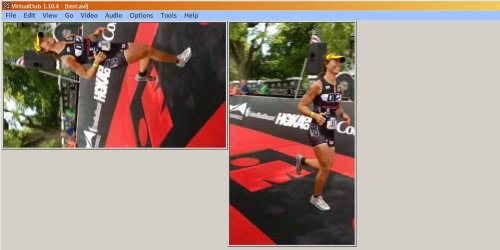
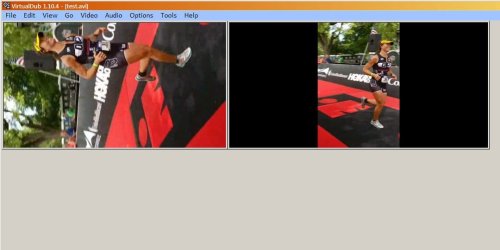
The first screenshot below is with the "rotate" filter only, the second is with both the "rotate" and "resize" filters.

If you really want to get into YouTube videos, the first thing you'll want to remember is to record in landscape mode. You may be a noob, but you don't have to let the whole world know it. ;)
 

Attachments

  • Image1.jpg
    Image1.jpg
    54.2 KB · Views: 2
  • Image2.jpg
    Image2.jpg
    46 KB · Views: 1

My Computer

Computer type
PC/Desktop
Computer Manufacturer/Model Number
Dell Optiplex 7050
OS
Windows 7/8.1/10 multiboot
CPU
Intel Core i7-7700
Motherboard
Dell, Intel Q270 chipset
Memory
48GB (2x16GB Crucial DDR4-3200 + 2x8GB Hynix DDR4-2400)
Graphics Card(s)
Intel HD630 + AMD Radeon R7 450 PCIe
Monitor(s) Displays
Asus VC279 (27")
Screen Resolution
1920x1080
Hard Drives
Toshiba M.2 NVMe (256GB),
Samsung 960 Evo (500GB),
WD Red Plus 80EFBX (8TB)
Back
Top