Video file question

Birddude007

New member
Member
Local time
4:30 PM
Messages
70
Hi folks I dont know if this is the right place to post this but maybe you all can help me. I am new to video processing and I am trying to get my dvd that I have a vid camera recordings converted to use on Camtasia. I have Allok video file converter program. I have converted the VOB files on the camera disk to many different file types but when I play them on Camtasia they have lots of lines in the playback. Could it be my converter program? if so what is a good converter program to get? Could it be my file formats that I am trying in Camtasia? if so then what file format should I try and at what settings?
Another note is that when I play the camera disk files directly using windows media player the videos play just fine.
I just want to know just how to work simply with videos so that I can share them on the web and friends and family
Thanks in advance for any info.
~James
 

My Computer

OS
Windows 7 64 bit
CPU
AMD Dual Core 2,2 GHZ
Motherboard
dunno...its a laptop
Memory
4GB, upgrading to 8GB
Graphics Card(s)
integrated
Sound Card
does it need one?
Monitor(s) Displays
built in
Screen Resolution
lots
Hard Drives
2 x 250 GB
PSU
wall outlet
Case
plastic
Cooling
swamp cooler
Keyboard
finger operated
Mouse
cat got it
Internet Speed
1 meg
Hi James.

This sounds like your converter is causing the problem.

I have never used Camtasia but would say if you want to convert VOB files that you hav a look at this old newsgroup How to Convert VOB Files for use with Windows Movie Maker - Vista Forums.

I would personally suggest installing Windows Movie Maker 6 on your PC (if that's available to you) using this tutorial http://www.sevenforums.com/tutorials/35151-windows-movie-maker-6-0-install-windows-7-a.html.

Another alternative if you are looking to upload your videos to youtube (or not) you may want to take a look at http://www.youtube.com/editor?popart=681928. It's very basic but I don't know what you went to do with your videos ;).

I hope this is useful.

Oli
 

My Computer

Computer Manufacturer/Model Number
Apple MacBook 5,1
OS
Windows 7 Profesional x86, Mac OS X 10.6 Snow Leopard
CPU
Intel Core 2 Duo 2.4Ghz
Memory
4GB DDR3
Graphics Card(s)
Nvidia 9400m
Monitor(s) Displays
13.3" Internal + 22" DVI + 21.5" USB
Screen Resolution
1280x800 + 1920x1080 + 1920x1080
Hard Drives
Internal SATA 2.5" 500GB (395GB Mac HFS+, 105GB Windows NTFS)
2.48TB RAID consisting of 5 disks (HFS+)
Case
Aluminium Unibody
Keyboard
Apple Late 2009 Wireless Keyboard (US)
Mouse
Apple Magic Mouse
Internet Speed
6.33Mb/s up. 0.36Mb/s down.
Other Info
Harman Kardon Soundsticks II Speakers
The best video format I have ever used till date is Matroska

And the best way to convert from vob to matroska is HandBrake

It uses x264, man ;)

Edit : If you use MeGui ofr FFmpeg, you will get x264 there. All the three may be free to use, but produces output far far better than that is done by a paid app .
 

My Computer

Computer type
PC/Desktop
Computer Manufacturer/Model Number
Self Assembled
OS
Microsoft Windows 10 Pro Insider Preview 64-bit
CPU
Intel(R) Core(TM) i3-4130 CPU @ 3.40GHz
Motherboard
Gigabyte Technology Co., Ltd. B85M-D3H
Memory
Corsair Vengence 4GB x2 (8.00GB Dual-Channel DDR3 @ 798MHz)
Graphics Card(s)
2047MB GeForce GTS 450 (ZOTAC International)
Sound Card
Onboard (Realtek High Definition Audio)
Monitor(s) Displays
LG Flatron E2040T
Screen Resolution
1600x900
Hard Drives
Western Digital 1 TB
Seagate 500 GB
PSU
Corsair VS550
Case
Cooler Master K380
Cooling
Cooler Master Seidon 120V Plus
Keyboard
Logitech MK260r
Mouse
Logitech MK260r
Internet Speed
PMPL Broadband
Antivirus
Windows Defender + MBAM
Browser
Firefox
Other Info
Dell Studio 15" Laptop
These are all great ideas and I have tried them all but no matter which converter program I try I even see the lines in the preview window player as well but when I just play the clips straight in windows media player or even HP media player i get good picture, if I go ahead and convert the files and play them in media player I get the lines.
 

My Computer

OS
Windows 7 64 bit
CPU
AMD Dual Core 2,2 GHZ
Motherboard
dunno...its a laptop
Memory
4GB, upgrading to 8GB
Graphics Card(s)
integrated
Sound Card
does it need one?
Monitor(s) Displays
built in
Screen Resolution
lots
Hard Drives
2 x 250 GB
PSU
wall outlet
Case
plastic
Cooling
swamp cooler
Keyboard
finger operated
Mouse
cat got it
Internet Speed
1 meg
These are all great ideas and I have tried them all but no matter which converter program I try I even see the lines in the preview window player as well but when I just play the clips straight in windows media player or even HP media player i get good picture, if I go ahead and convert the files and play them in media player I get the lines.
Lines in the preview window, you mean the preview window of the converter ? Use handbrake, it doesnot have a preview window (unless you have QuickTime Pro installed). If the input file is clear , the output file must be a clear one .
 

My Computer

Computer type
PC/Desktop
Computer Manufacturer/Model Number
Self Assembled
OS
Microsoft Windows 10 Pro Insider Preview 64-bit
CPU
Intel(R) Core(TM) i3-4130 CPU @ 3.40GHz
Motherboard
Gigabyte Technology Co., Ltd. B85M-D3H
Memory
Corsair Vengence 4GB x2 (8.00GB Dual-Channel DDR3 @ 798MHz)
Graphics Card(s)
2047MB GeForce GTS 450 (ZOTAC International)
Sound Card
Onboard (Realtek High Definition Audio)
Monitor(s) Displays
LG Flatron E2040T
Screen Resolution
1600x900
Hard Drives
Western Digital 1 TB
Seagate 500 GB
PSU
Corsair VS550
Case
Cooler Master K380
Cooling
Cooler Master Seidon 120V Plus
Keyboard
Logitech MK260r
Mouse
Logitech MK260r
Internet Speed
PMPL Broadband
Antivirus
Windows Defender + MBAM
Browser
Firefox
Other Info
Dell Studio 15" Laptop
These are all great ideas and I have tried them all but no matter which converter program I try I even see the lines in the preview window player as well but when I just play the clips straight in windows media player or even HP media player i get good picture, if I go ahead and convert the files and play them in media player I get the lines.
Lines in the preview window, you mean the preview window of the converter ? Use handbrake, it doesnot have a preview window (unless you have QuickTime Pro installed). If the input file is clear , the output file must be a clear one .

I have the Handbrake now and cannot figure it out, like I said I am not very good a t video
I am converting a file right now to ffmpeg but i am not sure if Camtasia will recognize the format
 

My Computer

OS
Windows 7 64 bit
CPU
AMD Dual Core 2,2 GHZ
Motherboard
dunno...its a laptop
Memory
4GB, upgrading to 8GB
Graphics Card(s)
integrated
Sound Card
does it need one?
Monitor(s) Displays
built in
Screen Resolution
lots
Hard Drives
2 x 250 GB
PSU
wall outlet
Case
plastic
Cooling
swamp cooler
Keyboard
finger operated
Mouse
cat got it
Internet Speed
1 meg
You have no need to convert the VOB files at all. Take a copy of the VOB file and change the file extension to mpg. Don't worry about the warning you might get, ignore it. (You've still got the original VOB file.) Then use the MPG file to upload to You Tube or burn to a disc so that your friends can play it on a PC. If you want to create a DVD to play on a DVD player through a TV post here and I will give you the workflow, it's quite straightforward!
 

My Computer

Computer type
PC/Desktop
OS
Microsoft Windows 7 Home Premium 64-bit 7601 Multiprocessor Free Service Pack 1
CPU
Intel(R) Core(TM) i7-3770 CPU @ 3.40GHz
Motherboard
ASUSTeK COMPUTER INC. P8H77-M
Memory
8.00 GB
Graphics Card(s)
Intel(R) HD Graphics 4000
Sound Card
On Board
Monitor(s) Displays
Dell 24"
Screen Resolution
1920 x 1080
Hard Drives
(1) INTEL SSDSC2CT180A3 ATA Device (2) ST500DM002-1BD142 ATA Device (3) WDC WD3200AAKS-75L9A0 ATA Device (4) Generic- Compact Flash USB Device (5) Generic- MS/MS-Pro USB Device (6) Generic- SD/MMC USB Device (7) Generic- SM/xD-Picture USB
PSU
500w Corsair
Case
Cooler Master
Cooling
3 Fans
Keyboard
Logitech MK300
Mouse
Logitech WOM
Internet Speed
75Mb
Antivirus
Norton 360
Browser
Firefox, Opera, IE
I have the Handbrake now and cannot figure it out, like I said I am not very good a t video
I am converting a file right now to ffmpeg but i am not sure if Camtasia will recognize the format
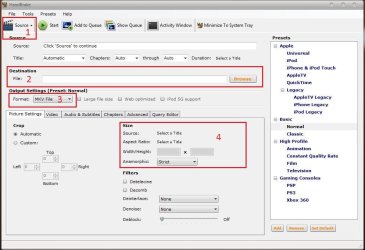
Four steps :D
1. Open the program. Inthe main window, first select source (Click on source, and browse) ; select destination (broese to desktop, give the filenake such as vid.mkv) select format (mkv) and set aspect ratio (if you want to change the default, click on anamorphic and select custom)
1.JPG

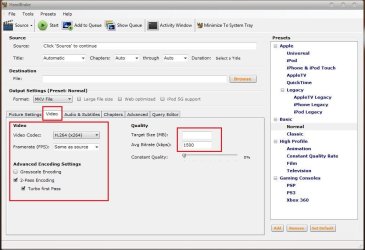
2. Click on videos tab , select codec x264, advanced options is two pass and turbo first pass both checked; and select the bitrate (try not to reduce below 1000)
2.JPG

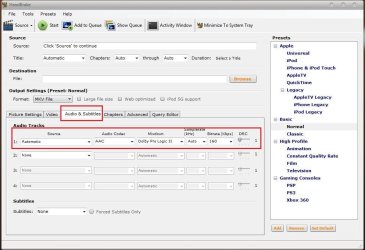
3. Click Audios tab, and accept the default, if the default is like the shot
3.JPG

4. Now click on start. A command prompt window will appear, and everything will be done in it
4.JPG
 

My Computer

Computer type
PC/Desktop
Computer Manufacturer/Model Number
Self Assembled
OS
Microsoft Windows 10 Pro Insider Preview 64-bit
CPU
Intel(R) Core(TM) i3-4130 CPU @ 3.40GHz
Motherboard
Gigabyte Technology Co., Ltd. B85M-D3H
Memory
Corsair Vengence 4GB x2 (8.00GB Dual-Channel DDR3 @ 798MHz)
Graphics Card(s)
2047MB GeForce GTS 450 (ZOTAC International)
Sound Card
Onboard (Realtek High Definition Audio)
Monitor(s) Displays
LG Flatron E2040T
Screen Resolution
1600x900
Hard Drives
Western Digital 1 TB
Seagate 500 GB
PSU
Corsair VS550
Case
Cooler Master K380
Cooling
Cooler Master Seidon 120V Plus
Keyboard
Logitech MK260r
Mouse
Logitech MK260r
Internet Speed
PMPL Broadband
Antivirus
Windows Defender + MBAM
Browser
Firefox
Other Info
Dell Studio 15" Laptop
Im wondering if the lines you see are Interlace lines, or other file corruption.


If it is interlaced, the player may need to de-interlace for playback. Otherwise there will be lines.

Im not sure what Camtasia is, but if it is not capale, turn on hardware acceleration and let the graphics card do it.

Alternatively, you can de-interlace the files yourself when encoding and just encode it progressive.
 

My Computer

Computer Manufacturer/Model Number
Custom (Self Build)
OS
Windows 7 Home Premium 64bit
CPU
Intel Core i7 2700k
Motherboard
eVGA P67 SLI
Memory
8GB Mushkin Redline Ridgebacks @1866
Graphics Card(s)
EVGA GTX570 SC
Sound Card
XiFi Titanium HD
Monitor(s) Displays
LG W2453V
Screen Resolution
1920x1080
Hard Drives
Intel 320 80GB -- Intel X25-V 40GB --WD Black 1TB x2 -- WD Blue 640GB
PSU
Seasonic x750
Case
Corsair 600T SE White
Cooling
eVGA Superclocked CPU Cooler
Keyboard
Saitek Cyborg
Antivirus
Kaspersky
Browser
IE
Other Info
LG BD/DVD
Cool! i figured it out but I have to take an extra step in order for Camtasia would accept it. I was right about Camtasia not accepting it but all I did was reconvert the output file from handbrake to AVI and Camtasia accepted it and it plays beautifully without those stupid lines and now it comes out awesome, thanks so much.
 

My Computer

OS
Windows 7 64 bit
CPU
AMD Dual Core 2,2 GHZ
Motherboard
dunno...its a laptop
Memory
4GB, upgrading to 8GB
Graphics Card(s)
integrated
Sound Card
does it need one?
Monitor(s) Displays
built in
Screen Resolution
lots
Hard Drives
2 x 250 GB
PSU
wall outlet
Case
plastic
Cooling
swamp cooler
Keyboard
finger operated
Mouse
cat got it
Internet Speed
1 meg

My Computer

Computer type
PC/Desktop
Computer Manufacturer/Model Number
Self Assembled
OS
Microsoft Windows 10 Pro Insider Preview 64-bit
CPU
Intel(R) Core(TM) i3-4130 CPU @ 3.40GHz
Motherboard
Gigabyte Technology Co., Ltd. B85M-D3H
Memory
Corsair Vengence 4GB x2 (8.00GB Dual-Channel DDR3 @ 798MHz)
Graphics Card(s)
2047MB GeForce GTS 450 (ZOTAC International)
Sound Card
Onboard (Realtek High Definition Audio)
Monitor(s) Displays
LG Flatron E2040T
Screen Resolution
1600x900
Hard Drives
Western Digital 1 TB
Seagate 500 GB
PSU
Corsair VS550
Case
Cooler Master K380
Cooling
Cooler Master Seidon 120V Plus
Keyboard
Logitech MK260r
Mouse
Logitech MK260r
Internet Speed
PMPL Broadband
Antivirus
Windows Defender + MBAM
Browser
Firefox
Other Info
Dell Studio 15" Laptop
Cool! i figured it out but I have to take an extra step in order for Camtasia would accept it. I was right about Camtasia not accepting it but all I did was reconvert the output file from handbrake to AVI and Camtasia accepted it and it plays beautifully without those stupid lines and now it comes out awesome, thanks so much.
We will be extremely happy (Mitchell65, Wishmaster and me) if we could take any positive role in solving your issue :D
 

My Computer

Computer type
PC/Desktop
Computer Manufacturer/Model Number
Self Assembled
OS
Microsoft Windows 10 Pro Insider Preview 64-bit
CPU
Intel(R) Core(TM) i3-4130 CPU @ 3.40GHz
Motherboard
Gigabyte Technology Co., Ltd. B85M-D3H
Memory
Corsair Vengence 4GB x2 (8.00GB Dual-Channel DDR3 @ 798MHz)
Graphics Card(s)
2047MB GeForce GTS 450 (ZOTAC International)
Sound Card
Onboard (Realtek High Definition Audio)
Monitor(s) Displays
LG Flatron E2040T
Screen Resolution
1600x900
Hard Drives
Western Digital 1 TB
Seagate 500 GB
PSU
Corsair VS550
Case
Cooler Master K380
Cooling
Cooler Master Seidon 120V Plus
Keyboard
Logitech MK260r
Mouse
Logitech MK260r
Internet Speed
PMPL Broadband
Antivirus
Windows Defender + MBAM
Browser
Firefox
Other Info
Dell Studio 15" Laptop
Back
Top