videos appear zoomed out in Firefox, IE 9 and Windows Media Player

snoozer

New member
Local time
9:24 AM
Messages
13
Just recently I have been having problems viewing YouTube, Hulu and videos on other websites with either Firefox or IE, videos all appear zoomed way in, but the videos play fine using Chrome.

Plus now I noticed when trying to play wmv or avi through Windows Media Player the videos all appear to zoomed way in just like on-line videos where you can not view them too, but if I load the videos into another media player they work fine.

I have the latest version of flash installed on all browsers, have uninstalled them and reinstalled them thinking maybe this was the
problem, but still having problems.

Noticed sometimes the videos work fine and other times have problems with the videos being zoomed way out.
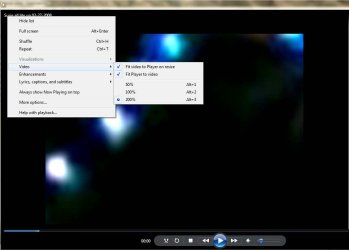
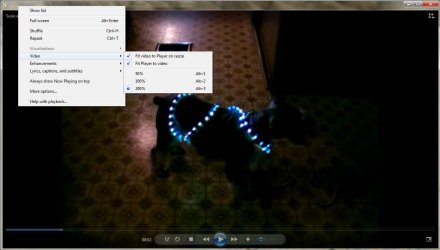
This is how the videos appear

youtube screen shot.jpg


I have no idea how to correct this problem.
If any one has any suggestions I would really appreciate the help

Thank you in advance,
Mark


HP Pavilion g6 series laptop
OS Version: Microsoft Windows 7 Home Premium, Service Pack 1, 64 bit
Processor: AMD A4-3320M APU with Radeon(tm) HD Graphics, AMD64 Family 18 Model 1 Stepping 0
Processor Count: 2
RAM: 5610 Mb
Graphics Card: AMD Radeon(TM) HD 6480G, 512 Mb
Hard Drives: C: Total - 689810 MB, Free - 584779 MB
Motherboard: Hewlett-Packard, 169B
Antivirus: Microsoft Security Essentials, Updated and Enabled
 
Last edited:

My Computer My Computer

At a glance

Windows 7 Home Premium 64bit.6 gigs
Computer Manufacturer/Model Number
HP Pavilion g6-1d47cl Notebook PC
OS
Windows 7 Home Premium 64bit.
Memory
6 gigs
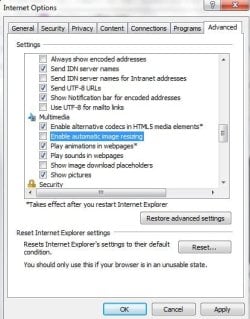
Not sure how it is done in Firefox but in IE you can set not to auto resize images.

Go to Internet Options on the Advanced Tab. Scroll down until you see this:

autosize.jpg

Make sure that box is unchecked. I am not sure will correct for videos but it makes a world of difference for images.
 

My Computer My Computer

At a glance

Windows 7 ProIntel(R) Pentium(R) Duel CPU E2200 2.20 Ghz4 gb 2.96 UsableOnboard
OS
Windows 7 Pro
CPU
Intel(R) Pentium(R) Duel CPU E2200 2.20 Ghz
Motherboard
GA-G41M-ES2L
Memory
4 gb 2.96 Usable
Graphics Card(s)
Onboard
Sound Card
Onboard
Hard Drives
2 - 1TB WD Sata Drives
Thank you for the suggestion huffman, but IE 9 was already set that way when I checked. I don't think it is just browser related because I have noticed that when playing videos in Windows Media Player I have the same problem. Just don't understand why videos are ok in Chrome and other video players. Hate to have to reinstall Windows to fix this.
Once again thank you for your suggestion
Mark
 

My Computer My Computer

At a glance

Windows 7 Home Premium 64bit.6 gigs
Computer Manufacturer/Model Number
HP Pavilion g6-1d47cl Notebook PC
OS
Windows 7 Home Premium 64bit.
Memory
6 gigs
Update to video problems

I just discovered why the video problem was off & on. If I unplug the power adapter on my laptop and run off battery power videos play perfect then if I plug adapter back in even while watching a video the video will zoom out.
Now this is getting stranger by the minute.:huh:
 

My Computer My Computer

At a glance

Windows 7 Home Premium 64bit.6 gigs
Computer Manufacturer/Model Number
HP Pavilion g6-1d47cl Notebook PC
OS
Windows 7 Home Premium 64bit.
Memory
6 gigs
another update

Thought I would post my latest findings

If I log on as a different user all videos play fine. I really don't want to have to get everything else working under a new user if I don't have too. Unless there is a simple way to get everything working under a new user like I have things setup

Seems to be just affecting Firefox IE9 and Windows Media Player.
Open for ideas on what to look for since under new user solves problem

Thank you
 

My Computer My Computer

At a glance

Windows 7 Home Premium 64bit.6 gigs
Computer Manufacturer/Model Number
HP Pavilion g6-1d47cl Notebook PC
OS
Windows 7 Home Premium 64bit.
Memory
6 gigs
Problem partially resolved

Decided to go ahead and create a new user Account which solved the problem with viewing videos in Firefox & IE 9, but still was having trouble with viewing videos in Windows Media Player 12. So decided to give Media Player Codec Pack 4.2.2.817 a try and now I can view all videos with no trouble other then wmv and mpg formats in WMP 12.

Since I do not use WMP that much if any and all videos play fine in UMplayer I am going to consider problem solved, but if anyone comes across this message and has ideas as to why the video problem only existed when plugged into ac adapter I am really curious.

This problem I think even stumped HP and at times I got the feeling that they did not believe I was having this problem.

To all who have replied and viewed my message I want to thank you though.

Later,
Mark
 

My Computer My Computer

At a glance

Windows 7 Home Premium 64bit.6 gigs
Computer Manufacturer/Model Number
HP Pavilion g6-1d47cl Notebook PC
OS
Windows 7 Home Premium 64bit.
Memory
6 gigs

My Computer My Computer

At a glance

Windows 10 Home x64INTEL Core i5-750 Quad-Core 3.37GHzHyperX Fury Black Series 8GB (2 x 4GB) 1866MhzEVGA GeForce GTX 750 Superclocked 1GB 128-Bit...
Computer type
PC/Desktop
OS
Windows 10 Home x64
CPU
INTEL Core i5-750 Quad-Core 3.37GHz
Motherboard
ASUS P7P55D
Memory
HyperX Fury Black Series 8GB (2 x 4GB) 1866Mhz
Graphics Card(s)
EVGA GeForce GTX 750 Superclocked 1GB 128-Bit GDDR5
Monitor(s) Displays
LG 32MA68HY 32" IPS
Screen Resolution
1920 x 1080
Hard Drives
Samsung 840 Evo 120GB, SEAGATE 500GB Barracuda® 7200.12, SATA 3 Gb/s, 7200 RPM, 16MB cache
PSU
ANTEC TruePower New TP-550, 80 PLUS, 550W
Case
ANTEC Three Hundred Illusion
Cooling
COOLER MASTER Hyper 212 Plus, 4 x 120mm 1 x 140mm Noctua's
Internet Speed
85 + Mbps
Antivirus
Avast
Browser
Vivaldi
Welcome to Seven Forums snoozer. Since you saw a difference when running on battery and AC, I would perhaps look to the power settings. Is there a difference in settings between the user account that works correctly, and the problem account?

http://www.sevenforums.com/tutorials/778-power-plan-settings-change.html

A Guy
Thank you for your reply. Unfortunately I deleted the user account that was giving me so much trouble.
The only problem now is any program that must use something that involves WMP shows the videos zoomed in.
Seems to be only wmv and mpg files now though and at least Firefox is showing videos correctly now.

Thank you for the power setting link I will check them out.
Mark
 

My Computer My Computer

At a glance

Windows 7 Home Premium 64bit.6 gigs
Computer Manufacturer/Model Number
HP Pavilion g6-1d47cl Notebook PC
OS
Windows 7 Home Premium 64bit.
Memory
6 gigs

My Computer My Computer

At a glance

Windows 7 x64Intel i7 2600kG.skill Ripjaw 16gigs @ 1866Nvidia gtx580 (evga)
Computer Manufacturer/Model Number
Insane hobo technologies. ;-)
OS
Windows 7 x64
CPU
Intel i7 2600k
Motherboard
Asrock z68 extreme 4 gen 3
Memory
G.skill Ripjaw 16gigs @ 1866
Graphics Card(s)
Nvidia gtx580 (evga)
Sound Card
Integrated HD audio + hdmi
Monitor(s) Displays
24" ASUS widescreen + 42" insignia
Screen Resolution
1080p (1920x1080)
Hard Drives
128 Samsung 830
256 Samsung 840
3 x 1tb storage drive (various)
1 western digital 1tb (eSATA)
1 Seagate 1tb (eSATA)
PSU
1 kilowatt SLI/Crossfire rated Silverstone modular
Case
NZXT Phantom + additional 220 fan
Cooling
Zalmann
Keyboard
Microsoft wireless 3000 (v2)
Mouse
MS - wireless 5000 (bluetrack)
Internet Speed
depends on if you ask me or my provider.
Other Info
The above information is provided as is, and the author assumes no responsibility for issues it may cause with your sanity or fanboyism.
I would peg that as a codec problem.
This has helped with random media player problems before.
Download Fix WMP Utility 1.0 Free - Will re-register over 40 dll files needed for the proper functioning of WMP. - Softpedia

Hi,
Thank you for the suggestion. I tried the WMP Utility and still no go.
Does seem to be a codec problem doesn't?
Since I installed the codec pack almost all videos play alright in WMP, but wmv and mpg files.
Creating a new user account solved the problems in viewing videos with web browsers.
All videos play fine in VLC.
Right now I have a work around for almost everything, but one the photo/video organizer must rely on WMP to show videos in it since they are messed up in that program too.
I think HP was just about to have me put my laptop back to like it was when I bought it, but I don't think I am that desperate right now, since it seems to be just a codec like you are thinking or something in the registry maybe.
I don't know just seems weird how everything works perfect on battery power.
Here is a link to that shows videos of my desktop & a video running on it, both on battery power & on ac power.
HP wanted to see these. Don't think they believed me that I was having this problem.
Not saying that you guys don't believe me, but thought it would give you more of an idea of whats going on.
This problem is driving me nuts. I am usually pretty good at figuring out computer related problems, but not this one.

http://sdrv.ms/Qaa05T

Once again thank you for your time.
I really appreciate it :geek:
 

My Computer My Computer

At a glance

Windows 7 Home Premium 64bit.6 gigs
Computer Manufacturer/Model Number
HP Pavilion g6-1d47cl Notebook PC
OS
Windows 7 Home Premium 64bit.
Memory
6 gigs
Generally for stand alone codecs I reccomend Shark007's codecs. I myself use Media Player Classic and the Klite codec pack. I don't want to cause you any conflicts however. If your Media Player Codec Pack shows up in Programs and features, you could uninstall it and try Shark007's codecs (he is also a member here).

Shark007.net - Windows 7 Codecs - WMP12 Codecs

It is still odd about battery/ac difference. It would seem it must somehow be power plan connected?

A Guy
 

My Computer My Computer

At a glance

Windows 10 Home x64INTEL Core i5-750 Quad-Core 3.37GHzHyperX Fury Black Series 8GB (2 x 4GB) 1866MhzEVGA GeForce GTX 750 Superclocked 1GB 128-Bit...
Computer type
PC/Desktop
OS
Windows 10 Home x64
CPU
INTEL Core i5-750 Quad-Core 3.37GHz
Motherboard
ASUS P7P55D
Memory
HyperX Fury Black Series 8GB (2 x 4GB) 1866Mhz
Graphics Card(s)
EVGA GeForce GTX 750 Superclocked 1GB 128-Bit GDDR5
Monitor(s) Displays
LG 32MA68HY 32" IPS
Screen Resolution
1920 x 1080
Hard Drives
Samsung 840 Evo 120GB, SEAGATE 500GB Barracuda® 7200.12, SATA 3 Gb/s, 7200 RPM, 16MB cache
PSU
ANTEC TruePower New TP-550, 80 PLUS, 550W
Case
ANTEC Three Hundred Illusion
Cooling
COOLER MASTER Hyper 212 Plus, 4 x 120mm 1 x 140mm Noctua's
Internet Speed
85 + Mbps
Antivirus
Avast
Browser
Vivaldi
There is also the insurgent app by the guys that make the cccp codec pack. It will scan your codecs looking for conflicts. It will also give you a complete list of what codecs you have etc..

CCCP - Combined Community Codec Pack
 

My Computer My Computer

At a glance

Windows 7 x64Intel i7 2600kG.skill Ripjaw 16gigs @ 1866Nvidia gtx580 (evga)
Computer Manufacturer/Model Number
Insane hobo technologies. ;-)
OS
Windows 7 x64
CPU
Intel i7 2600k
Motherboard
Asrock z68 extreme 4 gen 3
Memory
G.skill Ripjaw 16gigs @ 1866
Graphics Card(s)
Nvidia gtx580 (evga)
Sound Card
Integrated HD audio + hdmi
Monitor(s) Displays
24" ASUS widescreen + 42" insignia
Screen Resolution
1080p (1920x1080)
Hard Drives
128 Samsung 830
256 Samsung 840
3 x 1tb storage drive (various)
1 western digital 1tb (eSATA)
1 Seagate 1tb (eSATA)
PSU
1 kilowatt SLI/Crossfire rated Silverstone modular
Case
NZXT Phantom + additional 220 fan
Cooling
Zalmann
Keyboard
Microsoft wireless 3000 (v2)
Mouse
MS - wireless 5000 (bluetrack)
Internet Speed
depends on if you ask me or my provider.
Other Info
The above information is provided as is, and the author assumes no responsibility for issues it may cause with your sanity or fanboyism.
Another good link David ;)

A Guy
 

My Computer My Computer

At a glance

Windows 10 Home x64INTEL Core i5-750 Quad-Core 3.37GHzHyperX Fury Black Series 8GB (2 x 4GB) 1866MhzEVGA GeForce GTX 750 Superclocked 1GB 128-Bit...
Computer type
PC/Desktop
OS
Windows 10 Home x64
CPU
INTEL Core i5-750 Quad-Core 3.37GHz
Motherboard
ASUS P7P55D
Memory
HyperX Fury Black Series 8GB (2 x 4GB) 1866Mhz
Graphics Card(s)
EVGA GeForce GTX 750 Superclocked 1GB 128-Bit GDDR5
Monitor(s) Displays
LG 32MA68HY 32" IPS
Screen Resolution
1920 x 1080
Hard Drives
Samsung 840 Evo 120GB, SEAGATE 500GB Barracuda® 7200.12, SATA 3 Gb/s, 7200 RPM, 16MB cache
PSU
ANTEC TruePower New TP-550, 80 PLUS, 550W
Case
ANTEC Three Hundred Illusion
Cooling
COOLER MASTER Hyper 212 Plus, 4 x 120mm 1 x 140mm Noctua's
Internet Speed
85 + Mbps
Antivirus
Avast
Browser
Vivaldi
I downloaded the insurgent app and ran it, but I do not know what to look for.
I tried the Shark007's codecs before and it didn't help, but to honest with you I don't remember if it was before I created a new user account. I will uninstall the media pack that I now have and retry the Shark007's codecs again and see what happens.
Still bugs me about why everything works alright on battery power. You guys are being more of a help then HP thats for sure.
You don't think it could be hardware issue do you? My thoughts are if it was it would do it all the time on battery or ac power and do it in all media players.
A strange one thats for sure.

If you know what to look for after my running the app suggested I have attached the log file
View attachment cccp.insurgent.scan.txt
 

My Computer My Computer

At a glance

Windows 7 Home Premium 64bit.6 gigs
Computer Manufacturer/Model Number
HP Pavilion g6-1d47cl Notebook PC
OS
Windows 7 Home Premium 64bit.
Memory
6 gigs
I uninstalled the Media code pack and installed the Shark007.net – Windows 7 Codecs – WMP12 Codecs and lost the ability to watch avi videos in WMP again, so uninstalled it and reinstalled Media code pack and everything works, but the usual wmv and mpg in WMP.
Thank you for the suggestion though
Mark
 

My Computer My Computer

At a glance

Windows 7 Home Premium 64bit.6 gigs
Computer Manufacturer/Model Number
HP Pavilion g6-1d47cl Notebook PC
OS
Windows 7 Home Premium 64bit.
Memory
6 gigs
Generally for stand alone codecs I reccomend Shark007's codecs. I myself use Media Player Classic and the Klite codec pack. I don't want to cause you any conflicts however. If your Media Player Codec Pack shows up in Programs and features, you could uninstall it and try Shark007's codecs (he is also a member here).

Shark007.net - Windows 7 Codecs - WMP12 Codecs

It is still odd about battery/ac difference. It would seem it must somehow be power plan connected?

A Guy
I tried Media Player Classic just to see what it does and it acts just WMP 12 wmv and mpg videos zoomed way in.
VLC works perfect no matter what I play in it.

Just thought I would update you
Your ideas are appreciated
Mark
 

My Computer My Computer

At a glance

Windows 7 Home Premium 64bit.6 gigs
Computer Manufacturer/Model Number
HP Pavilion g6-1d47cl Notebook PC
OS
Windows 7 Home Premium 64bit.
Memory
6 gigs
Match this picture (yes even the 200% part)
 

Attachments

  • Untitled.png
    Untitled.png
    77.9 KB · Views: 6

My Computer My Computer

At a glance

Windows 7 x64Intel i7 2600kG.skill Ripjaw 16gigs @ 1866Nvidia gtx580 (evga)
Computer Manufacturer/Model Number
Insane hobo technologies. ;-)
OS
Windows 7 x64
CPU
Intel i7 2600k
Motherboard
Asrock z68 extreme 4 gen 3
Memory
G.skill Ripjaw 16gigs @ 1866
Graphics Card(s)
Nvidia gtx580 (evga)
Sound Card
Integrated HD audio + hdmi
Monitor(s) Displays
24" ASUS widescreen + 42" insignia
Screen Resolution
1080p (1920x1080)
Hard Drives
128 Samsung 830
256 Samsung 840
3 x 1tb storage drive (various)
1 western digital 1tb (eSATA)
1 Seagate 1tb (eSATA)
PSU
1 kilowatt SLI/Crossfire rated Silverstone modular
Case
NZXT Phantom + additional 220 fan
Cooling
Zalmann
Keyboard
Microsoft wireless 3000 (v2)
Mouse
MS - wireless 5000 (bluetrack)
Internet Speed
depends on if you ask me or my provider.
Other Info
The above information is provided as is, and the author assumes no responsibility for issues it may cause with your sanity or fanboyism.
Match this picture (yes even the 200% part)
It was originally set at 100%

ac power
ac power 9-16-2012.jpg

battery power
battery power 9-16-2012.jpg

Thank you for your suggestions
Appreciated more then you know it :)
 

My Computer My Computer

At a glance

Windows 7 Home Premium 64bit.6 gigs
Computer Manufacturer/Model Number
HP Pavilion g6-1d47cl Notebook PC
OS
Windows 7 Home Premium 64bit.
Memory
6 gigs
it's hard to tell when you are using unfamiliar images in the videos but did that change anything at all?
 

My Computer My Computer

At a glance

Windows 7 x64Intel i7 2600kG.skill Ripjaw 16gigs @ 1866Nvidia gtx580 (evga)
Computer Manufacturer/Model Number
Insane hobo technologies. ;-)
OS
Windows 7 x64
CPU
Intel i7 2600k
Motherboard
Asrock z68 extreme 4 gen 3
Memory
G.skill Ripjaw 16gigs @ 1866
Graphics Card(s)
Nvidia gtx580 (evga)
Sound Card
Integrated HD audio + hdmi
Monitor(s) Displays
24" ASUS widescreen + 42" insignia
Screen Resolution
1080p (1920x1080)
Hard Drives
128 Samsung 830
256 Samsung 840
3 x 1tb storage drive (various)
1 western digital 1tb (eSATA)
1 Seagate 1tb (eSATA)
PSU
1 kilowatt SLI/Crossfire rated Silverstone modular
Case
NZXT Phantom + additional 220 fan
Cooling
Zalmann
Keyboard
Microsoft wireless 3000 (v2)
Mouse
MS - wireless 5000 (bluetrack)
Internet Speed
depends on if you ask me or my provider.
Other Info
The above information is provided as is, and the author assumes no responsibility for issues it may cause with your sanity or fanboyism.
it's hard to tell when you are using unfamiliar images in the videos but did that change anything at all?
No it didn't change anything the video and window stayed the same. If I reduce to 50% the window gets smaller, but video is still zoomed in to far. Video being paused on battery power is what it should look like on ac power.
 

My Computer My Computer

At a glance

Windows 7 Home Premium 64bit.6 gigs
Computer Manufacturer/Model Number
HP Pavilion g6-1d47cl Notebook PC
OS
Windows 7 Home Premium 64bit.
Memory
6 gigs
Back
Top