Video's doesn't show as before...HELP!

Core7

New member
Member
VIP
Local time
3:01 PM
Messages
525
Location
South Africa
Uhm this is not a to big problem but I like everything to be perfect after an restart my videos does not show as before. All my vids would show as windows media player did but now it doesn't anymore.
 

Attachments

  • Untitled.png
    Untitled.png
    39.2 KB · Views: 33

My Computer My Computer

Computer Manufacturer/Model Number
Gigabyte
OS
Window 7 Ultimate 32bit
CPU
Intel core 2 duo @ 2.40 Ghz
Motherboard
Gigabyte
Memory
Hynix 2X1GB
Graphics Card(s)
The Club 3D GTS250 256bit
Sound Card
laptech
Monitor(s) Displays
Acer
Screen Resolution
1440X900
Hard Drives
Seagate 350gig
Seagate 250gig
PSU
Coolermaster GX 650
Case
Acer
Cooling
2 80mm fans
Keyboard
Acer
Mouse
Logitech
Internet Speed
54kb/s
You should try this: right click the video>open with>choose default program> windows media player

If just the video thumbnails don't show up, then you can try installing a codec pack like k-lite codec or CCCP
 

My Computer My Computer

OS
Windows 7 Ultimate
I dont want to use windows media player i want to use km player or vlc but that is the 2 that doesn't show me the preview anymore. It did worked don't know what went wrong and don't have a restore point
 

My Computer My Computer

Computer Manufacturer/Model Number
Gigabyte
OS
Window 7 Ultimate 32bit
CPU
Intel core 2 duo @ 2.40 Ghz
Motherboard
Gigabyte
Memory
Hynix 2X1GB
Graphics Card(s)
The Club 3D GTS250 256bit
Sound Card
laptech
Monitor(s) Displays
Acer
Screen Resolution
1440X900
Hard Drives
Seagate 350gig
Seagate 250gig
PSU
Coolermaster GX 650
Case
Acer
Cooling
2 80mm fans
Keyboard
Acer
Mouse
Logitech
Internet Speed
54kb/s
Hi Core7
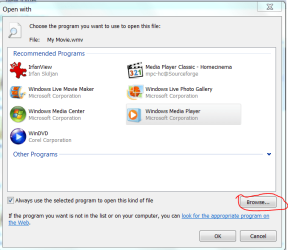
Right click on one of the files you want to open in your chosen player and click "Open With", go to the bottom of that window and click Choose Default Program... Another window will open like this:

Capture70.PNG

Click "Browse" then navigate to the exe file of your chosen player, probably in C:/Program Files (x86) folder. Highlight the EXE file and click Open.
 

My Computer My Computer

Computer type
PC/Desktop
OS
Microsoft Windows 7 Home Premium 64-bit 7601 Multiprocessor Free Service Pack 1
CPU
Intel(R) Core(TM) i7-3770 CPU @ 3.40GHz
Motherboard
ASUSTeK COMPUTER INC. P8H77-M
Memory
8.00 GB
Graphics Card(s)
Intel(R) HD Graphics 4000
Sound Card
On Board
Monitor(s) Displays
Dell 24"
Screen Resolution
1920 x 1080
Hard Drives
(1) INTEL SSDSC2CT180A3 ATA Device (2) ST500DM002-1BD142 ATA Device (3) WDC WD3200AAKS-75L9A0 ATA Device (4) Generic- Compact Flash USB Device (5) Generic- MS/MS-Pro USB Device (6) Generic- SD/MMC USB Device (7) Generic- SM/xD-Picture USB
PSU
500w Corsair
Case
Cooler Master
Cooling
3 Fans
Keyboard
Logitech MK300
Mouse
Logitech WOM
Internet Speed
75Mb
Antivirus
Norton 360
Browser
Firefox, Opera, IE
Still the same, I want the icon to be the preview of the movie and in the left hand down at the bottom the logo of km player it was like that but something went wrong....
 

My Computer My Computer

Computer Manufacturer/Model Number
Gigabyte
OS
Window 7 Ultimate 32bit
CPU
Intel core 2 duo @ 2.40 Ghz
Motherboard
Gigabyte
Memory
Hynix 2X1GB
Graphics Card(s)
The Club 3D GTS250 256bit
Sound Card
laptech
Monitor(s) Displays
Acer
Screen Resolution
1440X900
Hard Drives
Seagate 350gig
Seagate 250gig
PSU
Coolermaster GX 650
Case
Acer
Cooling
2 80mm fans
Keyboard
Acer
Mouse
Logitech
Internet Speed
54kb/s
I think I understand now. You mean the preview doesn't show if you use alternative players? Does the preview work if you choose WMP as the default program. Do you get a message in the preview window? Just a thought you have got the preview pane wide enough to show a preview. Try dragging the line to the left of the preview pane to the left a bit!
 

My Computer My Computer

Computer type
PC/Desktop
OS
Microsoft Windows 7 Home Premium 64-bit 7601 Multiprocessor Free Service Pack 1
CPU
Intel(R) Core(TM) i7-3770 CPU @ 3.40GHz
Motherboard
ASUSTeK COMPUTER INC. P8H77-M
Memory
8.00 GB
Graphics Card(s)
Intel(R) HD Graphics 4000
Sound Card
On Board
Monitor(s) Displays
Dell 24"
Screen Resolution
1920 x 1080
Hard Drives
(1) INTEL SSDSC2CT180A3 ATA Device (2) ST500DM002-1BD142 ATA Device (3) WDC WD3200AAKS-75L9A0 ATA Device (4) Generic- Compact Flash USB Device (5) Generic- MS/MS-Pro USB Device (6) Generic- SD/MMC USB Device (7) Generic- SM/xD-Picture USB
PSU
500w Corsair
Case
Cooler Master
Cooling
3 Fans
Keyboard
Logitech MK300
Mouse
Logitech WOM
Internet Speed
75Mb
Antivirus
Norton 360
Browser
Firefox, Opera, IE
Go to Control Panel\Programs\Default Programs\Set Associations and associate all filetypes that you want to see as e.g. VLC to VLC as "Current Default". You do that via "Change Program" on the top, right of the page.
 

My Computer My Computer

Computer Manufacturer/Model Number
HP, Dell, Gateway, Toshiba - 4 laptops and 2 desktops
OS
Vista, Windows7, Mint Mate, Zorin, Windows 8
CPU
from 1.6GHz Duo to i7
Monitor(s) Displays
2x HP w2207
Hard Drives
5x HDD, 7x SSD, 12x Externals
Keyboard
with trackball - no mices
Mouse
Trackball mice
Internet Speed
DSL 6000
The Problem/nuisance seems to be as soon as you set any external player as default, the thumbnail preview function is gone. (Makes sense in some way, since this preview is centered around wmp)
You're right is DOES work if an external player is set to default.
The question would be, what exactly did you do right before previews stopped to show? Did you install any additional Codec pack?

-DG
 

My Computer My Computer

Computer Manufacturer/Model Number
HP m8000n
OS
Windows 7 Ultimate x86
CPU
DualCore AMD Athlon 64 X2, 2600 MHz 5200+
Motherboard
Asus M2N68-LA (Narra)
Memory
Samsung 2GB DDR2
Graphics Card(s)
Onboard NVIDIA GeForce 6150SE nForce 430
Sound Card
Onboard nVIDIA nForce 6100-430 (MCP61P)
Monitor(s) Displays
Westinghouse 19" LED
Screen Resolution
1280x1024
Hard Drives
SATA II Seagate Barracuda 500GB
USB II WD Elements 500GB
USB II WD My Book 1TB
USB II WD My Book 2TB
PSU
Stock (HP)
Case
Stock (HP)
Cooling
Stock
Keyboard
Logitech Classic KB 200
Mouse
Standard HP opticle USB mouse
I think I understand now. You mean the preview doesn't show if you use alternative players? Does the preview work if you choose WMP as the default program. Do you get a message in the preview window? Just a thought you have got the preview pane wide enough to show a preview. Try dragging the line to the left of the preview pane to the left a bit!

When I set WMP as my default is doesn't want to preview...it did work before with KMP and VLC but now it doesn't anymore. The only vids that shows an review is the file type .mpe the res like avi, mpg and all that doesn't work.

Is there now easy simple way?
 

My Computer My Computer

Computer Manufacturer/Model Number
Gigabyte
OS
Window 7 Ultimate 32bit
CPU
Intel core 2 duo @ 2.40 Ghz
Motherboard
Gigabyte
Memory
Hynix 2X1GB
Graphics Card(s)
The Club 3D GTS250 256bit
Sound Card
laptech
Monitor(s) Displays
Acer
Screen Resolution
1440X900
Hard Drives
Seagate 350gig
Seagate 250gig
PSU
Coolermaster GX 650
Case
Acer
Cooling
2 80mm fans
Keyboard
Acer
Mouse
Logitech
Internet Speed
54kb/s
OK New idea Try this:
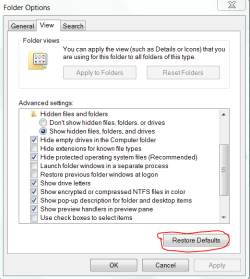
Click on TOOLS > FOLDER OPTIONS > VIEW Then click on RESTORE
DEFAULTS. as here:

Capture71.PNG
 

My Computer My Computer

Computer type
PC/Desktop
OS
Microsoft Windows 7 Home Premium 64-bit 7601 Multiprocessor Free Service Pack 1
CPU
Intel(R) Core(TM) i7-3770 CPU @ 3.40GHz
Motherboard
ASUSTeK COMPUTER INC. P8H77-M
Memory
8.00 GB
Graphics Card(s)
Intel(R) HD Graphics 4000
Sound Card
On Board
Monitor(s) Displays
Dell 24"
Screen Resolution
1920 x 1080
Hard Drives
(1) INTEL SSDSC2CT180A3 ATA Device (2) ST500DM002-1BD142 ATA Device (3) WDC WD3200AAKS-75L9A0 ATA Device (4) Generic- Compact Flash USB Device (5) Generic- MS/MS-Pro USB Device (6) Generic- SD/MMC USB Device (7) Generic- SM/xD-Picture USB
PSU
500w Corsair
Case
Cooler Master
Cooling
3 Fans
Keyboard
Logitech MK300
Mouse
Logitech WOM
Internet Speed
75Mb
Antivirus
Norton 360
Browser
Firefox, Opera, IE
still the same :(
 

My Computer My Computer

Computer Manufacturer/Model Number
Gigabyte
OS
Window 7 Ultimate 32bit
CPU
Intel core 2 duo @ 2.40 Ghz
Motherboard
Gigabyte
Memory
Hynix 2X1GB
Graphics Card(s)
The Club 3D GTS250 256bit
Sound Card
laptech
Monitor(s) Displays
Acer
Screen Resolution
1440X900
Hard Drives
Seagate 350gig
Seagate 250gig
PSU
Coolermaster GX 650
Case
Acer
Cooling
2 80mm fans
Keyboard
Acer
Mouse
Logitech
Internet Speed
54kb/s
Have you tried a file scan? If not type sfc /scannow (make sure you have a spce between c and /), right click on the sfc /scannow.exe at the top and choose "Run as Administrator". You will probably need your application disc.
 

My Computer My Computer

Computer type
PC/Desktop
OS
Microsoft Windows 7 Home Premium 64-bit 7601 Multiprocessor Free Service Pack 1
CPU
Intel(R) Core(TM) i7-3770 CPU @ 3.40GHz
Motherboard
ASUSTeK COMPUTER INC. P8H77-M
Memory
8.00 GB
Graphics Card(s)
Intel(R) HD Graphics 4000
Sound Card
On Board
Monitor(s) Displays
Dell 24"
Screen Resolution
1920 x 1080
Hard Drives
(1) INTEL SSDSC2CT180A3 ATA Device (2) ST500DM002-1BD142 ATA Device (3) WDC WD3200AAKS-75L9A0 ATA Device (4) Generic- Compact Flash USB Device (5) Generic- MS/MS-Pro USB Device (6) Generic- SD/MMC USB Device (7) Generic- SM/xD-Picture USB
PSU
500w Corsair
Case
Cooler Master
Cooling
3 Fans
Keyboard
Logitech MK300
Mouse
Logitech WOM
Internet Speed
75Mb
Antivirus
Norton 360
Browser
Firefox, Opera, IE
where must i type in that? cmd?
 

My Computer My Computer

Computer Manufacturer/Model Number
Gigabyte
OS
Window 7 Ultimate 32bit
CPU
Intel core 2 duo @ 2.40 Ghz
Motherboard
Gigabyte
Memory
Hynix 2X1GB
Graphics Card(s)
The Club 3D GTS250 256bit
Sound Card
laptech
Monitor(s) Displays
Acer
Screen Resolution
1440X900
Hard Drives
Seagate 350gig
Seagate 250gig
PSU
Coolermaster GX 650
Case
Acer
Cooling
2 80mm fans
Keyboard
Acer
Mouse
Logitech
Internet Speed
54kb/s
Set the videos to open with default WMP.
Then, Delete the thumb cache and regenerate it.


It can be done via the Disc Cleanup tool @
Start / All Programs / Accesories / System Tools --> Disc Cleanup

Make sure thumbnails is checked.

Sometimes if a program makes a a new thumb, explorer will show it if its already made.

Now let WMP regenerate the thumbs.
 

My Computer My Computer

Computer Manufacturer/Model Number
Custom (Self Build)
OS
Windows 7 Home Premium 64bit
CPU
Intel Core i7 2700k
Motherboard
eVGA P67 SLI
Memory
8GB Mushkin Redline Ridgebacks @1866
Graphics Card(s)
EVGA GTX570 SC
Sound Card
XiFi Titanium HD
Monitor(s) Displays
LG W2453V
Screen Resolution
1920x1080
Hard Drives
Intel 320 80GB -- Intel X25-V 40GB --WD Black 1TB x2 -- WD Blue 640GB
PSU
Seasonic x750
Case
Corsair 600T SE White
Cooling
eVGA Superclocked CPU Cooler
Keyboard
Saitek Cyborg
Antivirus
Kaspersky
Browser
IE
Other Info
LG BD/DVD
Still now preview of my videos as a icon
 

My Computer My Computer

Computer Manufacturer/Model Number
Gigabyte
OS
Window 7 Ultimate 32bit
CPU
Intel core 2 duo @ 2.40 Ghz
Motherboard
Gigabyte
Memory
Hynix 2X1GB
Graphics Card(s)
The Club 3D GTS250 256bit
Sound Card
laptech
Monitor(s) Displays
Acer
Screen Resolution
1440X900
Hard Drives
Seagate 350gig
Seagate 250gig
PSU
Coolermaster GX 650
Case
Acer
Cooling
2 80mm fans
Keyboard
Acer
Mouse
Logitech
Internet Speed
54kb/s
Back
Top