
View Problems

SpiderMan,

Your responses do not give us enough insight into what you have or have not done, to allow us to help you much more than we have. If you are saying that the Nvidia Control Panel adjustments are not making any difference, then either you are not doing what we have said, or there is something wrong with the Nvidia driver that you are using. Exactly which driver do you have installed.
 

My Computer

Computer Manufacturer/Model Number
DIY
OS
W7x64 Pro, SuSe 12.1/** W7 x64 Pro, XP MCE
CPU
Phenom II 1090T w/Noctua NH-D14 /**4400+ X2 w/CM Hyper TX 3
Motherboard
ASRock 890FX Deluxe 4/**A8N-SLI
Memory
2 x 2GB Patriot PGS34g1600LLKA/**4x1GB Corsair VS
Graphics Card(s)
EVGA GTX460 SC/**EVGA 8800GTS
Sound Card
Asus Xonar D2X/**Xonar D1
Monitor(s) Displays
Acer X233H, Dell E152FPc /**LG M237-WD
Screen Resolution
1920x1080 & 1024x768/**1980x1080
Hard Drives
WDC 2TB, 1.5TB, 1TB, 500GB,Seagate 500GB , Maxtor 80GB /**500GB Seagate & WDC 1TB Black
PSU
CM RS600 w/ APC BX1000G/**Antec 500 TP w/ APC BX1000
Case
HAF922/**Antec 1040IIB
Cooling
3x200mm, 1x140 and 1x120mm/**5x80mm fans
Keyboard
Logitech Media USB/**Saitek Eclipse
Mouse
Cordless Trackman Wheel/**Ditto
Internet Speed
3.3Mbps
Other Info
SB 560 5.1 w/ Sennheiser RS140/**Creative T20 speakers, Dvico FusionHDTV7 Gold RT, Cisco E3000, HP 5510V AIO, Linksys E3000, Belkin F5U237 hub and **F5D8055 adapter
(** = 2nd rig)
SO , the monitor can be the problem?
seekermeister, i reset all nvidia control panel settings, i reinstalled my drivers but no succed. Give me a picture with what you want on your pc, prefered with your explorer. Thanks :D
 

My Computer

OS
Windows 7 x64 Ultimate
CPU
Intel Core2 Quad Q9300 2.50 GHz Yorkfield Box
Motherboard
ASUS P5Q PRO
Memory
A-DATA 4GB DDR2 1066MHz Gaming Series CL6 Dual Channel Kit
Graphics Card(s)
Palit GeForce 8800GT Sonic 512MB DDR3 256-bit
Monitor(s) Displays
LG L1953TR
Hard Drives
2x Western Digital 640GB SATA-II 7200 rpm 16MB Caviar SE16 [ WD6400AAKS ]
PSU
Fortron Blue Storm II 500
Cooling
Arctic Cooling Freezer XTREME
Obviously, but before running out to buy another one, make sure that you have the monitor driver installed, and check the monitor's settings to see if you can adjust the problems away.
 

My Computer

Computer Manufacturer/Model Number
DIY
OS
W7x64 Pro, SuSe 12.1/** W7 x64 Pro, XP MCE
CPU
Phenom II 1090T w/Noctua NH-D14 /**4400+ X2 w/CM Hyper TX 3
Motherboard
ASRock 890FX Deluxe 4/**A8N-SLI
Memory
2 x 2GB Patriot PGS34g1600LLKA/**4x1GB Corsair VS
Graphics Card(s)
EVGA GTX460 SC/**EVGA 8800GTS
Sound Card
Asus Xonar D2X/**Xonar D1
Monitor(s) Displays
Acer X233H, Dell E152FPc /**LG M237-WD
Screen Resolution
1920x1080 & 1024x768/**1980x1080
Hard Drives
WDC 2TB, 1.5TB, 1TB, 500GB,Seagate 500GB , Maxtor 80GB /**500GB Seagate & WDC 1TB Black
PSU
CM RS600 w/ APC BX1000G/**Antec 500 TP w/ APC BX1000
Case
HAF922/**Antec 1040IIB
Cooling
3x200mm, 1x140 and 1x120mm/**5x80mm fans
Keyboard
Logitech Media USB/**Saitek Eclipse
Mouse
Cordless Trackman Wheel/**Ditto
Internet Speed
3.3Mbps
Other Info
SB 560 5.1 w/ Sennheiser RS140/**Creative T20 speakers, Dvico FusionHDTV7 Gold RT, Cisco E3000, HP 5510V AIO, Linksys E3000, Belkin F5U237 hub and **F5D8055 adapter
(** = 2nd rig)
My monitor have guarranty, 3 years and i have this for 2 years, no problem for that, but can you give me a picture with your explorer please?
 

My Computer

OS
Windows 7 x64 Ultimate
CPU
Intel Core2 Quad Q9300 2.50 GHz Yorkfield Box
Motherboard
ASUS P5Q PRO
Memory
A-DATA 4GB DDR2 1066MHz Gaming Series CL6 Dual Channel Kit
Graphics Card(s)
Palit GeForce 8800GT Sonic 512MB DDR3 256-bit
Monitor(s) Displays
LG L1953TR
Hard Drives
2x Western Digital 640GB SATA-II 7200 rpm 16MB Caviar SE16 [ WD6400AAKS ]
PSU
Fortron Blue Storm II 500
Cooling
Arctic Cooling Freezer XTREME
SO , the monitor can be the problem?
seekermeister, i reset all nvidia control panel settings, i reinstalled my drivers but no succed. Give me a picture with what you want on your pc, prefered with your explorer. Thanks :D

It doesn't really matter how I have my desktop set, it is how you want your's to look that does, but here is a screenshot anyway:
 

Attachments

  • Desktop.jpg
    Desktop.jpg
    178.8 KB · Views: 11

My Computer

Computer Manufacturer/Model Number
DIY
OS
W7x64 Pro, SuSe 12.1/** W7 x64 Pro, XP MCE
CPU
Phenom II 1090T w/Noctua NH-D14 /**4400+ X2 w/CM Hyper TX 3
Motherboard
ASRock 890FX Deluxe 4/**A8N-SLI
Memory
2 x 2GB Patriot PGS34g1600LLKA/**4x1GB Corsair VS
Graphics Card(s)
EVGA GTX460 SC/**EVGA 8800GTS
Sound Card
Asus Xonar D2X/**Xonar D1
Monitor(s) Displays
Acer X233H, Dell E152FPc /**LG M237-WD
Screen Resolution
1920x1080 & 1024x768/**1980x1080
Hard Drives
WDC 2TB, 1.5TB, 1TB, 500GB,Seagate 500GB , Maxtor 80GB /**500GB Seagate & WDC 1TB Black
PSU
CM RS600 w/ APC BX1000G/**Antec 500 TP w/ APC BX1000
Case
HAF922/**Antec 1040IIB
Cooling
3x200mm, 1x140 and 1x120mm/**5x80mm fans
Keyboard
Logitech Media USB/**Saitek Eclipse
Mouse
Cordless Trackman Wheel/**Ditto
Internet Speed
3.3Mbps
Other Info
SB 560 5.1 w/ Sennheiser RS140/**Creative T20 speakers, Dvico FusionHDTV7 Gold RT, Cisco E3000, HP 5510V AIO, Linksys E3000, Belkin F5U237 hub and **F5D8055 adapter
(** = 2nd rig)
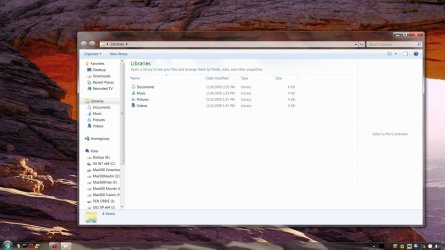
don't know what to say, i don't see any errors on your picture, i don't know what might be the problem
 

My Computer

OS
Windows 7 x64 Ultimate
CPU
Intel Core2 Quad Q9300 2.50 GHz Yorkfield Box
Motherboard
ASUS P5Q PRO
Memory
A-DATA 4GB DDR2 1066MHz Gaming Series CL6 Dual Channel Kit
Graphics Card(s)
Palit GeForce 8800GT Sonic 512MB DDR3 256-bit
Monitor(s) Displays
LG L1953TR
Hard Drives
2x Western Digital 640GB SATA-II 7200 rpm 16MB Caviar SE16 [ WD6400AAKS ]
PSU
Fortron Blue Storm II 500
Cooling
Arctic Cooling Freezer XTREME
Isn't a joke, it's real.
 

My Computer

OS
Windows 7 x64 Ultimate
CPU
Intel Core2 Quad Q9300 2.50 GHz Yorkfield Box
Motherboard
ASUS P5Q PRO
Memory
A-DATA 4GB DDR2 1066MHz Gaming Series CL6 Dual Channel Kit
Graphics Card(s)
Palit GeForce 8800GT Sonic 512MB DDR3 256-bit
Monitor(s) Displays
LG L1953TR
Hard Drives
2x Western Digital 640GB SATA-II 7200 rpm 16MB Caviar SE16 [ WD6400AAKS ]
PSU
Fortron Blue Storm II 500
Cooling
Arctic Cooling Freezer XTREME

My Computer

Computer Manufacturer/Model Number
DIY
OS
W7x64 Pro, SuSe 12.1/** W7 x64 Pro, XP MCE
CPU
Phenom II 1090T w/Noctua NH-D14 /**4400+ X2 w/CM Hyper TX 3
Motherboard
ASRock 890FX Deluxe 4/**A8N-SLI
Memory
2 x 2GB Patriot PGS34g1600LLKA/**4x1GB Corsair VS
Graphics Card(s)
EVGA GTX460 SC/**EVGA 8800GTS
Sound Card
Asus Xonar D2X/**Xonar D1
Monitor(s) Displays
Acer X233H, Dell E152FPc /**LG M237-WD
Screen Resolution
1920x1080 & 1024x768/**1980x1080
Hard Drives
WDC 2TB, 1.5TB, 1TB, 500GB,Seagate 500GB , Maxtor 80GB /**500GB Seagate & WDC 1TB Black
PSU
CM RS600 w/ APC BX1000G/**Antec 500 TP w/ APC BX1000
Case
HAF922/**Antec 1040IIB
Cooling
3x200mm, 1x140 and 1x120mm/**5x80mm fans
Keyboard
Logitech Media USB/**Saitek Eclipse
Mouse
Cordless Trackman Wheel/**Ditto
Internet Speed
3.3Mbps
Other Info
SB 560 5.1 w/ Sennheiser RS140/**Creative T20 speakers, Dvico FusionHDTV7 Gold RT, Cisco E3000, HP 5510V AIO, Linksys E3000, Belkin F5U237 hub and **F5D8055 adapter
(** = 2nd rig)
Sir, i'm not sure of any further steps we can take to solve your problem, do you possibly have a spare Screen that you can use to test to see if it's the monitor displaying incorrectly?

EDIT: One thing i just thought of, do you have a CRT screen, or an LCD screen?
 
Last edited:

My Computer

Computer Manufacturer/Model Number
Custom Build
OS
W7 RTM Ultimate x64
CPU
Intel Q8400 @ 2.66GHZ
Motherboard
Gigabyte GA-EG45M-UD2H
Memory
4GB DDR2-800
Graphics Card(s)
Gainward GTS 450 GLH 1GB Edition
Sound Card
Integrated 8 Channel
Monitor(s) Displays
AOC 23.6 Inch Widescreen LCD
Screen Resolution
1920x1080
Hard Drives
Seagate 500GB Internal
Western Digital 1TB Internal

Hitachi 1TB External
PSU
Apevia Java Power 500W
Case
Cooler Master HAF 922 Black
Cooling
Stock Intel CPU Fan
Keyboard
HP SK-2960 Multimedia Keyboard
Mouse
Logitech M350 Wireless Gaming Mouse
Internet Speed
1.5MB

My Computer

OS
Windows 7 x64 Ultimate
CPU
Intel Core2 Quad Q9300 2.50 GHz Yorkfield Box
Motherboard
ASUS P5Q PRO
Memory
A-DATA 4GB DDR2 1066MHz Gaming Series CL6 Dual Channel Kit
Graphics Card(s)
Palit GeForce 8800GT Sonic 512MB DDR3 256-bit
Monitor(s) Displays
LG L1953TR
Hard Drives
2x Western Digital 640GB SATA-II 7200 rpm 16MB Caviar SE16 [ WD6400AAKS ]
PSU
Fortron Blue Storm II 500
Cooling
Arctic Cooling Freezer XTREME
The monitor is on its way out.... Id start looking for a new one..
 

My Computer

Computer type
PC/Desktop
Computer Manufacturer/Model Number
LENOVO K450 @3.0GHZ
OS
64-bit Windows 8.1 Pro
CPU
Core(TM) i5 CPU 4330 Haswell @ 3.20GHz
Motherboard
LENOVO
Memory
12.00 GB
Graphics Card(s)
Intel(R) HD Graphics
Sound Card
Intel HD integtrated
Monitor(s) Displays
HP 25' ISP Monitor
Screen Resolution
1900/1020
Hard Drives
(1) ST1000DM003-1CH162 (2) Generic STORAGE DEVICE USB Device (3) Generic STORAGE DEVICE USB Device
Internet Speed
100mb down/10mb up
Can you take a picture of the screen with a digital camera and post that image?
 

My Computer

Computer type
PC/Desktop
Computer Manufacturer/Model Number
Dwarf Dwf/11/2012 r09/2013
OS
Windows 8.1 Pro RTM x64
CPU
Intel Core-i5-3570K 4-core @ 3.4GHz (Ivy Bridge) (OC 4.4GHz)
Motherboard
ASRock Z77 Extreme4-M
Memory
4 x 4GB DDR3-1600 Corsair Vengeance CMZ8GX3M2A1600C9B (16GB)
Graphics Card(s)
MSI GeForce GTX770 Gaming OC 2GB
Sound Card
Realtek High Definition on board solution (ALC 898)
Monitor(s) Displays
ViewSonic VA1912w Widescreen (VGA)
Screen Resolution
1440x900
Hard Drives
OCZ Agility 3 SSD 120GB SATA III x2 (RAID 0)
Samsung HD501LJ 500GB SATA II x2
Hitachi HDS721010CLA332 1TB SATA II
Iomega 1.5TB Ext USB 2.0
WD 2.0TB Ext USB 3.0
PSU
XFX Pro Series 850W Semi-Modular
Case
Gigabyte IF233
Cooling
1 x 120mm Front Inlet 1 x 120mm Rear Exhaust
Keyboard
Microsoft Comfort Curve Keyboard 3000 (USB)
Mouse
Microsoft Comfort Mouse 3000 for Business (USB)
Internet Speed
NetGear DG834Gv3 ADSL Modem/Router (Ethernet) ~4.0 Mb/s (O2)
Antivirus
Avast! 8.0.1497
Browser
IE 11
Other Info
Optical Drive: HL-DT-ST BD-RE BH10LS30 SATA Bluray
Lexmark S305 Printer/Scanner/Copier (USB)
WEI Score: 8.1/8.1/8.5/8.5/8.25
Asus Eee PC 1011PX Netbook (Windows 7 x86 Starter)

My Computer

Computer Manufacturer/Model Number
DIY
OS
W7x64 Pro, SuSe 12.1/** W7 x64 Pro, XP MCE
CPU
Phenom II 1090T w/Noctua NH-D14 /**4400+ X2 w/CM Hyper TX 3
Motherboard
ASRock 890FX Deluxe 4/**A8N-SLI
Memory
2 x 2GB Patriot PGS34g1600LLKA/**4x1GB Corsair VS
Graphics Card(s)
EVGA GTX460 SC/**EVGA 8800GTS
Sound Card
Asus Xonar D2X/**Xonar D1
Monitor(s) Displays
Acer X233H, Dell E152FPc /**LG M237-WD
Screen Resolution
1920x1080 & 1024x768/**1980x1080
Hard Drives
WDC 2TB, 1.5TB, 1TB, 500GB,Seagate 500GB , Maxtor 80GB /**500GB Seagate & WDC 1TB Black
PSU
CM RS600 w/ APC BX1000G/**Antec 500 TP w/ APC BX1000
Case
HAF922/**Antec 1040IIB
Cooling
3x200mm, 1x140 and 1x120mm/**5x80mm fans
Keyboard
Logitech Media USB/**Saitek Eclipse
Mouse
Cordless Trackman Wheel/**Ditto
Internet Speed
3.3Mbps
Other Info
SB 560 5.1 w/ Sennheiser RS140/**Creative T20 speakers, Dvico FusionHDTV7 Gold RT, Cisco E3000, HP 5510V AIO, Linksys E3000, Belkin F5U237 hub and **F5D8055 adapter
(** = 2nd rig)
Can you take a picture of the screen with a digital camera and post that image?
Sure , 5 minutes and i will post it
 

My Computer

OS
Windows 7 x64 Ultimate
CPU
Intel Core2 Quad Q9300 2.50 GHz Yorkfield Box
Motherboard
ASUS P5Q PRO
Memory
A-DATA 4GB DDR2 1066MHz Gaming Series CL6 Dual Channel Kit
Graphics Card(s)
Palit GeForce 8800GT Sonic 512MB DDR3 256-bit
Monitor(s) Displays
LG L1953TR
Hard Drives
2x Western Digital 640GB SATA-II 7200 rpm 16MB Caviar SE16 [ WD6400AAKS ]
PSU
Fortron Blue Storm II 500
Cooling
Arctic Cooling Freezer XTREME

My Computer

Computer Manufacturer/Model Number
DIY
OS
W7x64 Pro, SuSe 12.1/** W7 x64 Pro, XP MCE
CPU
Phenom II 1090T w/Noctua NH-D14 /**4400+ X2 w/CM Hyper TX 3
Motherboard
ASRock 890FX Deluxe 4/**A8N-SLI
Memory
2 x 2GB Patriot PGS34g1600LLKA/**4x1GB Corsair VS
Graphics Card(s)
EVGA GTX460 SC/**EVGA 8800GTS
Sound Card
Asus Xonar D2X/**Xonar D1
Monitor(s) Displays
Acer X233H, Dell E152FPc /**LG M237-WD
Screen Resolution
1920x1080 & 1024x768/**1980x1080
Hard Drives
WDC 2TB, 1.5TB, 1TB, 500GB,Seagate 500GB , Maxtor 80GB /**500GB Seagate & WDC 1TB Black
PSU
CM RS600 w/ APC BX1000G/**Antec 500 TP w/ APC BX1000
Case
HAF922/**Antec 1040IIB
Cooling
3x200mm, 1x140 and 1x120mm/**5x80mm fans
Keyboard
Logitech Media USB/**Saitek Eclipse
Mouse
Cordless Trackman Wheel/**Ditto
Internet Speed
3.3Mbps
Other Info
SB 560 5.1 w/ Sennheiser RS140/**Creative T20 speakers, Dvico FusionHDTV7 Gold RT, Cisco E3000, HP 5510V AIO, Linksys E3000, Belkin F5U237 hub and **F5D8055 adapter
(** = 2nd rig)
There is another way to approach the problem. Go to Control Panel>Display, and check that clear type is turned on. It also has a means of adjusting colors there.
 

My Computer

Computer Manufacturer/Model Number
DIY
OS
W7x64 Pro, SuSe 12.1/** W7 x64 Pro, XP MCE
CPU
Phenom II 1090T w/Noctua NH-D14 /**4400+ X2 w/CM Hyper TX 3
Motherboard
ASRock 890FX Deluxe 4/**A8N-SLI
Memory
2 x 2GB Patriot PGS34g1600LLKA/**4x1GB Corsair VS
Graphics Card(s)
EVGA GTX460 SC/**EVGA 8800GTS
Sound Card
Asus Xonar D2X/**Xonar D1
Monitor(s) Displays
Acer X233H, Dell E152FPc /**LG M237-WD
Screen Resolution
1920x1080 & 1024x768/**1980x1080
Hard Drives
WDC 2TB, 1.5TB, 1TB, 500GB,Seagate 500GB , Maxtor 80GB /**500GB Seagate & WDC 1TB Black
PSU
CM RS600 w/ APC BX1000G/**Antec 500 TP w/ APC BX1000
Case
HAF922/**Antec 1040IIB
Cooling
3x200mm, 1x140 and 1x120mm/**5x80mm fans
Keyboard
Logitech Media USB/**Saitek Eclipse
Mouse
Cordless Trackman Wheel/**Ditto
Internet Speed
3.3Mbps
Other Info
SB 560 5.1 w/ Sennheiser RS140/**Creative T20 speakers, Dvico FusionHDTV7 Gold RT, Cisco E3000, HP 5510V AIO, Linksys E3000, Belkin F5U237 hub and **F5D8055 adapter
(** = 2nd rig)
:( i try but it was turned on. I reset the settings, but no succes.
I don't think the color is the problem, i think the TEXT, i see the text without bold,i see it blurry.
 

My Computer

OS
Windows 7 x64 Ultimate
CPU
Intel Core2 Quad Q9300 2.50 GHz Yorkfield Box
Motherboard
ASUS P5Q PRO
Memory
A-DATA 4GB DDR2 1066MHz Gaming Series CL6 Dual Channel Kit
Graphics Card(s)
Palit GeForce 8800GT Sonic 512MB DDR3 256-bit
Monitor(s) Displays
LG L1953TR
Hard Drives
2x Western Digital 640GB SATA-II 7200 rpm 16MB Caviar SE16 [ WD6400AAKS ]
PSU
Fortron Blue Storm II 500
Cooling
Arctic Cooling Freezer XTREME
As I said before, you are not providing us with feedback in the form that permits us any insight into the problem. If you have no control over the color settings, then there is definitely something wrong, and it is most likely the video driver that you have installed. I asked you to give us the specific driver that you have installed, and you failed to do so.

You said that the installation of the driver failed. In that case, it would be the manner in which you attempted to install it that was the problem. I would recommend that you try again, while in Safe Mode. Uninstall the current driver by uninstalling the display adapter in the Device Manager, then use Driver Sweeper,(which you can find on the page that I linked above) to remove any portions of the old driver that might remain (DO NOT REMOVE ANYTHING TO DO WITH VGA, OTHERWISE YOU MIGHT NOT BE ABLE TO BOOT, AND HAVE TO REINSTALL THE OS).
Once you have cleaned house, either reboot or use the Scan New Hardware option at the top of the interface, so that the adapter reappears, probably using the VGA driver, install the new driver using the Have Disk method, if there is any problem with the driver's installation wizard working.
 

My Computer

Computer Manufacturer/Model Number
DIY
OS
W7x64 Pro, SuSe 12.1/** W7 x64 Pro, XP MCE
CPU
Phenom II 1090T w/Noctua NH-D14 /**4400+ X2 w/CM Hyper TX 3
Motherboard
ASRock 890FX Deluxe 4/**A8N-SLI
Memory
2 x 2GB Patriot PGS34g1600LLKA/**4x1GB Corsair VS
Graphics Card(s)
EVGA GTX460 SC/**EVGA 8800GTS
Sound Card
Asus Xonar D2X/**Xonar D1
Monitor(s) Displays
Acer X233H, Dell E152FPc /**LG M237-WD
Screen Resolution
1920x1080 & 1024x768/**1980x1080
Hard Drives
WDC 2TB, 1.5TB, 1TB, 500GB,Seagate 500GB , Maxtor 80GB /**500GB Seagate & WDC 1TB Black
PSU
CM RS600 w/ APC BX1000G/**Antec 500 TP w/ APC BX1000
Case
HAF922/**Antec 1040IIB
Cooling
3x200mm, 1x140 and 1x120mm/**5x80mm fans
Keyboard
Logitech Media USB/**Saitek Eclipse
Mouse
Cordless Trackman Wheel/**Ditto
Internet Speed
3.3Mbps
Other Info
SB 560 5.1 w/ Sennheiser RS140/**Creative T20 speakers, Dvico FusionHDTV7 Gold RT, Cisco E3000, HP 5510V AIO, Linksys E3000, Belkin F5U237 hub and **F5D8055 adapter
(** = 2nd rig)
1.I sayed the color IS NOT THE PROBLEM
2.I uninstalled succesfuly the drivers and installed again succesfull
3.The problem is only the TEXT
 

My Computer

OS
Windows 7 x64 Ultimate
CPU
Intel Core2 Quad Q9300 2.50 GHz Yorkfield Box
Motherboard
ASUS P5Q PRO
Memory
A-DATA 4GB DDR2 1066MHz Gaming Series CL6 Dual Channel Kit
Graphics Card(s)
Palit GeForce 8800GT Sonic 512MB DDR3 256-bit
Monitor(s) Displays
LG L1953TR
Hard Drives
2x Western Digital 640GB SATA-II 7200 rpm 16MB Caviar SE16 [ WD6400AAKS ]
PSU
Fortron Blue Storm II 500
Cooling
Arctic Cooling Freezer XTREME
Back
Top