Virgin dual boot, Win7 Pro + XP Pro

theog - thanks, I've downloaded.

gregrocker - small step forward, how and why I cannot figure. The XP CD now read and I skipped all (skipped the first "R"), it indicates that it is reading/loading DLLs, adapters, controllers, etc.

Next window options - ENTER for XP installation or R for repair or F3 for quit.
I select ENTER.
Then I accept the Conditions (F8).

The next window says I must select from the list:
ENTER if I want to install on the selected partition (which I cannot see, the frame below is empty)
C if I want to make a partition in the non-partitioned area
D if I want to remove the selected partition (which I cannot see)
I selected ENTER

Thereafter I'm blocked again -
BSOD:
setupdd.sys - Address F74139A8 base at F73EC000, Datestamp 41107c8f
STOP: 0x0000008E (0x0000005, 0xF74139A8, 0xF2FD075C, 0x00000000)

I do hope there is some clue?
Thanks for the patience.
 

My Computer My Computer

At a glance

Win7 Pro x64Intel(R) Core(TM) i7-2600 CPU @ 3.40GHzATI Radeon HD 5450
Computer type
PC/Desktop
OS
Win7 Pro x64
CPU
Intel(R) Core(TM) i7-2600 CPU @ 3.40GHz
Motherboard
ASRock H61M-VS4
Graphics Card(s)
ATI Radeon HD 5450
Screen Resolution
2560 x 1440
Hard Drives
WDC WD10EALX-009BA0 ATA x2
Internet Speed
100 Mbps
Browser
Waterfox 64-bit
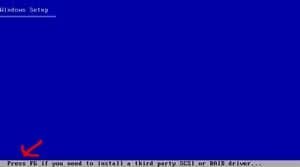
Did you load SATA drivers at F6.
 

Attachments

  • F6.jpg
    F6.jpg
    1.8 KB · Views: 74

My Computer My Computer

At a glance

ME/XP/Vista/Win7
OS
ME/XP/Vista/Win7
Yep, you are correct. I checked the BIOS again and it shows that there are no SATA drives detected. Only the primary IDE master which is the CD/DVD.

Selecting F6 has no effect, the XP CD keeps on running and gives me an option to load drivers but then states that no floppy drive detected to load anything.

I've been to my dentist and he gave me a USB floppy drive, any help?
 

My Computer My Computer

At a glance

Win7 Pro x64Intel(R) Core(TM) i7-2600 CPU @ 3.40GHzATI Radeon HD 5450
Computer type
PC/Desktop
OS
Win7 Pro x64
CPU
Intel(R) Core(TM) i7-2600 CPU @ 3.40GHz
Motherboard
ASRock H61M-VS4
Graphics Card(s)
ATI Radeon HD 5450
Screen Resolution
2560 x 1440
Hard Drives
WDC WD10EALX-009BA0 ATA x2
Internet Speed
100 Mbps
Browser
Waterfox 64-bit
Make sure the floppy shows up in BIOS first.

Unzip SATA driver files into root and browse from F6 prompt during XP file loading.
 
Last edited:
Yep, you are correct. I checked the BIOS again and it shows that there are no SATA drives detected. Only the primary IDE master which is the CD/DVD.

Check all the cables.

Sata drive must show in BIOS.
 

My Computer My Computer

At a glance

ME/XP/Vista/Win7
OS
ME/XP/Vista/Win7
gregrocker - I do not have access to Explorer, I cannot boot into the puter. I suppose I must check the BIOS to ensure that it will be able to detect the portable floppy drive?

theog - "Check all the cables" :-)
Sounds like a very dumb suggestion but actually super advice, that did the trick, thanks.

I can now get into Safe Mode but my keyboard and mouse inactive. It is a wired setup but I cannot confirm "Yes" when requested to enter the Safe Mode.
Behind the above pop-up I can see another pop-up "Welcome to the Found New Hardware Wizard" but I cannot get at anything w/o keyboard.
If I can get into Safe Mode (properly) it should help?
 

My Computer My Computer

At a glance

Win7 Pro x64Intel(R) Core(TM) i7-2600 CPU @ 3.40GHzATI Radeon HD 5450
Computer type
PC/Desktop
OS
Win7 Pro x64
CPU
Intel(R) Core(TM) i7-2600 CPU @ 3.40GHz
Motherboard
ASRock H61M-VS4
Graphics Card(s)
ATI Radeon HD 5450
Screen Resolution
2560 x 1440
Hard Drives
WDC WD10EALX-009BA0 ATA x2
Internet Speed
100 Mbps
Browser
Waterfox 64-bit
A quick follow-up, trying to get out of Safe Mode before doing any damage the Wizard somehow updated keyboard + mouse and now I can utilize Safe Mode if need be.
 

My Computer My Computer

At a glance

Win7 Pro x64Intel(R) Core(TM) i7-2600 CPU @ 3.40GHzATI Radeon HD 5450
Computer type
PC/Desktop
OS
Win7 Pro x64
CPU
Intel(R) Core(TM) i7-2600 CPU @ 3.40GHz
Motherboard
ASRock H61M-VS4
Graphics Card(s)
ATI Radeon HD 5450
Screen Resolution
2560 x 1440
Hard Drives
WDC WD10EALX-009BA0 ATA x2
Internet Speed
100 Mbps
Browser
Waterfox 64-bit
A quick follow-up, trying to get out of Safe Mode before doing any damage the Wizard somehow updated keyboard + mouse and now I can utilize Safe Mode if need be.

Sounds like time to get started.

Post back.
 

My Computer My Computer

At a glance

ME/XP/Vista/Win7
OS
ME/XP/Vista/Win7
One setting got lost, language. The 1st time this XP was installed it was done by the shop and they gave it to me fully English. During the "repair" I watched for the language option and ensured that English is selected. Sure enough the keyboard is qwerty but the MUI is Nederlands.
I know it is available either from the XP Pro CD or on my hd but cannot figure where?
Any tips?
 

My Computer My Computer

At a glance

Win7 Pro x64Intel(R) Core(TM) i7-2600 CPU @ 3.40GHzATI Radeon HD 5450
Computer type
PC/Desktop
OS
Win7 Pro x64
CPU
Intel(R) Core(TM) i7-2600 CPU @ 3.40GHz
Motherboard
ASRock H61M-VS4
Graphics Card(s)
ATI Radeon HD 5450
Screen Resolution
2560 x 1440
Hard Drives
WDC WD10EALX-009BA0 ATA x2
Internet Speed
100 Mbps
Browser
Waterfox 64-bit
Oops, the first lines did not paste -

I managed to re-instal/repair the XP installation, ALL there, all my prev installed progs, you name !!!!!!!!!!!! :D

Thanks folk, super service combined with years of PC knowledge.
 

My Computer My Computer

At a glance

Win7 Pro x64Intel(R) Core(TM) i7-2600 CPU @ 3.40GHzATI Radeon HD 5450
Computer type
PC/Desktop
OS
Win7 Pro x64
CPU
Intel(R) Core(TM) i7-2600 CPU @ 3.40GHz
Motherboard
ASRock H61M-VS4
Graphics Card(s)
ATI Radeon HD 5450
Screen Resolution
2560 x 1440
Hard Drives
WDC WD10EALX-009BA0 ATA x2
Internet Speed
100 Mbps
Browser
Waterfox 64-bit
Oops, the first lines did not paste -

I managed to re-instal/repair the XP installation, ALL there, all my prev installed progs, you name !!!!!!!!!!!! :D

Thanks folk, super service combined with years of PC knowledge.

That's good news.

XP language setting.
 

Attachments

  • xp1.jpg
    xp1.jpg
    55.4 KB · Views: 3

My Computer My Computer

At a glance

ME/XP/Vista/Win7
OS
ME/XP/Vista/Win7
Back again but w/o any issues regarding the XP reinstall. I'm busy cleaning up and organizing personal data files.
XP running 100% and activated.

Step 2 :(
gregrocker - re yr prev advice (#11) "As advised earlier, you must run a Repair Install on XP before starting it on new hardware. Details given earlier.

Then boot the Windows 7 DVD, select target HD for Custom install, format HD first. The drivers for mobo should be in installer."

I'm ready to install W7 on the new clean SATA drive which is seen by the system. On it I have a 30 GB partition and the rest of the 500 GB is unallocated. At the moment this drive is seen as O (named W7) after a USB drive N.

To confirm, for this dual boot set up/installation I can now boot up with W7 disk and will be given the option to select O drive and maybe W7 will or will not ask to format the drive to its standards or procedure?
Drive letter no issue cause W7 will rename it to C?

Thanks in advance.
 

My Computer My Computer

At a glance

Win7 Pro x64Intel(R) Core(TM) i7-2600 CPU @ 3.40GHzATI Radeon HD 5450
Computer type
PC/Desktop
OS
Win7 Pro x64
CPU
Intel(R) Core(TM) i7-2600 CPU @ 3.40GHz
Motherboard
ASRock H61M-VS4
Graphics Card(s)
ATI Radeon HD 5450
Screen Resolution
2560 x 1440
Hard Drives
WDC WD10EALX-009BA0 ATA x2
Internet Speed
100 Mbps
Browser
Waterfox 64-bit
After booting DVD, selecting Custom install, use Drive tools to apply Win7 formatting to the target partition to make sure the partition table is correct as XP's is different.

Win7 should take whatever drive letter it wants, then correctly configure the dual boot as last installed OS.

If not, install EasyBCD 2.0 beta after quick registration to use beta, add XP, accept boot files, restart to Dual boot menu.
 
Follow gregrocker's good advice.

Install looking good.
 

My Computer My Computer

At a glance

ME/XP/Vista/Win7
OS
ME/XP/Vista/Win7
Once again, thanks gregrocker. All went smoothly and precise, not a single hiccup. EasyBCD required no attention and running 100%.

I have issues with UAC and/or different accounts. I'll start a new thread because this thread/title completed veeeery succesfully :D
 

My Computer My Computer

At a glance

Win7 Pro x64Intel(R) Core(TM) i7-2600 CPU @ 3.40GHzATI Radeon HD 5450
Computer type
PC/Desktop
OS
Win7 Pro x64
CPU
Intel(R) Core(TM) i7-2600 CPU @ 3.40GHz
Motherboard
ASRock H61M-VS4
Graphics Card(s)
ATI Radeon HD 5450
Screen Resolution
2560 x 1440
Hard Drives
WDC WD10EALX-009BA0 ATA x2
Internet Speed
100 Mbps
Browser
Waterfox 64-bit
Back
Top