Virtual Box Installation

andrew124c41

New member
Local time
9:07 PM
Messages
30
I have ssd c and d partitions os and vbox respectively
HDD is e: dor data

I want to install vbox on d:. I assume os image whether win or Linux will go there.

However, say running browser....I don't want favorites writing to ssd.

How to get virtual Pc which is on ssd to write files to e: data?
 

My Computer

Computer type
PC/Desktop
OS
7
Motherboard
Asus m597A
Favorites will write to wherever your users folder is so if Vbox is running on D: then that is where Vbox will write.
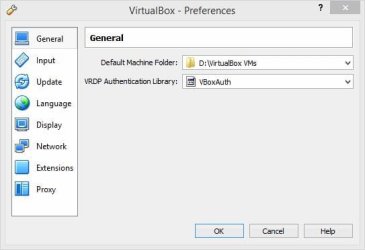
Mine writes everything under D:\VirtualBox VMs because that's where I told it to write.

Check and set this via File, Preferences, Default Machine Folder:

VboxDefFol.jpg
 

My Computer

Computer type
PC/Desktop
Computer Manufacturer/Model Number
Lenovo IdeaCenter 450
OS
Windows 10 Pro X64
CPU
Intel Quad Core i7-4770 @ 3.4Ghz
Memory
16.0GB PC3-12800 DDR3 SDRAM 1600 MHz
Graphics Card(s)
Intel Integrated HD Graphics
Sound Card
Realtek HD Audio
Monitor(s) Displays
HP 22" LCD
Screen Resolution
1680 x 1050
Hard Drives
250GB Samsung EVO SATA-3 SSD
2TB Seagate ST2000DM001 SATA-2
1.5TB Seagate ST3150041AS SATA
Keyboard
Dell USB
Mouse
Lenovo USB
Internet Speed
Cable via Road Runner 3MB Upload, 30MB Download
Antivirus
Windows Defender, MBAM Pro, MBAE
Browser
Seamonkey
Other Info
UEFI/GPT
PLDS DVD-RW DH16AERSH
Here is my setup up:

My SSD is partitioned into c:\ win 7 OS and d:\where I planed to put VBox, Win 7 and Linux and a HD e:\where my users folder is for my win 7 os

However, I don't want unnecessary writes to the SSD

I assumed one wants the speed of the ssd to operate vBox and the guest os.

So, is there someway to get the OS favorites to write onto my hd e;\
 

My Computer

Computer type
PC/Desktop
OS
7
Motherboard
Asus m597A
I wouldn't be concerned about SSD writes. SSD writes are limited but that limit ois so high it would normally never be reached in normal use. Typically the drive will be replaced for other reasons long before that happens.
 

My Computer

Computer type
PC/Desktop
Computer Manufacturer/Model Number
HP
OS
Windows 7 Pro 64 bit
CPU
Xeon W3520
Memory
8 GB
Graphics Card(s)
Nvidia Geforce 210
@Lmiller. Thanks. I suspected as much. I have a build with an earlier sandisk...not ultra extream...just sandisk. Would you mind answering something off topic..since I am in the middle of it I don't want to make a mistake.

I am deploying win 7 to 3 PCs with identical MBs. At this point I did a clean install of Win 7 prof and I in audit (sysprep) mode. I have done all the "tweaks," cut down services, turned off protection, indexing, etc. I will probably get one image at this point prior to installing programs.

I am about to put programs on like Office 2007, antimalwer, virus, Photoshop, etc.

On antoher computer I launched AIK and wrote the answer file using the same win 7 image. This file will be copied to the c:\ drive of the computer I will be imaging.

After installing programs I will get another image.

Then I will do sysprep clean up and get another image which will be used to deploy to other computers.

Is this order correct?

Can I turn on indexing for just the HD and write the indexing file to the HD rather than the SSD?

Finally, my main reasons for vbox are to try out software, but more importantly for my wife who watches a lot of alternative media and seems to get malware despite my using malwarebytes, superantimaleware, norton av, and Open DNS. I figured to simply give her a browser on a guest virtual pc and let her browse wherever she wants! Of course, I could use a separate HD with OS which could boot up solely for this purpose...It would run faster. I would not put the boot information as second OS..rather use the MB EUIF boot up choice to select the drive.

Which way is better?

 

My Computer

Computer type
PC/Desktop
OS
7
Motherboard
Asus m597A
Back
Top