
Virtual Hard Drive VHD File - Create and Start with at Boot

How to Create a Windows 7 VHD at Boot to Start with from Boot


   Information
This will show you how to create a Windows 7 VHD file at boot on an existing installed OS's (ex: Vista or Windows 7) C: hard disk or partition to be able to natively boot from the Windows 7 VHD at startup in the Windows Boot Manager.

   Note
This tutorial uses an example that will create a C:\(file name).vhd file on the C: drive/partition at boot that is used to natively boot from at startup.

You will be able to create the VHD file on any partition or drive letter that you like though.

   Warning
All Vista, Windows 7, and Windows 8 (except Windows 8 RT) editions support booting from a VHD.

You must have either Windows 7 Ultimate, Windows 7 Enterprise, Windows 8 Pro, or Windows 8 Enterprise installed on the VHD to be able to boot from the VHD natively.


EXAMPLE: Windows Boot Manager
NOTE: You will be able to either select your currently installed OS (ex: Vista) or the VHD file (ex: Windows 7) in the Windows Boot Manager to start your computer with.
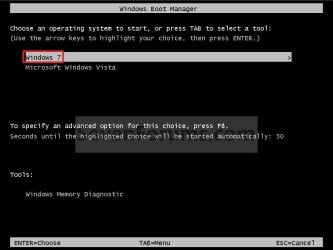
Boot_Manager.jpg
EXAMPLE: VHD file in your Current OS (ex: Vista)
NOTE: This is where the VHD file will be stored at on your currently installed OS (ex: Vista) to be used to boot from.
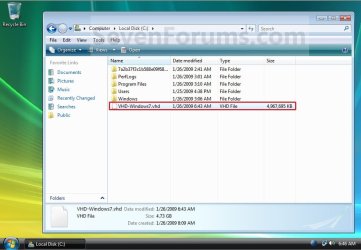
Example.jpg


OPTION ONE

To Create and Add the VHD to Boot From


1. Boot from your retail copy Windows 7 Ultimate or Enterprise installation DVD/USB, and do step 2 or 3 below for what you would like to do.
NOTE: To have Windows 8 on VHD, see instead: How to Create a Windows 8 VHD at Boot to Dual Boot with Windows 7 or Vista

2. When you are at the start of the Windows 7 installation screen, press the Shift+F10 keys, and go to step 4 below. (See screenshot below)
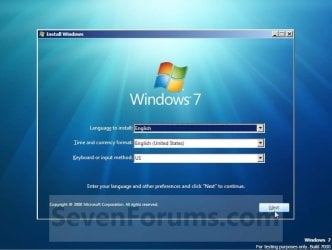
Setup.jpg
3. Boot into the command prompt from the Startup Recovery Options screen, and go to step 4 below. (See screenshot below)
NOTE: You will use OPTION TWO at that link.
Step1.jpg
4. In the command prompt, type diskpart and press Enter. (See screenshot below)
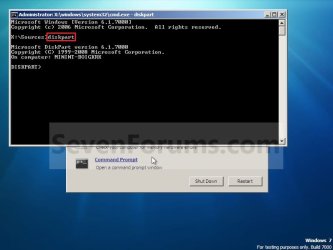
Step2.jpg
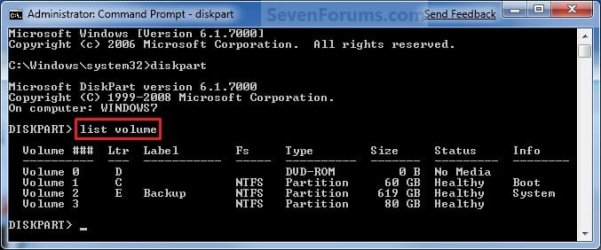
5. In the elevated command prompt, type list volume and press Enter. Make note of the drive letter for the volume that you want to create the VHD file on. (See screenshot below)
NOTE: This will allow you to see what the drive letters are for each volume. They are not always the same at boot as they are in Windows.
list-disk.jpg
6. Do either step 7 or 8 below for what type of VHD file you would like to create.

7. To Create a Fixed VHD File
NOTE: A fixed VHD file will allocate the entire maximum size (ex: 40GB) that you set below for the VHD file size.
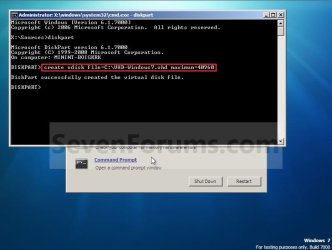
A) In the command prompt, type the command below and press Enter.
NOTE: Substitute the C drive letter in the command below for what volume (step 5) you would like to create the VHD on.

Code:
[B]create vdisk file=[COLOR=red]C[/COLOR]:\[COLOR=red]VHD-Windows7[/COLOR].vhd maximum=[COLOR=red]40960[/COLOR][/B]

NOTE: You can substitute the VHD-Windows7 name with any name you would like for the VHD file instead. You can also substitute the maximum size of 40960 MB for the VHD to the maximum size you want instead in MB (1GB = 1024MB).
Step3.jpg
B) Go to step 9.
8. To Create an Expandable VHD File
NOTE: An expandable VHD file will only be as large as the amount of data that is saved in the VHD file, but still can get as large as the maximium size (ex: 40GB) that you set below. For example, using this option, the VHD file showed only 7GB instead of the full 40GB. Even though the VHD file is expandable, you may need to install Windows Virtual PC to have a program associated with VHD files to actual see only the smaller size instead of the larger size for the VHD file.
A) In the command prompt, type the command below and press Enter.
NOTE: Substitute the C drive letter in the command below for what volume (step 5) you would like to create the VHD on.
Code:
[B]create vdisk file=[COLOR=red]C[/COLOR]:\[COLOR=red]VHD-Windows7[/COLOR].vhd maximum=[COLOR=red]40960[/COLOR][/B] [B]type=expandable[/B]

NOTE: You can substitute the VHD-Windows7 name with any name you would like for the VHD file instead. You can also substitute the maximum size of 40960 MB for the VHD to the maximum size you want instead in MB (1GB = 1024MB).
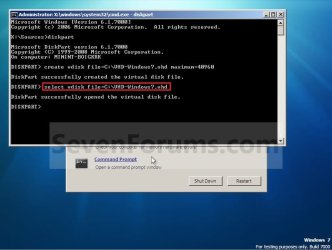
9. In the command prompt, type the command below and press Enter. (See screenshot below)
NOTE: If you subsituted the VHD-Windows7 name in step 7 or 8, then you will need to use it here as well. Substitute the C drive letter in the command below for what volume (step 5) you would like to create the VHD on.

Code:
[B]select vdisk file=[COLOR=red]C[/COLOR]:\[COLOR=red]VHD-Windows7[/COLOR].vhd[/B]
Step4.jpg
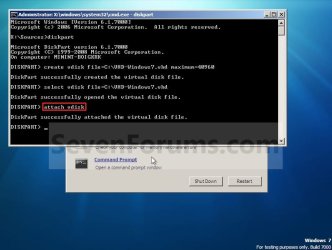
10. In the command prompt, type attach vdisk and press Enter. (See screenshot below)
Step5.jpg
11. In the command prompt, type exit and press Enter. (See screenshot below)
Step6.jpg
12. Close the command prompt window. (See screenshot above)
A) If you used step 2 above, then click on Next, and go to step 13 below.

B) If you used step 3 above, then continue on to step 14 below.
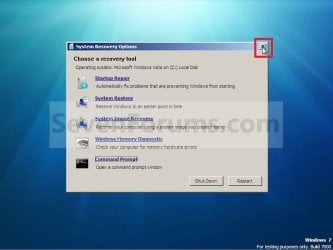
13. Close the System Recovery Options window. (See screenshot below)
WARNING: You must close it only. Do not click on the Shut Down or Restart button.
Step7.jpg
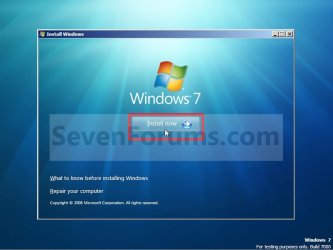
14. Click on the Install now button. (See screenshot below)
Step8.jpg
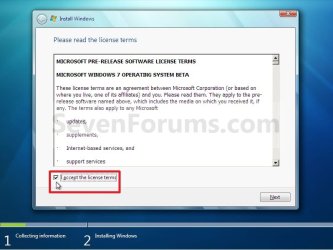
15. Check the I accept the license terms box and click on Next. (See screenshot below)
Step9.jpg
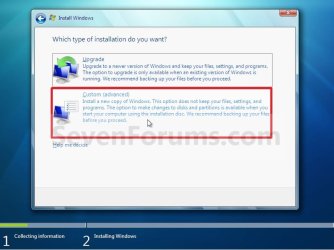
16. Click on the Custom (advanced) option. (See screenshot below)
Step10.jpg
17. Select the available option with the unallocated space that is the same maximum VHD size (ex: 40GB = 40960MB) that you specified in step 7 or 8 above, and click on the Next button. (See screenshot below)
NOTE: If you see the Windows cannot be installed to this disk warning, then you can ignore it. Windows 7 will still install on the VHD file.
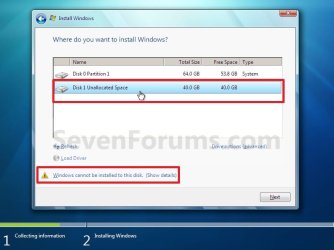
Step11.jpg
18. Finish doing a clean install of Windows 7.
NOTE: You will pick up at step 10 at that link to finish installing Windows 7 on the VHD file.

19. When you restart or start the computer, you will now have Windows 7 to select from at boot to start natively from the VHD file. (See the first example at top of the tutorial.)


OPTION TWO

To Delete the VHD and Remove from Boot List


1. To Remove OS VHD from Windows Boot Manager List
A) Delete the listed OS VHD from the Windows Boot Manager in msconfig.
2. To Delete the VHD File
A) In Windows Explorer, navigate to the VHD file that you have created in step 7 or 8 of OPTION ONE above (ex: C:\VHD-Windows7.vhd), right click on the VHD file and click on Delete.

B) Click on Yes to approve deletion.
That's it,
Shawn


Last edited:
Here and in other places, I note that people say that this method exacts only a tiny performance penalty, but I'm noticing extreme and crippling lagging when in the booted VHD because the disk activity light is solid red--on a fresh install (it's not indexing, either, since I disabled it). Performance Monitor in the VHD shows that the VHD is being written to and read from constantly, which makes sense to me, since everything is in the VHD, and Windows naturally reads and writes a lot. Yet, as I said, others don't seem to be seeing this issue.

You might think that I have the VHD located on some kind of awful drive, but it's a 7200rpm drive that works perfectly well when (at other times) I use large VHDs with a program like Virtualbox. Or maybe that my system is slow, but it's a Core i5-2500K with 8GB RAM. Or that the VHD isn't fixed, but it is, at 25GB.

Device Manager in the VHD looks fine. Is there something basic that I'm overlooking or something else to check?
 
Last edited:

My Computer My Computer

At a glance

Win7 Ultimate x64 SP1
OS
Win7 Ultimate x64 SP1
Hello Rseiler,

Is the HDD encrypted or compressed? If so, that will slow things down.
 

My Computer My Computer

At a glance

64-bit Windows 11 Pro for WorkstationsIntel i7-8700K OC'd to 5 GHz64 GB (4x16GB) G.SKILL TridentZ RGB DDR4 3600...ASUS ROG-STRIX-GTX1080TI-O11G-GAMING
Computer type
PC/Desktop
Computer Manufacturer/Model Number
Self built custom
OS
64-bit Windows 11 Pro for Workstations
CPU
Intel i7-8700K OC'd to 5 GHz
Motherboard
ASUS ROG Maximus XI Formula Z390
Memory
64 GB (4x16GB) G.SKILL TridentZ RGB DDR4 3600 MHz
Graphics Card(s)
ASUS ROG-STRIX-GTX1080TI-O11G-GAMING
Sound Card
Integrated
Monitor(s) Displays
2 x Samsung Odyssey G7 27"
Screen Resolution
2560x1440
Hard Drives
1TB Samsung 990 PRO M.2,
4TB Samsung 990 PRO PRO M.2,
TerraMaster F8 SSD Plus NAS
PSU
Seasonic Prime Titanium 850W
Case
Thermaltake Core P3
Cooling
Corsair Hydro H115i
Keyboard
Logitech wireless K800
Mouse
Logitech MX Master 4
Internet Speed
2 Gb/s Download and 100 Mb/s Upload
Antivirus
Malwarebyte Anti-Malware Premium
Browser
Google Chrome
Other Info
Logitech Z625 speaker system,
Logitech BRIO 4K Pro webcam,
HP Color LaserJet Pro MFP M477fdn,
APC SMART-UPS RT 1000 XL - SURT1000XLI,
Galaxy S23 Plus phone
Hi. Neither. It's just a straight 500GB NTFS partition that I use all the time in my "main" Windows, for media files, documents, storing data files for Virtualbox, etc. It performs normally there.
 

My Computer My Computer

At a glance

Win7 Ultimate x64 SP1
OS
Win7 Ultimate x64 SP1
I must admit that I'm not sure why it's running so slow for you. As a test, you might create a fixed VHD to see if it may run better with that setup instead.
 

My Computer My Computer

At a glance

64-bit Windows 11 Pro for WorkstationsIntel i7-8700K OC'd to 5 GHz64 GB (4x16GB) G.SKILL TridentZ RGB DDR4 3600...ASUS ROG-STRIX-GTX1080TI-O11G-GAMING
Computer type
PC/Desktop
Computer Manufacturer/Model Number
Self built custom
OS
64-bit Windows 11 Pro for Workstations
CPU
Intel i7-8700K OC'd to 5 GHz
Motherboard
ASUS ROG Maximus XI Formula Z390
Memory
64 GB (4x16GB) G.SKILL TridentZ RGB DDR4 3600 MHz
Graphics Card(s)
ASUS ROG-STRIX-GTX1080TI-O11G-GAMING
Sound Card
Integrated
Monitor(s) Displays
2 x Samsung Odyssey G7 27"
Screen Resolution
2560x1440
Hard Drives
1TB Samsung 990 PRO M.2,
4TB Samsung 990 PRO PRO M.2,
TerraMaster F8 SSD Plus NAS
PSU
Seasonic Prime Titanium 850W
Case
Thermaltake Core P3
Cooling
Corsair Hydro H115i
Keyboard
Logitech wireless K800
Mouse
Logitech MX Master 4
Internet Speed
2 Gb/s Download and 100 Mb/s Upload
Antivirus
Malwarebyte Anti-Malware Premium
Browser
Google Chrome
Other Info
Logitech Z625 speaker system,
Logitech BRIO 4K Pro webcam,
HP Color LaserJet Pro MFP M477fdn,
APC SMART-UPS RT 1000 XL - SURT1000XLI,
Galaxy S23 Plus phone
I perhaps wrote it unclearly above, but it is fixed, at least in my second install. The first time I did this, I decided to try it with a dynamic VHD, and performance was so horrible that I immediately deleted it and started over with a fixed. Little did I know that it would be just as bad.
 

My Computer My Computer

At a glance

Win7 Ultimate x64 SP1
OS
Win7 Ultimate x64 SP1
You might see how it performs with the VHD created on another partition or HDD. :(
 

My Computer My Computer

At a glance

64-bit Windows 11 Pro for WorkstationsIntel i7-8700K OC'd to 5 GHz64 GB (4x16GB) G.SKILL TridentZ RGB DDR4 3600...ASUS ROG-STRIX-GTX1080TI-O11G-GAMING
Computer type
PC/Desktop
Computer Manufacturer/Model Number
Self built custom
OS
64-bit Windows 11 Pro for Workstations
CPU
Intel i7-8700K OC'd to 5 GHz
Motherboard
ASUS ROG Maximus XI Formula Z390
Memory
64 GB (4x16GB) G.SKILL TridentZ RGB DDR4 3600 MHz
Graphics Card(s)
ASUS ROG-STRIX-GTX1080TI-O11G-GAMING
Sound Card
Integrated
Monitor(s) Displays
2 x Samsung Odyssey G7 27"
Screen Resolution
2560x1440
Hard Drives
1TB Samsung 990 PRO M.2,
4TB Samsung 990 PRO PRO M.2,
TerraMaster F8 SSD Plus NAS
PSU
Seasonic Prime Titanium 850W
Case
Thermaltake Core P3
Cooling
Corsair Hydro H115i
Keyboard
Logitech wireless K800
Mouse
Logitech MX Master 4
Internet Speed
2 Gb/s Download and 100 Mb/s Upload
Antivirus
Malwarebyte Anti-Malware Premium
Browser
Google Chrome
Other Info
Logitech Z625 speaker system,
Logitech BRIO 4K Pro webcam,
HP Color LaserJet Pro MFP M477fdn,
APC SMART-UPS RT 1000 XL - SURT1000XLI,
Galaxy S23 Plus phone
Finally got it: Updating the disk driver solved the problem! I've never had to do that before for a drive that's supported by Windows in the first place, as a SATA drive is, so this was pretty weird.
 

My Computer My Computer

At a glance

Win7 Ultimate x64 SP1
OS
Win7 Ultimate x64 SP1
That's great news. Thank you for posting back with your results. :)
 

My Computer My Computer

At a glance

64-bit Windows 11 Pro for WorkstationsIntel i7-8700K OC'd to 5 GHz64 GB (4x16GB) G.SKILL TridentZ RGB DDR4 3600...ASUS ROG-STRIX-GTX1080TI-O11G-GAMING
Computer type
PC/Desktop
Computer Manufacturer/Model Number
Self built custom
OS
64-bit Windows 11 Pro for Workstations
CPU
Intel i7-8700K OC'd to 5 GHz
Motherboard
ASUS ROG Maximus XI Formula Z390
Memory
64 GB (4x16GB) G.SKILL TridentZ RGB DDR4 3600 MHz
Graphics Card(s)
ASUS ROG-STRIX-GTX1080TI-O11G-GAMING
Sound Card
Integrated
Monitor(s) Displays
2 x Samsung Odyssey G7 27"
Screen Resolution
2560x1440
Hard Drives
1TB Samsung 990 PRO M.2,
4TB Samsung 990 PRO PRO M.2,
TerraMaster F8 SSD Plus NAS
PSU
Seasonic Prime Titanium 850W
Case
Thermaltake Core P3
Cooling
Corsair Hydro H115i
Keyboard
Logitech wireless K800
Mouse
Logitech MX Master 4
Internet Speed
2 Gb/s Download and 100 Mb/s Upload
Antivirus
Malwarebyte Anti-Malware Premium
Browser
Google Chrome
Other Info
Logitech Z625 speaker system,
Logitech BRIO 4K Pro webcam,
HP Color LaserJet Pro MFP M477fdn,
APC SMART-UPS RT 1000 XL - SURT1000XLI,
Galaxy S23 Plus phone
Hello Brink,

I am new to this, but can you bear with me? I noticed at the start of this tutorial, that Windows Pro is not mentioned. Does this mean that I cannot "Create and Start with Boot a Virtual Hard Drive?"
 

My Computer My Computer

At a glance

Windows 7 64bit ProfesionalIntel i7-950 O/CCorsair i7 DDR3 PC12800 1600Mhz XMS3 3X2GbGigabyte GTX 470
Computer type
PC/Desktop
Computer Manufacturer/Model Number
Cyberpower UK Built to my specs
OS
Windows 7 64bit Profesional
CPU
Intel i7-950 O/C
Motherboard
Asus P6X58D-E
Memory
Corsair i7 DDR3 PC12800 1600Mhz XMS3 3X2Gb
Graphics Card(s)
Gigabyte GTX 470
Sound Card
On board
Monitor(s) Displays
BenQ G2420HDBL
Screen Resolution
1920x1080
Hard Drives
WDC WD1002FAEX-0023AO SCSI Disk Device
WDC WD10 EZRX-00A8LB0 SCSI Disk Device
WD ST3320620 A6
PSU
Avenge Power PSU 850W
Case
CM Dominator CM-692II
Cooling
Asetek Watercooling
Antivirus
Vipre Internet Security 2014
Hello snap, and welcome to Seven Forums.

No problem.

You will be able to boot from a VHD with Windows 7 Pro installed on your computer, but you must have Windows 7 Ultimate, Windows 7 Enterprise, Windows 8 Pro, or Windows 8 Enterprise installed on the VHD itself to be able to boot from the VHD. :)
 

My Computer My Computer

At a glance

64-bit Windows 11 Pro for WorkstationsIntel i7-8700K OC'd to 5 GHz64 GB (4x16GB) G.SKILL TridentZ RGB DDR4 3600...ASUS ROG-STRIX-GTX1080TI-O11G-GAMING
Computer type
PC/Desktop
Computer Manufacturer/Model Number
Self built custom
OS
64-bit Windows 11 Pro for Workstations
CPU
Intel i7-8700K OC'd to 5 GHz
Motherboard
ASUS ROG Maximus XI Formula Z390
Memory
64 GB (4x16GB) G.SKILL TridentZ RGB DDR4 3600 MHz
Graphics Card(s)
ASUS ROG-STRIX-GTX1080TI-O11G-GAMING
Sound Card
Integrated
Monitor(s) Displays
2 x Samsung Odyssey G7 27"
Screen Resolution
2560x1440
Hard Drives
1TB Samsung 990 PRO M.2,
4TB Samsung 990 PRO PRO M.2,
TerraMaster F8 SSD Plus NAS
PSU
Seasonic Prime Titanium 850W
Case
Thermaltake Core P3
Cooling
Corsair Hydro H115i
Keyboard
Logitech wireless K800
Mouse
Logitech MX Master 4
Internet Speed
2 Gb/s Download and 100 Mb/s Upload
Antivirus
Malwarebyte Anti-Malware Premium
Browser
Google Chrome
Other Info
Logitech Z625 speaker system,
Logitech BRIO 4K Pro webcam,
HP Color LaserJet Pro MFP M477fdn,
APC SMART-UPS RT 1000 XL - SURT1000XLI,
Galaxy S23 Plus phone
Hello Brink,

I am new to this, but can you bear with me? I noticed at the start of this tutorial, that Windows Pro is not mentioned. Does this mean that I cannot "Create and Start with Boot a Virtual Hard Drive?"

Hello snap, and welcome to Seven Forums.

No problem.

You will be able to boot from a VHD with Windows 7 Pro installed on your computer, but you must have Windows 7 Ultimate, Windows 7 Enterprise, Windows 8 Pro, or Windows 8 Enterprise installed on the VHD itself to be able to boot from the VHD. :)


Brink,

Many thanks for the quick reply. I suppose I am a bit late to try out Windows 8 'Review', but I will give it a try. As my profile says, "Trying to learn windows better", and not just use the pc for gaming, and the occasional website making. With help of course from an editor.

Thanks again Brink,

I will let you know how I get on with VHD.

SNAP
 
Last edited by a moderator:

My Computer My Computer

At a glance

Windows 7 64bit ProfesionalIntel i7-950 O/CCorsair i7 DDR3 PC12800 1600Mhz XMS3 3X2GbGigabyte GTX 470
Computer type
PC/Desktop
Computer Manufacturer/Model Number
Cyberpower UK Built to my specs
OS
Windows 7 64bit Profesional
CPU
Intel i7-950 O/C
Motherboard
Asus P6X58D-E
Memory
Corsair i7 DDR3 PC12800 1600Mhz XMS3 3X2Gb
Graphics Card(s)
Gigabyte GTX 470
Sound Card
On board
Monitor(s) Displays
BenQ G2420HDBL
Screen Resolution
1920x1080
Hard Drives
WDC WD1002FAEX-0023AO SCSI Disk Device
WDC WD10 EZRX-00A8LB0 SCSI Disk Device
WD ST3320620 A6
PSU
Avenge Power PSU 850W
Case
CM Dominator CM-692II
Cooling
Asetek Watercooling
Antivirus
Vipre Internet Security 2014

My Computer My Computer

At a glance

64-bit Windows 11 Pro for WorkstationsIntel i7-8700K OC'd to 5 GHz64 GB (4x16GB) G.SKILL TridentZ RGB DDR4 3600...ASUS ROG-STRIX-GTX1080TI-O11G-GAMING
Computer type
PC/Desktop
Computer Manufacturer/Model Number
Self built custom
OS
64-bit Windows 11 Pro for Workstations
CPU
Intel i7-8700K OC'd to 5 GHz
Motherboard
ASUS ROG Maximus XI Formula Z390
Memory
64 GB (4x16GB) G.SKILL TridentZ RGB DDR4 3600 MHz
Graphics Card(s)
ASUS ROG-STRIX-GTX1080TI-O11G-GAMING
Sound Card
Integrated
Monitor(s) Displays
2 x Samsung Odyssey G7 27"
Screen Resolution
2560x1440
Hard Drives
1TB Samsung 990 PRO M.2,
4TB Samsung 990 PRO PRO M.2,
TerraMaster F8 SSD Plus NAS
PSU
Seasonic Prime Titanium 850W
Case
Thermaltake Core P3
Cooling
Corsair Hydro H115i
Keyboard
Logitech wireless K800
Mouse
Logitech MX Master 4
Internet Speed
2 Gb/s Download and 100 Mb/s Upload
Antivirus
Malwarebyte Anti-Malware Premium
Browser
Google Chrome
Other Info
Logitech Z625 speaker system,
Logitech BRIO 4K Pro webcam,
HP Color LaserJet Pro MFP M477fdn,
APC SMART-UPS RT 1000 XL - SURT1000XLI,
Galaxy S23 Plus phone
Thanks for that, will do. Now I can relly see things coming together. I will let you know how I get on with trial version, if things don't go pear-shaped with the pc. The worst that can happen, (I hope) is that I will have to re-load Win 7 and start out all over again.

Looking at your avatar, we could have met somewhere in another time and another world ;-))
 

My Computer My Computer

At a glance

Windows 7 64bit ProfesionalIntel i7-950 O/CCorsair i7 DDR3 PC12800 1600Mhz XMS3 3X2GbGigabyte GTX 470
Computer type
PC/Desktop
Computer Manufacturer/Model Number
Cyberpower UK Built to my specs
OS
Windows 7 64bit Profesional
CPU
Intel i7-950 O/C
Motherboard
Asus P6X58D-E
Memory
Corsair i7 DDR3 PC12800 1600Mhz XMS3 3X2Gb
Graphics Card(s)
Gigabyte GTX 470
Sound Card
On board
Monitor(s) Displays
BenQ G2420HDBL
Screen Resolution
1920x1080
Hard Drives
WDC WD1002FAEX-0023AO SCSI Disk Device
WDC WD10 EZRX-00A8LB0 SCSI Disk Device
WD ST3320620 A6
PSU
Avenge Power PSU 850W
Case
CM Dominator CM-692II
Cooling
Asetek Watercooling
Antivirus
Vipre Internet Security 2014

My Computer My Computer

At a glance

64-bit Windows 11 Pro for WorkstationsIntel i7-8700K OC'd to 5 GHz64 GB (4x16GB) G.SKILL TridentZ RGB DDR4 3600...ASUS ROG-STRIX-GTX1080TI-O11G-GAMING
Computer type
PC/Desktop
Computer Manufacturer/Model Number
Self built custom
OS
64-bit Windows 11 Pro for Workstations
CPU
Intel i7-8700K OC'd to 5 GHz
Motherboard
ASUS ROG Maximus XI Formula Z390
Memory
64 GB (4x16GB) G.SKILL TridentZ RGB DDR4 3600 MHz
Graphics Card(s)
ASUS ROG-STRIX-GTX1080TI-O11G-GAMING
Sound Card
Integrated
Monitor(s) Displays
2 x Samsung Odyssey G7 27"
Screen Resolution
2560x1440
Hard Drives
1TB Samsung 990 PRO M.2,
4TB Samsung 990 PRO PRO M.2,
TerraMaster F8 SSD Plus NAS
PSU
Seasonic Prime Titanium 850W
Case
Thermaltake Core P3
Cooling
Corsair Hydro H115i
Keyboard
Logitech wireless K800
Mouse
Logitech MX Master 4
Internet Speed
2 Gb/s Download and 100 Mb/s Upload
Antivirus
Malwarebyte Anti-Malware Premium
Browser
Google Chrome
Other Info
Logitech Z625 speaker system,
Logitech BRIO 4K Pro webcam,
HP Color LaserJet Pro MFP M477fdn,
APC SMART-UPS RT 1000 XL - SURT1000XLI,
Galaxy S23 Plus phone
That's a better idea. I have about 648Gb in the partition that should be plenty to work with.

Thanks again Brink, You are a Star,
 

My Computer My Computer

At a glance

Windows 7 64bit ProfesionalIntel i7-950 O/CCorsair i7 DDR3 PC12800 1600Mhz XMS3 3X2GbGigabyte GTX 470
Computer type
PC/Desktop
Computer Manufacturer/Model Number
Cyberpower UK Built to my specs
OS
Windows 7 64bit Profesional
CPU
Intel i7-950 O/C
Motherboard
Asus P6X58D-E
Memory
Corsair i7 DDR3 PC12800 1600Mhz XMS3 3X2Gb
Graphics Card(s)
Gigabyte GTX 470
Sound Card
On board
Monitor(s) Displays
BenQ G2420HDBL
Screen Resolution
1920x1080
Hard Drives
WDC WD1002FAEX-0023AO SCSI Disk Device
WDC WD10 EZRX-00A8LB0 SCSI Disk Device
WD ST3320620 A6
PSU
Avenge Power PSU 850W
Case
CM Dominator CM-692II
Cooling
Asetek Watercooling
Antivirus
Vipre Internet Security 2014
You're most welcome. :)
 

My Computer My Computer

At a glance

64-bit Windows 11 Pro for WorkstationsIntel i7-8700K OC'd to 5 GHz64 GB (4x16GB) G.SKILL TridentZ RGB DDR4 3600...ASUS ROG-STRIX-GTX1080TI-O11G-GAMING
Computer type
PC/Desktop
Computer Manufacturer/Model Number
Self built custom
OS
64-bit Windows 11 Pro for Workstations
CPU
Intel i7-8700K OC'd to 5 GHz
Motherboard
ASUS ROG Maximus XI Formula Z390
Memory
64 GB (4x16GB) G.SKILL TridentZ RGB DDR4 3600 MHz
Graphics Card(s)
ASUS ROG-STRIX-GTX1080TI-O11G-GAMING
Sound Card
Integrated
Monitor(s) Displays
2 x Samsung Odyssey G7 27"
Screen Resolution
2560x1440
Hard Drives
1TB Samsung 990 PRO M.2,
4TB Samsung 990 PRO PRO M.2,
TerraMaster F8 SSD Plus NAS
PSU
Seasonic Prime Titanium 850W
Case
Thermaltake Core P3
Cooling
Corsair Hydro H115i
Keyboard
Logitech wireless K800
Mouse
Logitech MX Master 4
Internet Speed
2 Gb/s Download and 100 Mb/s Upload
Antivirus
Malwarebyte Anti-Malware Premium
Browser
Google Chrome
Other Info
Logitech Z625 speaker system,
Logitech BRIO 4K Pro webcam,
HP Color LaserJet Pro MFP M477fdn,
APC SMART-UPS RT 1000 XL - SURT1000XLI,
Galaxy S23 Plus phone
Found the Windows 8 compatability website; well?
Epson R300, not compatable,
Logitech, MX-1000 mouse, not listed,
Logitech, Y-SAE71 keyboard not listed,
I got as far as checking my hard disk and that is not shown? WD 1002FAEX 1TB SATAIII 64MB 6GB/s not coming up on list, as well as the ST3320620 A6, back-up drive. I can understand the R300, that is old, but it still gives great photo prints. Anybody with suggestions, please? I relly don't want to go down the road of renewing most of my gear. Looking at a laptop that will be Windows 8 ready.
 

My Computer My Computer

At a glance

Windows 7 64bit ProfesionalIntel i7-950 O/CCorsair i7 DDR3 PC12800 1600Mhz XMS3 3X2GbGigabyte GTX 470
Computer type
PC/Desktop
Computer Manufacturer/Model Number
Cyberpower UK Built to my specs
OS
Windows 7 64bit Profesional
CPU
Intel i7-950 O/C
Motherboard
Asus P6X58D-E
Memory
Corsair i7 DDR3 PC12800 1600Mhz XMS3 3X2Gb
Graphics Card(s)
Gigabyte GTX 470
Sound Card
On board
Monitor(s) Displays
BenQ G2420HDBL
Screen Resolution
1920x1080
Hard Drives
WDC WD1002FAEX-0023AO SCSI Disk Device
WDC WD10 EZRX-00A8LB0 SCSI Disk Device
WD ST3320620 A6
PSU
Avenge Power PSU 850W
Case
CM Dominator CM-692II
Cooling
Asetek Watercooling
Antivirus
Vipre Internet Security 2014
SNAP,

For Windows 8 related issues, it would be best to post them at our sister site Eight Forums instead to get the best help with it. :)
 

My Computer My Computer

At a glance

64-bit Windows 11 Pro for WorkstationsIntel i7-8700K OC'd to 5 GHz64 GB (4x16GB) G.SKILL TridentZ RGB DDR4 3600...ASUS ROG-STRIX-GTX1080TI-O11G-GAMING
Computer type
PC/Desktop
Computer Manufacturer/Model Number
Self built custom
OS
64-bit Windows 11 Pro for Workstations
CPU
Intel i7-8700K OC'd to 5 GHz
Motherboard
ASUS ROG Maximus XI Formula Z390
Memory
64 GB (4x16GB) G.SKILL TridentZ RGB DDR4 3600 MHz
Graphics Card(s)
ASUS ROG-STRIX-GTX1080TI-O11G-GAMING
Sound Card
Integrated
Monitor(s) Displays
2 x Samsung Odyssey G7 27"
Screen Resolution
2560x1440
Hard Drives
1TB Samsung 990 PRO M.2,
4TB Samsung 990 PRO PRO M.2,
TerraMaster F8 SSD Plus NAS
PSU
Seasonic Prime Titanium 850W
Case
Thermaltake Core P3
Cooling
Corsair Hydro H115i
Keyboard
Logitech wireless K800
Mouse
Logitech MX Master 4
Internet Speed
2 Gb/s Download and 100 Mb/s Upload
Antivirus
Malwarebyte Anti-Malware Premium
Browser
Google Chrome
Other Info
Logitech Z625 speaker system,
Logitech BRIO 4K Pro webcam,
HP Color LaserJet Pro MFP M477fdn,
APC SMART-UPS RT 1000 XL - SURT1000XLI,
Galaxy S23 Plus phone
Please accept my appologies, yet another boo boo.
Sorry
 

My Computer My Computer

At a glance

Windows 7 64bit ProfesionalIntel i7-950 O/CCorsair i7 DDR3 PC12800 1600Mhz XMS3 3X2GbGigabyte GTX 470
Computer type
PC/Desktop
Computer Manufacturer/Model Number
Cyberpower UK Built to my specs
OS
Windows 7 64bit Profesional
CPU
Intel i7-950 O/C
Motherboard
Asus P6X58D-E
Memory
Corsair i7 DDR3 PC12800 1600Mhz XMS3 3X2Gb
Graphics Card(s)
Gigabyte GTX 470
Sound Card
On board
Monitor(s) Displays
BenQ G2420HDBL
Screen Resolution
1920x1080
Hard Drives
WDC WD1002FAEX-0023AO SCSI Disk Device
WDC WD10 EZRX-00A8LB0 SCSI Disk Device
WD ST3320620 A6
PSU
Avenge Power PSU 850W
Case
CM Dominator CM-692II
Cooling
Asetek Watercooling
Antivirus
Vipre Internet Security 2014
It's no problem mate. :)
 

My Computer My Computer

At a glance

64-bit Windows 11 Pro for WorkstationsIntel i7-8700K OC'd to 5 GHz64 GB (4x16GB) G.SKILL TridentZ RGB DDR4 3600...ASUS ROG-STRIX-GTX1080TI-O11G-GAMING
Computer type
PC/Desktop
Computer Manufacturer/Model Number
Self built custom
OS
64-bit Windows 11 Pro for Workstations
CPU
Intel i7-8700K OC'd to 5 GHz
Motherboard
ASUS ROG Maximus XI Formula Z390
Memory
64 GB (4x16GB) G.SKILL TridentZ RGB DDR4 3600 MHz
Graphics Card(s)
ASUS ROG-STRIX-GTX1080TI-O11G-GAMING
Sound Card
Integrated
Monitor(s) Displays
2 x Samsung Odyssey G7 27"
Screen Resolution
2560x1440
Hard Drives
1TB Samsung 990 PRO M.2,
4TB Samsung 990 PRO PRO M.2,
TerraMaster F8 SSD Plus NAS
PSU
Seasonic Prime Titanium 850W
Case
Thermaltake Core P3
Cooling
Corsair Hydro H115i
Keyboard
Logitech wireless K800
Mouse
Logitech MX Master 4
Internet Speed
2 Gb/s Download and 100 Mb/s Upload
Antivirus
Malwarebyte Anti-Malware Premium
Browser
Google Chrome
Other Info
Logitech Z625 speaker system,
Logitech BRIO 4K Pro webcam,
HP Color LaserJet Pro MFP M477fdn,
APC SMART-UPS RT 1000 XL - SURT1000XLI,
Galaxy S23 Plus phone
Back
Top