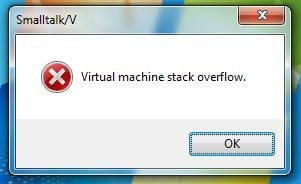
Solved Virtual Machine Stack Overflow?

burtie

New member
Power User
VIP
Local time
12:18 AM
Messages
291
Hi all,

I keep getting this error every time I log on to my Admin account.
Strange thing is its happening to my laptop too...anyone know what it means?

Thanks
 

Attachments

  • Capture.JPG
    Capture.JPG
    14.7 KB · Views: 2,454

My Computer

OS
Vista/Windows 7

My Computer

Computer type
PC/Desktop
Computer Manufacturer/Model Number
Alienware Aurora ALX R4
OS
Windows 10 Pro (x64)
CPU
Intel Core i7-3930K (3.2GHz - 4.5GHz)
Motherboard
Alienware Aurora-R4 x79
Memory
4x Samsung 4GB PC3-12800 DDR3 (16GB 1600MHz)
Graphics Card(s)
Nvidia Geforce GTX 690
Sound Card
SteelSeries Siberia Elite
Monitor(s) Displays
Dell UltraSharp U3011
Screen Resolution
2560x1600
Hard Drives
Samsung 850 Pro 256 GB, Seagate 1TB Desktop Hybrid HDD, 2x Western Digital 4TB Green HDD
PSU
875W Some Dell PSU <.<
Case
Alienware Aurora ALX
Cooling
Custom Liquid Cooling (EK CPU & GPU blocks) dual EK 480RAD
Keyboard
Logitech G710+ Mechanical
Mouse
Logitech G700s
Internet Speed
Verizon Fios (50 mbps average)
Other Info
Server: Intel NUC D54250WYK: i5-4250U, 16GB, 256 GB mSATA, Windows Server 2012 R2
Thanks but I am still none the wiser lol...I have never heard of it before. What is it for and what does it do? But more importantly how did it get on my machine? :confused:
 

My Computer

OS
Vista/Windows 7
I have the same problem. As long as it's not a virus I'm ok with it, but still would like to know how it got there and what program it's related to.
 

My Computer

Computer Manufacturer/Model Number
homemade
OS
win7 64 home premium
CPU
quad core
Motherboard
dk
Memory
4gb
Graphics Card(s)
dk
Sound Card
dk
Monitor(s) Displays
samsung
Hard Drives
500 gb internal
PSU
dk
Case
dk
Cooling
dk
I know this thread has been around for quite a while now but I think I fixed my problem. I had a program set to start when I logged on to windows as there was a short cut in my start up folder in the all programs menu. Deleting the short cut (to disable the auto start) has fixed the annoying window pop up.

I am not sure if this will work for other people but its worth a go :)

 

My Computer

OS
Vista/Windows 7
Back
Top