Virtual memory usage

mt12345

New member
Member
Local time
7:55 PM
Messages
67
Location
Europe
How can I monitor virtual memory usage (eg. during gaming session)?
 

My Computer

Computer type
Laptop
Computer Manufacturer/Model Number
Lenovo
OS
Windows 10 Pro Insider Preview + WSL2
CPU
i5
Motherboard
Lenovo
Memory
8GB
Graphics Card(s)
Intel HD
Sound Card
HD Audio
Monitor(s) Displays
12"
Screen Resolution
1280x800
Hard Drives
500GB SSD
PSU
65W
Keyboard
QWERTY
Mouse
Trackpoint
Internet Speed
100Mb
Antivirus
none
Browser
Vivaldi
Did you try Resource Monitor?

The size of virtual memory is controversy.
I always set it to a fixed value of the double of physical memory.
As I have a SSD and a HDD, virtual memory is set only on the HDD.

You have 4G of memory and use internal graphics. The ideal OS for this scenario is Win 7 32 not Win 7 64
 

My Computers

System One System Two

  • Computer type
    PC/Desktop
    Computer Manufacturer/Model Number
    custom build
    OS
    Windows 7 HP 64
    CPU
    i5 6600K - 800MHz to 4200MHz
    Motherboard
    GA-Z170-HD3P
    Memory
    4+4G GSkill DDR4 3000
    Graphics Card(s)
    IG - Intel 530
    Monitor(s) Displays
    Samsung 226BW
    Screen Resolution
    1680x1050
    Hard Drives
    (1) -1 SM951 – 128GB M.2 AHCI PCIe SSD drive for Windows 7 and Lubuntu
    (2) -1 WD SATA 3 - 1T for Data
    (3) -1 WD SATA 3 - 1T for backup
    PSU
    Thermaltake 450W TR2 gold
    Keyboard
    Old and good Chicony mechanical keyboard
    Mouse
    Logitech mX performance - 9 buttons (had to disable some)
    Internet Speed
    500Mb/s
    Browser
    Firefox 64
    Other Info
    TinyWall firewall
  • Computer type
    Laptop
    System Manufacturer/Model Number
    Asus Q550LF
    OS
    Windows 7 Pro
    CPU
    i7-4500U 800MHz to 3.0GHz
    Motherboard
    Asus Q550LF
    Memory
    (4+4)G DDR3 1600
    Graphics Card(s)
    IG intel 4400 + NVIDIA GeForce GT 745M
    Sound Card
    Realtek
    Monitor(s) Displays
    LG Display LP156WF4-SPH1
    Screen Resolution
    1920 x 1080
    Hard Drives
    BX500 120G SSD for Windows and programs +
    1T HDD for data
    Internet Speed
    500 Mb/s
    Browser
    Firefox
    Other Info
    TinyWall firewall
Don't look at my specs, Im asking about windows 7 in general, not my machine.

Currently Im on PC running windows 7 32 bit, 3GB RAM and 3GB virtual.
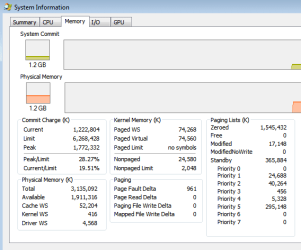
I can see in physical memory in Resource Monitor - 1,2GB active, 1,5GB cached, 300MB free but I can't see how much of 3GB virtual memory is actually in use.
I tried Sysinternals' Process Explorer - View - System information - memory tab: Paging Lists
but not sure how to read it. 'Standby' was sometimes 1,7GB - is that it?

EDIT
nah, standby=cached
9
 

Attachments

  • memory.png
    memory.png
    23.8 KB · Views: 14
Last edited:

My Computer

Computer type
Laptop
Computer Manufacturer/Model Number
Lenovo
OS
Windows 10 Pro Insider Preview + WSL2
CPU
i5
Motherboard
Lenovo
Memory
8GB
Graphics Card(s)
Intel HD
Sound Card
HD Audio
Monitor(s) Displays
12"
Screen Resolution
1280x800
Hard Drives
500GB SSD
PSU
65W
Keyboard
QWERTY
Mouse
Trackpoint
Internet Speed
100Mb
Antivirus
none
Browser
Vivaldi
Back
Top