Virtual PC seeing hosts HDD locally

augustud

New member
Local time
10:45 AM
Messages
3
Using the new Virtual PC in Win7 running XP is there a way to see the hosts HDD as local ones in the virtual machine?

Twas an option in Virtual PC 2007 but can't seem to find it in the new one. The nearest I've come is enabling the integrated features but that only maps network drives, no good for what I need.

This is on build 7100, is it an option in later builds?
 

My Computer

OS
Win 7
Using the new Virtual PC in Win7 running XP is there a way to see the hosts HDD as local ones in the virtual machine?

Twas an option in Virtual PC 2007 but can't seem to find it in the new one. The nearest I've come is enabling the integrated features but that only maps network drives, no good for what I need.

This is on build 7100, is it an option in later builds?

Hi Augustud,

Virtual PC has the same options on all builds on Windows 7 and Vista since its a separate installable component, it doesnt remove features based on the build of Windows your using :sarc: just depends when Microsoft will update Virtual PC to allow physical access to HDDs, until then everyone is stuck using the mapped network drives :(

Steven
 
...nearest I've come is enabling the integrated features but that only maps network drives, no good for what I need...
Can you SUBST an UNC? If yes, can it done in the VM? Just a thought.

As it turns out, No and Yes.

Subst.exe is used to associate a path with a drive letter.

If you use Subst.exe to connect to a network resource using a Universal Naming Convention (UNC) path, the command runs successfully, but when you try to gain access to the new drive letter you receive an error message similar to: The filename, directory name, or volume label syntax is incorrect.


To work around this behavior, use the NET USE command to connect to network resources instead of the SUBST command. For example, the command

net use * \\fileserver\share\path1\path2
Results in the next available drive letter being mapped to the root of path2.
 
I do not know if you can do it in the VM, but you should try it.
 
Thanks for reply s all

@dmex Yeh that's what I realised after I posted as I remembered you download it separately

@Antman Don't think NET USE will work. Let me explain a little. I have to run HP digital sending software which is software for setting up and running my printer and needs to be running all the time etc etc. This only runs in a XP 32bit environment and is very very fussy. For example, when specifying which folder the printer should send scanned PDF's to it has to be a local folder on the computer. Now when I'm running it in a virtual machine you can see the problem. When I was using Vista and Virtual PC 2007 you could set it so the virtual PC could see all the hosts drives as local drives. Worked like a charm. However, as we've discussed, the new one doesn't seem to have this function and the HP software wont let me specify a network location, (mapped drives included).

So, it appears my only two options are install Virtual PC 2007 and use that instead. Or set it to copy the files to a folder in the virtual machine then set up a script that automatically moves everything in that folder across to the server.
 

My Computer

OS
Win 7
yep 4.


Your suppose to be able to specify network locations I think but i've never ever managed to get it to work with windows networking.
 

My Computer

OS
Win 7
Hi Augustud,

Since it doesn't allow the use of a network drive, have you tried creating a symlink folder using the path for a network drive? That should be enough to trick it considering a symlink behaves and acts like a real folder ;)

You need to specify one of these options however (Im not sure which one will trick your HP software) otherwise it will create a symbolic file instead of a folder ;)

(you will need to put all of the names in quotation marks)

mklink /D "thelocalfolder" "\\themachinename\folder"


/D Creates a directory symbolic link. Default is a file symbolic link.
/H Creates a hard link instead of a symbolic link.
/J Creates a Directory Junction.

Steven
 
Using the new Virtual PC in Win7 running XP is there a way to see the hosts HDD as local ones in the virtual machine?

Twas an option in Virtual PC 2007 but can't seem to find it in the new one. The nearest I've come is enabling the integrated features but that only maps network drives, no good for what I need.

This is on build 7100, is it an option in later builds?

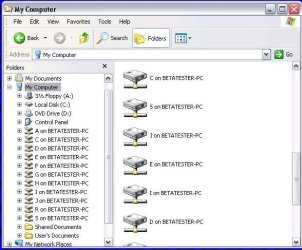
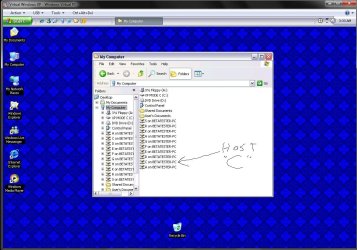
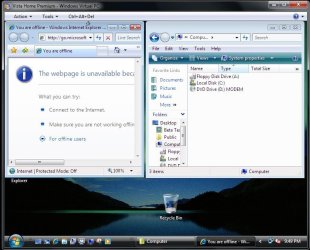
In the XP mode you have ready access to the main host drive while a custom install of Vista or 7 onto a vhd on the other hand only has access to the dvd drive used for the installation. That allows softwares to be installed from disk onto the VPC itself.

The first two images here show how the actually 5 sata, two optical, and a usb flash drive appear. The third was on completion of the Vista installation where you can see only the Virtual "C" and the dvd drive, floppy are available.

(now that the 32bit 7 is on I could use the XP mode's access for sure! :confused: )
 

Attachments

  • XP MODE DRIVE LIST.jpg
    XP MODE DRIVE LIST.jpg
    52.2 KB · Views: 289
  • VPC DRIVES SHOWN.jpg
    VPC DRIVES SHOWN.jpg
    139.1 KB · Views: 434
  • INSTALL VISTA23.jpg
    INSTALL VISTA23.jpg
    81.8 KB · Views: 291

My Computers

System One System Two

  • Computer type
    PC/Desktop
    Computer Manufacturer/Model Number
    Custom builds = 2
    OS
    W7 Ultimate x64/W10 Pro x64/W11 Pro Triple Boot - Main PC W7 Remote PC Micro ATX W7 Pro x64/W11 Pro
    CPU
    AMD Phenom II X4 975 Deneb 3.6ghz - 965 2nd remote pc
    Motherboard
    Gigabyte GA-790XTA-UD4-Gigabyte GA-880GM-D2H remote pc
    Memory
    Kingston Hyper X DDR3 1600 1.5v 16gb - Hyper X Fury 8gb 2nd
    Graphics Card(s)
    MSI HD Radeon 5750 1gb - MSI HD Radeon 6450 on mini tower
    Sound Card
    Creative Labs X-Fi Xtreme Audio P - Realtek onooard 2nd case
    Monitor(s) Displays
    ASUS VW199T-P 19" HP 2082a Main-HP 2082a 20" remote pc
    Screen Resolution
    Asus 1440x900 - HP 1600x900
    Hard Drives
    WD Black 1TB HD per OS W7, W10, and pending W11 presently on 500gb OS Drive - Pending Triple 1TB HDs for Spanned Storage/backup volume
    Single 2TB external USB enclosure, single 1TB System 7 Host/Boot drive, Pending 8TB external HD for system image b
    PSU
    Corsair 750TX - primary / Corsair CX600 - second
    Case
    Antec 900-2 - SSD compatible / NZXT Vulcan mini tower
    Cooling
    Zalman CNPS9900A
    Keyboard
    AZIO L70 Backlit Letters Gaming - ONN Cordless/USB
    Mouse
    MSI DS200 Programmable, Logitech Cordless
    Internet Speed
    30mbps upgrade - primary hard wired - mini tower usb WiFi
    Antivirus
    GFI VIPRE Internet Security 2014 on W7 2016 beta on W10,
    Browser
    Cyberfox, WaterFox 64bit FF variants, FireFox x64, Pale Moon
    Other Info
    Accomdata fan cooled usb 2.0 PIDE/Sata II, III external enclosure.
    Sambient usb/eSata PATA/Sata II, III external enclosure.
  • Computer type
    PC/Desktop
    System Manufacturer/Model Number
    CUSTOM ASSEMBLY
    OS
    W7 Pro x64/W11 Pro
    CPU
    AMD Deneb 3.6ghz - 965
    Motherboard
    Gigabyte GA-880GM-D2H remote pc
    Memory
    Kingston Hyper X Fury 8gb
    Graphics Card(s)
    MSI HD Radeon 6450 DVI Output
    Sound Card
    Realtek onooard Creative or Other separate PENDING
    Monitor(s) Displays
    VIZIO 32" LCD TV Separate LCD Pending
    Screen Resolution
    1600x1080
    Hard Drives
    WD 500GB OS Host/Boot WD Green 1TB Storage/Backup
    PSU
    Corsair 600W - THERMALTAKE 600W spare case
    Case
    NZXT Vulcan mini tower
    Cooling
    Twin 120mm Top Fans - 240mm Side Cover
    Keyboard
    ONN Cordless/USB Logitech Cordless
    Mouse
    ONN USB/Cordless - Logitech Cordless
    Internet Speed
    DSL 5G
    Browser
    MS Edge, FireFox, WaterFox x64, FireFox Nightly
    Other Info
    OS Testing-Remote Access to Main TeamViewer
Back
Top