Solved Virtual Pc

latepor

New member
Local time
11:09 AM
Messages
11
Location
Nova Friburgo - RJ - Brazil
Estou tentando instalar o Virtual PC no meu W7 Ultimate. Até há pouco consegui criar uma Maquina Virtual e instalei o Win XP Profecional SP3. Praticamente completei todas as etapas da instalação. Consigo abrir o XP e posso manobrar o mouse dentro dele. Mas não consigo acessar o menu superior para instalar os Recursos de integração pois o mouse não alcança o menu Ferramentas. E, pior quando uso Ctrl + Alt + Seta para a esquerda o mouse não é liberado para necessário acesso ao menu e - incrivel - minha tela pisca e passa para o formato RETRATO - e o mouse continua preso á tela do XP!
Só desligando o XP consigo liberar o mouse e acessando Resolução de Tela consigo voltar para o formato PAISAGEM.

Meu PC:
i5 2500 - MB Asus P8H67-M EVo - 4GB RAM - HD 500G SATA III - W7 64 Ultimate com todas as atualizações instaladas.

Alguem pode Ajudar?

Latepor
 

My Computer

Computer Manufacturer/Model Number
HP Compaq Presario CQ40-711BR
OS
Windows 7 starter 32bit
CPU
Intel Celeron T3100 @1.9MHz
Motherboard
HP 3607
Memory
2.0 GB one channel DDR2 @398MHz
Graphics Card(s)
Mobile Intel 4 series Express chipset family
Sound Card
IDT High Definition
Monitor(s) Displays
Generic HP PnP @ 1200 x 800
Hard Drives
313 GB Samsung HM320II ATA device (IDE)
PSU
HP
Case
HP Compaq
Cooling
HP
Welcome latepor, this is an English forum. Please translate for us and we'll be happy to help you.:D
 

My Computer

Computer type
PC/Desktop
Computer Manufacturer/Model Number
Home Built Desktop By DataTech
OS
Windows 7 Ultimate X64 SP1
CPU
Intel i5-2550K, Differing ~4.4-4.8GHz No built in GPU
Motherboard
ASUS P8Z68-V PRO/GEN3
Memory
16GB G.Skill Sniper 1866MHz @ 2133MHz 2x8GB
Graphics Card(s)
ASUS GTX650TIB-DC2OC-2GD5, (650TI Boost)
Sound Card
Onboard Realtek 5-1
Monitor(s) Displays
Samsung P2570HD
Screen Resolution
1920x1080
Hard Drives
Samsung 840 Pro 256GB SSD for OS, 500GB Seagate Constellation (Enterprise drive) for Data
PSU
Corsair HX650W
Case
Inwin Dragon Rider
Cooling
Hyper 212 EVO w/two Noctua fans, push-pull, @1300 RPM
Keyboard
E-Z Eyes, bright yellow keys with large characters
Mouse
steelseries SENSEI Laser Pro Gaming
Internet Speed
48-51Mbs Mbs down, 11 Mbs up Xfinity Cable
Antivirus
Norton Internet Security 2013
Browser
IE 10, Opera, Pale Moon if needed
Other Info
4 case fans, LG BluRay-RE, ASUS DVD-RW, Mr. Fusion power supply, 1.21 gigawatts.
Estou tentando instalar o Virtual PC no meu W7 Ultimate. Até há pouco consegui criar uma Maquina Virtual e instalei o Win XP Profecional SP3. Praticamente completei todas as etapas da instalação. Consigo abrir o XP e posso manobrar o mouse dentro dele. Mas não consigo acessar o menu superior para instalar os Recursos de integração pois o mouse não alcança o menu Ferramentas. E, pior quando uso Ctrl + Alt + Seta para a esquerda o mouse não é liberado para necessário acesso ao menu e - incrivel - minha tela pisca e passa para o formato RETRATO - e o mouse continua preso á tela do XP!
Só desligando o XP consigo liberar o mouse e acessando Resolução de Tela consigo voltar para o formato PAISAGEM.

Meu PC:
i5 2500 - MB Asus P8H67-M EVo - 4GB RAM - HD 500G SATA III - W7 64 Ultimate com todas as atualizações instaladas.

Alguem pode Ajudar?

Latepor


Google Translate#

I'm trying to install Virtual PC 7 on my Windows Ultimate. Until recently managed to create a virtual machine and install Win XP SP3 profecionales. Practically completed all installation steps. I open the XP and I can maneuver the mouse inside. But I can not access the top menu to install the integration features as the mouse does not reach the Tools menu. And, worse when I use Ctrl + Alt + Left Arrow released the mouse is not required to access the menu and - incredibly - my screen flashes and goes to the portrait - and the mouse will still stuck XP screen!
Just turning off the XP you release the mouse and accessing Screen Resolution can go back to landscape format.

My PC:
i5 2500 - MB Asus P8H67-M Evo - 4GB RAM - 500G SATA HD III - Windows 7 Ultimate 64 with all updates installed.

Can anyone help?

Translation of Britton30,

Bem-vindo latepor, este é um fórum de Inglês. Por favor, traduzir para nós e teremos prazer em ajudá-lo. :D
 

My Computer

Computer type
PC/Desktop
Computer Manufacturer/Model Number
Self Built
OS
Win 10 Pro x64
CPU
Intel I5-2500K @3.3GHz
Motherboard
Asrock P67 Extreme4
Memory
16GB G.Skill Ripjaws X (4x4GB)
Graphics Card(s)
EVGA GeForce 750 Ti SC 2GB
Sound Card
ASUS Xonar DG 5.1 Channels 24-bit 96KHz PCI Interface Sound
Monitor(s) Displays
auria eq2367
Screen Resolution
1920 x 1080
Hard Drives
250GB Samsung 850 EVO SSD
1TB WD Blue
1TB Hitachi
PSU
SeaSonic X 650W 80 Plus Gold
Case
Corsair Obsidian 750D
Cooling
Corsair H60, Three 140mm case fans
Keyboard
Logitech Wireless Keyboard K520
Mouse
Logitech Wireless Mouse M310
Internet Speed
Wave Broadband ~ 100 dn 5 up
Antivirus
Windows Defender, Malwarebytes Premium
Browser
Edge, IE11, Chrome
Other Info
Laptop specs: HP g7-1365dx /
CPU: AMD A6-3420M APU with Radeon(tm) HD Graphics /
RAM: Crucial 8Gb (2x4Gb) /
SSD: Crucial M4-CT128M4SSD2 ATA Device/ FW 000F /
GFX: AMD Radeon HD 6520G /
OS: Windows 10 Pro x64
Muchas gracias, señor Derek, le agradezco la ayuda.:D
 

My Computer

Computer type
PC/Desktop
Computer Manufacturer/Model Number
Home Built Desktop By DataTech
OS
Windows 7 Ultimate X64 SP1
CPU
Intel i5-2550K, Differing ~4.4-4.8GHz No built in GPU
Motherboard
ASUS P8Z68-V PRO/GEN3
Memory
16GB G.Skill Sniper 1866MHz @ 2133MHz 2x8GB
Graphics Card(s)
ASUS GTX650TIB-DC2OC-2GD5, (650TI Boost)
Sound Card
Onboard Realtek 5-1
Monitor(s) Displays
Samsung P2570HD
Screen Resolution
1920x1080
Hard Drives
Samsung 840 Pro 256GB SSD for OS, 500GB Seagate Constellation (Enterprise drive) for Data
PSU
Corsair HX650W
Case
Inwin Dragon Rider
Cooling
Hyper 212 EVO w/two Noctua fans, push-pull, @1300 RPM
Keyboard
E-Z Eyes, bright yellow keys with large characters
Mouse
steelseries SENSEI Laser Pro Gaming
Internet Speed
48-51Mbs Mbs down, 11 Mbs up Xfinity Cable
Antivirus
Norton Internet Security 2013
Browser
IE 10, Opera, Pale Moon if needed
Other Info
4 case fans, LG BluRay-RE, ASUS DVD-RW, Mr. Fusion power supply, 1.21 gigawatts.

My Computer

Computer type
PC/Desktop
Computer Manufacturer/Model Number
Self Built
OS
Win 10 Pro x64
CPU
Intel I5-2500K @3.3GHz
Motherboard
Asrock P67 Extreme4
Memory
16GB G.Skill Ripjaws X (4x4GB)
Graphics Card(s)
EVGA GeForce 750 Ti SC 2GB
Sound Card
ASUS Xonar DG 5.1 Channels 24-bit 96KHz PCI Interface Sound
Monitor(s) Displays
auria eq2367
Screen Resolution
1920 x 1080
Hard Drives
250GB Samsung 850 EVO SSD
1TB WD Blue
1TB Hitachi
PSU
SeaSonic X 650W 80 Plus Gold
Case
Corsair Obsidian 750D
Cooling
Corsair H60, Three 140mm case fans
Keyboard
Logitech Wireless Keyboard K520
Mouse
Logitech Wireless Mouse M310
Internet Speed
Wave Broadband ~ 100 dn 5 up
Antivirus
Windows Defender, Malwarebytes Premium
Browser
Edge, IE11, Chrome
Other Info
Laptop specs: HP g7-1365dx /
CPU: AMD A6-3420M APU with Radeon(tm) HD Graphics /
RAM: Crucial 8Gb (2x4Gb) /
SSD: Crucial M4-CT128M4SSD2 ATA Device/ FW 000F /
GFX: AMD Radeon HD 6520G /
OS: Windows 10 Pro x64
I found out that Ctrl+Alt+left arrow rotates my screen. So my question has to focus on how to liberate the cursor that is bound to my virtual XP to get to the menu bar to proceed with the instalation.
 

My Computer

Computer Manufacturer/Model Number
HP Compaq Presario CQ40-711BR
OS
Windows 7 starter 32bit
CPU
Intel Celeron T3100 @1.9MHz
Motherboard
HP 3607
Memory
2.0 GB one channel DDR2 @398MHz
Graphics Card(s)
Mobile Intel 4 series Express chipset family
Sound Card
IDT High Definition
Monitor(s) Displays
Generic HP PnP @ 1200 x 800
Hard Drives
313 GB Samsung HM320II ATA device (IDE)
PSU
HP
Case
HP Compaq
Cooling
HP
Can you shut the VM down and reboot?
Try changing the resolution and go to Display in Control Panel to change orientation of the monitor.
 

My Computer

Computer type
PC/Desktop
Computer Manufacturer/Model Number
Home Built Desktop By DataTech
OS
Windows 7 Ultimate X64 SP1
CPU
Intel i5-2550K, Differing ~4.4-4.8GHz No built in GPU
Motherboard
ASUS P8Z68-V PRO/GEN3
Memory
16GB G.Skill Sniper 1866MHz @ 2133MHz 2x8GB
Graphics Card(s)
ASUS GTX650TIB-DC2OC-2GD5, (650TI Boost)
Sound Card
Onboard Realtek 5-1
Monitor(s) Displays
Samsung P2570HD
Screen Resolution
1920x1080
Hard Drives
Samsung 840 Pro 256GB SSD for OS, 500GB Seagate Constellation (Enterprise drive) for Data
PSU
Corsair HX650W
Case
Inwin Dragon Rider
Cooling
Hyper 212 EVO w/two Noctua fans, push-pull, @1300 RPM
Keyboard
E-Z Eyes, bright yellow keys with large characters
Mouse
steelseries SENSEI Laser Pro Gaming
Internet Speed
48-51Mbs Mbs down, 11 Mbs up Xfinity Cable
Antivirus
Norton Internet Security 2013
Browser
IE 10, Opera, Pale Moon if needed
Other Info
4 case fans, LG BluRay-RE, ASUS DVD-RW, Mr. Fusion power supply, 1.21 gigawatts.
Try right CTL button + left click.
 

My Computer

Computer Manufacturer/Model Number
HP, Dell, Gateway, Toshiba - 4 laptops and 2 desktops
OS
Vista, Windows7, Mint Mate, Zorin, Windows 8
CPU
from 1.6GHz Duo to i7
Monitor(s) Displays
2x HP w2207
Hard Drives
5x HDD, 7x SSD, 12x Externals
Keyboard
with trackball - no mices
Mouse
Trackball mice
Internet Speed
DSL 6000

My Computer

Computer type
PC/Desktop
Computer Manufacturer/Model Number
Home Built Desktop By DataTech
OS
Windows 7 Ultimate X64 SP1
CPU
Intel i5-2550K, Differing ~4.4-4.8GHz No built in GPU
Motherboard
ASUS P8Z68-V PRO/GEN3
Memory
16GB G.Skill Sniper 1866MHz @ 2133MHz 2x8GB
Graphics Card(s)
ASUS GTX650TIB-DC2OC-2GD5, (650TI Boost)
Sound Card
Onboard Realtek 5-1
Monitor(s) Displays
Samsung P2570HD
Screen Resolution
1920x1080
Hard Drives
Samsung 840 Pro 256GB SSD for OS, 500GB Seagate Constellation (Enterprise drive) for Data
PSU
Corsair HX650W
Case
Inwin Dragon Rider
Cooling
Hyper 212 EVO w/two Noctua fans, push-pull, @1300 RPM
Keyboard
E-Z Eyes, bright yellow keys with large characters
Mouse
steelseries SENSEI Laser Pro Gaming
Internet Speed
48-51Mbs Mbs down, 11 Mbs up Xfinity Cable
Antivirus
Norton Internet Security 2013
Browser
IE 10, Opera, Pale Moon if needed
Other Info
4 case fans, LG BluRay-RE, ASUS DVD-RW, Mr. Fusion power supply, 1.21 gigawatts.
Integration Tools

Tks. This info was the one I used to guide my instalation.
I´m goingo to try to disable the Ctrl+Alt+Left arrow in my Intel Graphics menu and see if my Virtual XP responds to it.
Tks
 

My Computer

Computer Manufacturer/Model Number
HP Compaq Presario CQ40-711BR
OS
Windows 7 starter 32bit
CPU
Intel Celeron T3100 @1.9MHz
Motherboard
HP 3607
Memory
2.0 GB one channel DDR2 @398MHz
Graphics Card(s)
Mobile Intel 4 series Express chipset family
Sound Card
IDT High Definition
Monitor(s) Displays
Generic HP PnP @ 1200 x 800
Hard Drives
313 GB Samsung HM320II ATA device (IDE)
PSU
HP
Case
HP Compaq
Cooling
HP
Many Virtual machines capture the mouse and won't let you get to the menu. Just press ctl alt del and then
cancel. it will release the mouse from the virtual machine and you can do your thing with it.
I use it all the time running a virtual dos and windows 98 machines under vpc.

Rich
 

My Computer

Computer type
Laptop
Computer Manufacturer/Model Number
Toshiba Laptop Qosimo X870
OS
Windows 7 Pro x64 SP1
CPU
Intel Core I7
Motherboard
Toshiba Qosmio
Memory
16 Gigs
Graphics Card(s)
NVIDIA GeForce GTX 670M
Monitor(s) Displays
17.7" laptop
Screen Resolution
1600 x 900
Hard Drives
256 Gig SanDisk SSD for C
256 Gig Intel SSD for D
Internet Speed
50/25 FIOS
Antivirus
Vipre (all you can eat for 10 machines)
Browser
IE and FF
Other Info
I have dos 6.22, wfwg 3.11, win98, 2000 and xp VHD's available for testing. MS's Virtual PC works great.
My VM Reboots

Can you shut the VM down and reboot?
Try changing the resolution and go to Display in Control Panel to change orientation of the monitor.

Yes I can. It was akward because the display had rotated but I managed to shut it down and reboot. Then I looked at my Intel Graphics menu and discovered that Crtl+Alt+left arrow had the effec of rotating the screen, so I correct the orientation of scree. So now I will try do disable this shortcut on the Intel Graphics and hope my VM XP starts to respond to it.

Tks
 

My Computer

Computer Manufacturer/Model Number
HP Compaq Presario CQ40-711BR
OS
Windows 7 starter 32bit
CPU
Intel Celeron T3100 @1.9MHz
Motherboard
HP 3607
Memory
2.0 GB one channel DDR2 @398MHz
Graphics Card(s)
Mobile Intel 4 series Express chipset family
Sound Card
IDT High Definition
Monitor(s) Displays
Generic HP PnP @ 1200 x 800
Hard Drives
313 GB Samsung HM320II ATA device (IDE)
PSU
HP
Case
HP Compaq
Cooling
HP
Crtl+Alt+Del and Cancel instead Ctrl+Alt+Left Arrow

Many Virtual machines capture the mouse and won't let you get to the menu. Just press ctl alt del and then
cancel. it will release the mouse from the virtual machine and you can do your thing with it.
I use it all the time running a virtual dos and windows 98 machines under vpc.

Rich

:) Tks, :) Tks and :) Tks. Worked!! I could install the Integrations Tools. But unfortunately I could not Logon (:( forgot passaword!!!).
Any easy way to recover or kill the VM and start all over?
 

My Computer

Computer Manufacturer/Model Number
HP Compaq Presario CQ40-711BR
OS
Windows 7 starter 32bit
CPU
Intel Celeron T3100 @1.9MHz
Motherboard
HP 3607
Memory
2.0 GB one channel DDR2 @398MHz
Graphics Card(s)
Mobile Intel 4 series Express chipset family
Sound Card
IDT High Definition
Monitor(s) Displays
Generic HP PnP @ 1200 x 800
Hard Drives
313 GB Samsung HM320II ATA device (IDE)
PSU
HP
Case
HP Compaq
Cooling
HP
I found out that Ctrl+Alt+left arrow rotates my screen. So my question has to focus on how to liberate the cursor that is bound to my virtual XP to get to the menu bar to proceed with the instalation.
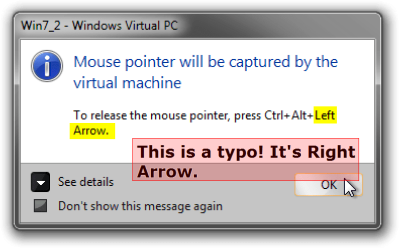
There's a typo in Virtual PC message which is displayed when mouse is captured: To "release" the pointer to the host you need to press CTRL + ALT + RIGHT ARROW, not LEFT ARROW as the displayed message tells you to do.

Hopefully someone in Microsoft notices this irritating, confusing typo and corrects it.

Kari

EDIT: an image is better than 1,000 words...

VPC_Mouse_Capture_typo.png
 
Last edited:

My Computer

Computer type
Laptop
Computer Manufacturer/Model Number
HP ENVY 17-1150eg
OS
Windows 10 Pro x64 EN-GB
CPU
1.6 GHz Intel Core i7-720QM Processor
Memory
6 GB
Graphics Card(s)
ATI Mobility Radeon HD 5850 Graphics
Sound Card
Beats sound system with integrated subwoofer
Monitor(s) Displays
17" laptop display, 22" LED and 32" Full HD TV through HDMI
Screen Resolution
1600*900 (1), 1920*1080 (2&3)
Hard Drives
Internal: 2 x 500 GB SATA Hard Disk Drive 7200 rpm
External: 2TB for backups, 3TB USB3 network drive for media
Cooling
As Envy runs a bit warm, I have it on a Cooler Master pad
Keyboard
Logitech diNovo Media Desktop Laser (bluetooth)
Mouse
Logitech Performance Mouse MX
Internet Speed
50/10 Mbps VDSL
Antivirus
Windows Defender 4.3.9431.0
Browser
Maxthon 3.5.2., IE11
Good to hear you fixed it Latepor!:party:
 

My Computer

Computer type
PC/Desktop
Computer Manufacturer/Model Number
Home Built Desktop By DataTech
OS
Windows 7 Ultimate X64 SP1
CPU
Intel i5-2550K, Differing ~4.4-4.8GHz No built in GPU
Motherboard
ASUS P8Z68-V PRO/GEN3
Memory
16GB G.Skill Sniper 1866MHz @ 2133MHz 2x8GB
Graphics Card(s)
ASUS GTX650TIB-DC2OC-2GD5, (650TI Boost)
Sound Card
Onboard Realtek 5-1
Monitor(s) Displays
Samsung P2570HD
Screen Resolution
1920x1080
Hard Drives
Samsung 840 Pro 256GB SSD for OS, 500GB Seagate Constellation (Enterprise drive) for Data
PSU
Corsair HX650W
Case
Inwin Dragon Rider
Cooling
Hyper 212 EVO w/two Noctua fans, push-pull, @1300 RPM
Keyboard
E-Z Eyes, bright yellow keys with large characters
Mouse
steelseries SENSEI Laser Pro Gaming
Internet Speed
48-51Mbs Mbs down, 11 Mbs up Xfinity Cable
Antivirus
Norton Internet Security 2013
Browser
IE 10, Opera, Pale Moon if needed
Other Info
4 case fans, LG BluRay-RE, ASUS DVD-RW, Mr. Fusion power supply, 1.21 gigawatts.
Thanks to the Community

Dear Members,

This was my first search for help in this Community.
And I can say I was pleased and surprised with so many members giving tips, and so goods that I could easily solve the problem. My VM Windows XP is installed.
It´s not running because I am having a password trouble. I can´t Logon.
I am still analysing the problem and will post about it soon.

Thanks for you all!
:)
 

My Computer

Computer Manufacturer/Model Number
HP Compaq Presario CQ40-711BR
OS
Windows 7 starter 32bit
CPU
Intel Celeron T3100 @1.9MHz
Motherboard
HP 3607
Memory
2.0 GB one channel DDR2 @398MHz
Graphics Card(s)
Mobile Intel 4 series Express chipset family
Sound Card
IDT High Definition
Monitor(s) Displays
Generic HP PnP @ 1200 x 800
Hard Drives
313 GB Samsung HM320II ATA device (IDE)
PSU
HP
Case
HP Compaq
Cooling
HP
Might be by medication that makes me post as I do ... ;) Or the fact that I'm forced to use on-screen keyboard.

However, now when I tested, both Left and Right Arrow works. But at least by me, the left arrow does not work always. Right arrow works 100% always.

Kari
 

My Computer

Computer type
Laptop
Computer Manufacturer/Model Number
HP ENVY 17-1150eg
OS
Windows 10 Pro x64 EN-GB
CPU
1.6 GHz Intel Core i7-720QM Processor
Memory
6 GB
Graphics Card(s)
ATI Mobility Radeon HD 5850 Graphics
Sound Card
Beats sound system with integrated subwoofer
Monitor(s) Displays
17" laptop display, 22" LED and 32" Full HD TV through HDMI
Screen Resolution
1600*900 (1), 1920*1080 (2&3)
Hard Drives
Internal: 2 x 500 GB SATA Hard Disk Drive 7200 rpm
External: 2TB for backups, 3TB USB3 network drive for media
Cooling
As Envy runs a bit warm, I have it on a Cooler Master pad
Keyboard
Logitech diNovo Media Desktop Laser (bluetooth)
Mouse
Logitech Performance Mouse MX
Internet Speed
50/10 Mbps VDSL
Antivirus
Windows Defender 4.3.9431.0
Browser
Maxthon 3.5.2., IE11
Crtl+Alt+Right Arrow

I found out that Ctrl+Alt+left arrow rotates my screen. So my question has to focus on how to liberate the cursor that is bound to my virtual XP to get to the menu bar to proceed with the instalation.
There's a typo in Virtual PC message which is displayed when mouse is captured: To "release" the pointer to the host you need to press CTRL + ALT + RIGHT ARROW, not LEFT ARROW as the displayed message tells you to do.

Hopefully someone in Microsoft notices this irritating, confusing typo and corrects it.

Kari

EDIT: an image is better than 1,000 words...

View attachment 160626

Hi,

It did not work for me. It rotated my screen. My Intel Graphics uses both shorkeys.
But the Ctrl+Alt+Del and after CANCEL worked fine.

Thank you anyway
 

My Computer

Computer Manufacturer/Model Number
HP Compaq Presario CQ40-711BR
OS
Windows 7 starter 32bit
CPU
Intel Celeron T3100 @1.9MHz
Motherboard
HP 3607
Memory
2.0 GB one channel DDR2 @398MHz
Graphics Card(s)
Mobile Intel 4 series Express chipset family
Sound Card
IDT High Definition
Monitor(s) Displays
Generic HP PnP @ 1200 x 800
Hard Drives
313 GB Samsung HM320II ATA device (IDE)
PSU
HP
Case
HP Compaq
Cooling
HP
Dear Members,

This was my first search for help in this Community.
And I can say I was pleased and surprised with so many members giving tips, and so goods that I could easily solve the problem. My VM Windows XP is installed.
It´s not running because I am having a password trouble. I can´t Logon.
I am still analysing the problem and will post about it soon.

Thanks for you all!
:)

OK. Today after deleting my VM e creating it again I could logon.:)
It looks OK. I can access my Desktop and my Laptop. I´ve already installed the AVG antivirus and updated the OS using Windows Update.The Microsoft VM is fantastic!!

Thanks you all.
 

My Computer

Computer Manufacturer/Model Number
HP Compaq Presario CQ40-711BR
OS
Windows 7 starter 32bit
CPU
Intel Celeron T3100 @1.9MHz
Motherboard
HP 3607
Memory
2.0 GB one channel DDR2 @398MHz
Graphics Card(s)
Mobile Intel 4 series Express chipset family
Sound Card
IDT High Definition
Monitor(s) Displays
Generic HP PnP @ 1200 x 800
Hard Drives
313 GB Samsung HM320II ATA device (IDE)
PSU
HP
Case
HP Compaq
Cooling
HP
Back
Top