VirtualBox causes Windows 7 anomalies; any better recommendations?

davesev

New member
Member
Local time
9:46 PM
Messages
56
I am using VirtualBox to run Ubuntu but it appears to cause problems with Windows 7 (network adapter prevents me from sharing USB drives) so I am looking for something better. Can someone recommend a better alternative to VirtualBox on Windows 7 for running Linux clients like Ubuntu?

PS: I've already posted in the Ubuntu forums, they told me to come here.
 

My Computer My Computer

At a glance

Windows 7 Pro 64-bit
Computer type
PC/Desktop
OS
Windows 7 Pro 64-bit
I'll let others make suggestions for other VM software since I primarily use VirtualBox (VBox). I do have a few questions for you - if you don't mind.

[I'm not attempting to talk you into staying with VBox.I too see Windows issues causes by VBox... but I've not installed the latest version of VBox just yet.]

1) What version of VBox do you have installed?

2) Did you install the option named VB Host-Only?

Thanks for your time.
 

My Computer My Computer

At a glance

W7 Pro SP1 64biti78GBIntel HD Graphics
Computer type
Laptop
Computer Manufacturer/Model Number
Employer provided Dell Latitude
OS
W7 Pro SP1 64bit
CPU
i7
Memory
8GB
Graphics Card(s)
Intel HD Graphics
Hard Drives
crappy SSD
Antivirus
Employer mandated Symantec Endpoint Protection
Browser
Pale Moon 64bit, IE11 64bit & Chrome 64bit
I have it auto-update so it was the latest version at the time, but the posts I read about the problem with the network adapter were at least a year old so it's been happening across multiple versions.

I did not install it as host-only, just the normal typical install.
 

My Computer My Computer

At a glance

Windows 7 Pro 64-bit
Computer type
PC/Desktop
OS
Windows 7 Pro 64-bit
Do you manually update the guest additions to match the VBox software updates?

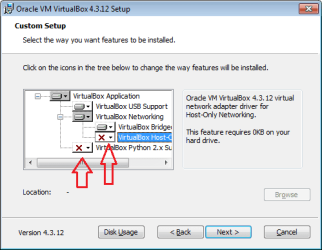
The typical/default install will install VB Host-Only. And by default, that feature is not used. I doubt that you need that feature.

You can uninstall VBox (keep the VMs) - then install VBox without the VB Host-Only option. See if that cures the issue.


I deselect these two items:
VB.png
 

My Computer My Computer

At a glance

W7 Pro SP1 64biti78GBIntel HD Graphics
Computer type
Laptop
Computer Manufacturer/Model Number
Employer provided Dell Latitude
OS
W7 Pro SP1 64bit
CPU
i7
Memory
8GB
Graphics Card(s)
Intel HD Graphics
Hard Drives
crappy SSD
Antivirus
Employer mandated Symantec Endpoint Protection
Browser
Pale Moon 64bit, IE11 64bit & Chrome 64bit
IMHO,

Vmware player is the best virtual platform out there right now.

Especially in terms of performance.
 

My Computer My Computer

At a glance

Windows 10 ProAMD Ryzen 5 2400G Processor with Radeon RX Ve...G.SKILL Ripjaws V Series 16GB (2 x 8GB) 288-P...2047MB NVIDIA GeForce GTX 1060 6GB (EVGA)
Computer type
PC/Desktop
Computer Manufacturer/Model Number
Custom Built
OS
Windows 10 Pro
CPU
AMD Ryzen 5 2400G Processor with Radeon RX Vega 11 Graphics
Motherboard
ASRock X470 Master SLI/AC AM4 AMD Promontory X470 SATA 6Gb/s
Memory
G.SKILL Ripjaws V Series 16GB (2 x 8GB) 288-Pin DDR4 SDRAM D
Graphics Card(s)
2047MB NVIDIA GeForce GTX 1060 6GB (EVGA)
Sound Card
Motherboard Built in
Monitor(s) Displays
Acer R240HY bidx 23.8-Inch IPS HDMI DVI VGA (1920 x 1080) Wi
Screen Resolution
1920 x 1080
Hard Drives
1TB Sandisk SSD PLUS (Main drive)
500 GB Seagate 7200 RPM (Games)
500 GB Western Digital 7200 RPM (Virtual Machines)
PSU
CORSAIR TX Series TX650M 650W 80+ Gold Modular Power Supply
Case
CORSAIR CARBIDE SPEC-02 Mid-Tower Gaming Case, Red LED Fan
Cooling
220mm, two 120mm, and four 60mm fans
Keyboard
Wired Dell keyboard
Mouse
Wireless Logitech mouse
Internet Speed
250mb down, 30mb up
Antivirus
Panda Cloud Antivirus
Browser
Chrome-ish x64
Other Info
Your awesome for reading this.
Back
Top