Solved Recent Windows Update KB3064209 causes Windows 7 to not boot

Cetus35

New member
Member
Local time
6:53 AM
Messages
17
[This thread is now marked SOLVED due to an effective workaround being found that allows Windows 10 to be installed on a system with a G3258 CPU.]

This thread originally addressed the Windows 7 update KB3064209 causing Windows 7 to boot to a black screen, but it was later found that this same coding was unfortunately BUILT-IN to the final release of Windows 10, thus causing anyone with a G3258 CPU to not be able to install Windows 10.

Go to the new posts (they are listed oldest to newest here) at or near the end of this thread to see my post regarding a workaround to this problem.

Original post:

Hi all,

As the title says, Update KB3064209 (Intel microcode update) from a couple of days ago (16June2015) causes my system to fail to boot after it is installed. My Windows version is 7 Ultimate with SP1 and all updates (besides this problem one). The required prerequisites for this update are met.

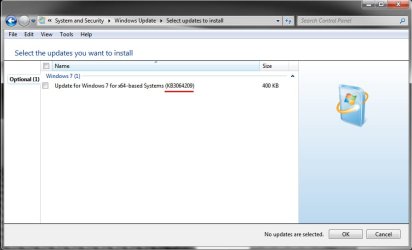
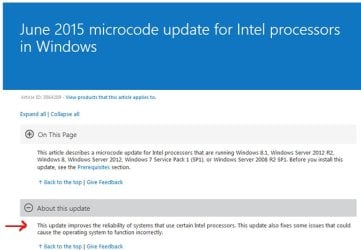
This update is in the 'Optional' category but if you read the details of the update it seems to be very close to 'Critical'. (Improves the reliability of the processor and Windows may not function correctly without it, it says)

I indeed have an Intel processor, the Intel Pentium G3258 3.20GHz Haswell, sometimes called the 'Anniversary Edition' Pentium.

After I install the KB3064209 Update (I have tried installing through Windows Update and also manually downloading and installing the update) my system will not boot.

It goes through POST then comes to the Starting Windows screen for 1-2 seconds. After 1-2 seconds the screen flashes what appears to be some kind of corrupted graphics for an instant then reboots.

Going through System Restore and restoring to a time before the update causes the system to boot successfully.

Do other people have a problem with this particular update or is it just me?

Obviously, unless I hear that there is a workaround, I'm not going to install it and just hide it in Windows Update.

This is the main reason I have Windows Update set to 'Never check for updates' and I just manually check for them about once a week.

If this was set to automatic and this failure to boot suddenly popped up after a silent Windows Update install in the background , I would probably spend hours trying to find out what caused it.

An installed program suddenly corrupted? A driver problem? Corrupted Windows System files? If so, which one? SFC /scannow is fine but it's not a 'cure all'. I've run it before and it found no problems when I was having major problems and I later found a corrupted system file. It had the right name but wrong size and date. I replaced the file with one from a working Windows 7 system and my problem was fixed.

Any info about others having this particular update causing problems for them would be appreciated.

2 screenshots:

2z67zpi.jpg
4

KB3064209.jpg


Intel microcode.jpg


.

EDIT:
As I just posted at the end of this thread, WINDOWS 10 WILL NOT INSTALL ON A SYSTEM WITH A PENTIUM G3258 CPU!! (In almost every case) Neither trying the install through 'updates' nor trying the install with an ISO image will work.

The installation fails with this error:
"We couldn't install Windows 10
0xC1900101 - 0x20017
The installation failed in the SAFE_OS phase with an error during boot operations"

As I predicted, this issue has come back to haunt us with a vengeance after most of us here agreed that simply not installing the Update 3064209 was a 'fix' to it causing the headache in Windows 7.

In Windows 10, this is not an 'update' that you can elect to not install, IT'S INTERNAL TO THE WINDOWS 10 CODE!

Microsoft blames Intel, Intel blames Microsoft, and just a very, very few motherboard companies (1 that I know of; Asus) have issued a BIOS update which supposedly fixes this.

A huge amount of discussion in other forums offers two possible workarounds:
1) Removing ALL overclocking of the CPU. (a few people have said this allows a successful Windows 10 install)
OR
2) (And this is just ridiculously unacceptable), going into the UEFI BIOS and disabling one of the cores of the CPU. However, the reports are that 100% of the time, this allows a successful installation of Windows 10.

99% of Pentium G3258 owners who want to install Windows 10, we are screwed.

A lot of reports are that a couple of the Windows 10 Preview versions did not have this problem, but the final 29July2015 release does.

There is a large number of motherboard owners who have somehow gotten the mistaken impression that you're golden if you have a Z series motherboard. Mine is a Z87 and the problem is very real with it. So don't waste your money thinking you can just buy a new Z87/Z97/Z99 and the problem will magically go away, it won't.


Note: I will burn in hell before I disable a CPU core to allow some bull**** 'fix' to a Microsoft/Intel complete and absolute debacle.

I'll guess I'll remain a faithful Win 7 x64 user for some time to come, it looks like.
.
 
Last edited:

My Computer My Computer

At a glance

Windows 10 Pro x64Intel Pentium G3258 3.20GHz Haswell, OC to 4....8GB G.SKILL Ripjaws X Series DDR3 1600 9-9-9-...NVIDIA GeForce GTX 650
Computer type
PC/Desktop
Computer Manufacturer/Model Number
Custom Build
OS
Windows 10 Pro x64
CPU
Intel Pentium G3258 3.20GHz Haswell, OC to 4.2GHz
Motherboard
EVGA Z87 FTW
Memory
8GB G.SKILL Ripjaws X Series DDR3 1600 9-9-9-24-2T
Graphics Card(s)
NVIDIA GeForce GTX 650
Sound Card
Onboard Realtek Hi-Def
Monitor(s) Displays
ViewSonic 20"
Screen Resolution
1680x1050
Hard Drives
1 OCZ ARC 100 120GB SSD (OS) &
2 WD Raptors 500GB in RAID 0
PSU
EVGA 80+ 500W
Case
Antec Nine Hundred ATX
Cooling
Case: 4x 120mm, 1x 200mm top fan - CPU: CM Hyper D92
Keyboard
Microsoft Comfort Curve 2000
Mouse
Logitech Laser
Internet Speed
12Mbps
Antivirus
Avira
Browser
Firefox 39
Other Info
Just a note on my CPU cooler. I currently have the new Cooler Master Hyper D92 (quite similar to the ever-popular Hyper 212 EVO except it has 2 fans and they are offset).
Believe it or not, my temps with a moderate OC (stock 3.2GHz to 4.2Ghz @1.215V (31% increase)) are 3C-5C LESS than the Corsair Hydro Series H90 water cooler I replaced, idle and 100% load.
Same here. When the Windows logo should appear, the system reboots. Safe mode etc. are also not working anymore: reboot after loading CLASSPNP.SYS. System restore to a point in time before installing the latest Windows Updates is the only working fix for me. After getting the system to work again I installed the optional updates 1 by 1 resulting in isolating KB3064209 as the problem. I'm running Windows 7 Professional SP1 x64, fully patched. System runs a Intel I3-4010U @1.70 GHz in a Gigabyte BRIX GB-BXi3-4010.
 

My Computer My Computer

At a glance

Windows 7 professional x64
Computer type
PC/Desktop
OS
Windows 7 professional x64
@jrnjrn

Hi,

I'd like to just quickly note that where you described the reboot is exactly the same place mine occurs.

1) It displays the 'Starting Windows' screen then reboots at the animated logo that normally shows immediately afterward. In fact, that is the graphic that flashes only for an instant and the graphic appears to be corrupted.

2) When booting in Safe Mode the list of files and drivers continue down until CLASSPNP.SYS, pauses there for a few seconds then reboots and goes into System Repair which automatically uses System Protection to roll back to a System Restore before the KB3064209 install (which then boots successfully to the desktop). I also used a System Restore point manually to achieve the same thing.

The method you used to isolate the problem update was exactly what I did. Luckily it was only trying to update about 6 or 7. I installed one at a time and found that KB3064209 was the bad one.

Hopefully someone who is much smarter than me can give advice on how to install this successfully with a workaround or some type of registry edit or Microsoft Fix It or something.

I'm currently at a loss on how to do it. The problem is that I have a very strong feeling that down the line some update or the other will refuse to install because this one is not installed. If it was just a standalone update that didn't affect anything else, I wouldn't have any problem at all just leaving it as 'hidden' in Windows Update.

Any information will be much appreciated.

.
 
Last edited:

My Computer My Computer

At a glance

Windows 10 Pro x64Intel Pentium G3258 3.20GHz Haswell, OC to 4....8GB G.SKILL Ripjaws X Series DDR3 1600 9-9-9-...NVIDIA GeForce GTX 650
Computer type
PC/Desktop
Computer Manufacturer/Model Number
Custom Build
OS
Windows 10 Pro x64
CPU
Intel Pentium G3258 3.20GHz Haswell, OC to 4.2GHz
Motherboard
EVGA Z87 FTW
Memory
8GB G.SKILL Ripjaws X Series DDR3 1600 9-9-9-24-2T
Graphics Card(s)
NVIDIA GeForce GTX 650
Sound Card
Onboard Realtek Hi-Def
Monitor(s) Displays
ViewSonic 20"
Screen Resolution
1680x1050
Hard Drives
1 OCZ ARC 100 120GB SSD (OS) &
2 WD Raptors 500GB in RAID 0
PSU
EVGA 80+ 500W
Case
Antec Nine Hundred ATX
Cooling
Case: 4x 120mm, 1x 200mm top fan - CPU: CM Hyper D92
Keyboard
Microsoft Comfort Curve 2000
Mouse
Logitech Laser
Internet Speed
12Mbps
Antivirus
Avira
Browser
Firefox 39
Other Info
Just a note on my CPU cooler. I currently have the new Cooler Master Hyper D92 (quite similar to the ever-popular Hyper 212 EVO except it has 2 fans and they are offset).
Believe it or not, my temps with a moderate OC (stock 3.2GHz to 4.2Ghz @1.215V (31% increase)) are 3C-5C LESS than the Corsair Hydro Series H90 water cooler I replaced, idle and 100% load.
Same here: Intel Pentium G3258 on Asrock B85M Pro4, Windows 7 Prof. 64bit SP1.

Unfortunately I had the system restore function disabled and therefore had to format C:

After some testing I also found out that Update KB3064209 is the problem.
 

My Computer My Computer

At a glance

Windows 7 Prof. 64bit
Computer type
PC/Desktop
OS
Windows 7 Prof. 64bit
Hi SevenDS,

An update: For an unrelated reason, I had to use an Acronis True Image backup to kick my Windows install back a couple of months. It was a pretty bare install at the time of the backup.

All Windows updates and just a small handful of programs (Photoshop, Office 2010, CCleaner, AVG 2015, etc.)

Thinking maybe something was corrupt with the install I was using the other day, I tried updating with the KB3064209 (Intel Microcode update) on the new practically bare install.

Same problem. System wouldn't boot. So evidently it's just simply not going to work with my system, barring someone on SevenForums offering advice for a workaround, registry edit, etc. to make it work.

I wouldn't even be worried about it at all except for the fact that I mentioned in my first post and that is that it's pretty important despite being labelled 'Optional'.

Anyway, just a thought on System Restore that you mentioned.

I've been a computer technician for about 25 years now and I cringe every time I see yet another 'expert' on some website or the other advising to turn the feature off completely.

It has saved me many, many times. When your system fails to boot (a Windows Update that crashes your computer, for example, or a bad device driver or whatever) and it goes into the automatic "Don't worry, I'll fix it for you" mode, it grinds and grinds like it's really working hard to fix the problem for you.

While it does check and attempt to fix a couple of important things, it usually resorts to using a Restore from System Protection to roll things back to when it worked. And most of the time that DOES work.

If a person doesn't like the idea that System Protection's restore points are using up hard drive or SSD real estate, simply set it to something you can live with such as 5% or so.

I've noticed that about 5-10GB (which is tiny these days) works just fine. I normally use about 20GB but that's just for no real reason besides the fact that I install and uninstall a LOT of software and I want many options of when and where I want to restore to when things get crazy.

As you know, when it reaches that limit it simply deletes the oldest restore point and keeps the newest.

Ok, I'm done typing my novel now.

Any help with the KB3064209 Windows Update issue is much appreciated. If 3 people have posted here about that problem, there's at least 100 'lurkers' (vs 'posters') that are waiting and watching this thread because they have the same issue.


.
 

My Computer My Computer

At a glance

Windows 10 Pro x64Intel Pentium G3258 3.20GHz Haswell, OC to 4....8GB G.SKILL Ripjaws X Series DDR3 1600 9-9-9-...NVIDIA GeForce GTX 650
Computer type
PC/Desktop
Computer Manufacturer/Model Number
Custom Build
OS
Windows 10 Pro x64
CPU
Intel Pentium G3258 3.20GHz Haswell, OC to 4.2GHz
Motherboard
EVGA Z87 FTW
Memory
8GB G.SKILL Ripjaws X Series DDR3 1600 9-9-9-24-2T
Graphics Card(s)
NVIDIA GeForce GTX 650
Sound Card
Onboard Realtek Hi-Def
Monitor(s) Displays
ViewSonic 20"
Screen Resolution
1680x1050
Hard Drives
1 OCZ ARC 100 120GB SSD (OS) &
2 WD Raptors 500GB in RAID 0
PSU
EVGA 80+ 500W
Case
Antec Nine Hundred ATX
Cooling
Case: 4x 120mm, 1x 200mm top fan - CPU: CM Hyper D92
Keyboard
Microsoft Comfort Curve 2000
Mouse
Logitech Laser
Internet Speed
12Mbps
Antivirus
Avira
Browser
Firefox 39
Other Info
Just a note on my CPU cooler. I currently have the new Cooler Master Hyper D92 (quite similar to the ever-popular Hyper 212 EVO except it has 2 fans and they are offset).
Believe it or not, my temps with a moderate OC (stock 3.2GHz to 4.2Ghz @1.215V (31% increase)) are 3C-5C LESS than the Corsair Hydro Series H90 water cooler I replaced, idle and 100% load.
insert a windows 7 installation disc and boot from it then select repair my computer
 

My Computer My Computer

At a glance

Windows 7 Ultimate 32 bit,Chromium OS, window...not sure2.00GBintel inside pentium 4,Vision AMD
Computer type
PC/Desktop
Computer Manufacturer/Model Number
Dell,Samsung,Compaq,oracle virtualbox
OS
Windows 7 Ultimate 32 bit,Chromium OS, windows server 2008 32bit
CPU
not sure
Motherboard
not sure
Memory
2.00GB
Graphics Card(s)
intel inside pentium 4,Vision AMD
Monitor(s) Displays
MAG Innovision
Keyboard
onn RF wireless
Mouse
onn RF wireless
Antivirus
Avast!
Browser
Google Chrome
Ditto the Win update

Wish I had read this post yesterday.

I just got a Gigabyute i3 up and running as a new station for a user and ready to go home. Now for some unknown reason, I get to the login CTRL-ALT-DEL screen and nothing works. No Keyboard, no mouse. Tried all the Safe modes, Bios disables etc. nothing.

Then I recognized the update KB3064209 and know you guys have the same issue.

Just FYI, it failed to update correctly the first time I tried so I made a manual restore point, tried again with no luck. So after trying to restore, I'm now stuck. It will not even let me have the option.

What can you do without a keyboard, mouse or Safe Mode?!?!?

I hope this thread finds a resolve!!

Chafin
 

My Computer My Computer

At a glance

Win 7 64 bit Pro
Computer type
PC/Desktop
Computer Manufacturer/Model Number
Gigabyte Brix i3
OS
Win 7 64 bit Pro
I also have a g3258 and I'm scared to death right now. Can anyone else reading this confirm that this update works with their g3258? Overclocked to 4.6GHz like mine?
 

My Computer My Computer

At a glance

Win7 x64
Computer type
PC/Desktop
OS
Win7 x64
I'm being offered this optional update for intel processors on both my computers despite having an AMD processor on one of them (and an intel processor on the other). I don't currently intend to install it on either computer.
 

My Computer My Computer

At a glance

Windows 7 Home Premium 64AMD Phenom II X4 9558GB Corsair XMS3 DDR3Gigabyte Geforce GTX 960 2GB
Computer type
PC/Desktop
Computer Manufacturer/Model Number
Custom build by PC Specialist
OS
Windows 7 Home Premium 64
CPU
AMD Phenom II X4 955
Motherboard
Asus M4A78T-E
Memory
8GB Corsair XMS3 DDR3
Graphics Card(s)
Gigabyte Geforce GTX 960 2GB
Sound Card
SB Audigy
Monitor(s) Displays
BenQ 24"
Screen Resolution
1920 x 1080
Hard Drives
500GB Serial ATA
PSU
1010W Quiet Quad Rail
Case
Antec 900
Cooling
Fenrir
Keyboard
Corsair
Mouse
Logitech
Internet Speed
20mbps
Antivirus
MSE plus MBAM 2.x Free
Browser
Chrome
Other Info
Second desktop different spec but similar level.
I'm being offered this optional update for intel processors on both my computers despite having an AMD processor on one of them (and an intel processor on the other). I don't currently intend to install it on either computer.

You know it's funny you say that because it's also being offered on my old Asus EEE netbook, that also has an AMD processor in it. Nice logic @Microsoft
 

My Computer My Computer

At a glance

Win7 x64
Computer type
PC/Desktop
OS
Win7 x64
Same problem here

I also have a computer with a Pentium G3258, and I had the same failure to boot as others have reported, right after I tried to install KB3064209. In my case, I was lucky enough to have a recent backup of the C drive with Acronis True Image, so I restored it. I had originally installed three different updates with Windows Update at the same time, so after restoring the hard drive, I went back and installed them one by one, and only KB3064209 caused the problem to recur. Also, I have two other computers with nearly identical software installed, and both of them had different CPUs, and they both ran the KB3064209 update with no problem. So the logical conclusion is that that particular patch is not compatible with the Pentium G3258. Has anybody else had a similar problem with KB3064209 with a CPU other than the Pentium G3258?
 

My Computer My Computer

At a glance

Windows 7 Professional 64-bitPentium G32588GBAMD Radeon HD 6800
Computer type
PC/Desktop
Computer Manufacturer/Model Number
Home built
OS
Windows 7 Professional 64-bit
CPU
Pentium G3258
Motherboard
Asus H81M-A
Memory
8GB
Graphics Card(s)
AMD Radeon HD 6800
Hard Drives
Samsung 850EVO 250GB,
WD 1TB
Many years ago I learned one important lesson concerning any type of hardware fix from Microsoft, DON'T INSTALL IT, chances are it will crash your system. Instead go to the manufacturer's website to see if they have any recommended updates for the hardware mentioned in the Microsoft "fix".

In a couple of cases, the manufacturer did have a fix for my particular hardware component but after installing their fix Microsoft Update still insisted they had a fix. Just for sh$%^ and grins, I installed a couple of them and sure enough, my system crashed.

Bob - Retired IT Professional 46 yrs
 

My Computer My Computer

At a glance

Windows 7 Pro x64Intel Dual-Core E6500 (Wolfdate) 2.93GHz4GBGeForce 9300 NVidia 730i
Computer type
PC/Desktop
Computer Manufacturer/Model Number
Custom build
OS
Windows 7 Pro x64
CPU
Intel Dual-Core E6500 (Wolfdate) 2.93GHz
Motherboard
EVGA NVIDIA 730i
Memory
4GB
Graphics Card(s)
GeForce 9300 NVidia 730i
Hard Drives
Maxtor STM3160815A PATA
WDC WD1001FALS-00Y6A0 SATA 6.0Gbps
Antivirus
TrendMicro Maximum Security
Browser
Internet Explorer 10
Since there hasn't been a single person yet in this thread who reported a successful installation with this update and a g3258 as their cpu, I'm looking for backup options and need help choosing the least painful and (somewhat) easy ones. I don't have a lot of hdd space to store a full image of the C drive (although the C drive is only a 128GB SSD.) I also don't have an optical drive either (lol -- they said it was antiquated technology by now, like floppies.) Here's what I'd like to do (in case the update bricks the system, even safe mode) and see if this remotely possible:


  • re-enable MS "System Restore/Protection" (I've had so much God-awful trouble with it in the past so I disabled it)
  • make a single restore point right before installing this update
  • convert an available 8GB usb drive as a "MS recovery cd"
  • copy the restore point over to the usb drive as well (so the MS recovery can "see" the restore point when it runs)
  • if the update bricks the system, restore from the restore point and then boot into Windows right before you isntalled the update

Remotely possible? A better option?
 

My Computer My Computer

At a glance

Win7 x64
Computer type
PC/Desktop
OS
Win7 x64
  • re-enable MS "System Restore/Protection" (I've had so much God-awful trouble with it in the past so I disabled it)
  • make a single restore point right before installing this update
  • convert an available 8GB usb drive as a "MS recovery cd"
Ok I've done these items already with the help of this guide, (note in step 5 of that guide: "FORMAT FS=NTFS" should be replaced with "FORMAT FS=NTFS QUICK" -- otherwise you're gonna be needlessly sitting there for hours and hours.)

Now I have a re-enabled system restore and made a restore point, but it's sitting on the C drive so I'm assuming if the system is bricked, it SHOULD see and revert back to that restore point on the C drive right? (It's only 360MB btw.)
 

My Computer My Computer

At a glance

Win7 x64
Computer type
PC/Desktop
OS
Win7 x64
Yes Restore Points should be on the "C" partition.
If the drive dies you will need to use a Backup you have made on a external drive.
 

My Computer My Computer

At a glance

Windows 10 Pro. 64/ version 1709 Windows 7 Pr...Intel i7-6800K @ 4.3Corsair Platinum 16 gig @2400EVGA GTX 1070 OC
Computer type
PC/Desktop
Computer Manufacturer/Model Number
Home made Desktop
OS
Windows 10 Pro. 64/ version 1709 Windows 7 Pro/64
CPU
Intel i7-6800K @ 4.3
Motherboard
ASUS X-99 Deluxe II
Memory
Corsair Platinum 16 gig @2400
Graphics Card(s)
EVGA GTX 1070 OC
Monitor(s) Displays
Asus 27" LED LCD/VE278Q
Screen Resolution
1920-1080 or 1280-720 HDMI
Hard Drives
INTEL SSD 730-240 Gb Sata 3.0/
PSU
EVGA Platium 1200W
Case
Phanteks Luxe Tempered Glass 8 fans/ one radiator
Cooling
XSPC/ Water Cooled CPU
Keyboard
Das 4 Professional
Mouse
Logitech M705/MX Anywhere 2-S
Internet Speed
100 mbits
Antivirus
Microsoft Security Essentials/ Malwarebytes Premium 3.0/ SAS
Browser
I.E. 11 default/Firefox/ ISP Time Warner Cable/Spectrum
Other Info
LG BluRay Burner/
Sound system-KLipsch-THX/
Icy Dock ssd Hot Swap bays.
Yes Restore Points should be on the "C" partition.
If the drive dies you will need to use a Backup you have made on a external drive.

Well, in this case we're just talking about a rogue update that can potentially brick a system, not kill a drive. Although, given my luck with System Restore, it probably won't work anyway, ESPECIALLY when switching to a new drive that isn't the same capacity/model/ssd/etc.:mad:
 

My Computer My Computer

At a glance

Win7 x64
Computer type
PC/Desktop
OS
Win7 x64
Isn't the answer to this issue not to install what is only an optional update? It simply isn't worth the risk unless you have a specific reason for installing it.
 

My Computer My Computer

At a glance

Windows 7 Home Premium 64AMD Phenom II X4 9558GB Corsair XMS3 DDR3Gigabyte Geforce GTX 960 2GB
Computer type
PC/Desktop
Computer Manufacturer/Model Number
Custom build by PC Specialist
OS
Windows 7 Home Premium 64
CPU
AMD Phenom II X4 955
Motherboard
Asus M4A78T-E
Memory
8GB Corsair XMS3 DDR3
Graphics Card(s)
Gigabyte Geforce GTX 960 2GB
Sound Card
SB Audigy
Monitor(s) Displays
BenQ 24"
Screen Resolution
1920 x 1080
Hard Drives
500GB Serial ATA
PSU
1010W Quiet Quad Rail
Case
Antec 900
Cooling
Fenrir
Keyboard
Corsair
Mouse
Logitech
Internet Speed
20mbps
Antivirus
MSE plus MBAM 2.x Free
Browser
Chrome
Other Info
Second desktop different spec but similar level.
Isn't the answer to this issue not to install what is only an optional update? It simply isn't worth the risk unless you have a specific reason for installing it.

Well I mean if there's true "performance enhancements" as Microsoft claims that results in a faster OS, then I don't want to miss out on that, especially for my lowly $45 cpu that's only a dual-core Hawsell. I'd like to hear Intel's side of the story though to see if they agree.

How many people NEVER install "optional" updates regardless of what the KB articles say? 50%?
 

My Computer My Computer

At a glance

Win7 x64
Computer type
PC/Desktop
OS
Win7 x64
Ok, after taking the necessary backup precautions and after installing this update, my system appears to be fine. I'll let you guys know if I run into trouble in the near future. Thanks for the support along the way. #sarcasm
 

My Computer My Computer

At a glance

Win7 x64
Computer type
PC/Desktop
OS
Win7 x64
@ jewishnigra

Since you're the one and only person here who says they have successfully installed the KB3064209 (Intel microcode update) with an Intel G3258 processor, it sure would be very handy if you could describe here what you did to accomplish that.

I mean "Ok, I have it working now" is not the most helpful post in the world :)

You did say that you had taken steps to ensure a good backup before an install attempt, but just about everyone here has done that and it hasn't helped a single thing.

Somehow this thread has wandered away from the original problem posted and has almost (but not completely) become a discussion on how and why to make Restore Points, emergency recovery CDs/USB flash drives, and regular backups.

Part of that may be my own fault because I did veer away from the topic myself earlier in recommending everyone always use System Protection and the fact that it wasn't a good thing to turn it off.

Ok, to gets things re-clarified:

When you have an Intel G3258 CPU (aka the Anniversary Edition Pentium) AND install an 'Optional' update
suggested by Windows Update, specifically KB3064209 (named 'Intel microcode update'), then upon a reboot your computer boots to a black screen and restarts.

The only way to get it to boot normally is to remove the update via System Restore, reverting to an earlier backup, or booting with a recovery CD/flash drive, etc.

Do take notice that booting with a recovery CD/flash drive results in the exact same fix as when it comes to the 'automatic problem fixer' that sometimes starts automatically after a failed boot.

They both resort to using a System Restore Point.

So like I said earlier, if you have System Protection turned off, neither of those methods will result in fixing the problem i.e. boot like normal.


Last note: All of us here admit that not installing the thing would prevent all the problems, but although Windows Update has it listed as an 'Optional' update, the description for the update sounds ominous:
(and there are also concerns that future Windows Updates may demand that this update is installed as a prerequisite)

"This update improves the reliability of systems that use certain Intel processors. This update also fixes
some issues that could cause the operating system to function incorrectly."

Without it, the operating system could possibly function incorrectly and be unreliable!?

I mean, that's what the worst virus in the world does, causes your operating system to "function incorrectly and be unreliable".


.
 

My Computer My Computer

At a glance

Windows 10 Pro x64Intel Pentium G3258 3.20GHz Haswell, OC to 4....8GB G.SKILL Ripjaws X Series DDR3 1600 9-9-9-...NVIDIA GeForce GTX 650
Computer type
PC/Desktop
Computer Manufacturer/Model Number
Custom Build
OS
Windows 10 Pro x64
CPU
Intel Pentium G3258 3.20GHz Haswell, OC to 4.2GHz
Motherboard
EVGA Z87 FTW
Memory
8GB G.SKILL Ripjaws X Series DDR3 1600 9-9-9-24-2T
Graphics Card(s)
NVIDIA GeForce GTX 650
Sound Card
Onboard Realtek Hi-Def
Monitor(s) Displays
ViewSonic 20"
Screen Resolution
1680x1050
Hard Drives
1 OCZ ARC 100 120GB SSD (OS) &
2 WD Raptors 500GB in RAID 0
PSU
EVGA 80+ 500W
Case
Antec Nine Hundred ATX
Cooling
Case: 4x 120mm, 1x 200mm top fan - CPU: CM Hyper D92
Keyboard
Microsoft Comfort Curve 2000
Mouse
Logitech Laser
Internet Speed
12Mbps
Antivirus
Avira
Browser
Firefox 39
Other Info
Just a note on my CPU cooler. I currently have the new Cooler Master Hyper D92 (quite similar to the ever-popular Hyper 212 EVO except it has 2 fans and they are offset).
Believe it or not, my temps with a moderate OC (stock 3.2GHz to 4.2Ghz @1.215V (31% increase)) are 3C-5C LESS than the Corsair Hydro Series H90 water cooler I replaced, idle and 100% load.
Back
Top