Virus/Malware/Trojon? Infecting My PC

jmrpjb

New member
Local time
5:01 AM
Messages
44
Location
Vancouver, Canada
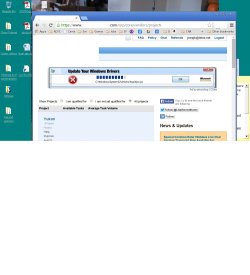
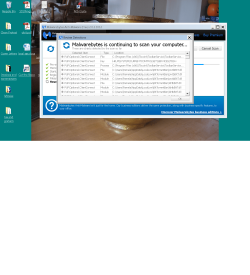
Something isn't right. Whenever I'm on a website, I get pop ups an advertisingmalware2.jpgand it won't go away unless I click the X about 10 times and then it asks, "are you sure you want to leave this page?" I did a scan with Malwarebytes and Jet Clean and I fixed all the errors that were found[/ATTACH][/ATTACH]
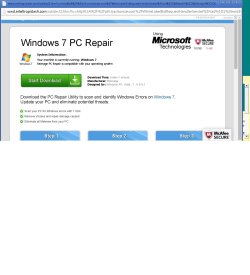
Unfortunately, it doesn't seem to have helped. Can someone please help me with this? I've got a Dell Inspiron ONE_2020, Intel (R) Pentium (R) CPU G620T 2.20 GHz, RAM: 4:00 GB 64-but OS and the last thing I tried to do that might shed some light on this is I tried to download a tv show, The Americans with Bittorrent.

Thank you
 

Attachments
  • mal.png
    mal.png
    202.8 KB · Views: 3
  • mal1.jpg
    mal1.jpg
    86.3 KB · Views: 3
  • malware1.jpg
    malware1.jpg
    125.4 KB · Views: 0

My Computer My Computer

Computer type
PC/Desktop
Computer Manufacturer/Model Number
Dell product #00359-OEM-8992687-00095
OS
Microsoft Windows 7 Home Premium 64-bit 7601 Multiprocessor Free Service Pack 1
CPU
Intel(R) Pentium(R) CPU G620T @ 2.20GHz
Motherboard
Dell Inc. 0MTFWP
Memory
4.00 GB
Graphics Card(s)
Intel(R) HD Graphics
Sound Card
(1) Realtek High Definition Audio (2) Bluetooth Audio Devi
Screen Resolution
1600 x 900 x 32 bits (4294967296 colors) @ 60 Hz
Hard Drives
(1) ST500DM002-1BD142 ATA Device (2) Multiple Card Reader USB Device
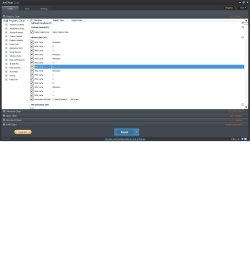
Please download AdwCleaner by Xplode and save to your Desktop.
Step 1.
  • Double click on AdwCleaner.exe to run the tool.
    Vista/Windows 7/8 users right-click and select Run As Administrator.
  • Click on the Scan button.
  • AdwCleaner will begin...be patient as the scan may take some time to complete.
  • After the scan has finished, click on the Report button...a logfile (AdwCleaner[R#].txt) will open in Notepad for review (where the largest value of # represents the most recent report).
  • The contents of the log file may be confusing. Unless you see a program name that you know should not be removed, don't worry about it. If you see an entry you want to keep, let me know about it.
  • Copy and paste the contents of that logfile in your next reply.
  • A copy of all logfiles are saved in the C:\AdwCleaner folder which was created when running the tool.


Step 2.
Using AdwCleaner v3: Scan & Clean:
This time click on the Clean button.
Press OK when asked to close all programs and follow the onscreen prompts.
Press OK again to allow AdwCleaner to restart the computer and complete the removal process.
After rebooting, a logfile report (AdwCleaner[S#].txt) will open automatically (where the largest value of # represents the most recent report).
Copy and paste the contents of that logfile in your next reply.
A copy of that logfile will also be saved in the C:\AdwCleaner folder


******Post both .txt logs
 

My Computer My Computer

Computer type
PC/Desktop
Computer Manufacturer/Model Number
Bruce ... somewhere in his 40's
OS
Windows 7 Ultimate 32bit SP1
CPU
Intel(R) Core(TM)2 Quad CPU @ 2.40GHz, 2400 MHz
Motherboard
INTEL/D975XBX2
Memory
4 GB
Graphics Card(s)
ATI Radeon HD 2600 Pro
Monitor(s) Displays
Samsung SyncMaster 914v
Screen Resolution
1280 x 1024
Hard Drives
2/500GB each ... ST3500630AS ATA Device.
One is not connected
PSU
Rocketfish 700 W
Case
G.Skill Gigabyte Chassis
Keyboard
Standard PS/2 Keyboard
Mouse
Microsoft PS/2 Mouse
Internet Speed
DSL
Antivirus
Avira Internet Security
Browser
IE 11
Other Info
ATI HDMI Audio
Hi, thank you for responding so quickly and I've followed the instructions[/ATTACH]

Here are the two logs generated after scanning and cleaning

Thank you again
 

Attachments

My Computer My Computer

Computer type
PC/Desktop
Computer Manufacturer/Model Number
Dell product #00359-OEM-8992687-00095
OS
Microsoft Windows 7 Home Premium 64-bit 7601 Multiprocessor Free Service Pack 1
CPU
Intel(R) Pentium(R) CPU G620T @ 2.20GHz
Motherboard
Dell Inc. 0MTFWP
Memory
4.00 GB
Graphics Card(s)
Intel(R) HD Graphics
Sound Card
(1) Realtek High Definition Audio (2) Bluetooth Audio Devi
Screen Resolution
1600 x 900 x 32 bits (4294967296 colors) @ 60 Hz
Hard Drives
(1) ST500DM002-1BD142 ATA Device (2) Multiple Card Reader USB Device
Back
Top