Virus name??

JAMESEPARMLEY

New member
Local time
12:16 AM
Messages
3
Location
515 WEST 8TH ST. ANTIOCH,CA. 94509
I have a virus that tells me all my files are arrested by the FBI, and to send $400.00 .What do I have to do to rid my PC of this threat??I think this is causing me other problems on my PC that I will address in a new thread.:cry:
 

My Computer

Computer type
PC/Desktop
Computer Manufacturer/Model Number
HP PAVILION MODEL#a6200n
OS
HP PAVILION a6200n PC - 32BIT - WINDOWS 7 ULTIMATE
CPU
AMD Athlon(TM) 64x2 Dual Core Processer 5000+ 2.60 GHz
Motherboard
ECS Product: Nettle 2
Memory
4.00GB (3.50 GB Usable)
Graphics Card(s)
ATI Radeon HD 2600XT Ram512MB Version 8.850.0.0
Hard Drives
ST 336032 OAS SCSI DISK DEVICE
Antivirus
Norton Security Suite Version 21.1.0.18
Browser
Internet Explorer Version 9.0.8112.16421
What anti virus software are you running and is it up to date?
 

My Computer

Computer type
PC/Desktop
OS
Microsoft Windows 7 Home Premium 64-bit 7601 Multiprocessor Free Service Pack 1
CPU
Intel(R) Core(TM) i7-3770 CPU @ 3.40GHz
Motherboard
ASUSTeK COMPUTER INC. P8H77-M
Memory
8.00 GB
Graphics Card(s)
Intel(R) HD Graphics 4000
Sound Card
On Board
Monitor(s) Displays
Dell 24"
Screen Resolution
1920 x 1080
Hard Drives
(1) INTEL SSDSC2CT180A3 ATA Device (2) ST500DM002-1BD142 ATA Device (3) WDC WD3200AAKS-75L9A0 ATA Device (4) Generic- Compact Flash USB Device (5) Generic- MS/MS-Pro USB Device (6) Generic- SD/MMC USB Device (7) Generic- SM/xD-Picture USB
PSU
500w Corsair
Case
Cooler Master
Cooling
3 Fans
Keyboard
Logitech MK300
Mouse
Logitech WOM
Internet Speed
75Mb
Antivirus
Norton 360
Browser
Firefox, Opera, IE

My Computer

Computer type
PC/Desktop
Computer Manufacturer/Model Number
Custom Built
OS
Windows 7 Professional x64
CPU
Intel i5 quad processor
Motherboard
DP67BG
Memory
16 GB
Graphics Card(s)
Radeon HD 5770
Sound Card
Realtek High Definition Audio
Monitor(s) Displays
Samsung SyncMaster
Screen Resolution
1920X1080
Hard Drives
WD 2TB (SATA Internal)
WD 1TB (USB External)
PSU
Corsair GS800
Case
Tower (Generic)
Cooling
3 Internal Fans
Keyboard
MS Wireless
Mouse
MS Optical Wired
Internet Speed
54 mbps
Antivirus
Emsisoft
Browser
IE-Version 9, Palemoon-Version 24.2.0
If the above does not work...


Download Combofix from any of the links below, and save it to your desktop.

Link 1
Link 2

To prevent your anti-virus application interfering with ComboFix we need to disable it. See here for a tutorial regarding how to do so if you are unsure.
  • Close any open windows and double click ComboFix.exe to run it.
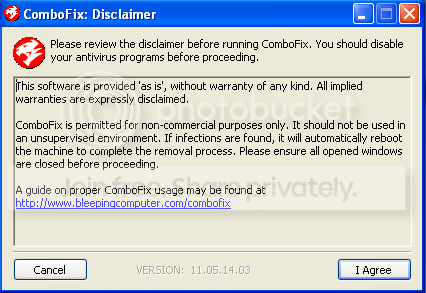
    You will see the following image:
NSIS_disclaimer_ENG.png


Click I Agree to start the program.

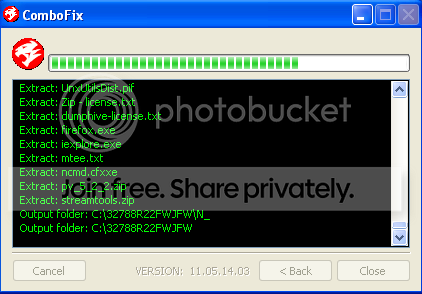
ComboFix will then extract the necessary files and you will see this:

NSIS_extraction.png


As part of it's process, ComboFix will check to see if the Microsoft Windows Recovery Console is installed. With malware infections being as they are today, it's strongly recommended to have this pre-installed on your machine before doing any malware removal. This will not occur in Windows Vista and 7

It will allow you to boot up into a special recovery/repair mode that will allow us to more easily help you should your computer have a problem after an attempted removal of malware.

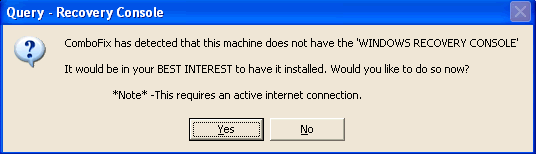
If you did not have it installed, you will see the prompt below. Choose YES.

RcAuto1.gif


Follow the prompts to allow ComboFix to download and install the Microsoft Windows Recovery Console, and when prompted, agree to the End-User License Agreement to install the Microsoft Windows Recovery Console.

**Please note: If the Microsoft Windows Recovery Console is already installed, ComboFix will continue it's malware removal procedures.

Once the Microsoft Windows Recovery Console is installed using ComboFix, you should see the following message:

whatnext.png


Click on Yes, to continue scanning for malware.

When finished, it will produce a report for you. Please post the contents of the log (C:\ComboFix.txt).

Leave your computer alone while ComboFix is running. ComboFix will restart your computer if malware is found; allow it to do so.

Note: Please Do NOT mouseclick combofix's window while its running because it may cause it to stall.
 

My Computer

Computer type
PC/Desktop
OS
7
JAMESEPARMLEY,

Welcome to the Windows Seven Forums!!


ComboFix is not the tool of choice for this situation, please do not use it.

At this point, would not use Malwarebytes Anti-Rootkit either, and would hold off on ADWCleaner.


:info: Please use the following diagnostic tool. It has a powerful detection mechanism, and may help us get to the root of your issues:

:info: Please use the Farbar Recovery Scan Tool.
Download: Farbar Recovery Scan Tool Download
Select the version that applies to your system.
Save it to your Desktop.
Double-click the downloaded file to run it.

When the tool opens click Yes to the disclaimer.
At the program's console, press the Scan button.

When done, the tool produces a log, FRST.txt, in the same directory from which the tool is run (Desktop).
:ar: Please provide the FRST.txt in your reply.

The first time the tool is run, it also makes another log: Addition.txt
:ar: Also post the Addition.txt in your reply.


:info: Next, please use the tool Zoek.exe:
Download > Download zoek.exe version 5.0.0.0

When the Zoek.exe download appears, save to the Desktop.
On the Desktop, right-click Zoek.exe and select: Run as Administrator
Give it a few seconds to appear.
Please disable your AntiVirus and AntiSpyware programs, so they don't interfere with the running of Zoek.exe.
You can find instructions how to disable your security applications here:
How To Temporarily Disable Your Anti-virus, Firewall And Anti-malware Programs - Security Mini-Guides

At the program console, click the Options button and place a checkmark only on the following options:

Do a Deep Scan
HijackThis Log

Now...
Close any open programs.
Click the Run script button, and wait.
It takes a few minutes to run.

When the tool finishes, the zoek-results.log is opened in Notepad.
The log is also found on the systemdrive, normally C:\
If a reboot is needed, the log is opened after the reboot.

:ar: Please post the zoek-results.log in your reply.

 

My Computer

Computer type
PC/Desktop
Computer Manufacturer/Model Number
An ol' eMachines
OS
Windows 7 Home Premium
Internet Speed
Fine for me...I'm retired!
Please follow cottonball's post! ;)
 

My Computer

Computer type
PC/Desktop
Computer Manufacturer/Model Number
Bruce ... somewhere in his 40's
OS
Windows 7 Ultimate 32bit SP1
CPU
Intel(R) Core(TM)2 Quad CPU @ 2.40GHz, 2400 MHz
Motherboard
INTEL/D975XBX2
Memory
4 GB
Graphics Card(s)
ATI Radeon HD 2600 Pro
Monitor(s) Displays
Samsung SyncMaster 914v
Screen Resolution
1280 x 1024
Hard Drives
2/500GB each ... ST3500630AS ATA Device.
One is not connected
PSU
Rocketfish 700 W
Case
G.Skill Gigabyte Chassis
Keyboard
Standard PS/2 Keyboard
Mouse
Microsoft PS/2 Mouse
Internet Speed
DSL
Antivirus
Avira Internet Security
Browser
IE 11
Other Info
ATI HDMI Audio
Back
Top