The problem is ona HP laptop running windows 7. bought ~ 2009-2010. Not sure if 32 or 64 bit. Running Norton antivirus. My other windows 7 computer at home is 64 bit.
I searched forum here but did not see a solution.
Norton was updated recently on this laptop.
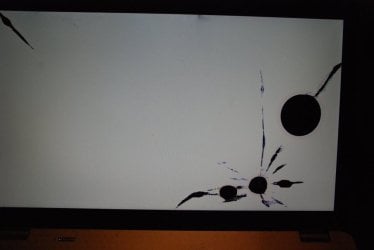
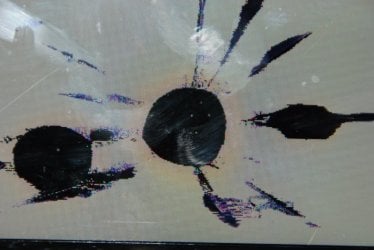
when you turn the computer on it immediately goes to a screen that is white with fake black cracks and holes. Believe it is a virus(no idea what name). Looks the same way every time it is turned on. I am 100% sure the screen is not physically broken.
Rebooted machine machine and it goes straight to this white screen does not show any windows or other symbols. I did notice that the light indicating capslock turned on before this screen popped up. Hitting capslock again does not fix it. It does not respond to any keystrokes when white screen is up.
Rebooted machine and immediately and repeatedly hit f8 for safe mode and it did no good. Same issue Saw a suggestion that HPs use F11 and same outcome. I tried this several times. One time F11 prevented white screen from coming up but computer turned off. rebooted and tried f2 and that did no good.
I do not have a recovery disc. I am the original owner but cannot find the discs.
What is the best ( an alternate) way(s) to fix this? Hoping for a solution that does not involve removing hard drive and one that I can do at home.
I saw suggestions for hitman.exe and recovery discs and boot discs etc but they require safe mode which I cannot access. Can I scan from one computer to another across a cable?
Could you take a clear picture of the white screen and post it?
This is the preferred, best way to upload an image or a file to a post. Press the ALT and PrntScrn keys at the same time, this will capture only the active window to use in Paint or your preferred graphics editor.
your screen looks broken.
too bad laptop, cant test screen.
The screen cable can go bad, it runs thru the hinge.
Laptop video chips can come loose bad solder joints.
The surface may look fine but the very thin part that has the actual liquid crystal is damaged. The part you can feel is a thicker protective layer over that. It looks like it has been hit with something or someone stepped on it.
If you have a monitor you can connect it to the laptop's VGA video port and see if that works.
My Computer
At a glance
Windows 7 Ultimate X64 SP1Intel i5-2550K, Differing ~4.4-4.8GHz No buil...16GB G.Skill Sniper 1866MHz @ 2133MHz 2x8GBASUS GTX650TIB-DC2OC-2GD5, (650TI Boost)
Computer type
PC/Desktop
Computer Manufacturer/Model Number
Home Built Desktop By DataTech
OS
Windows 7 Ultimate X64 SP1
CPU
Intel i5-2550K, Differing ~4.4-4.8GHz No built in GPU
Motherboard
ASUS P8Z68-V PRO/GEN3
Memory
16GB G.Skill Sniper 1866MHz @ 2133MHz 2x8GB
Graphics Card(s)
ASUS GTX650TIB-DC2OC-2GD5, (650TI Boost)
Sound Card
Onboard Realtek 5-1
Monitor(s) Displays
Samsung P2570HD
Screen Resolution
1920x1080
Hard Drives
Samsung 840 Pro 256GB SSD for OS, 500GB Seagate Constellation (Enterprise drive) for Data
PSU
Corsair HX650W
Case
Inwin Dragon Rider
Cooling
Hyper 212 EVO w/two Noctua fans, push-pull, @1300 RPM
Keyboard
E-Z Eyes, bright yellow keys with large characters
Mouse
steelseries SENSEI Laser Pro Gaming
Internet Speed
48-51Mbs Mbs down, 11 Mbs up Xfinity Cable
Antivirus
Norton Internet Security 2013
Browser
IE 10, Opera, Pale Moon if needed
Other Info
4 case fans, LG BluRay-RE, ASUS DVD-RW, Mr. Fusion power supply, 1.21 gigawatts.
Boot into the system BIOS. Even if you can't get into safe mode, you should still be able to get into the BIOS. Take a picture of the BIOS screen looking fine that way you can prove to everyone that the screen itself is not cracked.
My Computer
At a glance
Windows 7 Home Premium 64 bitIntel core i5 2500k8GB DDR3 (2 x 4GB)ATi Radeon HD 6870
Computer type
PC/Desktop
Computer Manufacturer/Model Number
Custom build
OS
Windows 7 Home Premium 64 bit
CPU
Intel core i5 2500k
Motherboard
AS Rock Z68 Pro3
Memory
8GB DDR3 (2 x 4GB)
Graphics Card(s)
ATi Radeon HD 6870
Sound Card
Realtek HD Audio, AMD HD audio
Monitor(s) Displays
Samsung 27" LED LCD
Screen Resolution
1920x1280
Hard Drives
Intel 120GB SSD
Antivirus
Norton Antivirus provided by Comcast (recently removed), MSE