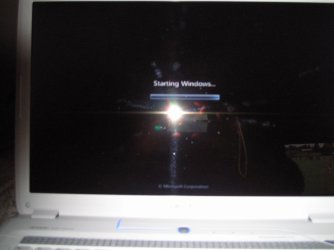
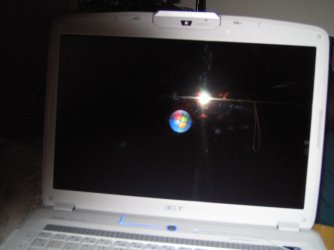
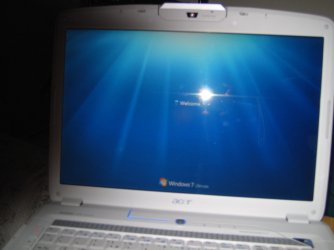
Vista BootScreen in Windows7

dmex

New member
Guru
VIP
Local time
3:46 AM
Messages
1,288
Location
Fremantle, Australia
Who noticed the Vista Bootscreen being used somewhere in Windows 7? :huh:


You might find it built into a specific function? :p

 
Hello dmex....:)

Isn't it one of the 7 desktop offerings?


Later ;) Ted
 

My Computer

Computer Manufacturer/Model Number
* BFK Customs *
OS
W 7 64-bit Ultimate
CPU
Intel Q9550 Yorkfield
Motherboard
ASUS P5Q Pro
Memory
8GB Dominator 8500C5D
Graphics Card(s)
ATI : XFX 5870
Sound Card
Realtek HD Audio 7-1
Monitor(s) Displays
1x 47" LCD HDMI & 3x 26" LCD HDMI
Screen Resolution
1920x1080P & 1920x1200
Hard Drives
1x 80GB Intel X25-M G2 SSD : 1x 500GB & 1x 640GB WD Caviar Black(s)
PSU
Corsair 620HX
Case
Cooler Master RC-690
Cooling
Tuniq Tower 120, 2x 140mm and 3x 120mm case fans
Keyboard
Microsoft 500
Mouse
Razer Diamondback 3G
Internet Speed
14 Mb/s
Other Info
1x Koutech 3Gb/s SATA HDD Hot Swap Rack
Isn't it one of the 7 desktop offerings?

Nope, Its built into one of the boot-options available during startup ;)

Im still waiting for someone to find it but I guess no one has spotted it yet...

Its being used for this 'something' function in windows 7 which is very surprising because you will notice it if your system crashes and you need to select this option to enter the start-up the repair menu built into the boot-options ;)
 
yep..... i saw it Steven, i tried to ''repair'' W7 from the boot screen & the vista loading logo came up ...i thought ''Noooooo'' surly its not running the repair on vista!!!

but W7 popped up much to my relief. :p

:)SK
 

My Computer

Computer Manufacturer/Model Number
myself
OS
SEVEN x64
CPU
Q9450 @ 3.6GHZ 1.34v
Motherboard
ASUS P5K PREMIUM P35
Memory
8GB 1066 buffalo firestix @ 1152mhz CL5
Graphics Card(s)
Sapphire HD 5970 + GTX260 (physX)
Sound Card
Creative X-FI Xtreme Gamer
Monitor(s) Displays
SAMSUNG 20'' & SAMSUNG 23'' (dual screens)
Screen Resolution
2048x1152 & 1680x1050
Hard Drives
1x seagate 160gb IDE & 1x seagate 160gb SATA
PSU
XCILIO 850w (78A)
Case
CM590 1x 120x38mm & 2x92x38mm / 4x 120x25mm
Cooling
AC7 PRO @ 92x38mm blower, Lamptron military bus bay controll
Keyboard
LOGITECH E110
Mouse
logitech NX5
Internet Speed
2MB
Other Info
its a continual ''work in progress''....
Yeah, I too tried the repair option on my Laptop but it kept going and going for at least an hour. So I did what the screen said not to do, and I turned off the PC hard booted it again and noticed there was another option. It said Delete recovery files and boot MBR. Which I selected and within minutes I was back to the regular desktop without the restored session. Which I didn't care about anyways.
 

My Computer

Computer Manufacturer/Model Number
Dell M1330 XPS - Laptop
OS
Windows 7 Build 7100
CPU
Core 2 Duo T7250
Motherboard
Dell Inc. 0U8042
Memory
2GB PC2-5300
Graphics Card(s)
NVIDIA 8400M GS
Sound Card
Standard HD Audio
Monitor(s) Displays
13" LCD Widescreen
Screen Resolution
1280x800
Hard Drives
160GB
Internet Speed
25 Mbit
Hello all.

I hope I never get to see it then.


Later ;) Ted
 

My Computer

Computer Manufacturer/Model Number
* BFK Customs *
OS
W 7 64-bit Ultimate
CPU
Intel Q9550 Yorkfield
Motherboard
ASUS P5Q Pro
Memory
8GB Dominator 8500C5D
Graphics Card(s)
ATI : XFX 5870
Sound Card
Realtek HD Audio 7-1
Monitor(s) Displays
1x 47" LCD HDMI & 3x 26" LCD HDMI
Screen Resolution
1920x1080P & 1920x1200
Hard Drives
1x 80GB Intel X25-M G2 SSD : 1x 500GB & 1x 640GB WD Caviar Black(s)
PSU
Corsair 620HX
Case
Cooler Master RC-690
Cooling
Tuniq Tower 120, 2x 140mm and 3x 120mm case fans
Keyboard
Microsoft 500
Mouse
Razer Diamondback 3G
Internet Speed
14 Mb/s
Other Info
1x Koutech 3Gb/s SATA HDD Hot Swap Rack
When using Windows 7 parallel with Xp, I got some OS Selection problem and I needed to repair it with Windows 7 Setup disk. Now my windows 7 always boots with the Vista logo...any ideas?
 

My Computer

Computer Manufacturer/Model Number
Thinkpad T60
OS
Windows 7 build 6956
CPU
Core Duo 2Ghz
Memory
2GB
Graphics Card(s)
ATI Mobility x1400
Monitor(s) Displays
15''
Internet Speed
20 - 100megabyte/s
When using Windows 7 parallel with Xp, I got some OS Selection problem and I needed to repair it with Windows 7 Setup disk. Now my windows 7 always boots with the Vista logo...any ideas?

Thats very interesting? :confused:

Can you run a elevated CMD prompt and type bcdedit /v and paste the results here?
 
I just took these pics of my boot up
 

Attachments

  • 004.JPG
    004.JPG
    202.6 KB · Views: 131
  • 005.JPG
    005.JPG
    218.4 KB · Views: 219
  • 006.JPG
    006.JPG
    158.2 KB · Views: 693

My Computer

Computer Manufacturer/Model Number
Self build
OS
Windows 7 Ultimate x64
CPU
AMD Phenom II x4
Motherboard
Gigabyte 880
Memory
8GB
Graphics Card(s)
NVIDIA GeForce HD
Sound Card
Realtek HD Audio
Screen Resolution
1920 x 1080
Hard Drives
2 x 1TB
PSU
Thermalake 550w
Case
XCase
Internet Speed
8MB

My Computer

Computer type
PC/Desktop
Computer Manufacturer/Model Number
Alienware® ALX X58
OS
Win 7 Ult SP1/Win 10 Pro (all x64)
CPU
Intel® Core™ i7-975 Extreme O/C to 4.02 GHz, 8MB Cache
Motherboard
Asus® P6T Deluxe V2 X58 LGA1366
Memory
24GB Corsair Vengeance DDR3 SDRAM at 1600MHz - 6 x 4096MB
Graphics Card(s)
1792 MB NVIDIA® GeForce® GTX 295 Dual Core
Sound Card
Onboard Soundmax® High-Definition 7.1 Performance Audio
Monitor(s) Displays
Samsung XL2370 LED backlit 23" W/S 2ms response time
Screen Resolution
1920 X 1080
Hard Drives
2 x 500gb SATA II
1 x 1TB SATA II
1 external eSATA LaCie 3TB
(Non-RAID)
PSU
Alienware® 1200 Watt Multi-GPU
Case
Alienware® P2 ALX Chassis with AlienIce™ 3.0 Video Cooling
Cooling
Alienware® High-Perf. Liquid Cooling + Acoustic Dampening
Keyboard
Microsoft® Wireless Entertainment 8000 + Logitech® G15 Wired
Mouse
Microsoft® Wireless Laser 8000 + Logitech® G9 Wired
Internet Speed
1Gb/s
Antivirus
McAfee LiveSafe
Browser
Firefox - latest
Other Info
Using non-RAID on purpose as I find RAID to be too temperamental.
Now set to AHCI
As it has been like this since the first boot up, I assumed the same.
 

My Computer

Computer Manufacturer/Model Number
Self build
OS
Windows 7 Ultimate x64
CPU
AMD Phenom II x4
Motherboard
Gigabyte 880
Memory
8GB
Graphics Card(s)
NVIDIA GeForce HD
Sound Card
Realtek HD Audio
Screen Resolution
1920 x 1080
Hard Drives
2 x 1TB
PSU
Thermalake 550w
Case
XCase
Internet Speed
8MB
Thats very interesting? :confused:

Can you run a elevated CMD prompt and type bcdedit /v and paste the results here?

Here you go...
extremesu5.jpg


Just remember that I got one Windows XP in the first partition (E:\ in this case)
At the first time, I think there was another session called {ntldr} for my XP. But after the problem, it became useless so I deleted it. Now I really want to know how to bring it back on.
 

My Computer

Computer Manufacturer/Model Number
Thinkpad T60
OS
Windows 7 build 6956
CPU
Core Duo 2Ghz
Memory
2GB
Graphics Card(s)
ATI Mobility x1400
Monitor(s) Displays
15''
Internet Speed
20 - 100megabyte/s
windows 7 boot screen

i,m having the same vista boot screen problem......install win 7 on my hp mini and getting the vista boot screen.......any help to resolve this would be greatful thanks:cry:
 
Last edited:

My Computer

OS
windows 7
Hi kings,

Try this:

Boot into 7, open an elevated command prompt and type:

bcdedit /set {current} locale en-US

press enter.

Hope it helps
 

My Computers

System One System Two

  • Computer type
    PC/Desktop
    OS
    7 X64
    CPU
    i5 8400
    Motherboard
    gigabyte b365m ds3h
    Memory
    2x8gb 3200mhz
    Hard Drives
    various
    PSU
    pure power 11 400w cm
    Case
    Coolermaster
    Cooling
    cryorig m9i
  • Computer type
    PC/Desktop
    OS
    7x64
    CPU
    g5400
    Motherboard
    ga b365m ds3h
    Memory
    8gb ddr4 2400
    PSU
    xfx pro 450w
Hi kings,

Try this:

Boot into 7, open an elevated command prompt and type:

bcdedit /set {current} locale en-US

press enter.

Hope it helps


i tried that and but without success

thanks for your speedy reply:)
 

My Computer

OS
windows 7

My Computers

System One System Two

  • Computer type
    PC/Desktop
    OS
    7 X64
    CPU
    i5 8400
    Motherboard
    gigabyte b365m ds3h
    Memory
    2x8gb 3200mhz
    Hard Drives
    various
    PSU
    pure power 11 400w cm
    Case
    Coolermaster
    Cooling
    cryorig m9i
  • Computer type
    PC/Desktop
    OS
    7x64
    CPU
    g5400
    Motherboard
    ga b365m ds3h
    Memory
    8gb ddr4 2400
    PSU
    xfx pro 450w
When you say without success - do you mean the command prompt did not respond it had completed successfully?

If so, try copying and pasting the command in - it has to be exactly correct, including the spacing:

bcdedit /set {current} locale en-US

like this:

en-US-2-2009-04-29_232014.jpg

You will probably be on the C: drive and have white writing on a black screen. ( You probably know that - it is for the benefit of others reading this thread).
 

My Computers

System One System Two

  • Computer type
    PC/Desktop
    OS
    7 X64
    CPU
    i5 8400
    Motherboard
    gigabyte b365m ds3h
    Memory
    2x8gb 3200mhz
    Hard Drives
    various
    PSU
    pure power 11 400w cm
    Case
    Coolermaster
    Cooling
    cryorig m9i
  • Computer type
    PC/Desktop
    OS
    7x64
    CPU
    g5400
    Motherboard
    ga b365m ds3h
    Memory
    8gb ddr4 2400
    PSU
    xfx pro 450w
Could be - there is a minimum graphics requirement .
 

My Computers

System One System Two

  • Computer type
    PC/Desktop
    OS
    7 X64
    CPU
    i5 8400
    Motherboard
    gigabyte b365m ds3h
    Memory
    2x8gb 3200mhz
    Hard Drives
    various
    PSU
    pure power 11 400w cm
    Case
    Coolermaster
    Cooling
    cryorig m9i
  • Computer type
    PC/Desktop
    OS
    7x64
    CPU
    g5400
    Motherboard
    ga b365m ds3h
    Memory
    8gb ddr4 2400
    PSU
    xfx pro 450w
i,m having the same vista boot screen problem......install win 7 on my hp mini and getting the vista boot screen.......any help to resolve this would be greatful thanks:cry:

If your screen resolution is less than 600 vertical pixels you get the Vista-style screen.

Here's what Steve Sinofsky has to say on the Endineering Windows 7 Blog in response to a question why the Dell Mini 9 has the Vista-style boot screen...
re: Engineering the Windows 7 Boot Animation
@Alan_Burchill -- the new sequence requires a native resolution higher than the 1024x600, "It gets a pointer to the frame buffer from the firmware (either BIOS or UEFI firmware), and displays a higher resolution image (1024 x 768)."
Thursday, February 19, 2009 12:41 AM by steven_sinofsky
 

My Computer

Computer type
PC/Desktop
Computer Manufacturer/Model Number
Dell: XPS 420 (2), XPS M1330 (several), XPS 14z, Mini 9, Mini 10v
OS
W8 Pro, W7 Ultimate, XP Pro x64, Vista x64, Ubuntu
CPU
Q6600, Q6700, T7500, T7500, N270, N270
Motherboard
Dell
Memory
8GB, 8GB, 4GB, 4GB, 2GB, 2GB
Graphics Card(s)
ATI, nVidia, nVidia, nVidia, Intel, Intel
Monitor(s) Displays
Dell 2408WFP
Hard Drives
A drawer full. OCZ Vertex's in RAID 0. Vertex 3's, Vertex 4, Samsung 830's, Samsung 840's, Intel 330. Don't use dino drives any more except for servers.
Keyboard
Logitech Wave
Internet Speed
29 Mbps DL / .95 Mbps UL
Other Info
New project(2013)...Another low power server. Zotac H67ITX, i3-2100T, Windows Server 2012 Essentials on Samsung SSD.
Previous project...Low power (38-40 watts using Kill-a-Watt) Windows Home Server. Zotac ION (Atom 330, GeForce9400), 4GB RAM, 2x2TB WD Green, IN WIM miniITX Case. Fits on a shelf in laundry closet, practically silent.
Back
Top