Vista can see Win 7 in Network - how come 7 no see vista?

David4321

New member
Local time
7:54 AM
Messages
8
I need to set up a network for file sharing between my Win 7 system, and my Vista machine. (If I can include my partner's Mac, that would be the best)

All computers are on the same wireless network - Win 7 has direct ethernet. All use same network printer.

So far, I cannot get 7 and Vista talking. Vista can see 7 and printer, as well as itself in Network. Win 7 only lists itself in Network, not even printer (which it uses daily)

Both have WORKGROUP as default network.

Thanks for any help!
 

My Computer My Computer

At a glance

Windows 7 Home Premiumi74GB
Computer Manufacturer/Model Number
ASUS N71jq
OS
Windows 7 Home Premium
CPU
i7
Memory
4GB
Last edited:

My Computer My Computer

At a glance

Win7 H.Prem. 32bit+SP1
Computer Manufacturer/Model Number
Look in my Signature.
OS
Win7 H.Prem. 32bit+SP1
Thanks for the response Roderunner.

a) These are both my computers, so there is no security issue whatsoever. If at all possible, what I really want is full access connectivity, not just access to a shared folder.

b) I tried the changes suggested in the pdf, and here are the results:

  • I can now see all computers in the network lists on both machines.
  • In addition to the expected systems and printer, in both machines I see an object I am not familiar with, under "media devices" which is labeled the same as the win7 machine. When clicked a WMP opens.
  • If I click on the win7 machine from the vista, it says it is not accessible, might not have permissions.
  • If I click on the vista machine from in the win7, I see what appears to be an empty folder. However when I attempt to drop an object into the folder, it does not appear in the window.
Any more help appreciated.
 

My Computer My Computer

At a glance

Windows 7 Home Premiumi74GB
Computer Manufacturer/Model Number
ASUS N71jq
OS
Windows 7 Home Premium
CPU
i7
Memory
4GB
Hi David, I have mine set as in the PDF I posted. Both my pc's are Win7 but these settings give a faster transfer speed.
During my set up I did encounter problems, but was not AFAIK related to my Netgear GN2000 router. I blamed my software firewalls. The main pc has Outpost FW Pro. As I only have one license for it, I put Outpost Security Suite on the Laptop. NFL. I then tried PCTools FW, Zonealarm FW & Online Armor FW all free still NFL. SO as I have a FW built-in to my router, I reluctantly opted for Windows FW which worked.
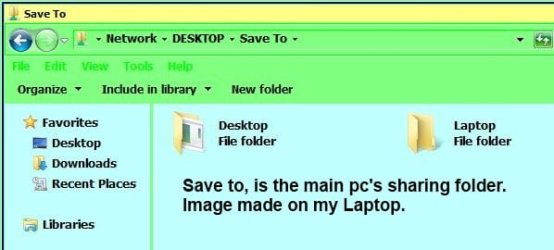
On my main pc, I made a folder, gave it the necessary sharing permission and that was job done.
My main pc is ON 24/7, Ltop only when in use. I don't have a printer.

RR.JPG

Hope this answers you questions.
 

My Computer My Computer

At a glance

Win7 H.Prem. 32bit+SP1
Computer Manufacturer/Model Number
Look in my Signature.
OS
Win7 H.Prem. 32bit+SP1
Back
Top