Win 7 Enterprise Desktop cant see XP Pro laptop on network
Hello all,
I have been fighting this issue for days now and am really getting pissed I haven't fixed it yet. By the way I have been doing this type of computer troubleshooting and maintenance for years.
Work Laptop Windows XP Pro (Wrokgroup) connected via wireless connection
Home Desktop Windows 7 Enterprise 32 bit (Workgroup) NOT IN A HOME GROUP
From my XP Laptop I can go to My Network Places and click on View Workgroup Computers and see my Win 7 Desktop. I can double click on the name of that computer and it prompts me for a name and password and I type in the user name and password for the account I use on the Win 7 desktop and I can see the folders I shared and can drag and drop folders with no problem,
From the Win 7 Desktop I cant see this Windows XP laptop.
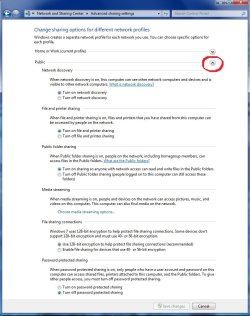
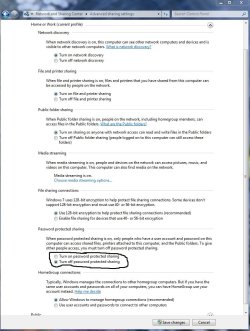
From Network Sharing Center / Change Advanced Sharing Settings I have ON Network Discovery, File and Printer Sharing, Public Folder Sharing, etc..
I can Ping my Windows XP Laptop from the Win 7 Desktop via computer name or IP Address. I have tried doing a search for the computer by name and nothing shows up. I have tried opening a browser and http://192.168.1.133 and cant get anything.
I have turned off the Firewall on both machines at the same time and still cant see the XP Laptop from Win 7 Desktop
I have rebooted everything and started over. Yes this includes cable modem and router.
I have went though every tutorial I can find and what ever solution has worked for one person has not worked for me so far so I would be glad to hear something new.
Cheers,
Chris
Hello all,
I have been fighting this issue for days now and am really getting pissed I haven't fixed it yet. By the way I have been doing this type of computer troubleshooting and maintenance for years.
Work Laptop Windows XP Pro (Wrokgroup) connected via wireless connection
Home Desktop Windows 7 Enterprise 32 bit (Workgroup) NOT IN A HOME GROUP
From my XP Laptop I can go to My Network Places and click on View Workgroup Computers and see my Win 7 Desktop. I can double click on the name of that computer and it prompts me for a name and password and I type in the user name and password for the account I use on the Win 7 desktop and I can see the folders I shared and can drag and drop folders with no problem,
From the Win 7 Desktop I cant see this Windows XP laptop.
From Network Sharing Center / Change Advanced Sharing Settings I have ON Network Discovery, File and Printer Sharing, Public Folder Sharing, etc..
I can Ping my Windows XP Laptop from the Win 7 Desktop via computer name or IP Address. I have tried doing a search for the computer by name and nothing shows up. I have tried opening a browser and http://192.168.1.133 and cant get anything.
I have turned off the Firewall on both machines at the same time and still cant see the XP Laptop from Win 7 Desktop
I have rebooted everything and started over. Yes this includes cable modem and router.
I have went though every tutorial I can find and what ever solution has worked for one person has not worked for me so far so I would be glad to hear something new.
Cheers,
Chris
Last edited:
My Computer
At a glance
Windows 7 Enterprise 32 bitIntel Core 2 Duo E6750OCZ DDR2 PC2-6400 Reaper HPC EditionXFX 8800 GT Nvidia
- Computer Manufacturer/Model Number
- custom made
- OS
- Windows 7 Enterprise 32 bit
- CPU
- Intel Core 2 Duo E6750
- Motherboard
- XFX nForce 680i LT SLI
- Memory
- OCZ DDR2 PC2-6400 Reaper HPC Edition
- Graphics Card(s)
- XFX 8800 GT Nvidia