Vista + Seven = where's dual boot?

narciso

New member
Local time
8:39 AM
Messages
5
Location
Portugal
Hey guys,

I've something going on in my PC with 3 partitions. I have one called C:/ where I have Windows Vista 32-bit (x86) installed, other called S:/ which is empty and the last one is N:/ where I have all my files like images, music, videos, etc... (wisely done so when I need to re-install OS, don't waste time burning all that files on dvd).

Since I got one partition empty (S:/), I decided to give Windows 7 a try. Being a TechNet Plus subscriber, allowed me to get a free copy of Win7, which I downloaded and it was saved on C:/ partition.

I know that's stupid and I've been slapping myself because of that but, I went to the downloaded files and hit twice on setup.exe. This means I didn't burned the .iso to a DVD :confused:

Seven was sucessfully installed. After playing around with new features and graphics, I installed some Windows Updates and rebooted for the first time (since I installed it).

DAMN, here starts the problem because when booting up, appeared the message on black screen saying "BOOTMGR IS COMPRESSED. HIT CTRL+ALT+DEL TO REBOOT". I totally forgot that my S:/ partition was compressed! And we all know that an OS partition should never be compressed. And then I slapped myself again.

The weird thing is that I couldn't boot in Windows Vista, I hadn't that option. Since I didn't burned Win7 to a DVD (*slapping me again*) and I couldn't start in Vista, I had to insert a modified Vista DVD by Toshiba (that came with PC when I bought it), this means that I don't have the repair option, I'm only able to format and re-install OS (and that sucks!), ..., and now it is fixed, that "bootmgr is compressed" message is gone which allowed me to boot to WinVista but where's dual boot??!

First thing I done when I got Vista back was uncompressing S:/ partition. Then I went to msconfig, but there is only one OS in Boot tab - Windows Vista. Once C:/ partition was formatted, and Win7 Setup was saved there, I lost those files, I need to download them again. But it is already installed, so there has to be a way to fix this. The problem is that I can't load Win7, I don't have that option while booting...

Anyone knows how to fix this? The OS is there, only is not recognized :(
Sorry for my english, sometimes it sounds good but it's totally wrong LOL :cool:

Thanks in advance.
Narciso
 

My Computer My Computer

Computer Manufacturer/Model Number
Toshiba A200
OS
Vista Home Edition x86 / Seven Ulimate x86
CPU
Intel Core2Duo
Memory
2.00 GB
Internet Speed
50mbps
Run a repair install?? This is the first time Ive heard of that error..
 

My Computer My Computer

Computer type
PC/Desktop
Computer Manufacturer/Model Number
LENOVO K450 @3.0GHZ
OS
64-bit Windows 8.1 Pro
CPU
Core(TM) i5 CPU 4330 Haswell @ 3.20GHz
Motherboard
LENOVO
Memory
12.00 GB
Graphics Card(s)
Intel(R) HD Graphics
Sound Card
Intel HD integtrated
Monitor(s) Displays
HP 25' ISP Monitor
Screen Resolution
1900/1020
Hard Drives
(1) ST1000DM003-1CH162 (2) Generic STORAGE DEVICE USB Device (3) Generic STORAGE DEVICE USB Device
Internet Speed
100mb down/10mb up
Hey guys,

I've something going on in my PC with 3 partitions. I have one called C:/ where I have Windows Vista 32-bit (x86) installed, other called S:/ which is empty and the last one is N:/ where I have all my files like images, music, videos, etc... (wisely done so when I need to re-install OS, don't waste time burning all that files on dvd).

Since I got one partition empty (S:/), I decided to give Windows 7 a try. Being a TechNet Plus subscriber, allowed me to get a free copy of Win7, which I downloaded and it was saved on C:/ partition.

I know that's stupid and I've been slapping myself because of that but, I went to the downloaded files and hit twice on setup.exe. This means I didn't burned the .iso to a DVD :confused:

Seven was sucessfully installed. After playing around with new features and graphics, I installed some Windows Updates and rebooted for the first time (since I installed it).

DAMN, here starts the problem because when booting up, appeared the message on black screen saying "BOOTMGR IS COMPRESSED. HIT CTRL+ALT+DEL TO REBOOT". I totally forgot that my S:/ partition was compressed! And we all know that an OS partition should never be compressed. And then I slapped myself again.

The weird thing is that I couldn't boot in Windows Vista, I hadn't that option. Since I didn't burned Win7 to a DVD (*slapping me again*) and I couldn't start in Vista, I had to insert a modified Vista DVD by Toshiba (that came with PC when I bought it), this means that I don't have the repair option, I'm only able to format and re-install OS (and that sucks!), ..., and now it is fixed, that "bootmgr is compressed" message is gone which allowed me to boot to WinVista but where's dual boot??!

First thing I done when I got Vista back was uncompressing S:/ partition. Then I went to msconfig, but there is only one OS in Boot tab - Windows Vista. Once C:/ partition was formatted, and Win7 Setup was saved there, I lost those files, I need to download them again. But it is already installed, so there has to be a way to fix this. The problem is that I can't load Win7, I don't have that option while booting...

Anyone knows how to fix this? The OS is there, only is not recognized :(
Sorry for my english, sometimes it sounds good but it's totally wrong LOL :cool:

Thanks in advance.
Narciso

if the files are truely there the fix is simple. You need to use bcdedit to modify the boot loader. instructions here http://www.sevenforums.com/tutorials/2676-bcdedit-how-use.html?ltr=B

Hope this helps and let us know if you need help with it

Ken
 

My Computer My Computer

Computer Manufacturer/Model Number
HP Pavillion dv-7 1005 Tx
OS
Win 8 Release candidate 8400
CPU
[email protected]
Memory
4 gigs
Graphics Card(s)
Nvidia 9600M
Sound Card
HD built-in
Monitor(s) Displays
17" Wxga
Screen Resolution
1440x900
Cooling
none
Internet Speed
45Mb down 5Mb up
@Tews: Like I said, I don't have the setup files to install it again, they were saved on C:/ partition, which was formatted, remember?

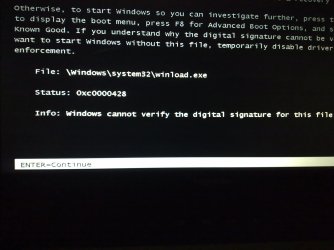
@zigzag3143: Thanks for replying. I tried that, I don't know if I changed it well, I think not because now I've got a different scenario. While booting, appears dual boot mode now, but when I select Windows 7, I get a message about winload.exe and asks me to insert the dvd-rom (which I don't have). In the bottom of the screen:

File: \Windows\system32\winload.exe
Status: 0xc0000428
Info: Windows cannot verify the digital signature for this file


Here I leave a pic I took with my cellphone, so you can see what I'm talking about:
http://www.sevenforums.com/attachment.php?attachmentid=36520&stc=1&d=1258124559

Any ideas?
Narciso.


EDIT: Here's my BCD :/

Gestor de Arranque do Windows
-----------------------------
identificador {bootmgr}
device partition=S:
description Windows Boot Manager
locale en-US
inherit {globalsettings}
default {default}
displayorder {current}
{default}
toolsdisplayorder {memdiag}
timeout 30


Carregador de Arranque do Windows
---------------------------------
identificador {current}
device partition=C:
path \Windows\system32\winload.exe
description Windows Vista
locale en-US
inherit {bootloadersettings}
osdevice partition=C:
systemroot \Windows
resumeobject {e8709fb7-fa5f-11db-be4d-e219ece5282e}
nx OptOut


Carregador de Arranque do Windows
---------------------------------
identificador {default}
device partition=S:
path \Windows\system32\winload.exe
description Windows 7
bootdebug No
osdevice partition=S:
systemroot \Windows
nx OptOut


"Carregador de Arranque do Windows" means "Windows boot loader", or something like that... (my Vista is in Portuguese-Portugal, Seven in English)
 

Attachments

  • 13112009070.jpg
    13112009070.jpg
    234.3 KB · Views: 724
Last edited:

My Computer My Computer

Computer Manufacturer/Model Number
Toshiba A200
OS
Vista Home Edition x86 / Seven Ulimate x86
CPU
Intel Core2Duo
Memory
2.00 GB
Internet Speed
50mbps
@Tews: Like I said, I don't have the setup files to install it again, they were saved on C:/ partition, which was formatted, remember?

@zigzag3143: Thanks for replying. I tried that, I don't know if I changed it well, I think not because now I've got a different scenario. While booting, appears dual boot mode now, but when I select Windows 7, I get a message about winload.exe and asks me to insert the dvd-rom (which I don't have). In the bottom of the screen:

File: \Windows\system32\winload.exe
Status: 0xc0000428
Info: Windows cannot verify the digital signature for this file


Here I leave a pic I took with my cellphone, so you can see what I'm talking about:
http://www.sevenforums.com/attachment.php?attachmentid=36520&stc=1&d=1258124559

Any ideas?
Narciso.


EDIT: Here's my BCD :/

Gestor de Arranque do Windows
-----------------------------
identificador {bootmgr}
device partition=S:
description Windows Boot Manager
locale en-US
inherit {globalsettings}
default {default}
displayorder {current}
{default}
toolsdisplayorder {memdiag}
timeout 30


Carregador de Arranque do Windows
---------------------------------
identificador {current}
device partition=C:
path \Windows\system32\winload.exe
description Windows Vista
locale en-US
inherit {bootloadersettings}
osdevice partition=C:
systemroot \Windows
resumeobject {e8709fb7-fa5f-11db-be4d-e219ece5282e}
nx OptOut


Carregador de Arranque do Windows
---------------------------------
identificador {default}
device partition=S:
path \Windows\system32\winload.exe
description Windows 7
bootdebug No
osdevice partition=S:
systemroot \Windows
nx OptOut


"Carregador de Arranque do Windows" means "Windows boot loader", or something like that... (my Vista is in Portuguese-Portugal, Seven in English)

Hi Narciso! Welcome to SevenForums! Try pressing F8 at that screen and then going to "Disable Driver Enforcement"
That should let you boot up. From there try doing a repair install of Vista.

ZeshanA
 
@ZeshanA: Hi and thanks for answering. What you said is correct but my problem is booting Win7 and not WinVista, so if I select Windows Seven in dual-boot and then press F8, it will redirect me to the screen I attached before, asking about the signature, etc...

I also tried the following:
-> Going to S:/Windows/system32/winload.exe and right-click -> Properties. In the "Digital Signatures" tab, selected the only one listed and click "Detail" and then "View certified" and then "Install certified". It says it was installed sucessfully, but nothing is changed... I was thinking in replacing this winload.exe for the one I have on Vista's Windows folder... Is this a good idea? And how can I do that? Because it doesn't allow me to delete or change name/extension... :/ (I admit I didn't tried that in Safe Mode, maybe it works, but is this healthy replacing a Seven file for a Vista file? I mean, they're pretty similar but it may crash, dunno...)

What do you think?
 
Last edited:

My Computer My Computer

Computer Manufacturer/Model Number
Toshiba A200
OS
Vista Home Edition x86 / Seven Ulimate x86
CPU
Intel Core2Duo
Memory
2.00 GB
Internet Speed
50mbps
You messed it up the first time so why don't you start all over from the beginning? Boot to Vista (you said that you now have an option to), burn the Win 7 to DVD, uncompressed (and if necessary format) the S drive/partition, then install the Win 7.
 

My Computer My Computer

OS
windows 7
@jktan99: well, thanks... I already knew I could do that! The reason I came here it was because I wanted to find another way to repair that boot problem with Win7 without having to format and install it again...
 

My Computer My Computer

Computer Manufacturer/Model Number
Toshiba A200
OS
Vista Home Edition x86 / Seven Ulimate x86
CPU
Intel Core2Duo
Memory
2.00 GB
Internet Speed
50mbps
it's much easier to to a re-install it save time and a headache.....
 

My Computer My Computer

Computer Manufacturer/Model Number
HP Pavilion p6795a
OS
windows 7 64 bit
CPU
intel core i5 3.30GHz Quad Core
Motherboard
HP
Memory
6gb
Graphics Card(s)
AMD RADEON HD 6450 1GB Dedicated
Sound Card
ATI HIGH DEFINITION SOUND
Monitor(s) Displays
LG
Screen Resolution
16:9 Hd
Hard Drives
1TB
Cooling
Fan
Keyboard
Wireless
Mouse
HP wireless keyboard and mouse
Internet Speed
fast enough
Other Info
Beast Of A Machine!
Yeah, I know... I've done that, that's why I'm marking this as solved... The reason of this post was to know alternatives, because in this case I can download the files as many times I want from TechNet Plus, but what if I couldn't get the install files anymore? There has to be a way to fix this...

Nevermind, it is fixed by my own...

Special thanks to zigzag3143 and ZeshanA.
 

My Computer My Computer

Computer Manufacturer/Model Number
Toshiba A200
OS
Vista Home Edition x86 / Seven Ulimate x86
CPU
Intel Core2Duo
Memory
2.00 GB
Internet Speed
50mbps
Back
Top