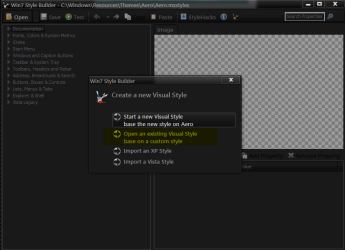
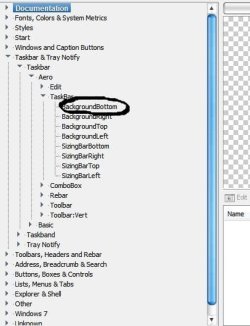
Vista Style Builder, error

If i change to Aero themes, i can log off / restart.
That's the problem. With SL test theme, i cannot restart / log off
:devil:

Just the SL text , if you use the SL (not text) will it logoff/logon OK
Yes, with the theme SL ( not SL test ) i can log off - logon
But with SL test, no way !!!

OK some thing is wrong with the test.

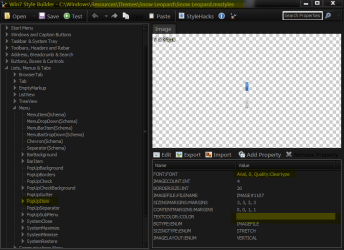
Change to a Windows Aero theme logoff/logon & start WSB open SL (not test) at C:\Windows\Resources\Themes\Snow Leopard & change the font size & color at Lists, Menus & Tabs > Menu > PopUpItem (screenshot) then save it to C:\Windows\Resources\Themes\Snow Leopard then when it ask to use visual style click on No the go to Personalization & start SL (not test) then see if you can logoff/logon
Post back
 

Attachments
  • z.png
    z.png
    23.1 KB · Views: 10

My Computer

Computer type
Laptop
Computer Manufacturer/Model Number
Sager NP9170
OS
Win 7 Pro x64 / Win 10 Pro
CPU
Intel(R) Core(TM) i7-3630QM CPU @ 2.40GHz
Motherboard
CLEVO P170EM
Memory
12 GB
Graphics Card(s)
(1) Intel(R) HD Graphics 4000 (2) NVIDIA GeForce GTX 675M
Sound Card
(1) Realtek High Definition Audio (2) Intel(R) Display Aud
Monitor(s) Displays
17.3
Screen Resolution
1920x1080
Hard Drives
(1) Samsung 860 EVO 500GB(OS) (1) Samsung 860 EVO 500GB(Data)
Keyboard
Backlite
Antivirus
MSE, Malwarebytes Pro
Browser
Firefox
Other Info
DESKTOP: Custom-built.
OS: Win 10 Pro x64.
CASE: Rosewill R5.
CPU: Intel I5 4670K CPU @ 3.40GHz.
CPU COOLER: Cool Master Hyper 212 EVO.
MOTHERBOARD: Asus Z87-A.
MEMORY: Kingston HyperX 2x4 GB.
GPU: Nvidia Geforce 650 TI.
PSU: Corsair TX750.
DRIVES: (1) Samsung 840 120 GB SSD (2) Western Digital blue 500 GB 7200 RPM.
LE : Somewhere is a problem with the Aero file which i modified.
I'm pretty sure about.
Are you sure i have to delete the Aero file ( 1.86 MB ) from this folder, and replace with SL test ? Maybe i have to keep both files in there.

No you do not need both it OK somewhere in the renaming of thing did not work.
 

My Computer

Computer type
Laptop
Computer Manufacturer/Model Number
Sager NP9170
OS
Win 7 Pro x64 / Win 10 Pro
CPU
Intel(R) Core(TM) i7-3630QM CPU @ 2.40GHz
Motherboard
CLEVO P170EM
Memory
12 GB
Graphics Card(s)
(1) Intel(R) HD Graphics 4000 (2) NVIDIA GeForce GTX 675M
Sound Card
(1) Realtek High Definition Audio (2) Intel(R) Display Aud
Monitor(s) Displays
17.3
Screen Resolution
1920x1080
Hard Drives
(1) Samsung 860 EVO 500GB(OS) (1) Samsung 860 EVO 500GB(Data)
Keyboard
Backlite
Antivirus
MSE, Malwarebytes Pro
Browser
Firefox
Other Info
DESKTOP: Custom-built.
OS: Win 10 Pro x64.
CASE: Rosewill R5.
CPU: Intel I5 4670K CPU @ 3.40GHz.
CPU COOLER: Cool Master Hyper 212 EVO.
MOTHERBOARD: Asus Z87-A.
MEMORY: Kingston HyperX 2x4 GB.
GPU: Nvidia Geforce 650 TI.
PSU: Corsair TX750.
DRIVES: (1) Samsung 840 120 GB SSD (2) Western Digital blue 500 GB 7200 RPM.
Just the SL text , if you use the SL (not text) will it logoff/logon OK
Yes, with the theme SL ( not SL test ) i can log off - logon
But with SL test, no way !!!

OK some thing is wrong with the test.

Change to a Windows Aero theme logoff/logon & start WSB open SL (not test) at C:\Windows\Resources\Themes\Snow Leopard & change the font size & color at Lists, Menus & Tabs > Menu > PopUpItem (screenshot) then save it to C:\Windows\Resources\Themes\Snow Leopard then when it ask to use visual style click on No the go to Personalization & start SL (not test) then see if you can logoff/logon
Post back
Yes, this way is working.
But when i SAVE the modified file with WSB, i cannot save the same name "Snow Leopard" so i put snow leopard test.
After that, i go to Personalization and i see there Aero Arial and Snow Leopard ( not test )
I apply SL ( not test ) then log off -on ...it's okay so far.
LE : i tried another time. Saved as snow leopard ... Arial 9 - black...
Personalization -apply SL - but the menu right click is still 8- grey
I can log off - on this way
 

My Computer

Computer type
PC/Desktop
OS
Windows 7 Ultimate x64
CPU
Intel7 4790K
Motherboard
Gigabyte GA-Z97X UD5H
Memory
8 GB DDR3
Graphics Card(s)
GTX 980Ti G1
Sound Card
SoundBlaster X-FI XtremeGamer
Monitor(s) Displays
Samsung UE40JU6550 UHD
Screen Resolution
3840 X 2160
Hard Drives
1 SSD Intel 330
2 x Western Digital 6400 AAKS
1 x Western Digital 3200 AAKS
PSU
Corsair 750W
Case
Cooler Master HAF 922
Yes, with the theme SL ( not SL test ) i can log off - logon
But with SL test, no way !!!

OK some thing is wrong with the test.

Change to a Windows Aero theme logoff/logon & start WSB open SL (not test) at C:\Windows\Resources\Themes\Snow Leopard & change the font size & color at Lists, Menus & Tabs > Menu > PopUpItem (screenshot) then save it to C:\Windows\Resources\Themes\Snow Leopard then when it ask to use visual style click on No the go to Personalization & start SL (not test) then see if you can logoff/logon
Post back
Yes, this way is working.
But when i SAVE the modified file with WSB, i cannot save the same name "Snow Leopard" so i put snow leopard test.
After that, i go to Personalization and i see there Aero Arial and Snow Leopard ( not test )
I apply SL ( not test ) then log off -on ...it's okay so far.

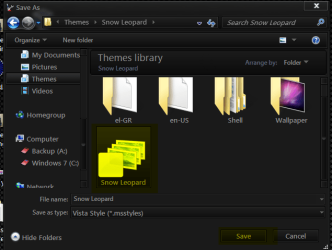
When you hit save and the save window opens do not change the name, click on the SL .msstyle then click on save button (Screenshot marked in yellow) try that.
Post back
 

Attachments

  • a.png
    a.png
    27.6 KB · Views: 5

My Computer

Computer type
Laptop
Computer Manufacturer/Model Number
Sager NP9170
OS
Win 7 Pro x64 / Win 10 Pro
CPU
Intel(R) Core(TM) i7-3630QM CPU @ 2.40GHz
Motherboard
CLEVO P170EM
Memory
12 GB
Graphics Card(s)
(1) Intel(R) HD Graphics 4000 (2) NVIDIA GeForce GTX 675M
Sound Card
(1) Realtek High Definition Audio (2) Intel(R) Display Aud
Monitor(s) Displays
17.3
Screen Resolution
1920x1080
Hard Drives
(1) Samsung 860 EVO 500GB(OS) (1) Samsung 860 EVO 500GB(Data)
Keyboard
Backlite
Antivirus
MSE, Malwarebytes Pro
Browser
Firefox
Other Info
DESKTOP: Custom-built.
OS: Win 10 Pro x64.
CASE: Rosewill R5.
CPU: Intel I5 4670K CPU @ 3.40GHz.
CPU COOLER: Cool Master Hyper 212 EVO.
MOTHERBOARD: Asus Z87-A.
MEMORY: Kingston HyperX 2x4 GB.
GPU: Nvidia Geforce 650 TI.
PSU: Corsair TX750.
DRIVES: (1) Samsung 840 120 GB SSD (2) Western Digital blue 500 GB 7200 RPM.
OK some thing is wrong with the test.

Change to a Windows Aero theme logoff/logon & start WSB open SL (not test) at C:\Windows\Resources\Themes\Snow Leopard & change the font size & color at Lists, Menus & Tabs > Menu > PopUpItem (screenshot) then save it to C:\Windows\Resources\Themes\Snow Leopard then when it ask to use visual style click on No the go to Personalization & start SL (not test) then see if you can logoff/logon
Post back
Yes, this way is working.
But when i SAVE the modified file with WSB, i cannot save the same name "Snow Leopard" so i put snow leopard test.
After that, i go to Personalization and i see there Aero Arial and Snow Leopard ( not test )
I apply SL ( not test ) then log off -on ...it's okay so far.

When you hit save and the save window opens do not change the name, click on the SL .msstyle then click on save button (Screenshot marked in yellow) try that.
Post back
I tried that, too
But still 8 Arial - grey
Is working this way, with 8 Arial - grey, i can log off - logon
But before i saved it to same name ( snow leopard ) i modified to 9 -arial-black
 

My Computer

Computer type
PC/Desktop
OS
Windows 7 Ultimate x64
CPU
Intel7 4790K
Motherboard
Gigabyte GA-Z97X UD5H
Memory
8 GB DDR3
Graphics Card(s)
GTX 980Ti G1
Sound Card
SoundBlaster X-FI XtremeGamer
Monitor(s) Displays
Samsung UE40JU6550 UHD
Screen Resolution
3840 X 2160
Hard Drives
1 SSD Intel 330
2 x Western Digital 6400 AAKS
1 x Western Digital 3200 AAKS
PSU
Corsair 750W
Case
Cooler Master HAF 922
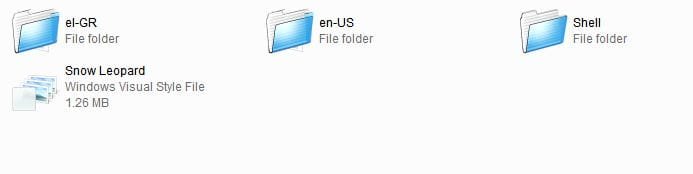
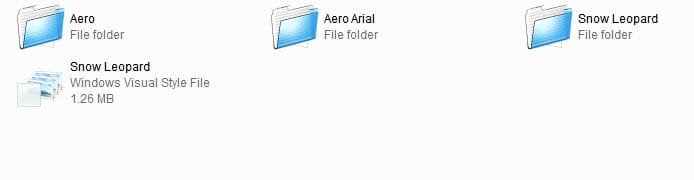
Wait a second :
Is that the problem, maybe ??
Which file do i have to modify ? I attached 2 images ( 1 and 2 )
I always modified the file from image nr 2
:eek:
 

Attachments

  • 1.jpg
    1.jpg
    7.2 KB · Views: 3
  • 2.jpg
    2.jpg
    7 KB · Views: 1

My Computer

Computer type
PC/Desktop
OS
Windows 7 Ultimate x64
CPU
Intel7 4790K
Motherboard
Gigabyte GA-Z97X UD5H
Memory
8 GB DDR3
Graphics Card(s)
GTX 980Ti G1
Sound Card
SoundBlaster X-FI XtremeGamer
Monitor(s) Displays
Samsung UE40JU6550 UHD
Screen Resolution
3840 X 2160
Hard Drives
1 SSD Intel 330
2 x Western Digital 6400 AAKS
1 x Western Digital 3200 AAKS
PSU
Corsair 750W
Case
Cooler Master HAF 922
Yes, this way is working.
But when i SAVE the modified file with WSB, i cannot save the same name "Snow Leopard" so i put snow leopard test.
After that, i go to Personalization and i see there Aero Arial and Snow Leopard ( not test )
I apply SL ( not test ) then log off -on ...it's okay so far.

When you hit save and the save window opens do not change the name, click on the SL .msstyle then click on save button (Screenshot marked in yellow) try that.
Post back
I tried that, too
But still 8 Arial - grey
Is working this way, with 8 Arial - grey, i can log off - logon
But before i saved it to same name ( snow leopard ) i modified to 9 -arial-black

Did you use the text button in WSB to see the changes before saving?
Did it ask to use the Visual Style after saving?
Post back
 

My Computer

Computer type
Laptop
Computer Manufacturer/Model Number
Sager NP9170
OS
Win 7 Pro x64 / Win 10 Pro
CPU
Intel(R) Core(TM) i7-3630QM CPU @ 2.40GHz
Motherboard
CLEVO P170EM
Memory
12 GB
Graphics Card(s)
(1) Intel(R) HD Graphics 4000 (2) NVIDIA GeForce GTX 675M
Sound Card
(1) Realtek High Definition Audio (2) Intel(R) Display Aud
Monitor(s) Displays
17.3
Screen Resolution
1920x1080
Hard Drives
(1) Samsung 860 EVO 500GB(OS) (1) Samsung 860 EVO 500GB(Data)
Keyboard
Backlite
Antivirus
MSE, Malwarebytes Pro
Browser
Firefox
Other Info
DESKTOP: Custom-built.
OS: Win 10 Pro x64.
CASE: Rosewill R5.
CPU: Intel I5 4670K CPU @ 3.40GHz.
CPU COOLER: Cool Master Hyper 212 EVO.
MOTHERBOARD: Asus Z87-A.
MEMORY: Kingston HyperX 2x4 GB.
GPU: Nvidia Geforce 650 TI.
PSU: Corsair TX750.
DRIVES: (1) Samsung 840 120 GB SSD (2) Western Digital blue 500 GB 7200 RPM.
When you hit save and the save window opens do not change the name, click on the SL .msstyle then click on save button (Screenshot marked in yellow) try that.
Post back
I tried that, too
But still 8 Arial - grey
Is working this way, with 8 Arial - grey, i can log off - logon
But before i saved it to same name ( snow leopard ) i modified to 9 -arial-black

Did you use the text button in WSB to see the changes before saving?
Did it ask to use the Visual Style after saving?
Post back
No, i didn't use the text button to see changes, but i saw them after, and the changes are okay, i mean, the font is 9 black, not 8 - grey.
Yes, i'm asked to use the Visual Style after saving.
I tried both options, but everytime, after log off, no logon.
 

My Computer

Computer type
PC/Desktop
OS
Windows 7 Ultimate x64
CPU
Intel7 4790K
Motherboard
Gigabyte GA-Z97X UD5H
Memory
8 GB DDR3
Graphics Card(s)
GTX 980Ti G1
Sound Card
SoundBlaster X-FI XtremeGamer
Monitor(s) Displays
Samsung UE40JU6550 UHD
Screen Resolution
3840 X 2160
Hard Drives
1 SSD Intel 330
2 x Western Digital 6400 AAKS
1 x Western Digital 3200 AAKS
PSU
Corsair 750W
Case
Cooler Master HAF 922
I think i tried every options /ways
Still no logon.
I give up now. If you have some time and can modify this SL theme for me, i'll give another try.
Thanks a million for your help.
 

My Computer

Computer type
PC/Desktop
OS
Windows 7 Ultimate x64
CPU
Intel7 4790K
Motherboard
Gigabyte GA-Z97X UD5H
Memory
8 GB DDR3
Graphics Card(s)
GTX 980Ti G1
Sound Card
SoundBlaster X-FI XtremeGamer
Monitor(s) Displays
Samsung UE40JU6550 UHD
Screen Resolution
3840 X 2160
Hard Drives
1 SSD Intel 330
2 x Western Digital 6400 AAKS
1 x Western Digital 3200 AAKS
PSU
Corsair 750W
Case
Cooler Master HAF 922
Let me think about it something not working right.
 

My Computer

Computer type
Laptop
Computer Manufacturer/Model Number
Sager NP9170
OS
Win 7 Pro x64 / Win 10 Pro
CPU
Intel(R) Core(TM) i7-3630QM CPU @ 2.40GHz
Motherboard
CLEVO P170EM
Memory
12 GB
Graphics Card(s)
(1) Intel(R) HD Graphics 4000 (2) NVIDIA GeForce GTX 675M
Sound Card
(1) Realtek High Definition Audio (2) Intel(R) Display Aud
Monitor(s) Displays
17.3
Screen Resolution
1920x1080
Hard Drives
(1) Samsung 860 EVO 500GB(OS) (1) Samsung 860 EVO 500GB(Data)
Keyboard
Backlite
Antivirus
MSE, Malwarebytes Pro
Browser
Firefox
Other Info
DESKTOP: Custom-built.
OS: Win 10 Pro x64.
CASE: Rosewill R5.
CPU: Intel I5 4670K CPU @ 3.40GHz.
CPU COOLER: Cool Master Hyper 212 EVO.
MOTHERBOARD: Asus Z87-A.
MEMORY: Kingston HyperX 2x4 GB.
GPU: Nvidia Geforce 650 TI.
PSU: Corsair TX750.
DRIVES: (1) Samsung 840 120 GB SSD (2) Western Digital blue 500 GB 7200 RPM.
:thumbsup::thumbsup::thumbsup::thumbsup:
YES, is working, i tried the SL test theme.
Log off- logon, no problems.
How did you fix that ??
THANKS. THANKS. THANKS.(d)
 

My Computer

Computer type
PC/Desktop
OS
Windows 7 Ultimate x64
CPU
Intel7 4790K
Motherboard
Gigabyte GA-Z97X UD5H
Memory
8 GB DDR3
Graphics Card(s)
GTX 980Ti G1
Sound Card
SoundBlaster X-FI XtremeGamer
Monitor(s) Displays
Samsung UE40JU6550 UHD
Screen Resolution
3840 X 2160
Hard Drives
1 SSD Intel 330
2 x Western Digital 6400 AAKS
1 x Western Digital 3200 AAKS
PSU
Corsair 750W
Case
Cooler Master HAF 922
:thumbsup::thumbsup::thumbsup::thumbsup:
YES, is working, i tried the SL test theme.
Log off- logon, no problems.
How did you fix that ??
THANKS. THANKS. THANKS.(d)

That's Great news sometimes WSB can be a little picky & have it keep trying.

Jerry
 

My Computer

Computer type
Laptop
Computer Manufacturer/Model Number
Sager NP9170
OS
Win 7 Pro x64 / Win 10 Pro
CPU
Intel(R) Core(TM) i7-3630QM CPU @ 2.40GHz
Motherboard
CLEVO P170EM
Memory
12 GB
Graphics Card(s)
(1) Intel(R) HD Graphics 4000 (2) NVIDIA GeForce GTX 675M
Sound Card
(1) Realtek High Definition Audio (2) Intel(R) Display Aud
Monitor(s) Displays
17.3
Screen Resolution
1920x1080
Hard Drives
(1) Samsung 860 EVO 500GB(OS) (1) Samsung 860 EVO 500GB(Data)
Keyboard
Backlite
Antivirus
MSE, Malwarebytes Pro
Browser
Firefox
Other Info
DESKTOP: Custom-built.
OS: Win 10 Pro x64.
CASE: Rosewill R5.
CPU: Intel I5 4670K CPU @ 3.40GHz.
CPU COOLER: Cool Master Hyper 212 EVO.
MOTHERBOARD: Asus Z87-A.
MEMORY: Kingston HyperX 2x4 GB.
GPU: Nvidia Geforce 650 TI.
PSU: Corsair TX750.
DRIVES: (1) Samsung 840 120 GB SSD (2) Western Digital blue 500 GB 7200 RPM.
Yes, i understand, but tell me, please, where was the problem ?
I wanna try to modify myself with WSB. Just in case, i have already made a backup with the new theme - changes, etc :D
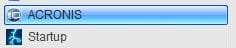
Is it possible to change the taskbar color, like here in the image ? ( see the blue line )
Or maybe, the active title bars ? I do not mean any color, i mean this nice blue color
( see the image "blue 2" as example )
 

Attachments

  • blue color.jpg
    blue color.jpg
    2.6 KB · Views: 188
  • blue 2.jpg
    blue 2.jpg
    8 KB · Views: 14

My Computer

Computer type
PC/Desktop
OS
Windows 7 Ultimate x64
CPU
Intel7 4790K
Motherboard
Gigabyte GA-Z97X UD5H
Memory
8 GB DDR3
Graphics Card(s)
GTX 980Ti G1
Sound Card
SoundBlaster X-FI XtremeGamer
Monitor(s) Displays
Samsung UE40JU6550 UHD
Screen Resolution
3840 X 2160
Hard Drives
1 SSD Intel 330
2 x Western Digital 6400 AAKS
1 x Western Digital 3200 AAKS
PSU
Corsair 750W
Case
Cooler Master HAF 922
Yes, i understand, but tell me, please, where was the problem ?
I wanna try to modify myself with WSB. Just in case, i have already made a backup with the new theme - changes, etc :D
Is it possible to change the taskbar color, like here in the image ? ( see the blue line )
Or maybe, the active title bars ? I do not mean any color, i mean this nice blue color
( see the image "blue 2" as example )

I do not know what the problem was is hard to say.
Yes you can change the taskbar color with WSB & Photoshop, Gimp, Paint.net Give me a moment & I will get the locations for you
Jerry
 

My Computer

Computer type
Laptop
Computer Manufacturer/Model Number
Sager NP9170
OS
Win 7 Pro x64 / Win 10 Pro
CPU
Intel(R) Core(TM) i7-3630QM CPU @ 2.40GHz
Motherboard
CLEVO P170EM
Memory
12 GB
Graphics Card(s)
(1) Intel(R) HD Graphics 4000 (2) NVIDIA GeForce GTX 675M
Sound Card
(1) Realtek High Definition Audio (2) Intel(R) Display Aud
Monitor(s) Displays
17.3
Screen Resolution
1920x1080
Hard Drives
(1) Samsung 860 EVO 500GB(OS) (1) Samsung 860 EVO 500GB(Data)
Keyboard
Backlite
Antivirus
MSE, Malwarebytes Pro
Browser
Firefox
Other Info
DESKTOP: Custom-built.
OS: Win 10 Pro x64.
CASE: Rosewill R5.
CPU: Intel I5 4670K CPU @ 3.40GHz.
CPU COOLER: Cool Master Hyper 212 EVO.
MOTHERBOARD: Asus Z87-A.
MEMORY: Kingston HyperX 2x4 GB.
GPU: Nvidia Geforce 650 TI.
PSU: Corsair TX750.
DRIVES: (1) Samsung 840 120 GB SSD (2) Western Digital blue 500 GB 7200 RPM.
Jerry, i think the location wouldn't be a problem.
The question is : how do i get this nice blue color ?
Another question : i tried 3 minutes before to make some changes with WBS.
I activated Try and Decide, just in case.
After i made some changes with WBS, after log off, the same problem, i couldn't login again.
If you tell me the location, or how to get this nice blue color, or how to modify whatever i want, it doesen't help me to much, because i can't use this modified changes, after i restart.
That's the first and most important problem : i will have to learn exactly how to save my changes, without having those problems on logon.
 

My Computer

Computer type
PC/Desktop
OS
Windows 7 Ultimate x64
CPU
Intel7 4790K
Motherboard
Gigabyte GA-Z97X UD5H
Memory
8 GB DDR3
Graphics Card(s)
GTX 980Ti G1
Sound Card
SoundBlaster X-FI XtremeGamer
Monitor(s) Displays
Samsung UE40JU6550 UHD
Screen Resolution
3840 X 2160
Hard Drives
1 SSD Intel 330
2 x Western Digital 6400 AAKS
1 x Western Digital 3200 AAKS
PSU
Corsair 750W
Case
Cooler Master HAF 922
The question is : how do i get this nice blue color ?
With Photoshop, Gimp, Paint.net or some image editor

I activated Try and Decide, just in case.
what is this?

That's the first and most important problem : i will have to learn exactly how to save my changes, without having those problems on logon.
Yes (look at post # 64) you need to save it where it came from.

Here is a test theme to play with (just a aero theme named to test) put in C:\Windows\Resources\Themes. Then open WSB then hit open then the open box opens chose Open an existing Visual Style from that open box go to C:\Windows\Resources\Themes\test make some changes & save it to C:\Windows\Resources\Themes\test & see want happens
Jerry
 

Attachments

My Computer

Computer type
Laptop
Computer Manufacturer/Model Number
Sager NP9170
OS
Win 7 Pro x64 / Win 10 Pro
CPU
Intel(R) Core(TM) i7-3630QM CPU @ 2.40GHz
Motherboard
CLEVO P170EM
Memory
12 GB
Graphics Card(s)
(1) Intel(R) HD Graphics 4000 (2) NVIDIA GeForce GTX 675M
Sound Card
(1) Realtek High Definition Audio (2) Intel(R) Display Aud
Monitor(s) Displays
17.3
Screen Resolution
1920x1080
Hard Drives
(1) Samsung 860 EVO 500GB(OS) (1) Samsung 860 EVO 500GB(Data)
Keyboard
Backlite
Antivirus
MSE, Malwarebytes Pro
Browser
Firefox
Other Info
DESKTOP: Custom-built.
OS: Win 10 Pro x64.
CASE: Rosewill R5.
CPU: Intel I5 4670K CPU @ 3.40GHz.
CPU COOLER: Cool Master Hyper 212 EVO.
MOTHERBOARD: Asus Z87-A.
MEMORY: Kingston HyperX 2x4 GB.
GPU: Nvidia Geforce 650 TI.
PSU: Corsair TX750.
DRIVES: (1) Samsung 840 120 GB SSD (2) Western Digital blue 500 GB 7200 RPM.
The question is : how do i get this nice blue color ?
With Photoshop, Gimp, Paint.net or some image editor

I activated Try and Decide, just in case.
what is this?

That's the first and most important problem : i will have to learn exactly how to save my changes, without having those problems on logon.
Yes (look at post # 64) you need to save it where it came from.

Here is a test theme to play with (just a aero theme named to test) put in C:\Windows\Resources\Themes. Then open WSB then hit open then the open box opens chose Open an existing Visual Style from that open box go to C:\Windows\Resources\Themes\test make some changes & save it to C:\Windows\Resources\Themes\test & see want happens
Jerry
I played with this "aero test" theme. Everything is fine, i can modify / save or whatever
Try and decide is an option from Acronis True Image, that lets you roll back all changes made to your Windows since you activated it.
After restart you have 2 options : CONTINUE or Discard changes
Now, let's get back to the Snow Leopard theme.:D
I tested some changes with WSB. I can change some menu colors, but seems to be impossible to change the taskbar color.
One good friend of mine was here today ( he is very good with computers / OS )
He tried everything, but couldn't change the taskbar color.
Do you have any idea why ? As you can see in the printscreen, that's the menu he tried.
 

Attachments

  • taskbar.jpg
    taskbar.jpg
    29.9 KB · Views: 17

My Computer

Computer type
PC/Desktop
OS
Windows 7 Ultimate x64
CPU
Intel7 4790K
Motherboard
Gigabyte GA-Z97X UD5H
Memory
8 GB DDR3
Graphics Card(s)
GTX 980Ti G1
Sound Card
SoundBlaster X-FI XtremeGamer
Monitor(s) Displays
Samsung UE40JU6550 UHD
Screen Resolution
3840 X 2160
Hard Drives
1 SSD Intel 330
2 x Western Digital 6400 AAKS
1 x Western Digital 3200 AAKS
PSU
Corsair 750W
Case
Cooler Master HAF 922
You have a old version of WSB mine is different
Sorry can help there
Jerry
 

My Computer

Computer type
Laptop
Computer Manufacturer/Model Number
Sager NP9170
OS
Win 7 Pro x64 / Win 10 Pro
CPU
Intel(R) Core(TM) i7-3630QM CPU @ 2.40GHz
Motherboard
CLEVO P170EM
Memory
12 GB
Graphics Card(s)
(1) Intel(R) HD Graphics 4000 (2) NVIDIA GeForce GTX 675M
Sound Card
(1) Realtek High Definition Audio (2) Intel(R) Display Aud
Monitor(s) Displays
17.3
Screen Resolution
1920x1080
Hard Drives
(1) Samsung 860 EVO 500GB(OS) (1) Samsung 860 EVO 500GB(Data)
Keyboard
Backlite
Antivirus
MSE, Malwarebytes Pro
Browser
Firefox
Other Info
DESKTOP: Custom-built.
OS: Win 10 Pro x64.
CASE: Rosewill R5.
CPU: Intel I5 4670K CPU @ 3.40GHz.
CPU COOLER: Cool Master Hyper 212 EVO.
MOTHERBOARD: Asus Z87-A.
MEMORY: Kingston HyperX 2x4 GB.
GPU: Nvidia Geforce 650 TI.
PSU: Corsair TX750.
DRIVES: (1) Samsung 840 120 GB SSD (2) Western Digital blue 500 GB 7200 RPM.

Back
Top